

Hello, Habr.
In Some signals that can be received on long and short waves were described. Equally interesting is the VHF range, where there are also interesting finds.
As in the first part, we will look at the signals that can be decoded independently using a computer. For those interested in how it works, the continuation is below.
In the first part, we used a Dutch to receive long and short waves. Unfortunately, there are no similar services for VHF—the frequency range is too vast. Therefore, those wishing to replicate the experiments described below will need to acquire their own receiver, among the cheapest is the , which can be purchased for $30. This receiver covers the range up to 1.7GHz, and all the signals described below were received on it.
So, let's get started. As in the first part, we will consider the signals in order of increasing frequency.
FM radio
FM radio itself is unlikely to surprise anyone; we will be interested in the RDS. The presence of RDS (Radio Data System) allows for the transmission of digital data 'within' the FM signal. The spectrum of the FM station's signal after demodulation looks like this:
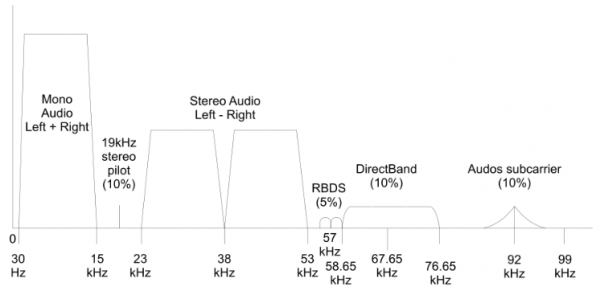
At a frequency of 19kHz, there is a pilot tone, and at its tripled frequency of 57kHz, the RDS signal is transmitted. On the oscilloscope, if both signals are displayed together, it looks something like this:
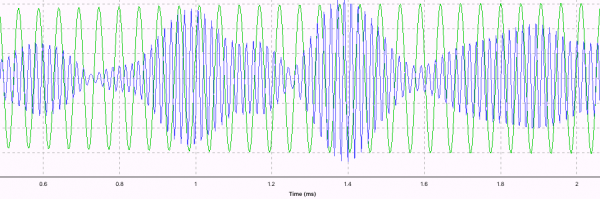
Using phase modulation, a low-frequency signal with a frequency of 1187.5Hz is encoded here (by the way, the frequency of 1187.5Hz is not chosen randomly—it is the frequency of 19kHz pilot tone divided by 16). Then, after bitwise decoding, data packets are deciphered, which come in many types—besides text, information such as alternative broadcasting frequencies of the radio station can also be transmitted, allowing the receiver to automatically switch to a new frequency when entering a different area.
To receive RDS data from local stations, you can use the program . It can be connected through HDSDR, if FM modulation, a signal width of 120kHz, and a bitrate of 192kHz are selected, as shown in the figure.
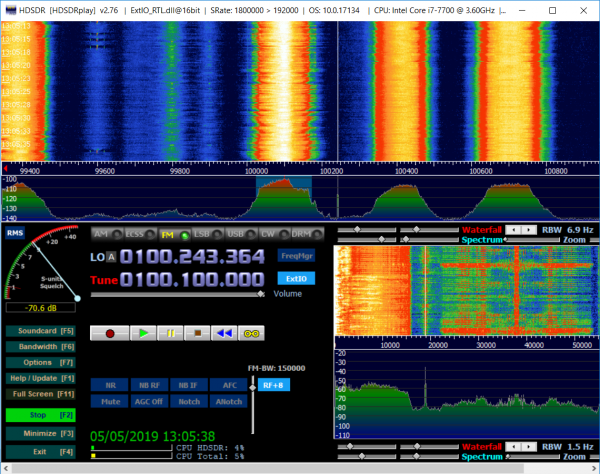
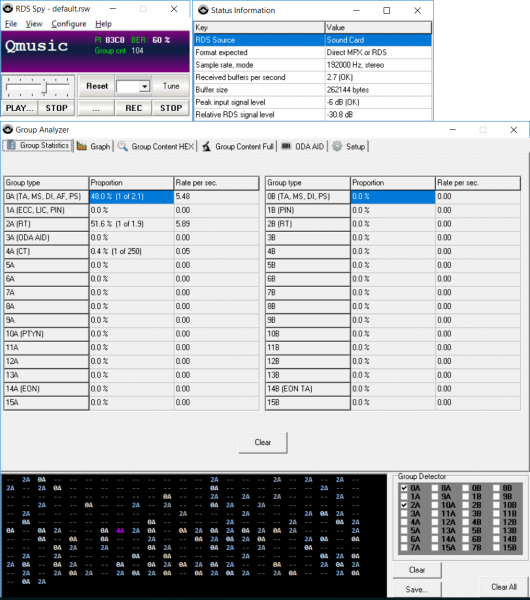
Then, it is sufficient to redirect the signal using Virtual Audio Cable from HDSDR to RDS Spy (in the VAC settings, the bitrate should also be set to 192kHz). If everything was done correctly, we will see all the RDS information, much more than a regular household radio receiver will show:
In addition to FM, you can also decode DAB+, by the way. In Russia, it doesn't work yet, but it may be relevant in other countries.
Aviation Band
Historically, amplitude modulation (AM) is used in aviation within the frequency range of 118-137 MHz. The conversations between pilots and air traffic controllers are not encrypted and can be received by anyone interested. About 20 years ago, regular cheap Chinese radios were modified for this purpose — just widening the heterodyne coils would shift the range, and if lucky, it would shift towards higher frequencies. Those interested in 'digital archaeology' can read the discussion from 2004. Later, Chinese manufacturers responded to users and simply added the Air band to their receivers (in the comments to the first part, Tecsun PL-660 or PL-680 were recommended). However, of course, using more specialized devices (such as AOR or Icom receivers) is more preferable — they have noise reduction (the sound turns off when there is no signal and no constant hiss) and a higher frequency scanning speed.
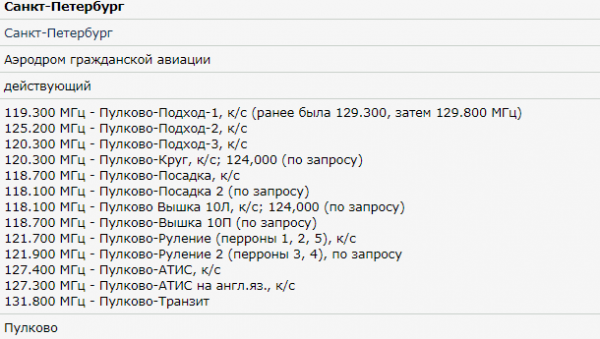
Each major airport uses quite a few frequencies; for example, here are the frequencies of Pulkovo Airport, taken from the radioscanner website:
By the way, you can listen to broadcasts of conversations from various Russian cities (Moscow, St. Petersburg, Chelyabinsk, and a few others) online at .
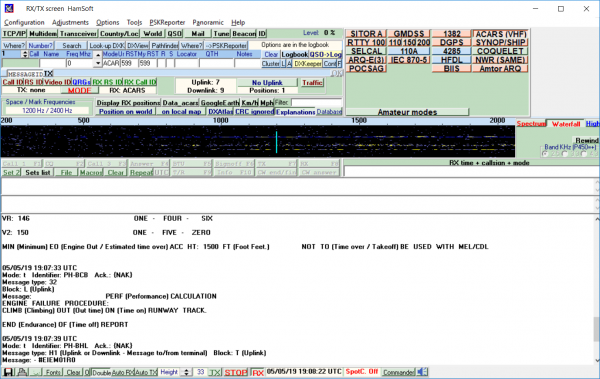
For us, in the aviation band, the digital protocol of interest is (Aircraft Communications Addressing and Reporting System). Its signals are transmitted on frequencies 131.525 and 131.725 MHz (European standard; frequencies in different regions ). These are digital packets with a bitrate of 2400 or 1200 bps; this system allows pilots to exchange messages with dispatchers. To decode it in MultiPSK, you need to tune into the AM signal (an SDR receiver is needed, as the signal bandwidth is more than 5 kHz) and redirect the sound using Virtual Audio Card.
The result is shown in the screenshot.
The format of ACARS signals is quite simple, and it can be viewed in the SA Free program. You just need to open a segment of the recording, and you'll see that 'inside' the AM recording there is actually frequency modulation.
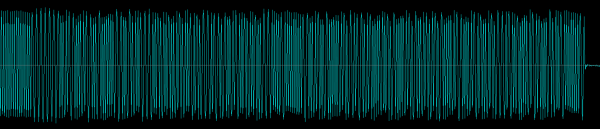
Next, by applying a frequency detector to the recording, we easily obtain a bit stream. In reality, it's unlikely that this will be necessary, as ready-made programs for decoding ACARS have long been written.
NOAA Weather Satellites
By listening to aviators' conversations, one can venture even higher — into space. What interests us are the weather satellites. , and , transmitting images of the Earth's surface at frequencies of 137.620, 137.9125, and 137.100 MHz. The signal can be decoded using the program .
The received image may look something like this (photo from the radioscanner website):
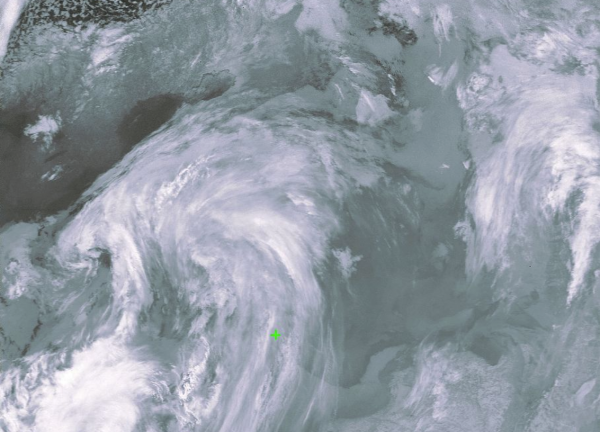
Unfortunately (you can't fool the laws of physics, and the Earth is round, even if not everyone believes it), the satellite signal can only be received when it is flying overhead, and these passes don't always happen at convenient times and angles over the horizon. In the past, to find out the time and date of the nearest pass, it was necessary to install the program (a long-standing program, existing since 2001), but now it's easier to do it online using the links. , and respectively.
The satellite signal is quite strong and can be heard on almost any antenna and receiver. However, to receive an image in good quality, a special antenna and a clear view of the horizon are still desirable. Those interested can watch or read . Personally, I never had the patience to bring it to completion, but others may have better luck.
FLEX/POCSAG Paging Messages
Whether paging communication for corporate clients in Russia still works, I do not know; however, in Europe, it is quite functional and is used by firefighters, police, and various services.
Signals from FLEX and POCSAG can be received using HDSDR and Virtual Audio Cable, while the program used for decoding is . It was written back in 2004, and the interface reflects that, but surprisingly, it still works quite well.
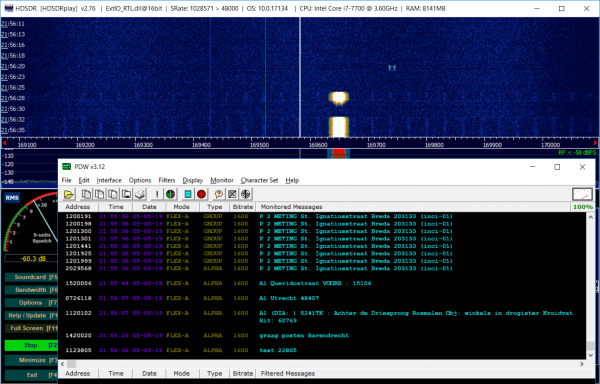
There is also a decoder called multimon-ng that operates under Linux, and its source code is available. . There was also a separate article about the POCSAG transmission protocol; those interested can familiarize themselves with it. .
Transponders/Wireless Switches
Even higher in frequency, at 433 MHz, is a whole range of various devices — wireless switches and sockets, doorbells, tire pressure sensors for cars, and others.
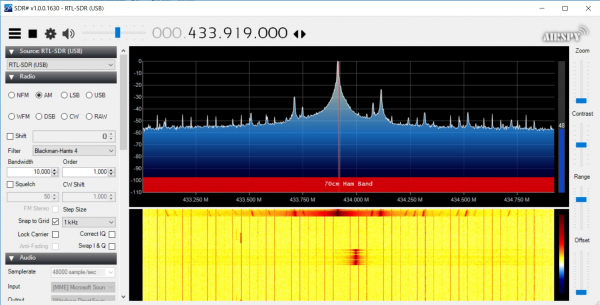
These are often cheap Chinese devices with the simplest modulation. There is no encryption, and a simple binary code (OOK — on-off keying) is used. The decoding of such signals has been considered in . We can use the ready-made rtl_433 decoder, which can be downloaded .
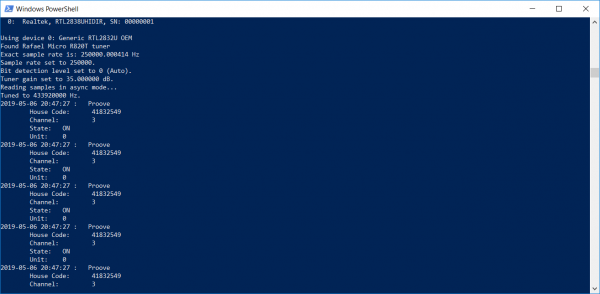
By running the program, one can see various devices and (if there's a parking lot nearby) find out, for example, the tire pressure of a neighbor's car. There is little practical use for this, but purely from a mathematical perspective, it's quite interesting — the protocols of these signals are simple to decode.
By the way, those buying such wireless switches should keep in mind that they are completely unprotected, and theoretically, your hacker neighbor with a HackRF or a similar device could maliciously turn off the lights in your bathroom at the most inconvenient moment or do something similar. Personally, I don't worry about it, but if security is a concern, you can use more serious and expensive devices with full keys and authentication (Z-Wave, Philips Hue, etc.).
TETRA
(Terrestrial Trunked Radio) is a professional corporate radio communication system with quite substantial capabilities (group calls, encryption, network merging, etc.). Its signals, if not encrypted, can also be received using a computer and an SDR receiver.
The TETRA decoder for Linux has existed , but its setup was far from trivial, and about a year ago, a Russian programmer created for SDR#. Now this task can be solved in almost literally two clicks; the program allows you to output system information, listen to voice messages, collect statistics, etc.
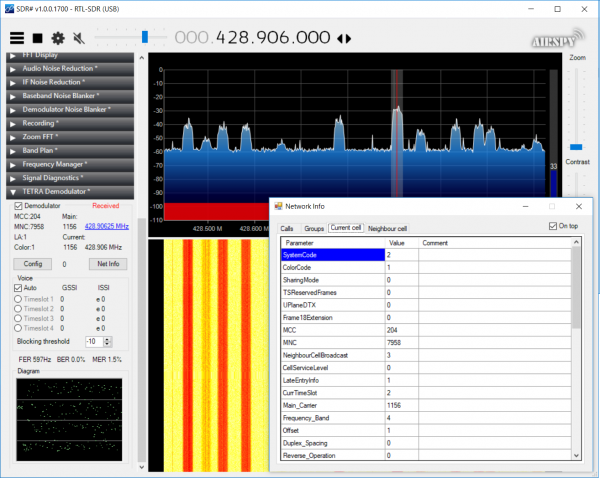
The plugin does not implement all the capabilities of the standard, but the main functions work reasonably well.
According to Wikipedia, Tetra can be used in ambulances, police, rail transport, etc. As for its distribution in Russia, I'm not sure (it seems Tetra networks were used during the 2018 World Cup, but that's uncertain); those interested can check for themselves — Tetra signals are easily recognizable and have a width of 25 kHz, as seen in the screenshot.
Of course, if encryption is enabled on the network (this option is available in Tetra), the plugin will not work — instead of speech, there will only be a 'gurgling' sound.
ADSB
Let's go even higher in frequency; at 1.09GHz, signals from aircraft transponders are transmitted, allowing sites like FlightRadar24 to show flying planes. This protocol has already been covered earlier, so I won't repeat it here (the article has turned out to be quite extensive), interested readers can read and the sections.
Conclusion
As you can see, even with a $30 receiver, there is a lot of interesting content available over the air. I'm sure what I've listed here is far from everything, and I've likely missed something or don't know it. Those interested can try it themselves — it's a great way to gain a better understanding of how different systems work.
I didn't cover amateur radio communication, although it does exist on VHF, but the article is still about service communication.
P.S.: Especially for it can be noted that nothing truly secret has been transmitted over the open airwaves for probably about 50 years, so from 'this' point of view, it's not worth spending time and money. However, from the perspective of studying communication principles and various engineering systems, familiarizing oneself with the actual operation of real networks is quite interesting and educational.
Source: habr.com
