

What principles are the foundation of an ideal Data Warehouse?
Focus on business value and analytics without boilerplate code. Managing a DWH like code: versioning, review, automated testing, and CI. Modularity, extensibility, open source and community. User-friendly documentation and dependency visualization (Data Lineage).
For more details and the role of DBT in the Big Data & Analytics ecosystem — welcome under the cut.
Hello everyone
Artemy Kozyr here. I have been working with data warehouses for over 5 years, focusing on ETL/ELT processes as well as data analytics and visualization. Currently, I work at , I teach at OTUS in the course, and today I want to share with you an article I wrote in anticipation of the start of the new intake for the course.
Brief Overview
The DBT framework is all about the 'T' in the ELT acronym (Extract — Transform — Load).
With the emergence of powerful and scalable analytical databases like BigQuery, Redshift, and Snowflake, there is no longer any reason to perform transformations outside the Data Warehouse.
DBT does not extract data from sources but provides extensive opportunities for working with the data already loaded into the Warehouse (in Internal or External Storage).
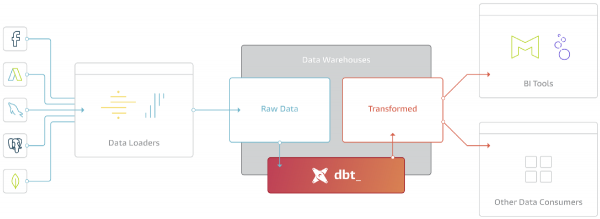
The primary purpose of DBT is to take code, compile it into SQL, and execute commands in the correct sequence within the Warehouse.
DBT Project Structure
The project consists of 2 types of directories and files:
- Model (.sql) — a unit of transformation expressed as a SELECT query
- Configuration file (.yml) — parameters, settings, tests, documentation
At a basic level, the workflow is as follows:
- The user prepares model code in any convenient IDE
- Using the CLI, models are triggered, and DBT compiles the model code into SQL
- The compiled SQL code is executed in the Warehouse in the specified sequence (graph)
Here’s how a CLI run might look:
Everything is SELECT
This is the killer feature of the Data Build Tool framework. In other words, DBT abstracts away all the code related to materializing your queries in the Warehouse (variations of CREATE, INSERT, UPDATE, DELETE, ALTER, GRANT commands, …).
Any model implies writing a single SELECT query that defines the resulting dataset.
At the same time, the logic of transformations can be multi-level and consolidate data from several other models. An example of a model that will build an orders showcase (f_orders):
{% set payment_methods = ['credit_card', 'coupon', 'bank_transfer', 'gift_card'] %}

with orders as (

   select * from {{ ref('stg_orders') }}

),

order_payments as (

   select * from {{ ref('order_payments') }}

),

final as (

   select
       orders.order_id,
       orders.customer_id,
       orders.order_date,
       orders.status,
       {% for payment_method in payment_methods -%}
       order_payments.{{payment_method}}_amount,
       {% endfor -%}
       order_payments.total_amount as amount
   from orders
       left join order_payments using (order_id)

)

select * from final
What interesting things can we see here?
First: CTEs (Common Table Expressions) are used — to organize and understand the code that contains many transformations and business logic.
Second: The model code is a mix of SQL and (templating language).
The example uses a for loop to calculate the amount for each payment method specified in the expression set. The function ref is also used — it allows referencing other models within the code:
- During compilation ref it will be transformed into a target pointer to a table or view in the Warehouse
- ref which allows building a graph of model dependencies.
This is what adds nearly unlimited capabilities to DBT. The most commonly used ones are:
- If / else statements — branching operators
- For loops — loops
- Variables — variables
- Macro — creating macros
Materialization: Table, View, Incremental
Materialization Strategy — the approach according to which the resulting dataset of the model will be stored in the Warehouse.
In basic terms, this is:
- Table — a physical table in the Warehouse
- View — a view, a virtual table in the Warehouse
There are also more complex materialization strategies:
- Incremental — incremental loading (of large fact tables); new rows are added, changed ones are updated, and deleted ones are purged.
- Ephemeral — the model is not directly materialized but participates as a CTE in other models.
- Any other strategies that you can add yourself.
In addition to materialization strategies, opportunities for optimization for specific Warehouses are opened up, for example:
- Snowflake: Transient tables, Merge behavior, Table clustering, Copying grants, Secure views.
- Redshift: Distkey, Sortkey (interleaved, compound), Late Binding Views.
- BigQuery: Table partitioning & clustering, Merge behavior, KMS Encryption, Labels & Tags.
- Spark: File format (parquet, csv, json, orc, delta), partition_by, clustered_by, buckets, incremental_strategy
Currently, the following Storage options are supported:
- Postgres
- Redshift
- BigQuery
- Snowflake
- Presto (partially)
- Spark (partially)
- Microsoft SQL Server (community adapter)
Let's enhance our model:
- We'll make its filling incremental (Incremental)
- We'll add segmentation and sorting keys for Redshift
-- Model configuration:
-- Incremental filling, unique key for updating records (unique_key)
-- Segmentation key (dist), sorting key (sort)
{{
  config(
       materialized='incremental',
       unique_key='order_id',
       dist='customer_id',
       sort='order_date'
   )
}}

{% set payment_methods = ['credit_card', 'coupon', 'bank_transfer', 'gift_card'] %}

with orders as (

   select * from {{ ref('stg_orders') }}
   where 1=1
   {% if is_incremental() -%}
       -- This filter will only be applied for incremental runs
       and order_date >= (select max(order_date) from {{ this }})
   {%- endif %}

),

order_payments as (

   select * from {{ ref('order_payments') }}

),

final as (

   select
       orders.order_id,
       orders.customer_id,
       orders.order_date,
       orders.status,
       {% for payment_method in payment_methods -%}
       order_payments.{{payment_method}}_amount,
       {% endfor -%}
       order_payments.total_amount as amount
   from orders
       left join order_payments using (order_id)

)

select * from final
Model dependency graph
Also known as the dependency tree. Also known as DAG (Directed Acyclic Graph).
DBT builds the graph based on the configuration of all models in the project, specifically the ref() links within models to other models. Having a graph allows for the following:
- Executing models in the correct sequence
- Parallelization of warehouse formation
- Running an arbitrary subgraph
Example of graph visualization:
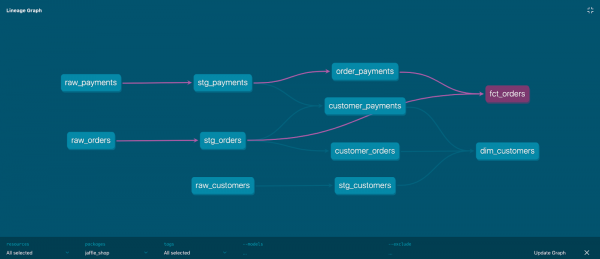
Each node in the graph represents a model, and the edges are defined by the ref expression.
Data Quality and Documentation
In addition to forming the models themselves, DBT allows testing a number of assertions about the resulting dataset, such as:
- Not Null
- Unique
- Reference Integrity — ensuring that customer_id in the orders table corresponds to an id in the customers table
- Conformance to a list of acceptable values
It is possible to add custom tests, such as the percentage deviation of revenue from figures a day, week, or month ago. Any assumption framed as an SQL query can become a test.
This way, unwanted deviations and errors in the data can be caught in the warehouse views.
When it comes to documentation, DBT provides mechanisms for adding, versioning, and distributing metadata and comments at the model and even attribute levels.
Here's how adding tests and documentation at the configuration file level looks:
 - name: fct_orders
   description: This table has basic information about orders, as well as some derived facts based on payments
   columns:
     - name: order_id
       tests:
         - unique # check for unique values
         - not_null # check for non-null
       description: This is a unique identifier for an order
     - name: customer_id
       description: Foreign key to the customers table
       tests:
         - not_null
         - relationships: # check for referential integrity
             to: ref('dim_customers')
             field: customer_id
     - name: order_date
       description: Date (UTC) that the order was placed
     - name: status
       description: '{{ doc("orders_status") }}'
       tests:
         - accepted_values: # check for valid values
             values: ['placed', 'shipped', 'completed', 'return_pending', 'returned']
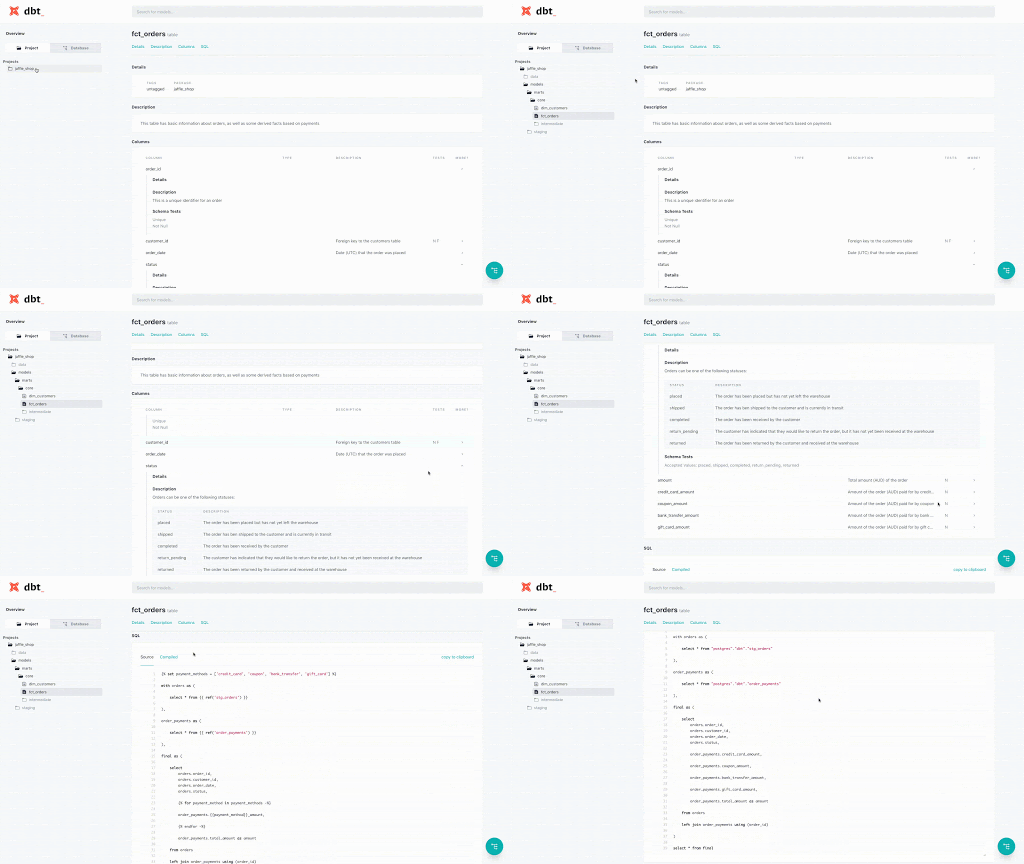
Here's how this documentation looks on the generated website:
Macros and Modules
The purpose of DBT is not so much to become a set of SQL scripts, but to provide users with powerful and feature-rich tools to build their own transformations and share these modules.
Macros are sets of constructs and expressions that can be called as functions within models. Macros allow for SQL reuse across models and projects following the engineering principle of DRY (Don’t Repeat Yourself).
An example of a macro:
{% macro rename_category(column_name) %}
case
 when {{ column_name }} ilike  '%osx%' then 'osx'
 when {{ column_name }} ilike  '%android%' then 'android'
 when {{ column_name }} ilike  '%ios%' then 'ios'
 else 'other'
end as renamed_product
{% endmacro %}
And its usage:
{% set column_name = 'product' %}
select
 product,
 {{ rename_category(column_name) }} -- macro call
from my_table
DBT comes with a package manager that allows users to publish and reuse individual modules and macros.
This means the ability to upload and use libraries such as:
- : working with Date/Time, Surrogate Keys, Schema tests, Pivot/Unpivot, and more
- Pre-built templates for services such as and
- Libraries for specific Data Warehouses, for example
- — A module for logging DBT work
A complete list of packages can be found at .
Even more possibilities
Here I will describe several other interesting features and implementations that my team and I use to build a Data Warehouse in .
Segregation of execution environments DEV — TEST — PROD
Even within a single DWH cluster (across different schemas). For example, using the following expression:
with source as (

   select * from {{ source('salesforce', 'users') }}
   where 1=1
   {%- if target.name in ['dev', 'test', 'ci'] -%}
       where timestamp >= dateadd(day, -3, current_date)
   {%- endif -%}

)
This code literally says: for environments dev, test, ci take data only from the last 3 days and no more. This means that runs in these environments will be much faster and require fewer resources. When running in the environment prod the filter condition will be ignored.
Materialization with alternative column encoding
Redshift is a columnar DBMS that allows you to set compression algorithms for each individual column. Choosing optimal algorithms can reduce disk space usage by 20-50%.
Macro will execute the ANALYZE COMPRESSION command, create a new table with the recommended column encoding algorithms, specify the segmentation keys (dist_key) and sort keys (sort_key), transfer data to it, and if necessary, delete the old copy.
Macro signature:
{{ compress_table(schema, table,
                 drop_backup=False,
                 comprows=none|Integer,
                 sort_style=none|compound|interleaved,
                 sort_keys=none|List,
                 dist_style=none|all|even,
                 dist_key=none|String) }}
Model run logging
For each model execution, you can attach hooks that will execute before or immediately after the model creation ends:
   pre-hook: "{{ logging.log_model_start_event() }}"
   post-hook: "{{ logging.log_model_end_event() }}"
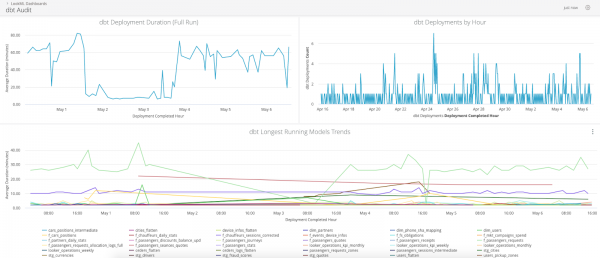
The logging module will allow you to record all necessary metadata in a separate table, which can then be used for auditing and analyzing bottlenecks.
Here is what the dashboard looks like with logging data in Looker:
Automation of Warehouse maintenance
If you are using any feature extensions of the Warehouse, such as UDF (User Defined Functions), then versioning these functions, managing access, and automating the rollout of new releases can be very conveniently done in DBT.
We use UDF in Python to calculate hash values, email address domains, and decode bitmasks.
An example of a macro that creates a UDF in any execution environment (dev, test, prod):
{% macro create_udf() -%}

 {% set sql %}
 CREATE OR REPLACE FUNCTION {{ target.schema }}.f_sha256(mes "varchar")
 RETURNS varchar
 LANGUAGE plpythonu
 STABLE
 AS $$
 import hashlib
 return hashlib.sha256(mes).hexdigest()
 $$
 ;
 {% endset %}

 {% set table = run_query(sql) %}

{%- endmacro %}
At Wheely, we use Amazon Redshift, which is based on PostgreSQL. It is important for Redshift to regularly gather statistics on tables and free up disk space — using the ANALYZE and VACUUM commands, respectively.
To achieve this, the commands from the redshift_maintenance macro are executed every night:
{% macro redshift_maintenance() %}

 {% set vacuumable_tables=run_query(vacuumable_tables_sql) %}

 {% for row in vacuumable_tables %}
 {% set message_prefix=loop.index ~ " of " ~ loop.length %}

  {%- set relation_to_vacuum = adapter.get_relation(
 database=row['table_database'],
 schema=row['table_schema'],
 identifier=row['table_name']
 ) -%}
 {% do run_query("commit") %}

 {% if relation_to_vacuum %}
 {% set start=modules.datetime.datetime.now() %}
 {{ dbt_utils.log_info(message_prefix ~ " Vacuuming " ~ relation_to_vacuum) }}
 {% do run_query("VACUUM " ~ relation_to_vacuum ~ " BOOST") %}
 {{ dbt_utils.log_info(message_prefix ~ " Analyzing " ~ relation_to_vacuum) }}
 {% do run_query("ANALYZE " ~ relation_to_vacuum) %}
 {% set end=modules.datetime.datetime.now() %}
 {% set total_seconds = (end - start).total_seconds() | round(2)  %}
 {{ dbt_utils.log_info(message_prefix ~ " Finished " ~ relation_to_vacuum ~ " in " ~ total_seconds ~ "s") }}
 {% else %}
 {{ dbt_utils.log_info(message_prefix ~ ' Skipping relation "' ~ row.values() | join ('"."') ~ '" as it does not exist') }}
 {% endif %}

 {% endfor %}

{% endmacro %}
DBT Cloud
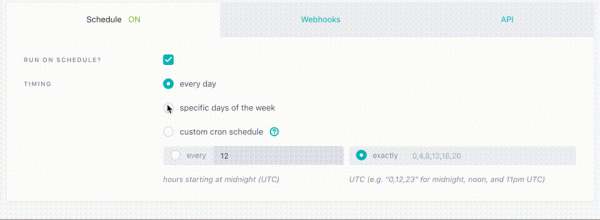
There is an option to use DBT as a Managed Service. Included are:
- Web IDE for project and model development
- Job configuration and scheduling setup
- Simple and convenient access to logs
- Website with your project documentation
- CI (Continuous Integration) integration
Conclusion
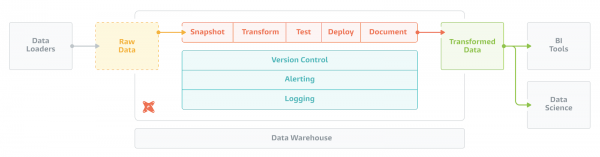
Preparing and consuming DWH becomes as enjoyable and beneficial as drinking a smoothie. DBT consists of Jinja, custom extensions (modules), a compiler, an executor, and a package manager. By bringing these elements together, you create a complete working environment for your Data Warehouse. There is hardly a better way to manage transformations within DWH today.
The beliefs followed by DBT developers are stated as follows:
- Code, not GUI, is the best abstraction for expressing complex analytical logic.
- Working with data should adapt the best practices of software development.
- The crucial infrastructure for data work should be controlled by the user community like open-source software.
- Not only analytics tools but also code will increasingly become the property of the Open Source community.
These core beliefs have birthed a product that is now used in over 850 companies, and they form the foundation of many interesting extensions that will be created in the future.
For those interested, there is a video recording of the open lesson I conducted a few months ago as part of an open lesson at OTUS — .
In addition to DBT and Data Warehouses, as part of the Data Engineer course on the OTUS platform, my colleagues and I cover a number of other relevant and modern topics:
- Architectural concepts of Big Data applications.
- Practice with Spark and Spark Streaming.
- Exploring methods and tools for loading data sources.
- Building analytical dashboards in DWH.
- NoSQL concepts: HBase, Cassandra, ElasticSearch.
- Principles of monitoring and orchestration organization.
- Final Project: bringing all skills together with mentoring support.
Links:
- — Official documentation.
- — Overview article by one of the DBT authors.
- — YouTube, OTUS open lesson recording.
- — Next open lesson on May 15, 2020.
- — OTUS.
- — A look at the future of data work and analytics.
- — The evolution of analytics and the impact of Open Source.
- — Principles of CI using DBT.
- — Practice, step-by-step instructions for self-study.
- — Github, code of the educational project
Source: habr.com
