

In we discussed the question of whether RAID is applicable on SSDs, using Kingston drives as an example, but we only did so in the context of the zero level. In this article, we will explore the use of professional and home NVMe solutions in the most popular types of RAID arrays and discuss controller compatibility. with Kingston drives.

Why is RAID necessary on SSDs?
The advantages of storage arrays based on SSDs compared to hard disk storage arrays include reduced access time to data on the drive and superior performance in read/write operations. However, for optimal SSD-based RAID performance, an ideal combination of CPU, cache, software, and hardware is required. When all these factors work perfectly together, a RAID array made of SSDs can significantly outperform a comparable configuration using traditional HDDs.
A typical SSD consumes less power than hard drives, so when combining a large number of solid-state drives into a RAID array, the energy savings compared to an HDD RAID array can result in lower corporate electricity bills.
However, SSD RAID has limitations and drawbacks: in particular, a higher price per gigabyte of storage compared to hard drives of comparable capacity. Additionally, the endurance of flash memory is limited by a certain number of rewrite cycles. This means SSDs have a defined lifespan that depends on usage: the more frequently information is rewritten on it, the faster the drive will fail. On the other hand, enterprise-grade solid-state drives have a decent lifespan comparable to mechanical hard drives.
How do Kingston SSDs perform in RAID mode with Broadcom controllers?
At the dawn of SSD technology, RAID configurations were fraught with many nuances. This was partly due to the use of less reliable HDDs. Solid state drives are significantly more dependable than their magnetic-disk-based counterparts. As we know, SSDs lack moving parts, which virtually eliminates the risk of mechanical damage. The failure of solid state drives caused by power surges is also unlikely, considering that home PCs and servers are protected by UPS, power filters, and even power supplies.
Moreover, SSDs have another significant advantage: even if the memory cells wear out from writing, data can still be read from them; however, in the case of a magnetic disk failure – unfortunately, that's not possible.
Today, using SSD solutions in RAID arrays of various levels is quite standard practice. The key is to choose the right solid state drives with minimal latency. Ideally, use SSDs from the same manufacturer and model to avoid a mishmash of drives that support different loads and are built on various types of memory, controllers, and other technologies. So, if we've decided to purchase four or 16 NVMe SSDs from Kingston to create a RAID array, it's best that they all come from the same series and model range.
By the way, in we did not randomly mention Broadcom controllers when discussing NVMe SSDs from Kingston. The point is that the manuals for these devices immediately list compatible drives (including those from the aforementioned American SSD manufacturer) that the controller will work with seamlessly. This information should be relied upon when choosing a 'controller-SSD' pairing for RAID.
We are examining the operation of Kingston SSDs in the most popular types of RAID – '1', '5', '10', '50'.
Thus, "zero" level RAID does not provide data redundancy but only enhances performance. RAID 0 offers no data protection at all, which is why we will not consider it in the corporate segment. RAID 1, on the other hand, provides complete redundancy but only a modest increase in performance, so it should be considered when performance enhancement is not a fundamental factor in creating a RAID array with SSDs.
RAID 1 based on Kingston SSDs and Broadcom controllers
So, the RAID array of the first level based on the Broadcom MegaRAID 9460-16i controller combines two to 32 Kingston drives that are copies of each other and provides full redundancy. While using traditional HDDs keeps data read and write speeds at that of the HDD itself, with NVMe SSD solutions we achieve a tenfold performance increase, especially in terms of data access time. For example, with two Kingston DC1000M U.2 NVMe SSDs in a server RAID 1, we will achieve 350,000 IOPS for random data reading and 75,000 IOPS for writing.

Regarding sequential read speed, the results will match the specifications of the drive — 3200 MB/s. However, since both NVMe SSDs are operational, data can be read from them simultaneously, making read operations quite fast. Write speed (claimed to be 2000 MB/s) will be slower because each write operation is performed twice.
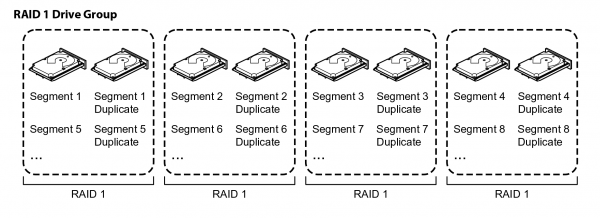
A RAID 1 array is perfect for small databases or any other environment that requires fault tolerance but limited capacity. Mirroring drives especially helps in disaster recovery scenarios (though performance is slightly reduced), as it ensures the immediate "revival" of critical data if one of the drives in the array fails. However, as this level of protection requires doubling the capacity for storing a mirrored copy of data (to store 100 TB, 200 TB of space is needed), many corporate systems use more cost-effective storage options: RAID 5 and RAID 6.
RAID 5 based on Kingston SSDs and Broadcom controllers
To set up a RAID level five array, we will need at least three drives, with data alternating (cyclically written across all drives in the array) but not duplicated. When organizing them, it's important to consider their more complex structure, as a concept known as 'parity' comes into play. This refers to the logical algebraic function XOR (exclusive 'OR'), which dictates the use of at least three drives in the array (with a maximum of 32). In this case, parity information is written across all 'disks' in the array.
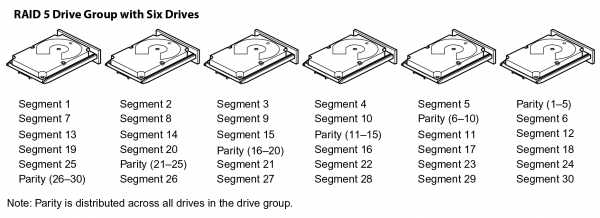
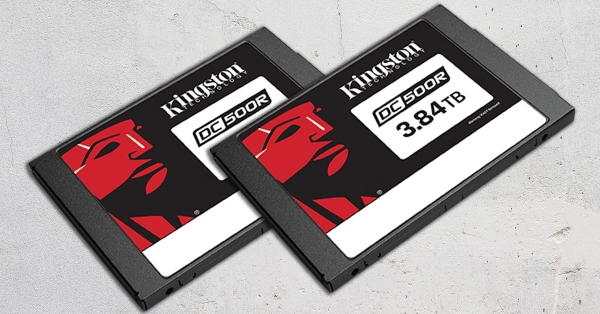
For an array of four Kingston DC500R SATA SSDs with a capacity of 3.84 TB each, we will achieve 11.52 TB of space and 3.84 TB for parity. If we combine 16 Kingston DC1000M U.2 NVMe drives with a capacity of 7.68 TB in a RAID 5 configuration, we end up with 115.2 TB with a loss of 7.68 TB. As you can see, the more drives, the better the result. This is also because having more drives in RAID 5 improves overall performance during write operations. Linear read speeds will reach the levels of RAID 0.
A RAID 5 disk group provides high throughput (especially for large files) and redundancy with minimal power loss. This type of array organization is best suited for networks that perform many small input/output (I/O) operations simultaneously. However, it should not be used for tasks that require a large number of small write operations for small blocks.
There is one more point to consider: if even one of the NVMe drives fails, RAID 5 enters a degraded state, and the failure of another storage device can become critical for all data. In the event of a single drive failure, the RAID controller uses parity information to reconstruct all missing data.
RAID 10 based on Kingston SSDs and Broadcom controllers
RAID 0 provides us with a twofold increase in speed and access time, while RAID 1 ensures reliability. Ideally, these would be combined, and that's where RAID 10 (or 1+0) comes into play. The 'ten' is constructed from four SATA SSD or NVMe drives (up to 32) and consists of an array of 'mirrors', with the number of drives always needing to be a multiple of four. Data in this array is written by dividing it into fixed blocks (as in RAID 0) and alternating between drives, distributing copies among the 'disks' in the RAID 1 array. Thanks to the ability to simultaneously access multiple groups of disks, RAID 10 delivers high performance.
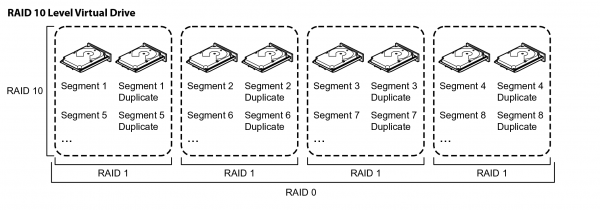
Since RAID 10 can distribute data across multiple mirrored pairs, it means that it can tolerate a failure of one drive in a pair. However, in the event of a failure of both mirrored pairs (that is, all four drives), there will be an inevitable loss of data. Consequently, we also achieve good fault tolerance and reliability. But it's important to note that, like RAID 1, the tenth-level array uses only half of the total capacity, making it an expensive solution that is also complex to configure.
RAID 10 is suited for data storage systems that require 100% redundancy of mirrored disk groups, as well as the increased input-output performance of RAID 0. It is the best solution for medium-sized databases or any environment that demands higher fault tolerance than RAID 5.
RAID 50 based on Kingston SSDs and Broadcom controllers
A combined array similar to the tenth-level RAID, which is a zero-level array created from arrays of the fifth level. As in the previous case, the main goal of this array is to achieve double performance while maintaining data reliability in RAID 5 arrays. RAID 50 provides improved write performance and better data protection than standard RAID 5 in the event of a drive failure, and it is capable of faster recovery when one of the drives fails.
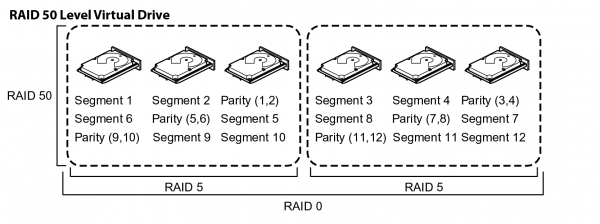
The RAID 50 disk group splits data into smaller blocks and then distributes them to each RAID 5 array. The RAID 5 disk group itself also divides data into smaller blocks, calculates parity, performs a logical OR operation on the blocks, and then executes write operations for data and parity blocks for each disk in the disk group.
Although performance inevitably decreases in the event of a failure of one of the drives, this is not as critical as in a RAID 5 array, since one failure only affects one of the arrays, leaving the other fully operational. In fact, RAID 50 can withstand up to eight HDD/SSD/NVMe drive failures, provided that each failed 'disk' is in a separate RAID 5 array.
RAID 50 is best used for applications that require high reliability and must handle a large number of requests while maintaining high data transfer rates and lower storage costs compared to a RAID 10 array. However, since configuring a RAID 50 array requires a minimum of six drives, cost cannot be completely disregarded as a factor. One downside of RAID 50 is that, like RAID 5, it requires a complex controller such as in the previous article from Broadcom.
It is also worth noting that RAID 50 has less usable disk space than RAID 5 due to the allocation of capacity for parity records. Nonetheless, it still has more usable space than other RAID levels, especially those that use mirroring. With a minimum requirement of six disks, RAID 50 can be an expensive option, but the additional disk space justifies the costs by protecting corporate data. This type of array is recommended for working with data that requires high storage reliability, high request frequency, high transfer rates, and large capacity.
RAID 6 and RAID 60: we haven't forgotten about them either.
Now that we have discussed the fifth and fiftieth level arrays, we must also mention RAID 6 and RAID 60 as types of array organization.
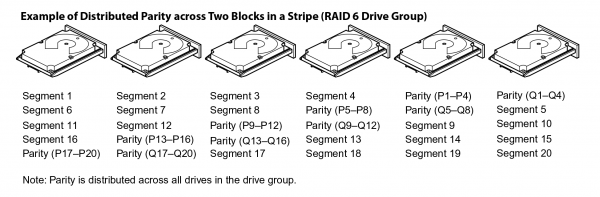
The performance of RAID 6 is similar to that of RAID 5, but here a minimum of two drives are dedicated to parity control, which allows the array to survive the failure of two drives without data loss (in RAID 5, such a situation is highly undesirable). This provides greater reliability. Otherwise, it's the same as in the fifth level array: in the event of a failure of one or two disks, the RAID controller uses the parity blocks to recreate all the missing information. When two drives fail, the recovery does not happen simultaneously: first the first drive is revived, then the second. Thus, two operations are performed for data recovery.
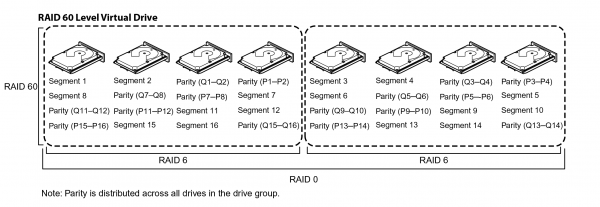
It’s not hard to guess that if RAID 50 is a zero-level array of fifth-level arrays, then RAID 60 is a zero-level array of sixth-level arrays, as we just discussed. This means that such an organization of RAID storage allows for the loss of two SSDs in each RAID 6 group of drives. The working principle is similar to what we described in the RAID 50 section, but the number of failures that the sixtieth level array can withstand increases from 8 to 16 drives. Typically, such arrays are used for online customer service that requires high fault tolerance.
In conclusion:
Although mirroring provides greater fault tolerance than RAID 50/60, it also requires much more space. Since the amount of data is doubled, you effectively get only 50% of the total capacity of the drives installed in the server for writing and storing information. The choice between RAID 50/60 and RAID 10 will likely depend on available budgets, server capacity, and your data protection needs. Cost comes to the forefront when we discuss SSD solutions (both enterprise and consumer-grade).
It's also important to note that we now clearly know – SSD-based RAID is a safe solution and standard practice for modern business. There is also a rationale for transitioning to NVMe for home use, if budgets allow. And if you still have a question about why all of this is necessary, refer back to the beginning of the article – we have already answered it in detail.
This article was prepared with support from our colleagues at Broadcom, who provide their controllers to Kingston engineers for testing with enterprise-class SATA/SAS/NVMe drives. Thanks to this friendly symbiosis, customers can be confident in the reliability and stability of Kingston drives with HBA and RAID controllers produced. .
Additional information about Kingston products can be found at of the company.
Source: habr.com
