

Introduction

Modern corporate content filtering systems from renowned manufacturers such as Cisco, BlueCoat, and FireEye share many characteristics with their more powerful counterparts—DPI systems—which are being increasingly implemented at the national level. The essence of both is to inspect incoming and outgoing internet traffic and, based on black/white lists, decide whether to block internet connections. Since both rely on similar principles in their operation, the methods to bypass them will also have much in common.
One of the technologies that allows for fairly effective circumvention of both DPI and corporate systems is domain fronting technology. Its essence lies in masking our access to a blocked resource with another public domain that has a good reputation and is guaranteed not to be blocked by any system, such as google.com.
A considerable number of articles and examples have already been written on this technology. However, the popular and recently discussed DNS-over-HTTPS and encrypted SNI technologies, along with the new version of the TLS 1.3 protocol, provide an opportunity to consider another version of domain fronting.
Understanding the technology
First, let's clarify the main concepts so everyone understands who is who and why all this is necessary. We mentioned the eSNI mechanism, the operation of which will be discussed further. The eSNI (encrypted Server Name Indication) mechanism is a secure version of SNI, available only for the TLS 1.3 protocol. The main idea is to encrypt, among other things, information about which domain the request is sent to.
Now, let's examine the operation of the eSNI mechanism in practice.
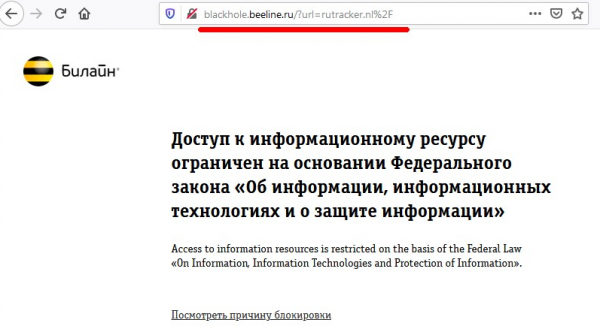
Suppose we have an internet resource that is blocked by a modern DPI solution (let’s take a well-known torrent tracker—rutracker.nl as an example). When attempting to access the torrent tracker website, we see the provider's standard notification that the resource is blocked:
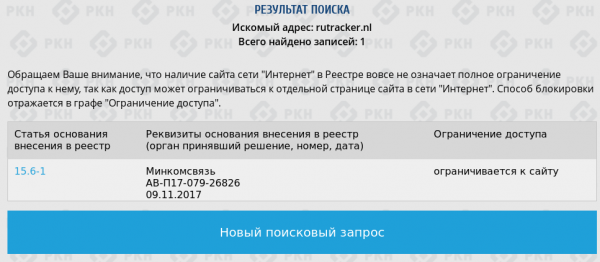
On the Roskomnadzor site, this domain is indeed listed in the blacklists:
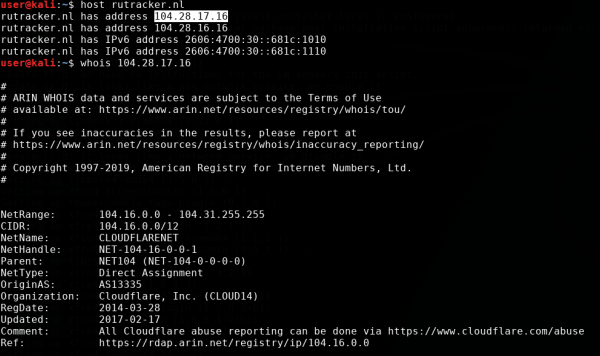
When performing a whois query, it is evident that the domain itself is 'hidden' behind the cloud provider Cloudflare.
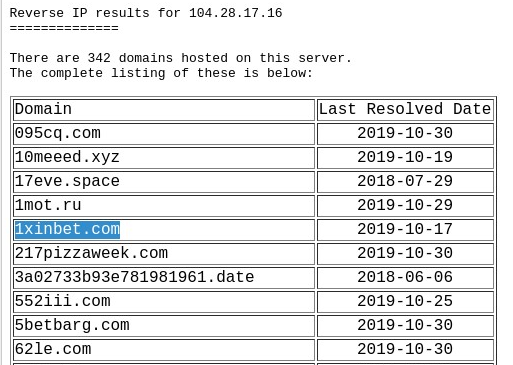
However, unlike the 'specialists' from the Roskomnadzor, the more technically savvy employees from Beeline (or perhaps taught by the bitter experience of our famed regulator) did not simply block the site by IP address, but added the domain name to the stop-list instead. domain name. This can be easily verified by checking which other domains are hidden behind the same IP address, visiting one of them, and seeing that access is not blocked:
So how does this happen? How does the provider's DPI know which of the domains my browser is accessing, given that all communications occur over the https protocol, and we haven't noticed any https certificate hijacking from Beeline so far? Is it prophetic or am I being monitored?
Let's try to answer this question by looking at the traffic through Wireshark.
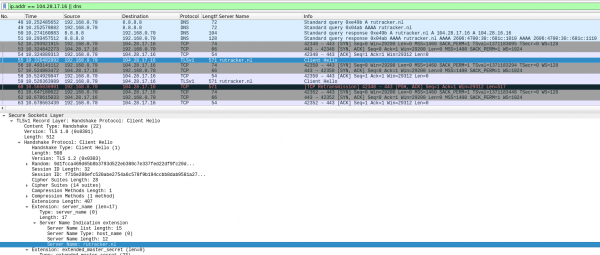
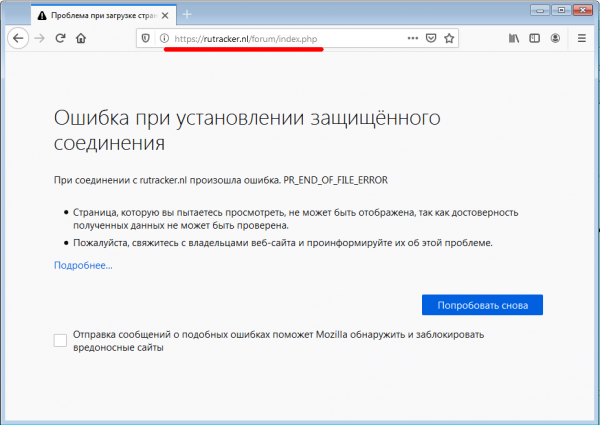
The screenshot shows that first, the browser receives the IP address of the server via DNS, then a standard TCP handshake occurs with the destination server, and afterwards, the browser attempts to establish an SSL connection with the server. For this, it sends a packet SSL Client Hello, which includes the name of the original domain in plain text. This field is necessary for the Cloudflare frontend server to route the connection properly. This is where the provider's DPI catches us, breaking our connection. We do not receive any blocking message from the provider, and see a standard browser error as if the site is offline or simply not working:
Now let’s enable the eSNI mechanism in the browser, as described in the instructions for Firefox :
To do this, we open the Firefox configuration page about:config and activate the following settings:
network.trr.mode = 2;
network.trr.uri = https://mozilla.cloudflare-dns.com/dns-query
network.security.esni.enabled = true
After that, we will check the settings' accuracy on the Cloudflare site by this link and try the trick with our torrent tracker once more.
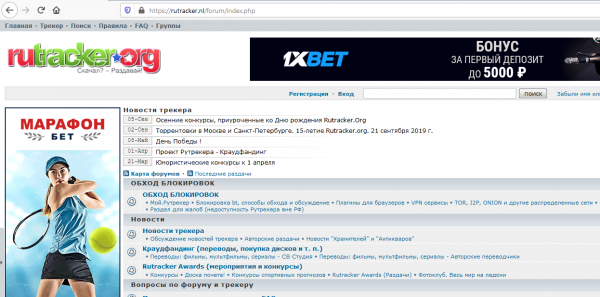
Voila. Our favorite tracker opened without any VPNs or proxy servers. Now let’s take a look at the traffic dump in Wireshark to see what happened.
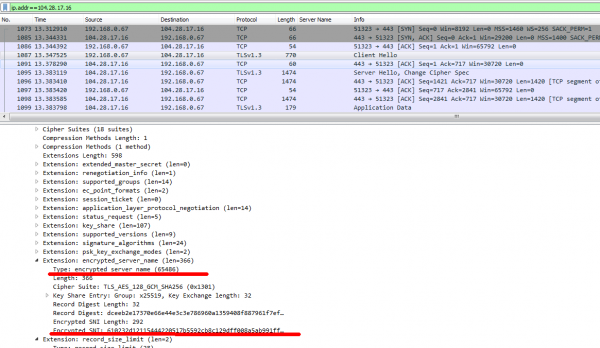
This time, the SSL Client Hello packet does not contain the destination domain explicitly; instead, a new field appears in the packet — encrypted_server_name — which contains the value rutracker.nl, and only the Cloudflare frontend server can decrypt this field. Thus, the provider's DPI has no choice but to wash its hands and allow such traffic. There are no other options for encryption.
So, we have looked at how technology works in the browser. Now let's try to apply it to more specific and interesting things. To start, we'll teach curl to use eSNI for working with TLS 1.3, while also examining how domain fronting based on eSNI works.
Domain Fronting with eSNI
Since curl uses the standard openssl library for connecting via https, the first thing we need to do is ensure eSNI support there. Currently, the master branches of openssl do not support eSNI, so we need to download a special openssl branch, compile it, and install it.
We clone the repository from GitHub and compile it as usual:
$ git clone https://github.com/sftcd/openssl
$ cd openssl
$ ./config

$ make
$ cd esnistuff
$ make
Next, we clone the curl repository and configure its compilation using our compiled openssl library:
$ cd $HOME/code
$ git clone https://github.com/niallor/curl.git curl-esni
$ cd curl-esni

$ export LD_LIBRARY_PATH=/opt/openssl
$ ./buildconf
$ LDFLAGS="-L/opt/openssl" ./configure --with-ssl=/opt/openssl --enable-esni --enable-debug
It is important to specify all directories where openssl is located correctly (in our case, this is /opt/openssl/) and ensure that the configuration process completes without errors.
In case of successful configuration, we will see the line:
WARNING: esni ESNI enabled but marked EXPERIMENTAL. Use with caution!
$ makeAfter successfully building the package, we will use a special bash file from the openssl package to configure and run curl. We will copy it to the curl directory for convenience:
cp /opt/openssl/esnistuff/curl-esni and perform a test https request to the cloudflare server, while simultaneously recording DNS and TLS packets in Wireshark.
$ ESNI_COVER="www.hello-rkn.ru" ./curl-esni https://cloudflare.com/In the server's response, along with a lot of debug information from openssl and curl, we will receive an HTTP response with a 301 status code from cloudflare.
HTTP/1.1 301 Moved Permanently
< Date: Sun, 03 Nov 2019 13:12:55 GMT
< Transfer-Encoding: chunked
< Connection: keep-alive
< Cache-Control: max-age=3600
< Expires: Sun, 03 Nov 2019 14:12:55 GMT
< Location: https://www.cloudflare.com/
which indicates that our request was successfully delivered to the destination server, heard, and processed.
Now let's look at the traffic dump in Wireshark, i.e., what the provider's DPI saw in this case.
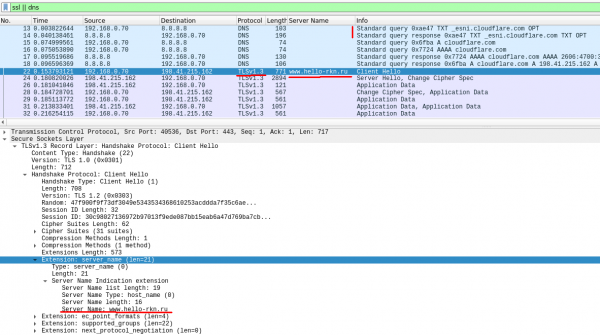
It is evident that initially curl contacted the DNS server for the public eSNI key for the cloudflare server — a TXT DNS request to _esni.cloudflare.com (packet #13). Then, using the openssl library, curl sent a TLS 1.3 request to the cloudflare server in which the SNI field was encrypted with the public key obtained in the previous stage (packet #22). However, in addition to the eSNI field, the SSL hello packet also included a field with the regular — unencrypted SNI, which we can specify in any order (in this case — www.hello-rkn.ru).
This open SNI field was not taken into account by the cloudflare servers during processing and was merely a disguise for the provider's DPI. The cloudflare server accepted our ssl hello packet, decrypted the eSNI, extracted the original SNI from it, and processed it as if nothing had happened (it did everything exactly as planned during the development of eSNI).
The only thing that can be pointed out from the DPI perspective in this case is the initial DNS request to _esni.cloudflare.com. However, we made the DNS request open just to demonstrate how this mechanism works internally.
To completely undermine the DPI, we use the already mentioned DNS-over-HTTPS mechanism. A brief explanation – DoH is a protocol that allows protection against man-in-the-middle attacks by sending DNS requests over HTTPS.
Let's execute the request again, but this time we will obtain the public eSNI keys using the HTTPS protocol instead of DNS:
ESNI_COVER="www.hello-rkn.ru" DOH_URL=https://mozilla.cloudflare-dns.com/dns-query ./curl-esni https://cloudflare.com/The traffic dump of the request is shown in the screenshot below:
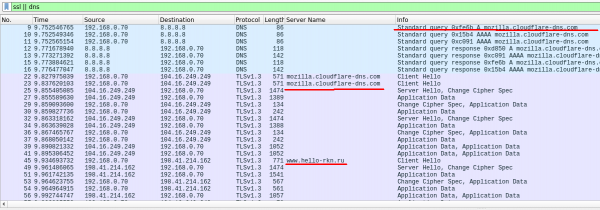
It is clear that first curl contacts the server mozilla.cloudflare-dns.com using the DoH protocol (https connection to server 104.16.249.249) to obtain the public keys for encrypting the SNI, and then to the destination server, masking itself with the domain www.hello-rkn.ru.
In addition to the mentioned DoH resolver mozilla.cloudflare-dns.com, we can also use other popular DoH services, for example, from the notorious evil corporation.
Let's perform such a request:
ESNI_COVER="www.kremlin.ru" DOH_URL=https://dns.google/dns-query ./curl-esni https://rutracker.nl/And we will receive a response:
< HTTP/1.1 301 Moved Permanently
< Date: Sun, 03 Nov 2019 14:10:22 GMT
< Content-Type: text/html
< Transfer-Encoding: chunked
< Connection: keep-alive
< Set-Cookie: __cfduid=da0144d982437e77b0b37af7d00438b1a1572790222; expires=Mon, 02-Nov-20 14:10:22 GMT; path=/; domain=.rutracker.nl; HttpOnly; Secure
< Location: https://rutracker.nl/forum/index.php
< CF-Cache-Status: DYNAMIC
< Expect-CT: max-age=604800, report-uri="https://report-uri.cloudflare.com/cdn-cgi/beacon/expect-ct"
< Server: cloudflare
< CF-RAY: 52feee696f42d891-CPH
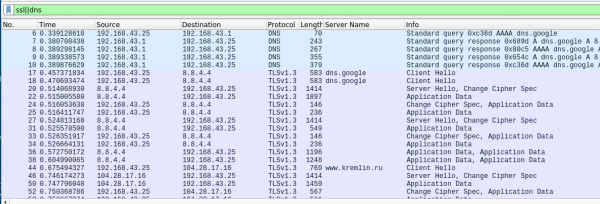
In this case, we accessed the blocked server rutracker.nl, using a DoH resolver dns.google (there's no typo here; the famous corporation now has its own top-level domain) and masked it with another domain, which is strictly forbidden to be blocked by any DPI under threat of severe penalties. From the response received, it can be understood that our request was successfully processed.
As an additional check to see if the provider's DPI reacts to the open SNI we are using as a disguise — we can make a request to rutracker.nl masking it with some other prohibited resource, for example, another 'good' torrent tracker:
$ ESNI_COVER="rutor.info" DOH_URL=https://dns.google/dns-query ./curl-esni https://rutracker.nl/We will not receive a response from the server, as our request will be blocked by the DPI system.
A brief conclusion to the first part
So, we have managed to demonstrate the functionality of eSNI using OpenSSL and cURL and verify the operation of domain fronting based on eSNI. In this way, we can adapt our favorite tools that use the OpenSSL library to work 'under the cover' of other domains. More about this in our upcoming articles.
Source: habr.com
