

The translation of the article is specially prepared for the students of the course .
Interested in developing in this direction? Watch the recording of the professional master class , conducted by Yegor Zuyev — TeamLead at InBit and author of the educational program at OTUS.

Google Cloud Platform (GCP) offers numerous services, particularly a compute stack that includes Google Compute Engine (GCE), Google Kubernetes Engine (formerly known as Container Engine) (GKE), Google App Engine (GAE), and Google Cloud Functions (GCF). All these services have cool names, but their functions and what makes them unique from each other may not be entirely obvious. This article is intended for those who are just getting acquainted with cloud concepts, particularly cloud services and GCP.

1. Compute Stack
The compute stack can be viewed as a multi-layer abstraction of what a computer system can provide. This stack moves up (moves up) from 'bare metal' (bare metal), referring to the actual hardware components of the computer, to functions (functions), which represent the smallest unit of computation. What is important to note regarding the stack is that services aggregate as you move up the stack; for example, the 'applications' section (apps), shown in Figure 1 below, should include all the foundational components of containers (containers), virtual machines (virtual machines), and hardware. Similarly, the virtual machines component must contain hardware inside to operate.

Figure 1: Compute Stack | Image sourced from
This model, shown in Figure 1, serves as a basis for describing offerings from cloud providers. Thus, some providers may offer only, for example, containers and services lower quality on the stack, while others provide everything shown in Figure 1.
— If you are familiar with cloud services, proceed to Section 3, to learn about the GCP equivalent
— If you just need a summary of cloud services, go to Section 2.4
2. Cloud Services
The world of cloud computing is quite diverse. Cloud providers offer a multitude of services tailored to different client needs. You may have heard of terms such as IaaS, PaaS, SaaS, FaaS, KaaS, etc., with all the letters of the alphabet followed by 'aaS'. Despite the strange naming convention, they form a set of services provided by cloud providers. I note that there are three main 'as a Service' offerings that cloud providers almost always deliver.
These are IaaS, PaaS, and SaaS, which stand for Infrastructure as a Service, Platform as a Service, and Software as a Service, respectively. It is important to visualize cloud services as tiers of offerings. This means that when you move up or down from level to level, you, as a client, encounter different service options that are either added or removed from the core offering. It is best to think of it as a pyramid, as shown in Figure 2.
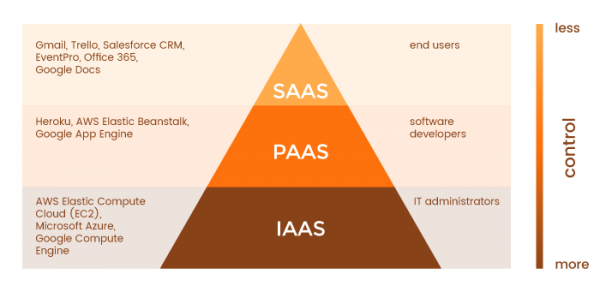
Figure 2: The 'aaS' Pyramid | Image derived from
2.1 Infrastructure as a Service (IaaS)
This is the lowest tier that a cloud service provider can offer, and it includes a cloud computing provider supplying 'bare' infrastructure, including middleware, network cables, processors, graphics processors, RAM, external storage, servers, and base operating system images, such as Debian Linux, CentOS, Windows, etc.
When you order an IaaS offering from a cloud service provider, this is what you should expect to receive. It is up to you, as the client, to assemble these parts to run your business. The level of what you will have to work with may vary from provider to provider, but generally, you simply get the hardware and OS, with the rest being up to you. Examples of IaaS include AWS Elastic Compute, Microsoft Azure, and GCE.
Some people may not like the fact that they have to install OS images and manage networking, load balancing, or worry about what type of processor is ideal for their workload. This is where we move up the pyramid to PaaS.
2.2 Platform as a Service (PaaS)
PaaS includes only the cloud service provider that offers a specific platform on which users can build applications. This is an abstraction over IaaS, meaning that the cloud provider takes care of all the details regarding CPUs, memory, RAM, storage, networks, etc. As shown in Figure 2, as a client, you have limited control over the actual platform, as the cloud provider manages all infrastructure details on your behalf. You request the selected platform and build your project on it. Examples of PaaS include Heroku.
For some, this might be too high a level, as they may not necessarily want to build a project on the specified platform but rather need a set of services directly from the cloud service provider. This is where SaaS comes in.
2.3 Software as a Service (SaaS)
SaaS represents the most common services provided by cloud service providers. They are aimed at end-users and are mainly accessible through websites, such as Gmail, Google Docs, Dropbox, etc. Regarding Google Cloud, there are several offerings outside their compute stack that are SaaS. These include Data Studio, Big Query, etc.
2.4 Summary of Cloud Services
Components
IaaS
PaaS
SaaS
What You Get
You receive infrastructure and pay accordingly. Freedom to use or install any software, operating system, or their composition.
Here you get what you request: software, hardware, operating system, web environment. You receive a ready-to-use platform and pay accordingly.
Here you don't need to worry about anything. You are provided with a pre-installed package configured according to your requirements, and you just need to pay accordingly.
Value
Basic Level of Computing
The Top of IaaS
This is essentially a full service package.
Technical Complexities
Technical knowledge is required.
You are given a basic configuration, but domain knowledge is still necessary.
No need to worry about technical details. The SaaS provider supplies everything.
What It Works With
Virtual machines, storage, servers, network, load balancers, etc.
Runtime environments (like Java runtime), databases (like MySQL, Oracle), web servers (like Tomcat, etc.)
Applications like email services (Gmail, Yahoo Mail, etc.), social interaction websites (Facebook, etc.)
Popularity Graph
Popular among highly skilled developers and researchers who require customization according to their needs or research areas
Most popular among developers since they can focus on developing their applications or scripts. They don't have to worry about traffic load or server management, etc.
Most popular among regular consumers or companies that use software like email, file-sharing services, and social networks, as they don't have to worry about technical details
Figure 3: Summary of Main Cloud Offerings | Image Provided
3. Google Cloud Platform Compute Package
Having reviewed typical cloud provider offerings in Section 2, we can compare them to Google Cloud’s offerings.
3.1 Google Compute Engine (GCE) — IaaS

Figure 4: Google Compute Engine (GCE) Icon
GCE is Google’s IaaS offering. With GCE, you can freely create virtual machines, allocate CPU and memory resources, choose storage types such as SSD or HDD, and determine memory size. It's almost as if you were building your own computer/workstation and managing all the details of its operation.
In GCE, you can choose from micro instances with 0.3-core processors and 1 GB of RAM to 96-core monsters with over 300 GB of RAM. You can also create virtual machines of custom sizes for your workloads. For those interested — these are virtual machines that you can assemble.
3.2 Google Kubernetes Engine (GKE) — (CaaS / KaaS)
Figure 5: Google Kubernetes Engine (GKE) Icon
GKE is a unique computing offering from GCP that represents an abstraction over the Compute Engine. More generally, GKE can be classified as a 'Container as a Service' (CaaS), sometimes referred to as 'Kubernetes as a Service' (KaaS), which allows clients to easily run their Docker containers in a fully managed Kubernetes environment. For those unfamiliar with containers, they help modularize services/applications, allowing different containers to hold different services; for example, one container may host your web application's frontend while another may contain its backend. Kubernetes automates, coordinates, manages, and deploys your containers. More information is available here.
3.3 Google App Engine (GAE) — (PaaS)

Figure 6: Google App Engine (GAE) Icon
As mentioned in section 2.2, PaaS stands above IaaS, and in the case of GCP, it can also be viewed as an offering on top of GKE. GAE is a specialized Google PaaS, and as they best describe themselves — 'bring your code, and we take care of everything else.'
This ensures that clients using GAE do not have to deal with the underlying hardware/middleware and can already have a pre-configured platform ready to work; all they need to do is provide the code necessary to run it.
GAE automatically handles scaling to meet user load and demand, meaning that if your flower-selling website suddenly hits capacity because Valentine's Day is approaching, GAE will manage the scaling of the underlying infrastructure to meet demand and ensure your website does not go down due to increased traffic. This means you pay only for the resources your application needs at the moment.
GAE uses Kubernetes or its built-in version to handle all of this so that you don’t have to worry about it. GAE is best suited for companies that are not interested in the underlying infrastructure and care only about making their application available in the best possible way.
In my opinion, GAE is the best starting point if you're a developer with a great idea but don't want to deal with the routine tasks of server setup, load balancing, and all the other labor-intensive devops/SRE work. Over time, you could try GKE and GCE, but that's just my opinion.
Disclaimer: AppEngine is used for web applications, not mobile applications.
For reference:
3.4 Google Cloud Functions — (FaaS)

Figure 7: Google Cloud Functions (GCF) icon
I hope you've noticed a trend by analyzing the previous statements. The higher you go up the GCP computing solutions ladder, the less you need to worry about the underlying technologies. This pyramid culminates in the smallest possible computing unit, the function, as shown in section 1.
GCF is a relatively new GCP offering that is still in beta testing (as of the time of writing this article). Cloud functions allow specific functions written by a developer to be triggered by some event.
They are event-driven and form the basis of the trendy term 'serverless', meaning they do not know about servers. Cloud functions are very simple and have many different applications that require event-driven thinking. For example, whenever a new user registers, a cloud function might be triggered to alert the developers.
In a factory, when a specific sensor reaches a certain value, it can trigger a cloud function that performs some information processing or notifies some support personnel, etc.
Conclusion
In this article, we've discussed various cloud offerings such as IaaS, PaaS, etc., and how the Google computing stack implements these different levels. We saw that the levels of abstraction when transitioning from one service category to another, such as IaaS to PaaS, require less knowledge of the underlying technology.
For businesses, this provides critical flexibility that not only meets its operational goals but also addresses other key areas such as security and cost. In summary:
Compute Engine — allows you to create your own virtual machine by allocating specific hardware resources like RAM, CPU, and storage. It is also quite practical and low-level.
Kubernetes Engine — is a step up from Compute Engine, which allows you to use Kubernetes and containers to manage your application, enabling scaling as needed.
App Engine — is a step up from Kubernetes Engine, allowing you to focus solely on your code while Google handles all underlying platform requirements.
Cloud Functions — is the pinnacle of the computing pyramid, allowing you to write a simple function that utilizes the entire underlying infrastructure to compute and return results.
Thank you for your attention!
Twitter:
Source: habr.com
