


More collaboration opportunities and additional notifications
At GitLab, we are constantly looking for new ways to enhance collaboration throughout the DevOps lifecycle. We are excited to announce that with this release we support ! This feature is available starting from the GitLab Starter level and truly embodies our motto: “Everyone can contribute”. We understand that multiple people may be working on a single merge request to ensure everything is in order, and now you have the ability to assign multiple people to merge requests!
Additionally, DevOps teams now receive . Add new notifications to the event sending list in these two chats, and your team will be notified almost instantly about new deployments.
Reducing costs with Docker container support on Windows and preparing Kubernetes clusters at the instance level
We love containers! Containers use fewer system resources compared to virtual machines and improve application portability. Since GitLab version 11.11, we support , so now you can use Docker containers on Windows and enjoy enhanced pipeline orchestration and management capabilities.
GitLab Premium (for self-managed instances only) now offers . This addition will speed up delivery, as you will now have a caching proxy for frequently used Docker images.
Users of self-managed GitLab instances can now prepare , and all groups and projects within the instance will use it for their deployments. Thanks to this integration, GitLab will automatically create resources for specific projects for added security.
And that's not all!
In addition to new collaboration opportunities and additional notifications, we have added , increased , simplified checks with , and much more!
The most valuable player of the month () — Kia Mei Somabes ()
In this release, we added the ability to upload individual folders from repositories, rather than all content. Now you can upload just a few necessary files. Thank you, Kia May Somabes!
Key Features of GitLab 11.11
Windows Container Executor for GitLab Runner
CORE, STARTER, PREMIUM, ULTIMATE, FREE, BRONZE, SILVER, GOLD
In GitLab 11.11, we added a new executor to GitLab Runner, enabling Docker containers to be used on Windows. Previously, orchestrating Docker containers on Windows required the use of a shell, but now you can work with Docker containers on Windows directly, nearly the same way as on Linux. Microsoft platform users now have more capabilities for orchestrating pipelines and management.
This update includes improved PowerShell support in GitLab CI/CD, as well as new helper images for various versions of Windows containers. Your own Windows runners can, of course, be used with GitLab.com, but they are not yet part of the publicly available tools.
Caching dependency proxy for the container registry
PREMIUM, ULTIMATE
Teams often use containers in build pipelines, and a caching proxy for frequently used images and packages from upstream is a great way to speed up pipelines. With a local copy of the required layers available through the new caching proxy, you can work more efficiently with popular images in your environment.
So far, the container proxy is available only for self-managed instances on the web server .
Multiple assignees for merge requests
STARTER, PREMIUM, ULTIMATE, BRONZE, SILVER, GOLD
It is quite common for several people to work on a feature in a shared branch and merge request, for example, when frontend and backend developers collaborate closely or when developers pair up, as in extreme programming.
In GitLab 11.11, multiple people can be assigned to merge requests. As with multiple assignees for tasks, you can also use lists, filters, notifications, and the API here.
Kubernetes cluster configuration at the instance level
CORE, STARTER, PREMIUM, ULTIMATE
The security and preparation model in Kubernetes is evolving, and now you can serve a large number of clients through a single shared cluster.
In GitLab 11.11, users of self-managed instances can now prepare a cluster at the instance level, and all groups and projects within an instance will use it for their deployments. Thanks to this integration, GitLab will automatically create resources for specific projects for added security.
Deployment notifications in Slack and Mattermost
CORE, STARTER, PREMIUM, ULTIMATE, FREE, BRONZE, SILVER, GOLD
You can now configure automatic notifications for deployment events in your team's channel thanks to the integration with chat systems. and , and your team will stay informed about all important events.
Guest access to releases
CORE, STARTER, PREMIUM, ULTIMATE, FREE, BRONZE, SILVER, GOLD
Now, guest users of your projects can view releases published on the Releases page. They will be able to download published artifacts but will not be able to download the source code or see repository details, such as tags or commits.
Other improvements in GitLab 11.11
Serialized commit graphs for performance enhancement
CORE, STARTER, PREMIUM, ULTIMATE, FREE, BRONZE, SILVER, GOLD
Many Git operations require traversing the commit graph, such as calculating the merge base or outputting branches that contain a commit. The more commits there are, the slower these operations become because traversing requires loading each object from disk to read its pointers.
In GitLab 11.11, we incorporated the serialized commit graph feature introduced in recent Git releases to precompute and store this information. Now traversals in large repositories are significantly faster. The commit graph will be automatically created during the next garbage collection of the repository.
Read about how the serialized commit graph was created in by one of the feature's authors.
Additional CI Runner minutes: now available for free plans
FREE, BRONZE, SILVER, GOLD
Last month, we added the ability to purchase additional CI Runner minutes, but only for paid plans of GitLab.com. In this release, minutes can also be purchased for free plans.
Uploading directory archives in repositories
CORE, STARTER, PREMIUM, ULTIMATE, FREE, BRONZE, SILVER, GOLD
Depending on the type and size of the project, archiving the entire project can be slow and may not always be necessary, especially in the case of large monorepositories. In GitLab 11.11, you can upload an archive of the contents of the current directory, including subdirectories, to select only the needed folders.
Thank you for your work, !
Applying a suggestion now automatically resolves discussions
CORE, STARTER, PREMIUM, ULTIMATE, FREE, BRONZE, SILVER, GOLD
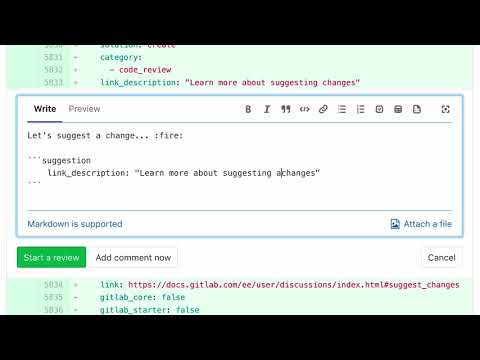
The proposal for changes simplifies collaboration on merge requests: you can now avoid copy-pasting to accept the proposed change. In GitLab 11.11, we made this process even easier: discussions are automatically resolved when applying a suggestion.
Time tracker on the task board sidebar
CORE, STARTER, PREMIUM, ULTIMATE, FREE, BRONZE, SILVER, GOLD
Task sidebars should look the same in board and task views. Therefore, GitLab now has a time tracker on the sidebar of the task board. Just go to the task board, click on a task, and the sidebar with the time tracker will open.
Deployment information in Environments API
CORE, STARTER, PREMIUM, ULTIMATE, FREE, BRONZE, SILVER, GOLD
We added the ability to request information about a specific environment from the Environments API to know which commit is deployed in the environment right now. This will simplify automation and reporting for Environments users in GitLab.
Negative variable matches for pipeline rules
CORE, STARTER, PREMIUM, ULTIMATE, FREE, BRONZE, SILVER, GOLD
It is now possible to check for negative equality or pattern matches (!= and !~) in the file .gitlab-ci.yml when checking environment variable values, so the behavior control of pipelines has become more flexible.
Run all manually executed jobs in a stage with one click
CORE, STARTER, PREMIUM, ULTIMATE, FREE, BRONZE, SILVER, GOLD
In GitLab 11.11, users with many manually executed jobs in stages can now execute all such jobs in one stage by clicking the "Play all" ("Run all") button next to the stage name in the pipelines view.
Creating a file directly from an environment variable
CORE, STARTER, PREMIUM, ULTIMATE, FREE, BRONZE, SILVER, GOLD
Environment variables are often used to create files, especially for secrets that need to be protected and are only accessible in a specific environment pipeline. To do this, you set the variable's content to the file's content and create a file in a job that contains the value. With the new type of environment variable, file this can be done in a single step without modifying .gitlab-ci.yml.
API endpoint for vulnerability information
ULTIMATE, GOLD
You can now request all vulnerabilities identified in the project from the GitLab API. This API allows you to create machine-readable lists of vulnerabilities filtered by type, trustworthiness, and severity.
Ability for full dynamic scanning for DAST
ULTIMATE, GOLD
In GitLab, you can dynamically test application security (Dynamic Application Security Testing, DAST) as part of the CI pipeline. Starting with this release, you can choose full dynamic scanning instead of standard passive scanning. Full dynamic scanning protects against a greater number of vulnerabilities.
Installing Prometheus in group-level clusters
CORE, STARTER, PREMIUM, ULTIMATE, FREE, BRONZE, SILVER, GOLD
In this release, GitLab introduced the ability to attach a Kubernetes cluster to the entire group. We also added the option to install a single instance of Prometheus on this cluster to simplify the monitoring of all projects on the cluster.
Information about ignoring vulnerabilities on the security dashboard
ULTIMATE, GOLD
On GitLab's security dashboards, administrators can view ignored vulnerabilities. To optimize the workflow, we added the ability to view information about ignoring them directly on the security dashboard.
Creating custom metric charts on the dashboard
PREMIUM, ULTIMATE, SILVER, GOLD
Create new charts with custom performance metrics directly on the metrics dashboard toolbar. Users can now create, update, and delete metric visualizations on the dashboard by clicking the Add Metric ("Добавить метрику") in the upper right corner of the dashboard toolbar.
Tasks from notifications now open in the name of GitLab Alert Bot
PREMIUM, ULTIMATE, SILVER, GOLD
Now tasks created from notifications will have GitLab Alert Bot as the author, so you will immediately see that the task was created automatically from an important notification.
Autosaving epic descriptions to local storage
ULTIMATE, GOLD
Epic descriptions were not saved in local storage, so changes were lost unless you explicitly saved them when changing the epic description. In GitLab 11.11, the ability to save epic descriptions in local storage was introduced. This means you can easily return to the epic description edits if an error occurs, if you get distracted, or if you accidentally exit the browser.
Support for mirroring on GitLab for Git LFS
STARTER, PREMIUM, ULTIMATE, BRONZE, SILVER, GOLD
By using mirroring, you can replicate Git repositories from one location to another. This simplifies the storage of a GitLab replica repository located elsewhere. GitLab now supports mirroring of repositories with Git LFS, so this feature is available even for repositories with large files, such as game textures or scientific data.
Read and write permissions for repositories for personal access tokens
CORE, STARTER, PREMIUM, ULTIMATE, FREE, BRONZE, SILVER, GOLD
Many personal access tokens have permissions for changes at the level of api, but full access to the API can grant too many rights to some users or organizations.
Thanks to community contributions, personal access tokens can now have read and write rights for project repositories, rather than deeper API access to sensitive areas of GitLab, such as settings and membership.
Thank you, Horatiu Eugen Vlad ()!
Adding basic support for group GraphQL queries
FREE, BRONZE, SILVER, GOLD, CORE, STARTER, PREMIUM, ULTIMATE
With the GraphQL API, users can precisely specify what data they need and receive all necessary information in a few requests. Starting with this release, GitLab supports adding basic group information to the GraphQL API.
Login with Salesforce credentials
CORE, STARTER, PREMIUM, ULTIMATE, FREE, BRONZE, SILVER, GOLD
GitLab loves Salesforce developers, and to support this community, we allow users to log into GitLab with Salesforce.com credentials. Now instances can be configured to set up GitLab as an application connected to Salesforce, enabling one-click login to GitLab using Salesforce.com.
SAML SSO is now mandatory for web access
PREMIUM, ULTIMATE, SILVER, GOLD
We at the group level, introduced in version 11.8, with strict resource checks for groups and projects, allowing users to access only when logged in with SAML. This adds an extra layer of access control for organizations that value security and use GitLab.com through SAML SSO. You can now make SSO a mandatory requirement, knowing that users in your group are using SSO.
Filtering by recently created or modified data for epic APIs
ULTIMATE, GOLD
It was previously challenging to query recently created or modified data using the epic API in GitLab. In release 11.11, we added additional filters created_after, created_before, updated_after and updated_before, to ensure consistency with the task API and quickly find modified or newly created epics.
Biometric authentication with UltraAuth
CORE, STARTER, PREMIUM, ULTIMATE, FREE, BRONZE, SILVER, GOLD
Company specializes in passwordless biometric authentication. We now support this authentication method on GitLab!
Thank you, Kartikey Tanna ()!
GitLab Runner 11.11
CORE, STARTER, PREMIUM, ULTIMATE, FREE, BRONZE, SILVER, GOLD
Today we released GitLab Runner 11.11! GitLab Runner is an open-source project used to run CI/CD jobs and send results back to GitLab.
Omnibus Improvements
CORE, STARTER, PREMIUM, ULTIMATE
We made the following improvements in Omnibus in GitLab 11.11:
- GitLab 11.11 includes — , which includes interactive ephemeral messages and more. This release contains , and we recommend upgrading.
- .
Improved schemas
CORE, STARTER, PREMIUM, ULTIMATE
We made the following improvements to Helm charts in GitLab 11.11:
- In GitLab 11.11, you can .
- Administrators have access to , including
memoryKiller,maxRss,graceTimeandshutdownWait. - Helm charts are now in Amazon Elastic Container Service for Kubernetes ()
Performance Improvements
CORE, STARTER, PREMIUM, ULTIMATE, FREE, BRONZE, SILVER, GOLD
We continue to improve GitLab's performance with each release for GitLab instances of any size. Some improvements in GitLab 11.11:
Deprecated features
GitLab Geo will provide hashed storage in GitLab 12.0
GitLab Geo requires to mitigate competition on secondary nodes. This was noted in .
In GitLab we have added this requirement to the Geo documentation: .
In GitLab sudo gitlab-rake gitlab:geo:check checks whether hashed storage is enabled and whether all projects are migrated. See . If you are using Geo, please run this check and migrate as soon as possible.
In GitLab A permanently dismissible warning will appear on the page. Admin Area › Geo › Nodes, if the aforementioned checks are not resolved. .
In GitLab Geo will utilize the requirements for hashed storage. See .
Removal date: June 22, 2019.
GitLab Geo will require PG FDW in GitLab 12.0.
This is necessary for the Geo Log Cursor as it significantly improves the performance of certain synchronization operations. It also enhances the performance of Geo node status queries. Previous requests had too low performance in large projects. See how to configure this in . In GitLab Geo will require PG FDW. See .
Removal date: June 22, 2019.
Sentry configurations for error reporting and logging will be removed from the user interface in GitLab 12.0.
These settings will be removed from the user interface in GitLab 12.0 and will be available in the file gitlab.yml.Additionally, you will be able to define the Sentry environment to differentiate multiple deployments. For example, development, staging, and production. See .
Removal date: June 22, 2019.
Limit on the maximum number of pipelines created by a single push
Previously, GitLab created pipelines for HEAD for each branch in a push. This is convenient for developers who push multiple changes at once (for example, to a feature branch and to the develop).
However, when pushing a large repository with many active branches (e.g., for moving, mirroring, or branching), it is unnecessary to create a pipeline for each branch. Starting with GitLab 11.10, we create per push.
Removal date: May 22, 2019.
Outdated legacy paths for GitLab Runner code
Starting with GitLab 11.9, GitLab Runner uses of cloning/calling the repository. Currently, GitLab Runner will use the old method if the new one is not supported. For more details, see .
In GitLab 11.0, we changed the configuration viewing server for GitLab Runner. metrics_serverwill be removed in favor of listen_address in GitLab 12.0. For more details, see .
In version 11.3, GitLab Runner began supporting ; which led to new settings for . In a table of changes is provided along with instructions for transitioning to the new configuration. For more details, see .
These paths will be unavailable in GitLab 12.0. As a user, you don’t need to change anything, just ensure that your GitLab instance is running version 11.9+ when updating to GitLab Runner 12.0.
Removal date: June 22, 2019.
Deprecated parameter for the entry point feature for GitLab Runner
In 11.4, GitLab Runner introduced the feature parameter to fix issues such as and .
In GitLab 12.0, we will switch to the proper behavior, as if the feature parameter was disabled. For more details, see .
Removal date: June 22, 2019.
Deprecated support for Linux distributions that have reached EOL for GitLab Runner
Some Linux distributions that can install GitLab Runner have reached their end of life.
In GitLab 12.0, GitLab Runner will no longer distribute packages to these Linux distributions. A complete list of distributions that are no longer supported can be found in our Thank you, Javier Ardo (), for your !
Removal date: June 22, 2019.
Removal of old GitLab Runner Helper commands
As part of adding support we had to drop some old commands that are used for .
In GitLab 12.0, GitLab Runner starts using new commands. This only affects users who . For more details, see .
Removal date: June 22, 2019.
Removal of the legacy git clean mechanism from GitLab Runner
In GitLab Runner 11.10, we customize how the Runner executes the command git cleanAdditionally, the new cleanup strategy removes the use of git reset and places the command git clean after the unload step.
Since this change in behavior may affect some users, we have prepared a parameter FF_USE_LEGACY_GIT_CLEAN_STRATEGY. Setting this to true, it will restore the legacy cleanup strategy. More about using feature parameters in GitLab Runner can be found .
In GitLab Runner 12.0, we will remove support for the legacy cleanup strategy and the option to restore it via function parameter. See in .
Removal date: June 22, 2019.
are available only for Silver/Premium plans.
When we introduced group-level project templates in the 11.6 release, we accidentally made this feature for Premium/Silver available for all plans.
We in the 11.11 release and are giving an additional 3 months to all users and instances below the Silver/Premium level.
As of August 22, 2019, group project templates will only be available for the Silver/Premium plan and above, as described in the documentation.
Removal date: August 22, 2019.
Support for Windows batch jobs has been discontinued.
In GitLab 13.0 (June 22, 2020), we plan to discontinue support for Windows command line batch jobs in GitLab Runner (e.g., cmd.exe) in favor of enhanced support for Windows PowerShell. More details in .
Now our vision for enterprise DevOps aligns with Microsoft's position that PowerShell is the best option for automating enterprise applications in Windows environments. If you wish to continue using cmd.exe, these commands can be issued from PowerShell, but we will not directly support Windows batch jobs due to several discrepancies that lead to high maintenance and development costs.
Removal date: September 22, 2019.
Requires Git 2.21.0 or higher.
Starting with GitLab 11.11, Git 2.21.0 is required to run. , but users of source installations with previous versions of Git will need to upgrade.
Removal date: May 22, 2019.
Deprecated Kubernetes service template.
In GitLab 12.0, we plan to discontinue the Kubernetes service template. in favor of the instance-level cluster configuration introduced in GitLab 11.11.
All self-managed instances using the service template will be migrated to the instance-level cluster when upgrading to GitLab 12.0.
Removal date: June 22, 2019.
Label matching deprecation. app in Kubernetes deployment panels.
In GitLab 12.0, we plan to discontinue matching by app label in the Kubernetes deployment selector. In GitLab 11.10, we introduced , which looks for matches for app.example.com/app and app.example.com/env, to display deployments on the panel.
To have these deployments displayed on deployment panels, simply submit a new deployment, and GitLab will apply the new labels.
Removal date: June 22, 2019.
GitLab 12.0 packages will be signed with an extended signature.
On May 2, 2019, GitLab in Omnibus GitLab from 01.08.2019 to 01.07.2020. If you check package signatures and want to update the keys, just re-follow the instructions from .
Removal date: June 22, 2019.
Changelog
Find all these changes in the changelog:
Installation
If you are setting up a new GitLab installation, visit .
Upgrade
→ Check out
Source: habr.com
