

Links to other parts of the research
- (You are here)
This article concludes the series of publications dedicated to ensuring the information security of banking cashless payments. Here we will review typical threat models cited in :
- .
- .
- .
- .
HABRA-WARNING !!! Dear Habr users, this is not an entertainment post.
Hidden below are 40+ pages of materials intended to assist in work or study for people specializing in banking or information security. This material is the final product of the research and is written in a dry, official tone. Essentially, these are templates for internal documents on information security.And the traditional — “Using the information from this article for illegal purposes is punishable by law”. Productive reading!
Information for readers who are starting to familiarize themselves with the research from this publication.
About the research
You are reading a guide for the specialist responsible for ensuring the information security of payments at a bank.
Logic of the presentation
At the beginning in and there is a description of the object of protection. Then in it explains how to build a protection system and discusses the need to form a threat model. In it discusses what types of threat models exist and how they are created. In and it provides an analysis of real attacks. and contain a description of the threat model developed based on information from all previous parts.
TYPICAL THREAT MODEL. NETWORK CONNECTION
The object of protection for which the threat model is applied (scope)
The object of protection consists of data transmitted over a network connection operating in data transmission networks based on the TCP/IP stack.
Architecture
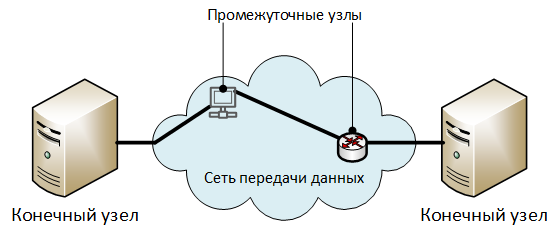
Description of architecture elements:
- "End nodes" — nodes exchanging protected information.
- "Intermediate nodes" — elements of the data transmission network: routers, switches, access servers, proxy servers, and other equipment through which the traffic of the network connection is transmitted. In general, a network connection can function without intermediate nodes (directly between end nodes).
High-level security threats
Decomposition
U1. Unauthorized access to transmitted data.
U2. Unauthorized modification of transmitted data.
U3. Violation of authorship of transmitted data.
U1. Unauthorized access to transmitted data
Decomposition
U1.1. , carried out at end or intermediate nodes:
U1.1.1. by reading data while it is stored in the node's memory:
U1.1.1.1. in RAM.
Explanations for U1.1.1.1.
For example, during data processing by the node's network stack.
U1.1.1.2. in non-volatile memory.
Explanations for U1.1.1.2.
For example, when storing transmitted data in cache, temporary files, or swap files.
U1.2. , carried out at third-party nodes of the data transmission network:
U1.2.1. by capturing all packets entering the node's network interface:
Explanations for U1.2.1.
Capturing all packets is done by setting the network card to promiscuous mode (promiscuous mode for wired adapters or monitor mode for Wi-Fi adapters).
U1.2.2. by performing man-in-the-middle (MiTM) attacks, but without modifying the transmitted data (except for protocol overhead data).
U1.2.2.1. Reference: .
U1.3. , occurring due to the leakage of information through technical channels (TCUIs) from physical nodes or communication lines.
U1.4. , occurring due to the installation of special technical means (STC) on end or intermediate nodes, intended for covert information extraction.
U2. Unauthorized Modification of Transmitted Data
Decomposition
U2.1. , performed on end or intermediate nodes:
U2.1.1. by reading and modifying data while it is stored in the memory of nodes:
U2.1.1.1. in volatile memory:
U2.1.1.2. in non-volatile memory:
U2.2. , performed on external nodes of the data transfer network:
U2.2.1. through executing man-in-the-middle (MiTM) attacks and redirecting traffic to the nodes of attackers:
U2.2.1.1. Physical connection of attacker equipment in the network connection interruption.
U2.2.1.2. Conducting attacks on network protocols:
U2.2.1.2.1. managing Virtual Local Area Networks (VLAN):
U2.2.1.2.1.1. .
U2.2.1.2.1.2. Unauthorized modification of VLAN settings on switches or routers.
U2.2.1.2.2. routing traffic:
U2.2.1.2.2.1. Unauthorized modification of static routing tables on routers.
U2.2.1.2.2.2. Announcing false routes by attackers through dynamic routing protocols.
U2.2.1.2.3. automatic configuration:
U2.2.1.2.3.1. .
U2.2.1.2.3.2. .
U2.2.1.2.4. addressing and name resolution:
U2.2.1.2.4.1. .
U2.2.1.2.4.2. .
U2.2.1.2.4.3. Unauthorized modifications to local hostname files (hosts, lmhosts, etc.)
U3. Violation of Copyright of Transmitted Data
Decomposition
U3.1. Neutralizing the mechanisms of authorship determination by indicating false information about the author or source of data:
U3.1.1. Modification of information about the author contained in the transmitted information.
U3.1.1.1. Neutralizing the cryptographic protection of the integrity and authorship of transmitted data:
U3.1.1.1.1. Reference: .
3.1.1.2. Neutralization of authorship protection for transmitted data implemented through one-time confirmation codes:
3.1.1.2.1. .
3.1.2. Modification of the source information of the transmitted data:
3.1.2.1. .
3.1.2.2. .
TYPICAL THREAT MODEL. INFORMATION SYSTEM BUILT ON CLIENT-SERVER ARCHITECTURE
The object of protection for which the threat model is applied (scope)
The object of protection is the information system built on client-server architecture.
Architecture
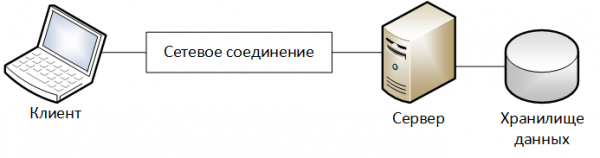
Description of architecture elements:
- ‘Client’ – a device on which the client part of the information system operates.
- ‘Server’ – a device on which the server part of the information system operates.
- ‘Data Storage’ – a part of the server infrastructure of the information system designed for storing data processed by the information system.
- ‘Network Connection’ – a channel for information exchange between the Client and Server that passes through the data transmission network. A more detailed description of the element model is provided in .
Restrictions
When modeling the object, the following constraints are established:
- The user interacts with the information system within finite intervals of time, referred to as work sessions.
- At the beginning of each work session, identification, authentication, and authorization of the user occur.
- All protected information is stored on the server part of the information system.
High-level security threats
Decomposition
1. Unauthorized actions by intruders on behalf of a legitimate user.
2. Unauthorized modification of protected information during its processing by the server part of the information system.
1. Unauthorized actions by intruders on behalf of a legitimate user
Explanations
Typically, in information systems, the correspondence of actions to the user who performed them is determined by:
- system activity logs.
- special attributes of data objects containing information about the user who created or modified them.
Regarding the work session, this threat can be decomposed into:
- actions performed within the user’s work session.
- actions performed outside the user’s work session.
The user’s work session can be initiated by:
- The user themselves.
- Intruders.
At this stage, the intermediate decomposition of this threat will look as follows:
U1.1. Unauthorized actions performed within the user's session:
U1.1.1. , installed by the attacked user.
U1.1.2. , installed by the attackers.
U1.2. Unauthorized actions performed outside the user's session.
From the perspective of the objects of the information infrastructure that can be affected by attackers, the decomposition of intermediate threats will look as follows:
attribute
Decomposition of threats
U1.1.1.
U1.1.2.
U1.2.
Client
U1.1.1.1.
U1.1.2.1.
Network connection
U1.1.1.2.
Server
U1.2.1.
Decomposition
U1.1. Unauthorized actions performed within the user's session:
U1.1.1. , installed by the attacked user:
U1.1.1.1. Attackers acted independently using the Client:
U1.1.1.1.1 Attackers used built-in access means of the information system:
U1.1.1.1.1.1. Attackers used the Client's physical input/output means (keyboard, mouse, monitor, or touchscreen of a mobile device):
U1.1.1.1.1.1.1. Attackers acted during times when the session was active, input/output means were available, and the user was not present.
U1.1.1.1.1.2. Attackers used remote administration tools (either standard or provided by malicious code) to control the Client:
U1.1.1.1.1.2.1. Attackers acted during times when the session was active, input/output means were available, and the user was not present.
U1.1.1.1.1.2.2. Attackers used remote administration tools whose operation is unnoticed by the attacked user.
U1.1.1.2. Attackers altered data in the network connection between the Client and the Server, modifying it so that it seemed like actions of a legitimate user:
U1.1.1.2.1. Link: .
U1.1.1.3. Attackers forced the user to perform the actions they specified using social engineering methods.
U1.1.2 installed by the attackers:
U1.1.2.1. Attackers acted from the Client (I can use):
U1.1.2.1.1. Attackers neutralized the access control system of the information system:
U1.1.2.1.1.1. Link: .
U1.1.2.1.2. Attackers used standard access tools of the information system.
U1.1.2.2. Attackers operated from other nodes of the data transmission network from which a network connection to the Server can be established (I can use):
U1.1.2.2.1. Attackers neutralized the access control system of the information system:
U1.1.2.2.1.1. Link: .
U1.1.2.2.2. Attackers used non-standard access tools of the information system.
Explanations U1.1.2.2.2.
Attackers could install the standard client of the information system on a third-party node or could use non-standard software that implements standard protocols for communication between the Client and the Server.
U1.2 Unauthorized actions were performed outside the user's working session.
U1.2.1 Attackers performed unauthorized actions and then made unauthorized changes to the logs of the information system or special attributes of data objects, indicating that the actions they took were performed by a legitimate user.
U2. Unauthorized modification of protected information during its processing by the server part of the information system.
Decomposition
U2.1. Attackers modify protected information using standard tools of the information system and conduct this in the name of a legitimate user.
U2.1.1. Link: .
U2.2. Attackers modify protected information by using mechanisms for accessing data that are not provided by the standard operating mode of the information system.
U2.2.1. Attackers modify files containing protected information:
U2.2.1.1. , using file operations mechanisms provided by the operating system.
U2.2.1.2. by provoking file recovery from an unauthorizedly modified backup.
U2.2.2. Attackers modify protected information stored in the database (I can use):
U2.2.2.1. Attackers neutralize the access control system of the DBMS:
U2.2.2.1.1. Link: .
U2.2.2.2. Attackers modify information using standard DBMS interfaces to access data.
U2.3. Attackers modify protected information by unauthorized changes to the algorithms of the software processing it.
U2.3.1. The source code of the software is subject to modifications.
U2.3.1. The machine code of the software is subject to modifications.
U2.4. Attackers modify protected information by exploiting vulnerabilities in the information system software.
U2.5. Attackers modify protected information during its transmission between the components of the server part of the information system (for example, between the database server and the application server):
U2.5.1. Link: .
TYPICAL THREAT MODEL. ACCESS CONTROL SYSTEM
The object of protection for which the threat model is applied (scope)
The object of protection for which this threat model applies corresponds to the protection object of the threat model: 'Typical Threat Model. Information System Built on Client-Server Architecture'.
The access control system for users in this threat model refers to the component of the information system that implements the following functions:
- User identification.
- User authentication.
- User authorization.
- User action logging.
High-level security threats
Decomposition
U1. Unauthorized establishment of a session on behalf of a legitimate user.
U2. Unauthorized elevation of a user's privileges within the information system.
U1. Unauthorized establishment of a session on behalf of a legitimate user
Explanations
The decomposition of this threat in general will depend on the type of user identification and authentication systems used.
This model will only consider the user identification and authentication system that uses a text login and password. It will be assumed that the user's login is public information known to attackers.
Decomposition
U1.1. due to the compromise of credentials:
U1.1.1. Attackers compromised the user's credentials during their storage.
Explanations for U1.1.1.
For example, credentials may have been written on a sticky note attached to the monitor.
1.1.2. The user accidentally or maliciously shared access credentials with attackers.
1.1.2.1. The user spoke the credentials aloud while entering them.
1.1.2.2. The user intentionally shared their credentials:
1.1.2.2.1. with colleagues.
Explanations 1.1.2.2.1.
For example, to allow them to replace them during sick leave.
1.1.2.2.2. with the employer's contractors working on information infrastructure projects.
1.1.2.2.3. with third parties.
Explanations 1.1.2.2.3.
One, but not the only way this threat can be realized is through the use of social engineering methods by attackers.
1.1.3. Attackers guessed the credentials by brute force:
1.1.3.1. using standard access mechanisms.
1.1.3.2. using previously intercepted codes (for example, password hashes) for storing credentials.
1.1.4. Attackers used malicious code to intercept user credentials.
1.1.5. Attackers extracted credentials from the network connection between the Client and the Server:
1.1.5.1. Link: .
1.1.6. Attackers extracted credentials from monitoring system logs:
1.1.6.1. video surveillance systems (if keystrokes were recorded during operation).
1.1.6.2. employee activity monitoring systems.
Explanations 1.1.6.2.
An example of such a system is— .
1.1.7. Attackers compromised user credentials due to flaws in their transmission process.
Explanations 1.1.7.
For example, transmitting passwords in plain text via email.
1.1.8. Attackers learned the credentials by observing the user's session through remote administration systems.
1.1.9. Attackers extracted credentials as a result of their leakage through technical channels (TCE):
1.1.9.1. Attackers watched as the user entered credentials on the keyboard:
1.1.9.1.1. Attackers were in close proximity to the user and could see the credentials being entered.
Explanations 1.1.9.1.1.
Such cases may include actions by colleagues or a situation where the user's keyboard is visible to visitors of the organization.
U1.1.9.1.2 Attackers used additional technical means, such as binoculars or drones, and observed the input of credentials through a window.
U1.1.9.2. Attackers extracted credentials from radio communication records between the keyboard and the computer case when connected via radio interface (e.g., Bluetooth).
U1.1.9.3. Attackers intercepted credentials due to leakage through the channel of secondary electromagnetic radiation and coupling (PEMIR).
Explanations U1.1.9.3.
Examples of attacks and .
U1.1.9.4. An attacker intercepted the input of credentials from the keyboard using special technical means (STM) designed for clandestine information capture.
Explanations U1.1.9.4.
Examples .
U1.1.9.5. Attackers intercepted the input of credentials from the keyboard by analyzing the Wi-Fi signal modulated by the user's keystroke process.
Explanations U1.1.9.5.
U1.1.9.6. Attackers intercepted the input of credentials from the keyboard by analyzing the sounds of key presses.
Example .
Explanations U1.1.9.6.
U1.1.9.7. Attackers intercepted the input of credentials from the keyboard of a mobile device by analyzing the accelerometer readings.
Example .
Explanations U1.1.9.7.
U1.1.10. , previously saved on the Client.
Example .
Explanations U1.1.10.
For example, a user could save their username and password for access to a specific website in the browser.
U1.1.11. Attackers compromised credentials due to flaws in the user access revocation process.
Explanations U1.1.11.
For example, after a user’s dismissal, their accounts remained unlocked.
U1.2. due to vulnerabilities in the access control system.
U2. Unauthorized privilege escalation of a user in the information system
U2.1 by making unauthorized changes to data containing user privilege information.
Decomposition
U2.2 due to vulnerabilities in the access control system.
U2.3. due to flaws in the user access management process.
U2.3. due to flaws in the user access management process.
Clarifications U2.3.
Example 1. The user was given access that was greater than required for operational necessity.
Example 2. After the user was transferred to another position, previously granted access rights were not revoked.
TYPICAL THREAT MODEL. INTEGRATION MODULE
The object of protection for which the threat model is applied (scope)
The integration module is a set of objects in the information infrastructure designed to facilitate the exchange of information between information systems.
Considering the fact that in corporate networks it is not always possible to clearly separate one information system from another, the integration module can also be viewed as a link between components within a single information system.
Architecture
The generalized diagram of the integration module looks as follows:
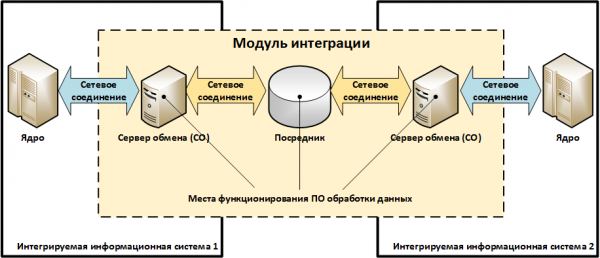
Description of architecture elements:
- Exchange Server (ES) – a node / service / component of the information system that performs the function of exchanging data with another information system.
- Mediator – a node / service designed to facilitate interaction between information systems, but not part of them.
Examples of Mediators can include email services, enterprise service buses (enterprise service bus / SoA architecture), third-party file servers, etc. In general, the integration module may or may not contain Mediators. - Data Processing Software – a set of programs implementing data exchange protocols and format transformations.
For example, converting data from the UFBBS format to the ABS format, changing the statuses of messages during transmission, etc. - ‘Network Connection’ corresponds to the object described in the typical threat model 'Network Connection'. Some network connections from those presented in the diagram above may be absent.
Examples of Integration Modules
Diagram 1. Integration of ABS and ARM KBR via a third-party file server
To execute payments, an authorized bank employee exports electronic payment documents from ABS and saves them in a file (in a custom format, e.g., SQL dump) on the shared folder (…SHARE) of the file server. This file is then converted into a set of UFBBS format files using a conversion script, which are subsequently read by ARM KBR.
After that, the authorized employee — a user of the KBR ARM — encrypts and signs the received file and sends it to the payment system of the Bank of Russia.
Upon receiving payments from the Bank of Russia, the KBR ARM decrypts them and verifies the electronic signature, after which it saves them as a set of UFSB files on the file server. Before importing the payment documents into the ABS, they are converted using a converter script from UFSB format to ABS format.
Let’s assume that in this scheme, the ABS operates on one physical server, the KBR ARM operates on a dedicated computer, and the converter script runs on the file server.
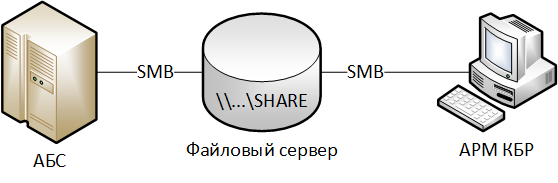
Correspondence of objects in the examined scheme to the elements of the integration module model:
"Exchange servers from the ABS side" – ABS server.
"Exchange servers from the KBR ARM side" – KBR ARM computer.
Mediator – third-party file server.
Data Processing Software – converter script.
Scheme 2. Integration of ABS and KBR ARM when placing a shared network folder with payments on KBR ARM.
Everything is similar to Scheme 1, but a separate file server is not used; instead, a network folder (…SHARE) with electronic payment documents is located on the computer with the KBR ARM. The converter script also runs on the KBR ARM.
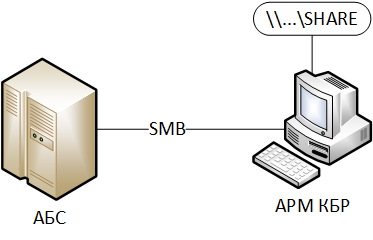
Correspondence of objects in the examined scheme to the elements of the integration module model:
Similarly to Scheme 1, but Mediator is not used.
Scheme 3. Integration of ABS and KBR ARM-N through IBM WebSphere MQ and signing electronic documents "on the ABS side".
The ABS operates on a platform not supported by the KSI SKAD Signature. The signing of outgoing electronic documents is performed on a special electronic signature server (ES Server). This server also checks the electronic signature of incoming documents from the Bank of Russia.
The ABS exports to the ES Server a file with payment documents in its own format.
The ES Server uses a converter script to transform the file into electronic messages in UFSB format, after which the electronic messages are signed and sent to IBM WebSphere MQ.
The KBR ARM-N queries IBM WebSphere MQ and receives signed payment messages from there, after which the authorized employee — a user of the KBR ARM — encrypts them and sends them to the payment system of the Bank of Russia.
When payments are received from the Bank of Russia, the KBR Workstation decodes them and verifies the electronic signature. Successfully processed payments, in the form of decoded and signed electronic messages in the UFB format, are sent to IBM WebSphere MQ, from where they are received by the EDS Server.
The EDS Server checks the electronic signature of the received payments and saves them in an ABS format file. After this, an authorized employee — the ABS user — uploads the resulting file into ABS in the established manner.
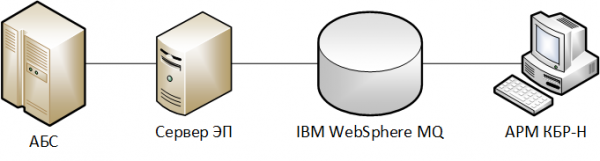
Correspondence of objects in the examined scheme to the elements of the integration module model:
Exchange Server on the ABS side – ABS server.
Exchange Server on the KBR Workstation side — KBR Workstation computer.
Mediator – EDS Server and IBM WebSphere MQ.
Data Processing Software – converter script, KSI SKAD Signature on EDS Server.
Scheme 4. Integration of the Remote Banking Server and ABS through the API provided by the dedicated exchange server
Let's assume that the bank uses several remote banking service systems (RBS):
- “Internet Client-Bank” for individuals (ICB Individual);
- “Internet Client-Bank” for legal entities (ICB Legal).
To ensure information security, all interactions of ABS with RBS systems are carried out through a dedicated exchange server operating within the information system “ABS.”
Next, we will consider the interaction process of the RBS system ICB Legal with ABS.
The RBS Server, having received a properly certified payment order from the client, must create the corresponding document in ABS based on it. For this, it transmits information to the exchange server via the API, which, in turn, enters the data into ABS.
When the client's account balances change, ABS generates electronic notifications, which are transmitted to the RBS server through the exchange server.
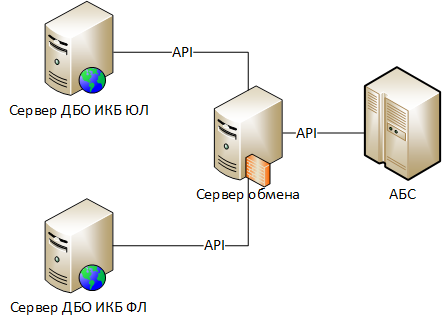
Correspondence of objects in the examined scheme to the elements of the integration module model:
Exchange Server on the RBS side – RBS ICB Legal server.
Exchange Server on the ABS side – exchange server.
Mediator – missing.
Data Processing Software – components of the RBS Server responsible for using the exchange server's API, components of the exchange server responsible for using the ABS API.
High-level security threats
Decomposition
U1. Introduction of false information by malicious actors through the integration module.
U1. Introduction of false information by malicious actors through the integration module
Decomposition
U1.1. Unauthorized modification of legitimate data during transmission over network connections:
U1.1.1 Link: .
U1.2. Transmission of false data over communication channels in the name of a legitimate exchange participant:
U1.1.2 Link: .
U1.3. Unauthorized modification of legitimate data during processing on Exchange Servers or Intermediaries:
U1.3.1. Link: .
U1.4. Creation of false data on Exchange Servers or Intermediaries on behalf of a legitimate exchange participant:
U1.4.1. Link:
U1.5. Unauthorized modification of data during processing using data processing software:
U1.5.1. by introducing unauthorized changes by attackers in the settings (configuration) of data processing software.
U1.5.2. by introducing unauthorized changes by attackers in the executable files of data processing software.
U1.5.3. through interactive control by attackers over the operation of data processing software.
TYPICAL THREAT MODEL. INFORMATION CRYPTOGRAPHY PROTECTION SYSTEM.
The object of protection for which the threat model is applied (scope)
The object of protection is the information cryptography protection system used to ensure the security of the information system.
Architecture
The foundation of any information system is the application software (AS) that implements its target functionality.
Cryptographic protection is usually implemented by calling cryptographic primitives from the business logic of application software, which are placed in specialized libraries – crypto kernels.
Cryptographic primitives include low-level cryptographic functions such as:
- encrypt/decrypt a block of data;
- create/verify the electronic signature of a block of data;
- compute the hash function of a block of data;
- format/load/unload key information;
- etc.
The business logic of application software implements higher-level functionality using cryptographic primitives:
- encrypt a file using the keys of selected recipients;
- establish a secure network connection;
- inform about the results of the electronic signature check;
- etc.
The interaction between business logic and the crypto core can occur:
- directly, by calling cryptographic primitives from dynamic crypto core libraries (.DLL for Windows, .SO for Linux);
- indirectly, through cryptographic interfaces – wrappers, for example, MS Crypto API, Java Cryptography Architecture, PKCS#11, etc. In this case, the business logic interacts with the crypto interface, which then translates the call to the appropriate crypto core, referred to as the cryptographic provider. Using cryptographic interfaces allows application software to abstract away from specific cryptographic algorithms and be more flexible.
Two typical schemes for organizing the crypto core can be distinguished:
Scheme 1 – Monolithic crypto core
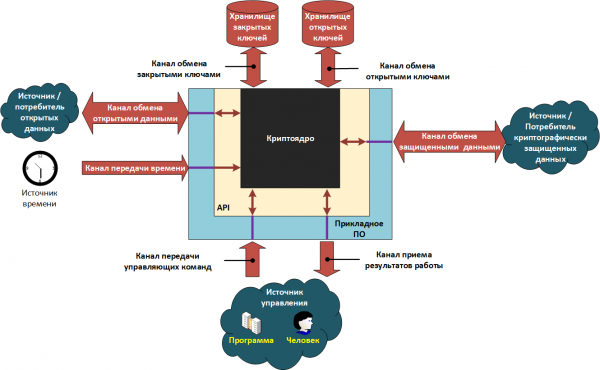
Scheme 2 – Split crypto core
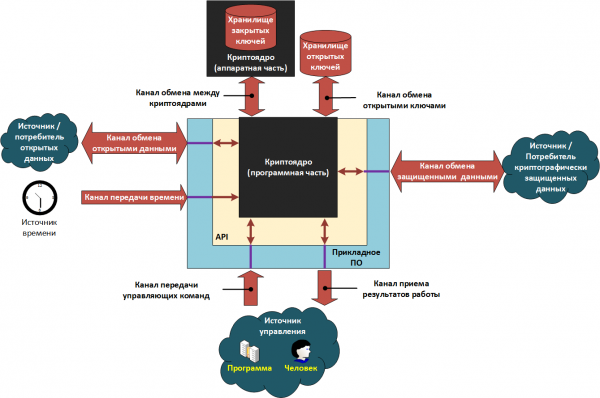
The elements in the presented schemes can be either separate software modules operating on one computer or network services interacting within a computing network.
In systems built according to scheme 1, the application software and crypto core operate within a unified operational environment of the cryptographic means (CFC), for example, on the same computer, under the same operating system. The system user can typically run other programs within this same operational environment, including those containing malicious code. Under such conditions, there is a serious risk of leakage of private cryptographic keys.
To minimize this risk, scheme 2 is applied, where the crypto core is divided into two parts:
- The first part, along with the application software, operates in an untrusted environment, where there is a risk of infection by malicious code. We will refer to this part as the 'software part'.
- The second part operates in a trusted environment on a dedicated device that contains a storage of private keys. We will refer to this part as the 'hardware part'.
The division of the crypto core into software and hardware components is quite conditional. There are systems on the market built on the scheme with a divided crypto core, but whose 'hardware' part is represented as a virtual machine image — virtual HSM ().
The interaction between both parts of the crypto core occurs in such a way that private cryptographic keys are never transmitted to the software part and, consequently, cannot be stolen by malicious code.
The interaction interface (API) and the set of cryptographic primitives provided to the application software by the crypto core are the same in both cases. The difference lies in the way they are implemented.
Thus, when using the scheme with a divided crypto core, the interaction between the software and hardware parts is performed according to the following principle:
- Cryptographic primitives that do not require the use of a private key (for example, hash function calculations, electronic signature verification, etc.) are performed by the software part.
- Cryptographic primitives that use a private key (creating an electronic signature, decrypting data, etc.) are performed by the hardware part.
Let's illustrate the operation of the divided crypto core using the example of creating an electronic signature:
- The software part calculates the hash function of the data to be signed and transmits this value to the hardware part through the exchange channel between the crypto cores.
- The hardware part, using the private key and the hash, forms the value of the electronic signature and transmits it back to the software part through the exchange channel.
- The software part returns the received value to the application software.
Features of verifying the authenticity of an electronic signature
When the receiving party obtains data signed with an electronic signature, it must undergo several verification stages. A positive result of the electronic signature verification is achieved only when all verification stages are successfully completed.
Stage 1. Control of data integrity and data authenticity.
Content of the stage. An electronic signature verification of the data is conducted according to the relevant cryptographic algorithm. Successful completion of this stage indicates that the data has not been modified since it was signed, and that the signature was produced by a private key corresponding to the public key used for electronic signature verification.
Location of the stage execution: crypto core.
Stage 2. Trust control for the signer's public key and control of the validity period for the electronic signature's private key.
Content of the stage. This stage consists of two intermediate sub-stages. The first establishes whether the public key for electronic signature verification was trusted at the time the data was signed. The second determines whether the private key for the electronic signature was valid at the moment of signing. In general, the validity periods of these keys may not coincide (for example, for qualified certificates of electronic signature verification keys). Methods for establishing trust in the signer's public key are defined by the electronic document management rules adopted by the interacting parties.
Location of the stage execution: application software / crypto core.
Stage 3. Control of the signer's authority.
Content of the stage. In accordance with established electronic document management rules, it is verified whether the signer had the authority to certify the protected data. For example, consider a situation involving a breach of authority. Let’s assume there is an organization where all employees have an electronic signature. An order from the manager is received in the internal electronic document management system, but it is signed with the electronic signature of the warehouse manager. Accordingly, such a document cannot be considered legitimate.
Location of the stage execution: application software.
Assumptions made when describing the protection object
- Information transmission channels, except for key exchange channels, also pass through application software, APIs, and crypto cores.
- Information about the trust in public keys and/or certificates, as well as information about the authorities of the owners of public keys, is stored in the public key repository.
- The application software interacts with the public key repository through the crypto core.
Example of an information system protected using cryptographic means of information security (СКЗИ)
To illustrate the previously presented schemes, let's consider a hypothetical information system and highlight all its structural elements.
Description of the Information System
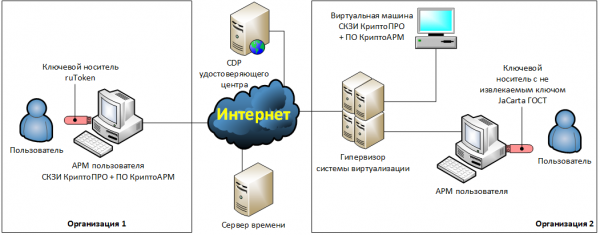
Two organizations decided to implement legally significant electronic document flow (EDF) between themselves. To do this, they signed an agreement stating that documents would be transmitted via email, and they must be encrypted and signed with a qualified electronic signature. Office programs from the Microsoft Office 2016 suite should be used for document creation and processing, while the cryptographic protection tools should include the KryptoPRO cryptographic software and KryptoARM encryption software.
Description of Organization 1's Infrastructure
Organization 1 decided to install the KryptoPRO cryptographic software and KryptoARM software on the user's workstation — a physical computer. The encryption and electronic signature keys will be stored on a key carrier, ruToken, which operates in removable key mode. The user will prepare electronic documents locally on their computer, after which they will encrypt, sign, and send them using a locally installed email client.
Description of Organization 2's Infrastructure
Organization 2 decided to move encryption and electronic signature functions to a dedicated virtual machine. In this case, all cryptographic operations will be performed automatically.
For this purpose, two network folders have been set up on the dedicated virtual machine: '…In', '…Out'. The '…In' folder will automatically receive files from the counterparty in an unencrypted format. These files will be decrypted, and their electronic signature will be verified.
In the '…Out' folder, the user will place files that need to be encrypted, signed, and sent to the counterparty. The user will prepare these files on their workstation.
To perform encryption and electronic signature functions on the virtual machine, KryptoPRO cryptographic software, KryptoARM software, and an email client are installed. The automatic management of all elements of the virtual machine will be handled by scripts developed by system administrators. The operation of the scripts is logged in log files.
Cryptographic keys for electronic signatures will be stored on the JaCarta GOST token with a non-extractable key, which the user will connect to their local computer.
The token will be passed through to the virtual machine using specialized USB-over-IP software installed on the user's workstation and the virtual machine.
The system clock on the user's workstation in Organization 1 will be adjusted manually. The system clock of the specialized virtual machine in Organization 2 will be synchronized with the hypervisor's system clock, which, in turn, will synchronize over the Internet with public time servers.
Identification of structural elements of the information security system
Based on the description of the IT infrastructure provided above, we will identify the structural elements of the information security system and record them in a table.
Table — Correspondence of the information security system model elements to information system elements
Element name
Organization 1
Organization 2
Application software
CryptoARM software
CryptoARM software
Software component of the cryptographic core
CryptoPRO CSP
CryptoPRO CSP
Hardware component of the cryptographic core
is missing
JaCarta GOST
API
MS CryptoAPI
MS CryptoAPI
Public key storage
User workstation:
— hard drive;
— standard Windows certificate store.
Hypervisor:
— hard drive.
Virtual machine:
— hard drive;
— standard Windows certificate store.
Private key storage
Key carrier ruToken, operating in extractable key mode
Key carrier JaCarta GOST, operating in non-extractable key mode
Channel for exchanging public keys
User workstation:
— RAM.
Hypervisor:
— RAM.
Virtual machine:
— RAM.
Channel for exchanging private keys
User workstation:
— USB bus;
— RAM.
is missing
Channel for communication between cryptographic cores
absent (no hardware component of the cryptographic core)
User workstation:
— USB bus;
— RAM;
— USB-over-IP software module;
— network interface.
Corporate network of Organization 2.
Hypervisor:
— RAM;
— network interface.
Virtual machine:
— network interface;
— RAM;
— USB-over-IP software module.
Channel for exchanging open data
User workstation:
— input-output devices;
— RAM;
— hard drive.
User workstation:
— input-output devices;
— RAM;
— hard drive;
— network interface.
Corporate network of Organization 2.
Hypervisor:
— network interface;
— RAM;
— hard drive.
Virtual machine:
— network interface;
— RAM;
— hard drive.
Channel for exchanging protected data
Internet.
Corporate network of Organization 1.
User workstation:
— hard drive;
— RAM;
— network interface.
Internet.
Corporate network of Organization 2.
Hypervisor:
— network interface;
— RAM;
— hard drive.
Virtual machine:
— network interface;
— RAM;
— hard drive.
Time distribution channel
User workstation:
— input-output devices;
— RAM;
— system timer.
Internet.
Corporate network of Organization 2,
Hypervisor:
— network interface;
— RAM;
— system timer.
Virtual machine:
— RAM;
— system timer.
Control command transmission channel
User workstation:
— input-output devices;
— RAM.
(Graphical User Interface of CryptoARM software)
Virtual machine:
— RAM;
— hard drive.
(Automation scripts)
Results reception channel
User workstation:
— input-output devices;
— RAM.
(Graphical User Interface of CryptoARM software)
Virtual machine:
— RAM;
— hard drive.
(Log files of automation script executions)
High-level security threats
Explanations
Assumptions made during the threat decomposition:
- Robust cryptographic algorithms are used.
- Cryptographic algorithms are used securely in the correct modes of operation (for example, is not used for encrypting large volumes of data, considering the allowable load on the key, etc.).
- Attackers are aware of all algorithms, protocols, and public keys being used.
- Attackers can read all encrypted data.
- Attackers are able to reproduce any software elements in the system.
Decomposition
U1. Compromise of secret cryptographic keys.
U2. Encryption of fraudulent data on behalf of a legitimate sender.
U3. Decryption of encrypted data by parties who are not the legitimate recipients of the data (attackers).
U4. Creation of an electronic signature of a legitimate signer on fraudulent data.
U5. Receiving a positive result for the verification of an electronic signature on fraudulent data.
U6. Incorrect acceptance of electronic documents for execution due to issues in the organization of electronic document flow.
U7. Unauthorized access to protected data during processing by cryptographic means.
U1. Compromise of secret cryptographic keys
U1.1. Obtaining the private key from the secure key storage.
U1.2. Obtaining the private key from the operating environment objects where it may temporarily reside.
Explanations U1.2.
Objects that may temporarily store the private key include:
- RAM,
- temporary files,
- paging files,
- hibernation files,
- snapshot files of the 'hot' state of virtual machines, including files containing the RAM contents of paused virtual machines.
U1.2.1. Extracting private keys from active RAM by freezing RAM modules, extracting them, and subsequently reading the data (freeze attack).
Explanations U1.2.1.
Example .
U1.3. Obtaining the private key from a channel for exchanging private keys.
Explanations U1.3.
An example of this threat will be provided .
U1.4. Unauthorized modification of the cryptographic core that results in the private keys becoming known to attackers.
U1.5. Compromise of the private key due to the use of technical information leakage channels (TILC).
Explanations U1.5.
Example .
U1.6. Compromise of the private key due to the use of special technical means (STM) designed for covert information gathering ("bugs").
U1.7. Compromise of private keys during their storage outside the cryptographic information protection system (CIPS).
Explanations U1.7.
For example, a user stores their key media in a desk drawer, from which they can easily be extracted by malicious actors.
U2. Encryption of false data on behalf of a legitimate sender.
Explanations
This threat is considered only for encryption schemes with sender authentication. Examples of such schemes are indicated in the standardization recommendations. . For other cryptographic schemes, this threat does not exist, as encryption is performed using the recipient's public keys, which are generally known to malicious actors.
Decomposition
U2.1. Compromise of the sender's private key:
U2.1.1. Link: .
U2.2. Substitution of input data in the open data exchange channel.
Notes U2.2.
Examples of the implementation of this threat are provided below. and .
U3. Decryption of encrypted data by persons who are not legitimate recipients (malicious actors).
Decomposition
U3.1. Compromise of the recipient's private keys for encrypted data.
U3.1.1 Reference: .
U3.2. Substitution of encrypted data in the protected data exchange channel.
U4. Creation of an electronic signature of a legitimate signer on false data.
Decomposition
U4.1. Compromise of the private keys of the legitimate signer's electronic signature.
U4.1.1 Reference: .
U4.2. Substitution of signed data in the open data exchange channel.
Note U4.2.
Examples of the implementation of this threat are provided below. and .
U5. Obtaining a positive result for the verification of an electronic signature on false data.
Decomposition
U5.1. Attackers intercept the message about the negative result of the electronic signature verification in the communication channel and substitute it with a message indicating a positive result.
U5.2. Attackers carry out a trust attack on signature certificates (SCENARIO — all elements are mandatory):
U5.2.1. Attackers generate a public and private key for the electronic signature. If the system uses electronic signature key certificates, they generate an electronic signature certificate that closely resembles the certificate of the intended data sender whose message they want to forge.
U5.2.2. Attackers make unauthorized changes to the public key repository, endowing the generated public key with the necessary level of trust and authority.
U5.2.3. Attackers sign fake data with the previously formed electronic signature key and inject it into the secure data exchange channel.
U5.3. Attackers conduct an attack using expired electronic signature keys of a legitimate signer (SCENARIO — all elements are mandatory):
U5.3.1. Attackers compromise the expired (currently inactive) private keys of the legitimate sender.
U5.3.2. Attackers substitute the time in the time transmission channel with the time when the compromised keys were still valid.
U5.3.3. Attackers sign fake data with the previously compromised electronic signature key and inject it into the secure data exchange channel.
U5.4. Attackers conduct an attack using compromised electronic signature keys of a legitimate signer (SCENARIO — all elements are mandatory):
U5.4.1. Attackers make a copy of the public key repository.
U5.4.2. Attackers compromise the private keys of one of the legitimate senders. That sender notices the compromise, revokes the keys, and the revocation information is placed in the public key repository.
U5.4.3. Attackers replace the public key repository with the previously copied one.
U5.4.4. Attackers sign fake data with the previously compromised electronic signature key and inject it into the secure data exchange channel.
U5.5. due to errors in the implementation of the 2nd and 3rd stages of electronic signature verification:
Explanation U5.5.
An example of the implementation of this threat is provided .
U5.5.1. Trust in the electronic signature key certificate is verified solely based on the trust in the certificate with which it is signed, without checking the CRL or OCSP.
Explanation U5.5.1.
Example of implementation .
U5.5.2. When establishing a trust chain for the certificate, the authority of the issuing certificates is not analyzed
Explanation U5.5.2.
An example of an SSL/TLS certificate attack.
Attackers purchased a legitimate certificate for their e-mail. They then created a fraudulent website certificate and signed it with their certificate. If no verification of authority is conducted, the trust chain verification will appear valid, and thus the fraudulent certificate will also be valid.
U5.5.3. When establishing a trust chain for the certificate, intermediate certificates are not checked for revocation.
U5.5.4. The CRL is updated less frequently than it is issued by the certification authority.
U5.5.5. The decision on trust in the electronic signature is made before the OCSP response regarding the certificate status, which is sent in response to a request made after the signature formation time, or before the next CRL after the signature formation is received.
Explanation U5.5.5.
In the regulations of most CAs, the revocation time of a certificate is considered the time of issuance of the nearest CRL containing information about the revocation of the certificate.
U5.5.6. When receiving signed data, the certificate's ownership is not verified for the sender.
Explanation U5.5.6.
Example of an attack. In relation to SSL certificates: the address of the calling server may not be checked against the CN field in the certificate.
Example of an attack. Attackers compromised the electronic signature keys of one participant in the payment system. They then hacked into the network of another participant and sent payment documents to the payment system's processing server on its behalf, signed with the compromised keys. If the server only analyzes trust and does not check for compliance, the fraudulent documents will be considered legitimate.
U6. Incorrect acceptance of electronic documents for execution due to issues in the organization of electronic document flow.
Decomposition
U6.1. The receiving party does not detect duplication of received documents.
Explanation U6.1.
Attack example. Attackers can intercept the document being transmitted to the recipient, even if it is cryptographically protected, and then repeatedly send it through the secure data transmission channel. If the recipient does not detect duplicates, all received documents will be perceived and processed as different documents.
U7. Unauthorized access to protected data during processing of KSI.
Decomposition
U7.1. due to information leakage through external channels (side channel attack).
Explanations U7.1.
Example .
U7.2. due to the neutralization of protection against unauthorized access to information processed on KSI:
U7.2.1. Operation of KSI in violation of the requirements described in the documentation for KSI.
U7.2.2. carried out due to the presence of vulnerabilities in:
U7.2.2.1. means of protection against unauthorized access.
U7.2.2.2. the KSI itself.
U7.2.2.3. the environment in which cryptographic means operate.
Examples of attacks
The scenarios discussed below deliberately contain errors in information security organization and serve only to illustrate possible attacks.
Scenario 1. Example of threat implementation U2.2 and U4.2.
Object description
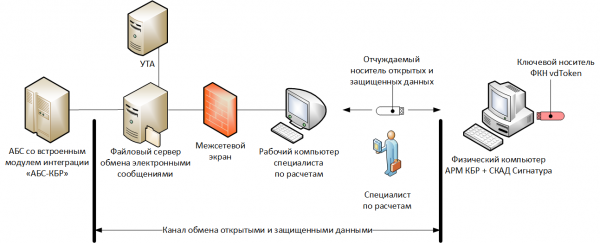
The software of the KBR APM and KSI SKAD Signature is installed on a physical computer not connected to the computing network. An FKDN vdToken is used as a key carrier in the mode of operation with an unextractable key.
The regulations for conducting calculations stipulate that the calculation specialist downloads electronic messages in an unencrypted form (according to the old KBR APM scheme) from a special secure file server to their work computer, then writes them to a removable USB flash drive and transfers them to the KBR APM, where they are encrypted and signed. After this, the specialist transfers the secured electronic messages to the removable media and then, through their work computer, uploads them to the file server, from where they reach the UTA and further into the payment system of the Bank of Russia.
In this case, the channels for exchanging unprotected and protected data will include: file server, specialist's work computer, and removable storage.
Attack
Malicious actors install unauthorized remote management software on a specialist's work computer and replace the contents of one of the payment orders (electronic messages) in an open format at the moment of writing to the removable payment medium. The specialist transfers the payment orders to the KBR ARM, signs and encrypts them, unaware of the substitution (for example, due to the large number of payment orders on the run, fatigue, etc.). After that, the counterfeit payment order goes through the technological chain and reaches the payment system of the Bank of Russia.
Scenario 2. Example of implementing threats U2.2 and U4.2.
Object description
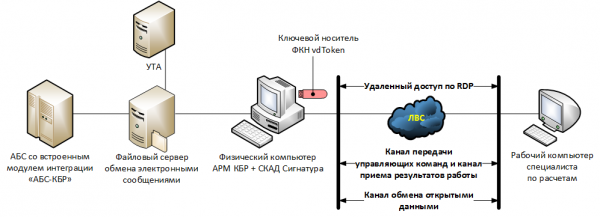
A computer with KBR ARM, SCAD Signature installed, and a connected FKD vdToken key medium operates in a designated area with no personnel access.
The calculation specialist connects to the KBR ARM in remote access mode via the RDP protocol.
Attack
Malicious actors intercept the credentials used by the calculation specialist to connect and work with the KBR ARM (for instance, through malicious code on their computer). They then make a connection in their name and send a counterfeit payment order to the payment system of the Bank of Russia.
Scenario 3. Example of implementing threat U1.3.
Object description
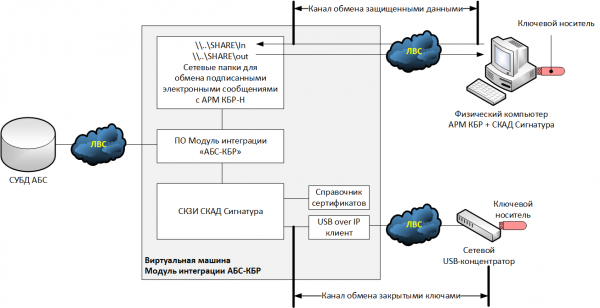
Let’s consider one of the hypothetical options for implementing integration modules of the "ABS-KBR" for the new scheme (KBR ARM-N), where the electronic signature of outgoing documents occurs on the side of the ABS. We will assume that the ABS operates on an operating system not supported by SCAD Signature cryptography, and, accordingly, the cryptographic functionality is transferred to a separate virtual machine — the integration module "ABS-KBR."
An ordinary USB token operating in detachable key mode is used as the key medium. When connecting the key medium to the hypervisor, it turned out that there were no free USB ports in the system, so it was decided to connect the USB token via a network USB hub, and to install a USB-over-IP client on the virtual machine, which would facilitate communication with the hub.
Attack
The attackers intercepted the private key of the electronic signature from the communication channel between the USB hub and the hypervisor (the data was transmitted in plain text). With the private key, the attackers created a counterfeit payment order, signed it with the electronic signature, and sent it to the KBR-N ARM for execution.
Scenario 4. Example of implementing threats U5.5.
Object description
Let’s consider the same scheme as in the previous scenario. We will assume that electronic messages coming from the KBR-N ARM go to the folder …SHAREIn, while those sent to the KBR-N ARM and further to the Bank of Russia's payment system go to …SHAREout.
We will also consider that when implementing the integration module, the lists of revoked certificates are updated only during the reissuance of cryptographic keys, and that electronic messages received in the folder …SHAREIn are checked only for integrity control and trust control of the public key of the electronic signature.
Attack
Using the stolen keys from the previous scenario, the attackers signed a counterfeit payment order containing details of funds being deposited into the fraudster's account and injected it into the secure data exchange channel. Since there is no verification that the payment order was signed by the Bank of Russia, it is accepted for execution.
Source: habr.com
