


A modern approach to operations addresses many pressing business problems. Containers and orchestrators make it easy to scale projects of any complexity, simplify the release of new versions, and make them more reliable, but at the same time create additional challenges for developers. A programmer is primarily concerned with their code: architecture, quality, performance, elegance—not with how it runs in Kubernetes or how to test and debug it after even minimal changes. Therefore, it’s quite natural that tools for Kubernetes are actively developing to help solve issues even for the most 'archaic' developers, allowing them to focus on what truly matters.
This overview provides a brief overview of some tools that simplify life for programmers whose code runs in the pods of a Kubernetes cluster.
Simple Helpers
Kubectl-debug
- Essence: add your container to the Pod and see what is happening inside it.
- .
- GH statistics: 715 stars, 54 commits, 9 contributors.
- Language: Go.
- License: Apache License 2.0.
This kubectl plugin allows you to create an additional container inside the pod of interest that shares the process namespace with other containers. You can debug the pod’s operation: check network functions, listen to network traffic, perform strace on the process of interest, etc.
You can also switch to the process container by executing chroot /proc/PID/root — this is very convenient when you need to obtain a root shell in a container for which the manifest has set securityContext.runAs.
The tool is simple and effective, making it useful for any developer. We wrote more about it in .
Telepresence
- Essence: move the application to your computer. Develop and debug locally.
- ; .
- GH statistics: 2131 stars, 2712 commits, 33 contributors.
- Language: Python.
- License: Apache License 2.0.
The idea behind this tool is to run a container with the application on the local user’s computer while proxying all traffic from the cluster to it and back. This approach allows for local development simply by modifying files in your favorite IDE: changes will be available immediately.
The advantages of local launch include ease of editing and immediate results, as well as the ability to debug applications in a familiar way. The downsides are the demands on connection speed, which become especially apparent when dealing with applications that have relatively high RPS and traffic. Additionally, Telepresence has issues with volume mounts on Windows, which can be a decisive limitation for developers accustomed to this OS.
We have already shared our experience using Telepresence .
Ksync
- Essence: provides near-instantaneous code synchronization with the container in the cluster..
- .
- Brief GH statistics: 555 stars, 362 commits, 11 contributors.
- Language: Go.
- License: Apache License 2.0.
The utility allows you to synchronize the contents of a local directory with the container's directory running in the cluster. This tool is perfect for developers using scripting languages whose main challenge is delivering code to a running container. Ksync is designed to alleviate this headache.
Upon a single initialization with the command ksync init a DaemonSet is created in the cluster, which is used to monitor the state of the filesystem of the selected container. On their local machine, the developer runs the command ksync watch, which monitors configurations and triggers , which performs the actual file synchronization with the cluster.
The next step is to instruct ksync on what to synchronize with what. For example, the command:
ksync create --name=myproject --namespace=test --selector=app=backend --container=php --reload=false /home/user/myproject/ /var/www/myproject/ … will create a watcher named myproject, which will search for a pod with the label app=backend and attempt to synchronize the local directory /home/user/myproject/ with the directory /var/www/myproject/ of the container named php.
Problems and notes regarding ksync from our experience:
- The Kubernetes cluster nodes must use
overlay2as the storage driver for Docker. No other utility will work. - When using Windows as the client OS, the file system watcher may not function correctly. This bug has been observed when working with large directories containing many nested files and folders. We created in the syncthing project, but there has been no progress on it so far (since early July).
- Use the file to specify paths or file patterns that should not be synchronized (for example, directories
app/cacheand.git). - By default, ksync will restart the container on every file change. This is convenient for Node.js, but completely unnecessary for PHP. It’s better to disable opcache and use the flag
--reload=false. - The configuration can always be corrected in
$HOME/.ksync/ksync.yaml.
Squash
- Essence: debug processes directly in the cluster.
- .
- Brief GH statistics: 1154 stars, 279 commits, 23 contributors.
- Language: Go.
- License: Apache License 2.0.
This tool is designed for debugging processes directly in pods. The utility is simple and allows you to choose the desired debugger in interactive mode (see below) and namespace + pod where intervention is needed. Currently, the following are supported:
- delve — for Go applications;
- GDB — via target remote + port forwarding;
- port forwarding JDWP for debugging Java applications.
IDE support is currently only available in VScode (with the help of ), however, plans for the current year (2019) include Eclipse and Intellij.
For process debugging, Squash runs a privileged container on the cluster nodes, so you must first familiarize yourself with the capabilities of the to avoid security issues.
Comprehensive solutions
Now we move on to heavy artillery — more 'scalable' projects aimed at addressing many developer needs at once.
NB: This list certainly includes our Open Source utility (formerly known as dapp). However, we have written and talked about it many times before, so we decided not to include it in the overview. For those interested in exploring its capabilities more closely, we recommend reading/listening to the presentation "».
DevSpace
- Essence: for those who want to start working with Kubernetes but do not wish to delve deep into its complexities..
- .
- Brief GH statistics: 630 stars, 1912 commits, 13 contributors.
- Language: Go.
- License: Apache License 2.0.
A solution from the same company providing managed Kubernetes clusters for team development. The utility was created for commercial clusters but works perfectly with any others.
When you run the command devspace init in the project directory, you will be prompted (in interactive mode):
- to select a working Kubernetes cluster,
- to use an existing
Dockerfile(or generate a new one) to create a container based on it, - to choose a repository for storing container images, etc.
After all these preparatory actions, you can start the development by executing the command devspace dev. It will build the container, upload it to the repository, deploy the application to the cluster, and initiate port forwarding and synchronization of the container with the local directory.
Optionally, you will be prompted to access the container through the terminal. You shouldn't decline, as the container actually starts with a sleep command, and for real testing, the application needs to be started manually.
Finally, the command devspace deploy deploys the application and its related infrastructure to the cluster, after which everything begins to function in production mode.
All project configuration is stored in the file devspace.yaml. In addition to development environment settings, it also contains a description of the infrastructure, similar to standard Kubernetes manifests, but significantly simplified.
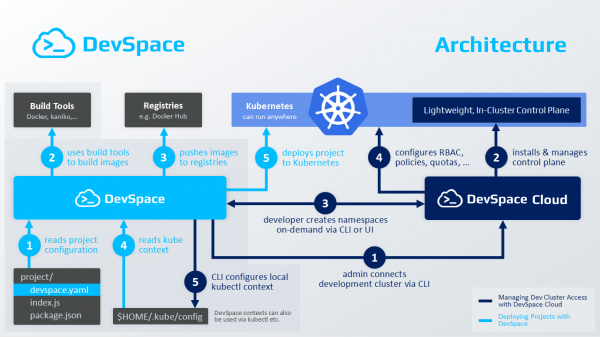
Architecture and main stages of working with DevSpace
Additionally, it's easy to add a predefined component (for example, a MySQL database) or a Helm chart to the project. Read more in — it’s not complicated.
Skaffold
- ; .
- Brief GH statistics: 7423 stars, 4173 commits, 136 contributors.
- Language: Go.
- License: Apache License 2.0.
This utility from Google aims to meet all the needs of a developer whose code will be executed in a Kubernetes cluster. Getting started with it is not as straightforward as with devspace; there’s no interactivity, language detection, or automatic creation Dockerfile you won’t be offered here.
However, if that doesn’t scare you, here’s what Skaffold allows you to do:
- Track changes in the source code.
- Synchronize it with the pod container if it doesn’t require building.
- Build containers with code if the programming language is interpreted, or compile artifacts and package them into containers.
- Automatically verify the resulting images using .
- Tag and upload images to Docker Registry.
- Deploy the application in the cluster using kubectl, Helm, or kustomize.
- Perform port forwarding.
- Debug applications written in Java, Node.js, Python.
Workflow in various variations is declaratively described in the file skaffold.yamlFor the project, you can also define several profiles, which can partially or completely change the stages of build and deployment. For example, for development, specify a base image that is convenient for the developer, while for staging and production — a minimal one (+ use securityContext or override the cluster in which the application will be deployed).
Docker container builds can be done locally or remotely: in or in a cluster using . Bazel and Jib Maven/Gradle are also supported. For tagging, Skaffold supports various strategies: by git commit hash, date/time, sha256 checksum of the sources, etc.
It is also worth noting the ability to test containers. The previously mentioned framework container-structure-test provides the following methods of verification:
- Executing commands in the context of the container while tracking exit statuses and checking the command's text output.
- Checking for the presence of files in the container and ensuring attributes match specified ones.
- Controlling the contents of files based on regular expressions.
- Verifying image metadata (
ENV,ENTRYPOINT,VOLUMESetc.). - Checking license compatibility.
File synchronization with the container is done in a less than optimal way: Skaffold simply creates an archive with the sources, copies it, and unpacks it in the container (tar must be installed). Therefore, if your main task is code synchronization, it’s better to look at a specialized solution (ksync).
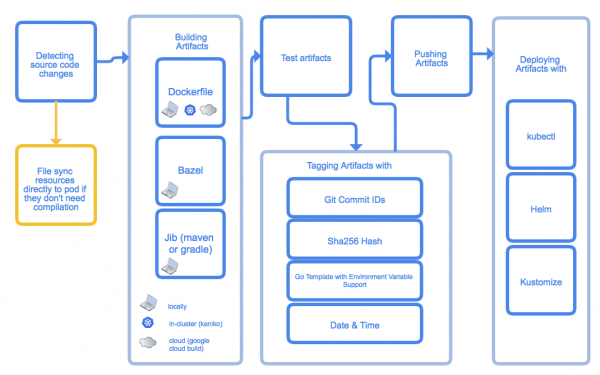
Main stages of Skaffold's operation
Overall, the tool does not allow for abstraction from Kubernetes manifests and lacks any interactivity, so it may seem complex to learn. But therein lies its advantage — greater freedom of action.
Garden
- ; .
- Brief GH statistics: 1063 stars, 1927 commits, 17 contributors.
- Language: TypeScript (there are plans to break the project into several components, some of which will use Go, and also to create an SDK for building extensions in TypeScript/JavaScript and Go).
- License: Apache License 2.0.
Like Skaffold, Garden aims to automate the processes of delivering application code to the K8s cluster. To do this, you first need to describe the project structure in a YAML file, then run the command garden dev. It will do all the magic:
- It will build containers with various parts of the project.
- It will run integration and unit tests if they have been specified.
- It will deploy all project components to the cluster.
- In case of code changes, it will rerun the entire pipeline.
This tool heavily focuses on collaborative use of a remote cluster by a development team. In this situation, if some stages of building and testing have already been completed, this significantly speeds up the entire process since Garden can utilize cached results.
A project module can be a container, Maven container, Helm chart, or manifest for kubectl apply or even an OpenFaaS function. Any of the modules can be pulled from a remote Git repository. A module may define (or not define) services, tasks, and tests. Services and tasks can have dependencies, allowing the definition of the deployment sequence of a particular service, ordering the execution of jobs and tests.
Garden provides users with a nice dashboard (currently in ), displaying the project graph: components, build sequence, task execution, testing, their relationships, and dependencies. You can view logs of all project components directly in the browser and check the HTTP output of any component (if an ingress resource is declared for it, of course).
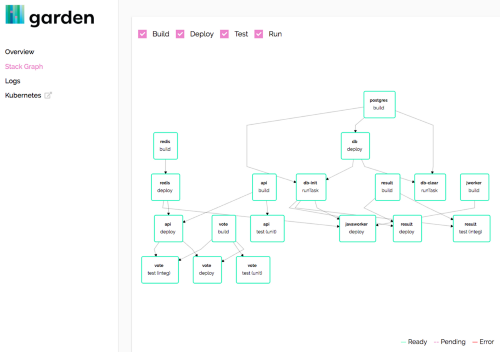
Garden dashboard
This tool also features a hot-reload mode, which simply synchronizes script changes with the container in the cluster, greatly speeding up the application debugging process. Garden has a good and decent , allowing users to quickly get started and use it. By the way, we recently published by its authors.
Conclusion
Of course, this list does not exhaust the toolkit for developing and debugging applications in Kubernetes. There are still many very useful and practical utilities worthy of at least mentioning if not a separate article. Share what tools you use, what problems you have faced, and how you solved them!
P.S.
Also read in our blog:
- «»;
- «»;
- «»;
- «».
Source: habr.com
