

Good day, Community!
My name is Mikhail Podivilov. I am the founder of the public organization "Medium."
I have been repeatedly asked to write a brief but comprehensive guide on how to connect to the in overlay mode, meaning not connecting directly to the router of the operator "Medium," but using the Internet and as a transport.
In this publication, I will try to explain in accessible terms how to connect to the "Medium" network in overlay mode and configure the working environment if you are using the Windows operating system.
If you want to learn in detail what a decentralized internet provider "Medium" is and what it is not, I recommend reading .

A philosophical digression
Before moving on to the main part of the narrative, I would like to say a few words about why connecting in overlay mode to the "Medium" network is currently playing a significantly important role.
Firstly, even though we use a downward API support (simultaneously with this in and not everyone wants to make a pilgrimage to these cities to try the network in action.
In these cities, operates at the level , where already at the level of working , which we use as the main transport of the network.
Thus, the topology of the "Medium" network looks as follows: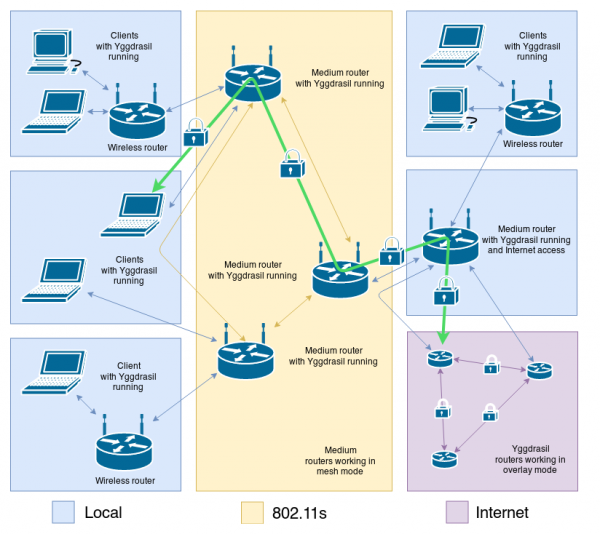
Secondly, due to the lack of most users' ability to connect directly to the routers of the "Medium" network operators, there is a natural need for access to network resources by using the already familiar Internet transport.
Thanks to the use of overlay connections, the "Medium" network has acquired a large number of information resources currently administered by operators and participants of the "Medium" network.
See for yourself!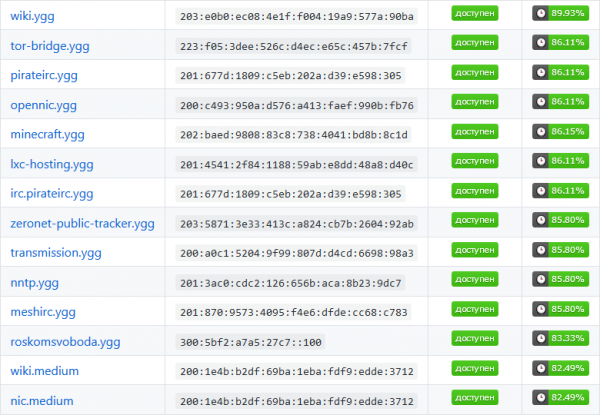
I feel that the title contradicts the content. Is that how it should be?
The title does not contradict the content, but rather represents a subjective projection of the author's expectations that in the near future, the decentralized internet provider 'Medium' will be able to organize access to the network in many other cities in Russia. This will allow users to use the resources of the 'Medium' network without the need for the Internet.
We believe that every person should have the right to freely access and use communication services, as we do not pay to communicate directly with one another in reality. It is important to remember that the network is primarily formed by people, not technologies — we pay for the use of the Internet transport only because it does not belong to us..
Despite the fact that the Internet was initially decentralized (as indicated by its name - 'Interconnected Networks'), communication channels still belong either to the state or corporations. Therefore, its main drawback is that it is not controlled by the community, but by the state and corporations.
By the way, in addition to Kolomna and Khanty-Mansiysk, 'Medium' has access points in , and . Foreign enthusiasts also support the initiative of the 'Medium' network and establish access points in Riga and Barcelona.
So, let's get started!
Step 1. Download the software necessary for proper operation within the network.
Depending on the architecture of your operating system, download the latest release of the Yggdrasil client . As of the date of writing, the current version is 0.3.8.
You can determine your operating system's architecture by right-clicking on 'Computer' in the 'File Explorer' program and selecting 'Properties'.
You are looking for the 'System Type' entry. It will display your operating system's architecture. For example, '64-bit operating system».
You can download the client here:
|
And, accordingly, the utility for administering your copy of Yggdrasil can be downloaded here:
|
Step 2. Installing the software necessary for proper operation within the network.
Now you need to move the previously uploaded files to the directory located at C:\Windows\System32. Generally, the Windows environment variable %PATH% contains the addresses of the directories where executable files are located. It includes C:\Windows\System32.
Step 3. Configuring the Yggdrasil client.
By pressing the key combination Win + R and entering the command in the appeared field cmd, launch the command line.
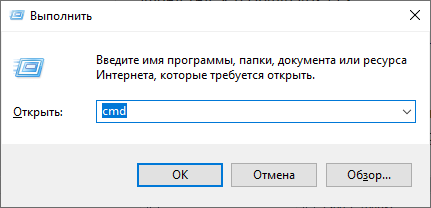
Use the command yggdrasil -genconf > yggdrasil.conf, to create a new configuration file. Under no circumstances share this file with anyone, as it contains your private key for encrypting traffic within the network.
Your internal IPv6 address is formed from the private key, so if an attacker is able to obtain a copy of your configuration file, they will also be able to use your IPv6 address and impersonate you.
Your configuration file is now located at C:UsersYOUR_USERNAMEyggdrasil.conf. Open this file with any text editor and pay special attention to the following key-value pairs key-value:
Peers: [] — if you leave this field empty, the Yggdrasil client will only work in -autoconf mode. Here you should specify other peers (participants) of the network that also operate in overlay mode. They will be connected to at client startup.Select several peers from
the following list You should end up with something like
Peers: ["tcp://46.151.26.194:60575", "tcp://78.155.207.12:32320", "tcp://194.177.21.156:5066"] . You can also use peers from other countries, but this is highlynot recommended , as it negatively impacts the overall performance of the network.Change the parameter
NodeInfoPrivacy: false NodeInfoPrivacy: true to , if you do not want other network participants to know which platform, architecture, and version of the Yggdrasil client you are using. I recommend hiding these parameters since Yggdrasil is currently not sufficiently stable and some versionsmay have vulnerabilities .
NodeInfo , so that other network users can learn more information about your node. You choose what information you will share and what you will not.. Creating a task in the task scheduler.
For example:
NodeInfo:
 {
 contact: mihail@podivilov.ru
 location: Ozyory, Russia
 name: home.y.podivilov.ru
 }
Step 4taskschd.msc
By pressing the key combination Win + R and entering the command in the appeared field , launch the task scheduler., start the task scheduler.
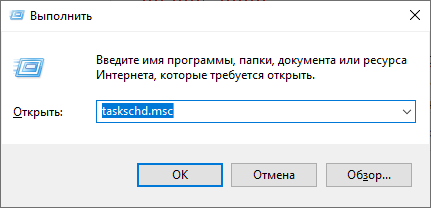
In the context menu on the right, select Create Task.
On the 'General' tab, enter 'Yggdrasil' in the 'Name' field and check the box next to 'Run with highest privileges'. This is necessary for the Yggdrasil client to use the network TAP driver, which we will install in the next step.
On the 'Triggers' tab, click the 'Create' button and select 'At log on' from the context menu. Click 'OK'.
On the 'Actions' tab, click the 'Create' button and select 'Start a program' from the context menu next to 'Action'. In the 'Program/script' field, enter Yggdrasil. In the 'Add arguments (optional)' field, enter -useconffile C:\Users\YOUR_USERNAME\yggdrasil.conf. Click 'OK'.
Step 5. Installing the OpenVPN distribution.
Yggdrasil uses a virtual TAP network driver to emulate an Ethernet device and ensure the network operates correctly.
You can download the OpenVPN distribution .
Step 6. Setting up DNS servers for the IPv6 protocol.
- Open the Windows context menu by pressing the
Winkey and open the Control Panel. - Select 'Network and Internet'
- Select 'Network and Sharing Center'
- Click on the link next to 'Connections'
- Click 'Properties'
- Select 'Internet Protocol Version 6 (TCP/IPv6)'
- Click 'Properties'
- Check the box next to 'Use the following DNS server addresses'
- Enter
200:d0c4:68ee:e87b:c206:67b8:5fa5:d4bein the 'Preferred DNS server' field and click 'OK'.
Congratulations! The setup is complete. Return to Task Scheduler, select the Yggdrasil item, and click the 'Run' button from the context menu on the right.
You will see the terminal window pop up:
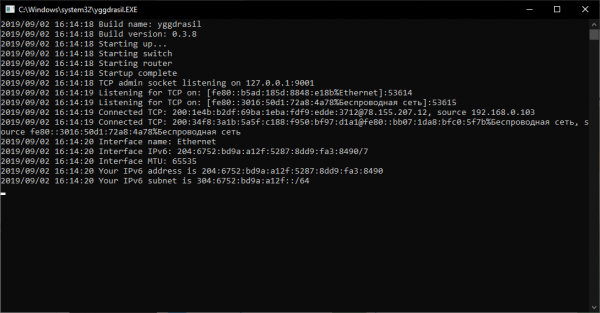
Everything is working.
Now you can open your browser and enter the address . If the network is set up correctly, you will see the following page:
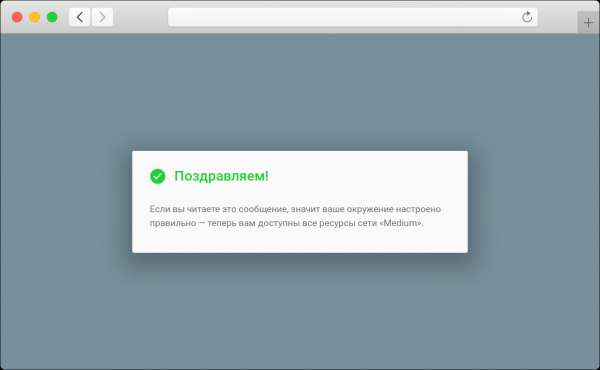
Welcome!
We have prepared a list of the most interesting and in-demand resources on the network — you can find it .
A free Internet in Russia starts with you
You can contribute to the establishment of a free Internet in Russia today. We’ve compiled a comprehensive list of ways you can help the network:
 Tell your friends and colleagues about the "Medium" network
 Share to this article on social networks or your personal blog
 Participate in the discussion of technical issues regarding the "Medium" network
 Create your own web service on the network
 Lift your to the "Medium" network
Also read:
We are on Telegram:
Only registered users can participate in the survey. , please.
Alternative Voting: We value the opinions of those who do not have a full-fledged account on Habr.
↑
↓
86 users voted. 22 users abstained.
Source: habr.com
