


Recently, many organizations want their applications to shift from monoliths to microservices using 'Platform as a Service' (PaaS) solutions like RedHat OpenShift v3. AppDynamics has made significant investments to ensure first-class integration with such providers.
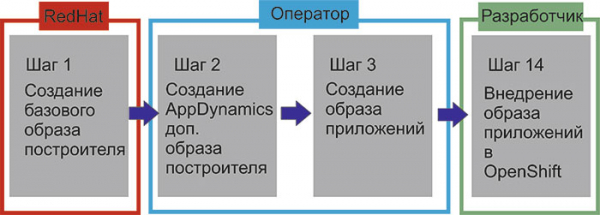
AppDynamics integrates its agents with RedHat OpenShift v3 using Source-to-Image (S2I) methodologies. S2I is a tool for building reproducible Docker images. It creates ready-to-run images by inserting the application source into the Docker image and assembling a new Docker image. The new image includes a base image (builder) and the built source, ready to use with the docker run command. S2I supports incremental builds, which reuse previously downloaded dependencies, artifacts created earlier, etc.
Process
Complete process for using AppDynamics with RedHat OpenShift
Step 1: RedHat is already provided
For steps 2 and 3, you can use S2I scripts from the following GitHub repository along with instructions on how to create enhanced builder images for JBoss Wildfly and EAP servers.
Let's consider everything with a specific example and use an application template .
Prerequisites:
- Ensure that OC is installed ()
- Ensure that sti is installed ()
- Make sure you have a dockerhub account ()
Step 2: Create the AppDynamics builder image
 $ git clone https://github.com/Appdynamics/sti-wildfly.git
$ cd sti-wildfly
$ make build VERSION=eap6.4
Step 3: Create the application image
 $ s2i build -e "APPDYNAMICS_APPLICATION_NAME=os3-ticketmonster,APPDYNAMICS_TIER_NAME=os3-ticketmonster-tier,APPDYNAMICS_ACCOUNT_NAME=customer1_xxxxxxxxxxxxxxxxxxf,APPDYNAMICS_ACCOUNT_ACCESS_KEY=xxxxxxxxxxxxxxxxxxxxx,APPDYNAMICS_CONTROLLER_HOST=xxxx.saas.appdynamics.com,APPDYNAMICS_CONTROLLER_PORT=443,APPDYNAMICS_CONTROLLER_SSL_ENABLED=true" https://github.com/jim-minter/ose3-ticket-monster appdynamics/sti-wildfly-eap64-centos7:latest pranta/appd-eap-ticketmonster
$ docker tag openshift-ticket-monster pranta/openshift-ticket-monster:latest
$ docker push pranta/openshift-ticket-monster
Step 4: Deploy the application to OpenShift
$ oc login 10.0.32.128:8443
$ oc new-project wildfly
$ oc project wildfly
$ oc new-app --docker-image=pranta/appd-eap-ticketmonster:latest --name=ticketmonster-demo 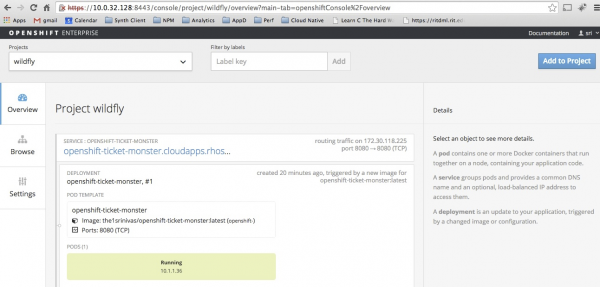
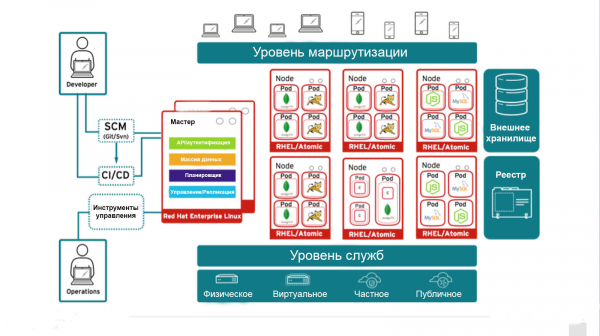
Now you can log into the controller and view the ticketmonster application in the application dashboard:
Source: habr.com
