

The article material is taken from my .

We use TShark to analyze RTP packets
Previously We assembled a remote control scheme using a generator and a tonal signal detector, with communication established via an RTP stream.
In this article, we continue to explore the transmission of audio signals using the RTP protocol. First, we will split our test application into a transmitter and a receiver and learn how to investigate the RTP stream using a network traffic analyzer.
So, to clarify which program elements are responsible for transmitting RTP and which are for receiving, we will divide our mstest6.c file into two separate programs, one for the transmitter and one for the receiver, while common functions used by both will be moved to a third file, which we will name mstest_common.c, which will be included by both the transmitter and the receiver using the include directive:
/* Файл mstest_common.c Общие функции для передатчика и приемника. */
#include <mediastreamer2/msfilter.h>
#include <mediastreamer2/msticker.h>
#include <mediastreamer2/msrtp.h>
#include <ortp/rtpsession.h>
#include <ortp/payloadtype.h>

define PCMU 0

/*---------------------------------------------------------*/
/* Функция регистрации типов полезных нагрузок. */
void register_payloads(void)
{
 /* Регистрируем типы нагрузок в таблице профилей. Позднее, по индексу    взятому
     из заголовка RTP-пакета из этой таблицы будут извлекаться    параметры
     нагрузки, необходимые для декодирования данных пакета. */
  rtp_profile_set_payload (&av_profile, PCMU, &payload_type_pcm8000);
}

/*---------------------------------------------------------*/
/* Эта функция создана из функции create_duplex_rtpsession() в audiostream.c   медиастримера2. */
 static RtpSession *create_rtpsession (int loc_rtp_port, int loc_rtcp_port,  bool_t ipv6, RtpSessionMode mode)
{
  RtpSession *rtpr;  rtpr = rtp_session_new ((int) mode);
  rtp_session_set_scheduling_mode (rtpr, 0);
  rtp_session_set_blocking_mode (rtpr, 0);
  rtp_session_enable_adaptive_jitter_compensation (rtpr, TRUE);
  rtp_session_set_symmetric_rtp (rtpr, TRUE);
  rtp_session_set_local_addr (rtpr, ipv6 ? "::" : "0.0.0.0", loc_rtp_port,  loc_rtcp_port);
  rtp_session_signal_connect (rtpr, "timestamp_jump",  (RtpCallback) rtp_session_resync, 0);
  rtp_session_signal_connect (rtpr, "ssrc_changed",  (RtpCallback) rtp_session_resync, 0);
  rtp_session_set_ssrc_changed_threshold (rtpr, 0);
  rtp_session_set_send_payload_type(rtpr, PCMU);

  /* По умолчанию выключаем RTCP-сессию, так как наш пульт не будет использовать
  её. */
 rtp_session_enable_rtcp (rtpr, FALSE);
 return rtpr;
}
Now for the isolated transmitter file:
/* Файл mstest6.c Имитатор пульта управления (передатчика). */
#include <mediastreamer2/dtmfgen.h>
#include <mediastreamer2/msrtp.h>
#include "mstest_common.c"

/*----------------------------------------------------------*/
int main()
{
  ms_init();

/* Создаем экземпляры фильтров. */
  MSFilter *voidsource = ms_filter_new(MS_VOID_SOURCE_ID);
  MSFilter *dtmfgen = ms_filter_new(MS_DTMF_GEN_ID);

/* Создаем фильтр кодера. */
  MSFilter *encoder = ms_filter_create_encoder("PCMU");

/* Регистрируем типы нагрузки. */
  register_payloads();

/* Создаем RTP-сессию передатчика. */
  RtpSession *tx_rtp_session = create_rtpsession (8010, 8011, FALSE, RTP_SESSION_SENDONLY);
 rtp_session_set_remote_addr_and_port(tx_rtp_session,"127.0.0.1", 7010, 7011);
 rtp_session_set_send_payload_type(tx_rtp_session, PCMU);
 MSFilter *rtpsend = ms_filter_new(MS_RTP_SEND_ID);
 ms_filter_call_method(rtpsend, MS_RTP_SEND_SET_SESSION, tx_rtp_session);

/* Создаем источник тактов - тикер. */
 MSTicker *ticker_tx = ms_ticker_new();

/* Соединяем фильтры передатчика. */
 ms_filter_link(voidsource, 0, dtmfgen, 0);
 ms_filter_link(dtmfgen, 0, encoder, 0);
 ms_filter_link(encoder, 0, rtpsend, 0);

/* Подключаем источник тактов. */
  ms_ticker_attach(ticker_tx, voidsource);

/* Настраиваем структуру, управляющую выходным сигналом генератора. */
 MSDtmfGenCustomTone dtmf_cfg;
 dtmf_cfg.tone_name[0] = 0;
 dtmf_cfg.duration = 1000;
 dtmf_cfg.frequencies[0] = 440;

/* Будем генерировать один тон, частоту второго тона установим в 0. */
 dtmf_cfg.frequencies[1] = 0;
 dtmf_cfg.amplitude = 1.0;
 dtmf_cfg.interval = 0.;
 dtmf_cfg.repeat_count = 0.;

/* Организуем цикл сканирования нажатых клавиш. Ввод нуля завершает
* цикл и работу программы. */
 char key='9';
 printf("Нажмите клавишу команды, затем ввод.n"
"Для завершения программы введите 0.n");
while(key != '0')
{
 key = getchar();
 if ((key >= 49) && (key <= 54))
   {
      printf("Отправлена команда: %cn", key);
      /* Устанавливаем частоту генератора в соответствии с
       * кодом нажатой клавиши. */
      dtmf_cfg.frequencies[0] = 440 + 100*(key-49);

      /* Включаем звуковой генератор c обновленной частотой. */
      ms_filter_call_method(dtmfgen, MS_DTMF_GEN_PLAY_CUSTOM,      (void*)&dtmf_cfg);
   }
   /* Укладываем тред в спячку на 20мс, чтобы другие треды
   * приложения получили время на работу. */
  ms_usleep(20000);
  }
}
And finally, the receiver file:
/* Файл mstest7.c Имитатор приемника. */
include <mediastreamer2/mssndcard.h>
include <mediastreamer2/mstonedetector.h>
include <mediastreamer2/msrtp.h>

/* Подключаем заголовочный файл с функциями управления событиями  медиастримера.*/
include <mediastreamer2/mseventqueue.h>
/* Подключаем файл общих функций. */
include "mstest_common.c"

/* Функция обратного вызова, она будет вызвана фильтром, как только он   обнаружит совпадение характеристик входного сигнала с заданными. */
static void tone_detected_cb(void *data, MSFilter *f, unsigned int event_id,MSToneDetectorEvent *ev)
{
 printf("Принята команда: %sn", ev->tone_name);
}

/*----------------------------------------------------------*/
int main()
{
 ms_init();

/* Создаем экземпляры фильтров. */
 MSSndCard *card_playback =  ms_snd_card_manager_get_default_card(ms_snd_card_manager_get());
 MSFilter *snd_card_write = ms_snd_card_create_writer(card_playback);
 MSFilter *detector = ms_filter_new(MS_TONE_DETECTOR_ID);

/* Очищаем массив находящийся внутри детектора тонов, он описывает
* особые приметы разыскиваемых сигналов.*/
  ms_filter_call_method(detector, MS_TONE_DETECTOR_CLEAR_SCANS, 0);

/* Подключаем к фильтру функцию обратного вызова. */
ms_filter_set_notify_callback(detector,  (MSFilterNotifyFunc)tone_detected_cb, NULL);

/* Создаем массив, каждый элемент которого описывает характеристику
* одного из тонов, который требуется обнаруживать:
Текстовое имя
* данного элемента, частота в герцах, длительность в миллисекундах,
* минимальный уровень относительно 0,775В. */
  MSToneDetectorDef scan[6]=
 {
    {"V+",440, 100, 0.1}, /* Команда "Увеличить громкость". */
    {"V-",540, 100, 0.1}, /* Команда "Уменьшить громкость". */
    {"C+",640, 100, 0.1}, /* Команда "Увеличить номер канала". */
    {"C-",740, 100, 0.1}, /* Команда "Уменьшить номер канала". */
    {"ON",840, 100, 0.1}, /* Команда "Включить телевизор". */
    {"OFF", 940, 100, 0.1}/* Команда "Выключить телевизор". */
  };

/* Передаем "приметы" сигналов детектор тонов. */
  int i;
 for (i = 0; i < 6; i++)
 {
   ms_filter_call_method(detector, MS_TONE_DETECTOR_ADD_SCAN,    &scan[i]);
 }

/* Создаем фильтр декодера */
  MSFilter *decoder=ms_filter_create_decoder("PCMU");

/* Регистрируем типы нагрузки. */
  register_payloads();

/* Создаем RTP-сессию приемника. */
  MSFilter *rtprecv = ms_filter_new(MS_RTP_RECV_ID);
  RtpSession *rx_rtp_session = create_rtpsession (7010, 7011, FALSE, RTP_SESSION_RECVONLY);
  ms_filter_call_method(rtprecv, MS_RTP_RECV_SET_SESSION, rx_rtp_session);

/* Создаем источник тактов - тикер. */
 MSTicker *ticker_rx = ms_ticker_new();

/* Соединяем фильтры приёмника. */
  ms_filter_link(rtprecv, 0, decoder, 0);
  ms_filter_link(decoder, 0, detector, 0);
  ms_filter_link(detector, 0, snd_card_write, 0);

/* Подключаем источник тактов. */
  ms_ticker_attach(ticker_rx, rtprecv);
  char key='9';
  printf( "Для завершения программы введите 0.n");
  while(key != '0')
 {
    key = getchar();
   /* Укладываем тред в спячку на 20мс, чтобы другие треды    * приложения получили время на работу. */
   ms_usleep(20000);
 }
}
We compile the transmitter and receiver, then run each in its own console. Next, it should work as before—only the input of numbers from 1 to 6 should be done in the transmitter console, while the response should appear in the receiver console. Tones should be audible in real-time. If this works, then we have established a connection between the receiver and the transmitter—RTP packets are continuously transmitted from the transmitter to the receiver.
Now is the perfect time to install a traffic analyzer; for this, we will install the console version of the excellent program Wireshark—it’s called TShark. I chose TShark for the subsequent explanation to simplify the control of the program. With Wireshark, I would need a ton of screenshots, which could quickly become outdated with new Wireshark releases.
If you know how to use Wireshark, you can use it to study our examples. But even in that case, I recommend mastering TShark, as it will help you automate the testing of your VoIP applications and allow for remote capture.
We install TShark with the following command:
$ sudo apt-get install tsharkTraditionally, we check the installation result by asking for the program version:
$ tshark --versionIf an adequate response is received, we continue.
Since our packets are currently only circulating within the computer, we can tell TShark to show only those packets. To do this, we need to select packet capture from the interface loopback (loopback), passing TShark the option -i lo:
$ sudo tshark -i loMessages about packets being sent by our transmitter will immediately start appearing in the console (continuously, regardless of whether we pressed the button on the remote or not). There may be programs on your computer that also send packets over the local loop, in which case we will get a mix of our and other packets. To ensure that we see only the packets sent by our remote control in the list, we will add a filter by the port number. By pressing Ctrl-C, we will stop the analyzer and input a filter for the port number that the remote uses as the destination port for its transmission (8010): -f "udp port 8010". Now our command line will look like this:
$ sudo tshark -i lo -f "udp port 8010"The console will display output of the following type (the first 10 lines):
 1 0.000000000    127.0.0.1 → 127.0.0.1    UDP 214 8010 → 7010 Len=172
 2 0.020059705    127.0.0.1 → 127.0.0.1    UDP 214 8010 → 7010 Len=172
 3 0.040044409    127.0.0.1 → 127.0.0.1    UDP 214 8010 → 7010 Len=172
 4 0.060057104    127.0.0.1 → 127.0.0.1    UDP 214 8010 → 7010 Len=172
 5 0.080082311    127.0.0.1 → 127.0.0.1    UDP 214 8010 → 7010 Len=172
 6 0.100597153    127.0.0.1 → 127.0.0.1    UDP 214 8010 → 7010 Len=172
 7 0.120122668    127.0.0.1 → 127.0.0.1    UDP 214 8010 → 7010 Len=172
 8 0.140204789    127.0.0.1 → 127.0.0.1    UDP 214 8010 → 7010 Len=172
 9 0.160719008    127.0.0.1 → 127.0.0.1    UDP 214 8010 → 7010 Len=172
10 0.180673685    127.0.0.1 → 127.0.0.1    UDP 214 8010 → 7010 Len=172
This is not yet packets, but a numbered list of events, where each line is a message about a subsequent packet that was detected on the interface. Since we have already taken care of filtering packets, we only see messages about our transmitter's packets in the listing. Next, let's decode this table by column numbers:
Event number.
Time of occurrence.
Source IP address of the packet and destination IP address of the packet.
Protocol of the packet, shown as UDP, since RTP packets are transmitted as payload within UDP packets.
Size of the packet in bytes.
Source port number of the packet and destination port number of the packet.
Size of the payload of the packet, from which we can conclude that our transmitter forms RTP packets of size 172 bytes, which, like a duck in a chest, is inside a UDP packet of size 214 bytes.
Now it's time to look inside the UDP packets; for this, we will run TShark with an expanded set of options:
sudo tshark -i lo -f "udp port 8010" -P -V -O rtp -o rtp.heuristic_rtp:TRUE -xAs a result, the program output will be enriched — each event will have a decryption of the internal content of the packet that triggered it. To better examine the output data, you can either stop TShark by pressing Ctrl-C or duplicate its output to a file by adding a pipe to the tee program along with the filename, tee :
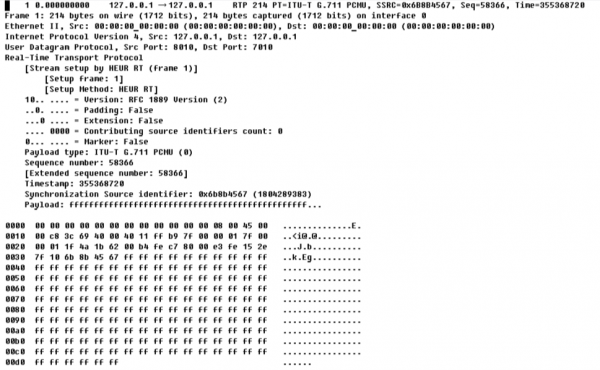
$ sudo tshark -i lo -f "udp port 8010" -P -V -O rtp -o rtp.heuristic_rtp:TRUE -x | tee log.txtNow let’s take a look at what we received in the file; here is the first packet from it:
1 0.000000000    127.0.0.1 → 127.0.0.1    RTP 214 PT=ITU-T G.711 PCMU, SSRC=0x6B8B4567, Seq=58366, Time=355368720
Frame 1: 214 bytes on wire (1712 bits), 214 bytes captured (1712 bits) on interface 0
Ethernet II, Src: 00:00:00_00:00:00 (00:00:00:00:00:00), Dst: 00:00:00_00:00:00 (00:00:00:00:00:00)
Internet Protocol Version 4, Src: 127.0.0.1, Dst: 127.0.0.1
User Datagram Protocol, Src Port: 8010, Dst Port: 7010
Real-Time Transport Protocol    [Stream setup by HEUR RT (frame 1)]
        [Setup frame: 1]
       [Setup Method: HEUR RT]
    10.. .... = Version: RFC 1889 Version (2)
    ..0. .... = Padding: False
    ...0 .... = Extension: False
    .... 0000 = Contributing source identifiers count: 0
   0... .... = Marker: False
    Payload type: ITU-T G.711 PCMU (0)
    Sequence number: 58366    [Extended sequence number: 58366]
    Timestamp: 355368720
    Synchronization Source identifier: 0x6b8b4567 (1804289383)
    Payload: ffffffffffffffffffffffffffffffffffffffffffffffff...

0000  00 00 00 00 00 00 00 00 00 00 00 00 08 00 45 00   ..............E.
0010  00 c8 3c 69 40 00 40 11 ff b9 7f 00 00 01 7f 00   ..<i@.@.........
0020  00 01 1f 4a 1b 62 00 b4 fe c7 80 00 e3 fe 15 2e   ...J.b..........
0030  7f 10 6b 8b 45 67 ff ff ff ff ff ff ff ff ff ff   ..k.Eg..........
0040  ff ff ff ff ff ff ff ff ff ff ff ff ff ff ff ff   ................
0050  ff ff ff ff ff ff ff ff ff ff ff ff ff ff ff ff   ................
0060  ff ff ff ff ff ff ff ff ff ff ff ff ff ff ff ff   ................
0070  ff ff ff ff ff ff ff ff ff ff ff ff ff ff ff ff   ................
0080  ff ff ff ff ff ff ff ff ff ff ff ff ff ff ff ff   ................
0090  ff ff ff ff ff ff ff ff ff ff ff ff ff ff ff ff   ................
00a0  ff ff ff ff ff ff ff ff ff ff ff ff ff ff ff ff   ................
00b0  ff ff ff ff ff ff ff ff ff ff ff ff ff ff ff ff   ................
00c0  ff ff ff ff ff ff ff ff ff ff ff ff ff ff ff ff   ................
00d0  ff ff ff ff ff ff                                  ......
The next article will be dedicated to analyzing the information contained in this listing, and we will inevitably discuss the internal structure of the RTP packet.
Source: habr.com
