

While everyone knows that testing software is important and necessary, and many have been doing it automatically for a long time, there hasn’t been a single recipe on Habr for configuring the combination of popular products in this niche, such as (our favorite) GitLab and JUnit. Let’s fill this gap!

Introduction
To start, I will outline the context:
- Since all our applications work in Kubernetes, we will look at how to run tests in the corresponding infrastructure.
- For building and deploying, we use (in terms of infrastructure components, this also implies that Helm is utilized).
- I won’t go into the details of creating tests: in our case, the client writes the tests themselves, and we only ensure their execution (and the presence of the relevant report in the merge request).
What will the overall sequence of actions look like?
- Building the application — we will skip the description of this stage.
- Deploying the application to a separate namespace in the Kubernetes cluster and starting the testing.
- Searching for artifacts and parsing the JUnit report by GitLab.
- Deleting the previously created namespace.
Now, let’s move to the implementation!
Settings
GitLab CI
We will start with the snippet .gitlab-ci.yaml, which describes the deployment of the application and the running of tests. The listing turned out to be quite lengthy, so it has been thoroughly supplemented with comments:
variables:
# declare the version of werf that we plan to use
  WERF_VERSION: "1.0 beta"

.base_deploy: &base_deploy
  script:
# create namespace in K8s if it does not exist
    - kubectl --context="${WERF_KUBE_CONTEXT}" get ns ${CI_ENVIRONMENT_SLUG} || kubectl create ns ${CI_ENVIRONMENT_SLUG}
# load werf and deploy — for more details, see the documentation
# (https://werf.io/how_to/gitlab_ci_cd_integration.html#deploy-stage)
    - type multiwerf && source <(multiwerf use ${WERF_VERSION})
    - werf version
    - type werf && source <(werf ci-env gitlab --tagging-strategy tag-or-branch --verbose)
    - werf deploy --stages-storage :local
      --namespace ${CI_ENVIRONMENT_SLUG}
      --set "global.commit_ref_slug=${CI_COMMIT_REF_SLUG:-''}"
# pass the variable `run_tests`
# it will be used in the Helm release render
      --set "global.run_tests=${RUN_TESTS:-no}"
      --set "global.env=${CI_ENVIRONMENT_SLUG}"
# modify timeout (there can be long tests) and pass it to the release
      --set "global.ci_timeout=${CI_TIMEOUT:-900}"
     --timeout ${CI_TIMEOUT:-900}
  dependencies:
    - Build

.test-base: &test-base
  extends: .base_deploy
  before_script:
# create a directory for the future report, based on $CI_COMMIT_REF_SLUG
    - mkdir /mnt/tests/${CI_COMMIT_REF_SLUG} || true
# a forced workaround, since GitLab expects to receive artifacts in its build-dir
    - mkdir ./tests || true
    - ln -s /mnt/tests/${CI_COMMIT_REF_SLUG} ./tests/${CI_COMMIT_REF_SLUG}
  after_script:
# after the tests finish, remove the release along with the Job
# (and possibly its infrastructure)
    - type multiwerf && source <(multiwerf use ${WERF_VERSION})
    - werf version
    - type werf && source <(werf ci-env gitlab --tagging-strategy tag-or-branch --verbose)
    - werf dismiss --namespace ${CI_ENVIRONMENT_SLUG} --with-namespace
# we allow failures, but you can do otherwise
  allow_failure: true
  variables:
    RUN_TESTS: 'yes'
# set the context in werf
# (https://werf.io/how_to/gitlab_ci_cd_integration.html#infrastructure)
    WERF_KUBE_CONTEXT: 'admin@stage-cluster'
  tags:
# use the runner with the tag `werf-runner`
    - werf-runner
  artifacts:
# an artifact needs to be collected so that it can be seen
# in the pipeline and downloaded — for more in-depth exploration
    paths:
      - ./tests/${CI_COMMIT_REF_SLUG}/*
# artifacts older than a week will be removed
    expire_in: 7 days
# important: these lines are responsible for parsing the report by GitLab
    reports:
      junit: ./tests/${CI_COMMIT_REF_SLUG}/report.xml

# for simplicity, only two stages are shown here
# in reality, you will have more — at least due to deployment
stages:
  - build
  - tests

build:
  stage: build
  script:
# build — again according to the werf documentation
# (https://werf.io/how_to/gitlab_ci_cd_integration.html#build-stage)
    - type multiwerf && source <(multiwerf use ${WERF_VERSION})
    - werf version
    - type werf && source <(werf ci-env gitlab --tagging-strategy tag-or-branch --verbose)
    - werf build-and-publish --stages-storage :local
  tags:
    - werf-runner
  except:
    - schedules

run tests:
  <<: *test-base
  environment:
# "the essence" of naming the namespace
# (https://docs.gitlab.com/ce/ci/variables/predefined_variables.html)
    name: tests-${CI_COMMIT_REF_SLUG}
  stage: tests
  except:
    - schedules
Kubernetes
Now in the directory .helm/templates let's create a YAML with a Job — tests-job.yaml — for running tests and the necessary resources for Kubernetes. Explanations can be found after the listing:
{{- if eq .Values.global.run_tests "yes" }}
---
apiVersion: v1
kind: ConfigMap
metadata:
  name: tests-script
data:
  tests.sh: |
    echo "======================"
    echo "${APP_NAME} TESTS"
    echo "======================"

    cd /app
    npm run test:ci
    cp report.xml /app/test_results/${CI_COMMIT_REF_SLUG}/

    echo ""
    echo ""
    echo ""

    chown -R 999:999 /app/test_results/${CI_COMMIT_REF_SLUG}
---
apiVersion: batch/v1
kind: Job
metadata:
  name: {{ .Chart.Name }}-test
  annotations:
    "helm.sh/hook": post-install,post-upgrade
    "helm.sh/hook-weight": "2"
    "werf/watch-logs": "true"
spec:
  activeDeadlineSeconds: {{ .Values.global.ci_timeout }}
  backoffLimit: 1
  template:
    metadata:
      name: {{ .Chart.Name }}-test
    spec:
      containers:
      - name: test
        command: ['bash', '-c', '/app/tests.sh']
{{ tuple "application" . | include "werf_container_image" | indent 8 }}
        env:
        - name: env
          value: {{ .Values.global.env }}
        - name: CI_COMMIT_REF_SLUG
          value: {{ .Values.global.commit_ref_slug }}
       - name: APP_NAME
          value: {{ .Chart.Name }}
{{ tuple "application" . | include "werf_container_env" | indent 8 }}
        volumeMounts:
        - mountPath: /app/test_results/
          name: data
        - mountPath: /app/tests.sh
          name: tests-script
          subPath: tests.sh
      tolerations:
      - key: dedicated
        operator: Exists
      - key: node-role.kubernetes.io/master
        operator: Exists
      restartPolicy: OnFailure
      volumes:
      - name: data
        persistentVolumeClaim:
          claimName: {{ .Chart.Name }}-pvc
      - name: tests-script
        configMap:
          name: tests-script
---
apiVersion: v1
kind: PersistentVolumeClaim
metadata:
  name: {{ .Chart.Name }}-pvc
spec:
  accessModes:
  - ReadWriteOnce
  resources:
    requests:
      storage: 10Mi
  storageClassName: {{ .Chart.Name }}-{{ .Values.global.commit_ref_slug }}
  volumeName: {{ .Values.global.commit_ref_slug }}

---
apiVersion: v1
kind: PersistentVolume
metadata:
  name: {{ .Values.global.commit_ref_slug }}
spec:
  accessModes:
  - ReadWriteOnce
  capacity:
    storage: 10Mi
  local:
    path: /mnt/tests/
  nodeAffinity:
   required:
     nodeSelectorTerms:
     - matchExpressions:
       - key: kubernetes.io/hostname
         operator: In
         values:
         - kube-master
  persistentVolumeReclaimPolicy: Delete
  storageClassName: {{ .Chart.Name }}-{{ .Values.global.commit_ref_slug }}
{{- end }}
What resources are described in this configuration? When deploying, we create a unique namespace for the project (this is specified in .gitlab-ci.yaml — tests-${CI_COMMIT_REF_SLUG}) and we roll out to it:
- ConfigMap with the test script;
- Job with the pod description and the specified directive
command, which actually runs the tests; - PV and PVC, which allow to store test data.
Note the conditional statement with if at the beginning of the manifest — accordingly, other YAML files of the Helm chart with the application need to be wrapped in the reverse construction so that they are not deployed during testing. That is:
{{- if ne .Values.global.run_tests "yes" }}
---
I have another YAML
{{- end }}
However, if the tests require some infrastructure (for example, Redis, RabbitMQ, Mongo, PostgreSQL…) — their YAMLs can be do not turning off. Expand and test them in a test environment… of course, adjusting as you see fit.
Final Touch
Since the build and deploy with werf is currently working only on the build server (with gitlab-runner), and the pod with tests is launched on the master, you will need to create a directory /mnt/tests on the master and give it to the runner, for example, via NFS. An expanded example with explanations can be found in .
The result will be:
user@kube-master:~$ cat /etc/exports | grep tests
/mnt/tests    IP_gitlab-builder/32(rw,nohide,insecure,no_subtree_check,sync,all_squash,anonuid=999,anongid=998)

user@gitlab-runner:~$ cat /etc/fstab | grep tests
IP_kube-master:/mnt/tests    /mnt/tests   nfs4    _netdev,auto  0       0
Nobody forbids creating an NFS share directly on the gitlab-runner, after which it can be mounted in the pods.
Note
You might ask why complicate things by creating a Job if you can just run the test script directly on the shell runner? The answer is quite simple...
Some tests require access to infrastructure (MongoDB, RabbitMQ, PostgreSQL, etc.) to validate proper functioning. We make testing standardized — with this approach, including such additional entities becomes easy. In addition, we gain standard deployment practices (even using NFS and additional mounting of directories).
Result
What will we see when we apply the prepared configuration?
The merge request will show summary statistics on the tests run in its latest pipeline:
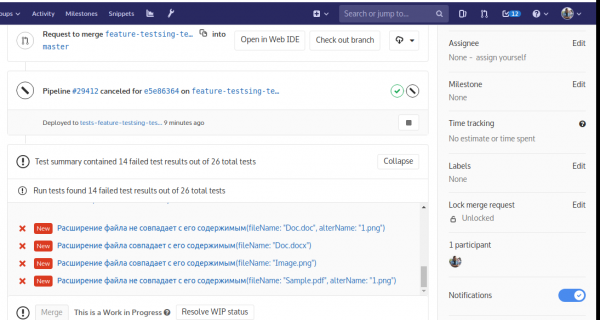
For each error here, you can click to get details:
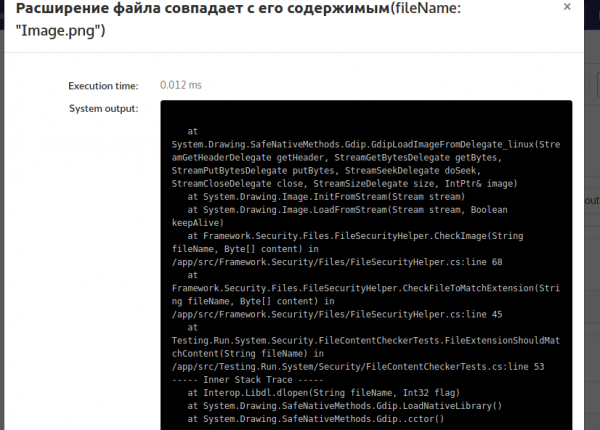
NB: A careful reader will notice that we are testing a NodeJS application, while the screenshots show .NET… Don't be surprised: just during the preparation of the article, there were no errors in testing the first application, but errors were found in another.
Conclusion
As you can see, nothing complicated!
In principle, if you already have a shell builder and it works, and you don't need Kubernetes — attaching testing to it will be an even simpler task than described here. And in you will find examples for Ruby, Go, Gradle, Maven, and some others.
P.S.
Also read in our blog:
- «»;
- «»;
- «».
Source: habr.com

 Russian
 Italian
 German
 Polish
 Estonian
 Albanian
 Bulgarian
 Croatian
 Czech
Czech Danish
 Dutch
Dutch English
 French
 Hungarian
 Latvian
 Portuguese
 Romanian
 Slovak
 Slovenian
 Spanish
 Swedish