

Hi all. In this article, I will tell you why we chose Kafka nine months ago in Avito, and what it is. I will share one of the use cases - a message broker. And finally, let's talk about what advantages we got from using the Kafka as a Service approach.
Problem

Let's start with some context. Some time ago, we began to move away from a monolithic architecture, and now there are already several hundred different services in Avito. They have their own repositories, their own technology stack and are responsible for their own part of the business logic.
One problem with a large number of services is communication. Service A often wants to know the information that service B has. In this case, service A accesses service B through a synchronous API. Service C wants to know what is happening at services D and D, and they, in turn, are interested in services A and B. When there are many such “curious” services, the connections between them turn into a tangled tangle.
At the same time, service A may become unavailable at any time. And what should service B and all other services tied to it do in this case? And if a chain of consecutive synchronous calls is required to complete a business operation, the probability of failure of the entire operation becomes even higher (and it is higher, the longer the chain).
Technology Choice

Okay, the problems are clear. You can eliminate them by making a centralized messaging system between services. Now it is enough for each of the services to know only about this messaging system. In addition, the system itself must be fault-tolerant and horizontally scalable, and in case of failures, accumulate a call buffer in itself for their subsequent processing.
Let's now select the technology on which message delivery will be implemented. To do this, first we understand what we expect from her:
- messages between services should not be lost;
- messages may be duplicated;
- messages can be stored and read to a depth of several days (persistent buffer);
- services can subscribe to the data they are interested in;
- multiple services can read the same data;
- messages may contain a detailed, voluminous payload (event-carried state transfer);
- Sometimes you need a guarantee of message order.
It was also critical for us to choose the most scalable and reliable system with high throughput (at least 100k messages of several kilobytes per second).
At this stage, we said goodbye to RabbitMQ (difficult to keep stable at high rps), PGQ from SkyTools (not fast enough and poorly scalable) and NSQ (not persistent). All these technologies are used in our company, but they did not fit the task being solved.
Next, we started looking at new technologies for us - Apache Kafka, Apache Pulsar and NATS Streaming.
Pulsar was the first to be thrown back. We decided that Kafka and Pulsar are pretty similar solutions. And despite the fact that Pulsar is tested by large companies, is newer and offers lower latency (in theory), we decided to leave Kafka as the de facto standard for such tasks from these two. We will probably return to Apache Pulsar in the future.
And now there are two candidates left: NATS Streaming and Apache Kafka. We studied both solutions in some detail, and both of them fit the task. But in the end, we were afraid of the relative youth of NATS Streaming (and the fact that one of the main developers, Tyler Treat, decided to leave the project and start his own - Liftbridge). At the same time, the Clustering mode of NATS Streaming did not allow strong horizontal scaling (probably this is no longer a problem after the addition of the partitioning mode in 2017).
However, NATS Streaming is a cool technology written in Go and backed by the Cloud Native Computing Foundation. Unlike Apache Kafka, it doesn't need Zookeeper to work (probably ), since internally it implements RAFT. At the same time, NATS Streaming is easier to administer. We do not exclude that in the future we will return to this technology.
And yet, Apache Kafka has become our winner so far. In our tests, it proved to be quite fast (more than a million messages per second for reading and writing with a message volume of 1 kilobyte), quite reliable, well-scalable and proven by experience in the production of large companies. In addition, Kafka supports at least a few large commercial companies (we, for example, use the Confluent version), and Kafka also has a developed ecosystem.
Overview of Kafka
Before I start, I will immediately recommend an excellent book - Kafka: The Definitive Guide (there is also a Russian translation, but the terms break the brain a little). In it you can find the information you need for a basic understanding of Kafka and even a little more. The documentation itself from Apache and the blog from Confluent are also well written and easy to read.
So let's take a bird's eye view of how Kafka works. The basic Kafka topology consists of producer, consumer, broker, and zookeeper.
Broker
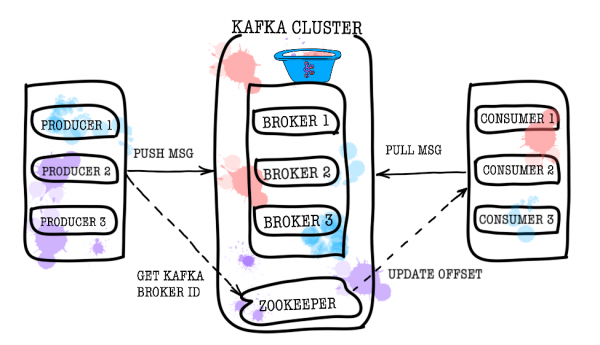
The broker is responsible for storing your data. All data is stored in binary form, and the broker knows little about what they are and what their structure is.
Each logical type of events is usually located in its own topic (topic). For example, the ad creation event can go to the item.created topic, and the ad change event can go to item.changed. Topics can be thought of as event classifiers. At the topic level, you can set configuration parameters such as:
- the amount of data stored and/or their age (retention.bytes, retention.ms);
- data redundancy factor (replication factor);
- maximum size of one message (max.message.bytes);
- the minimum number of consistent replicas at which data can be written to the topic (min.insync.replicas);
- the ability to failover to a non-synchronous lagging replica with potential data loss (unclean.leader.election.enable);
- and many more ().
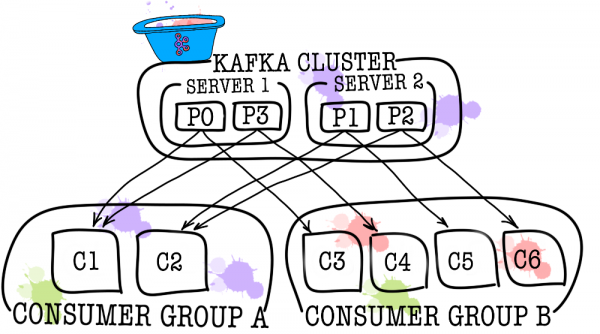
In turn, each topic is divided into one or more partitions. It is in the partition that the events end up. If there is more than one broker in the cluster, then the partitions will be distributed evenly across all brokers (as far as possible), which will allow scaling the load on writing and reading in one topic to several brokers at once.
On disk, the data for each partition is stored as segment files, by default equal to one gigabyte (controlled via log.segment.bytes). An important feature is that deleting data from partitions (when retention is triggered) occurs just in segments (you cannot delete one event from a partition, you can delete only an entire segment, and only an inactive one).
Zookeeper
Zookeeper acts as a metadata store and coordinator. It is he who is able to tell if brokers are alive (you can look at this through the eyes of a zookeeper through the zookeeper-shell command ls /brokers/ids), which broker is the controller (get /controller), whether partitions are in synchronous state with their replicas (get /brokers/topics/topic_name/partitions/partition_number/state). Also, the producer and consumer will first go to the zookeeper to find out on which broker which topics and partitions are stored. In cases where a replication factor greater than 1 is set for a topic, zookeeper will indicate which partitions are leaders (they will be written to and read from). In the event of a broker crash, it is in zookeeper that information about new leader partitions will be written (from version 1.1.0 asynchronously, ).
In older versions of Kafka, the zookeeper was also responsible for storing offsets, but now they are stored in a special topic __consumer_offsets on a broker (although you can still use zookeeper for this purpose).
The easiest way to turn your data into a pumpkin is just to lose information with zookeeper. In such a scenario, it will be very difficult to understand what and where to read from.
Producer
Producer is most often a service that writes data directly to Apache Kafka. The Producer chooses a topic to store its topic messages and starts writing information to it. For example, a producer might be an ad service. In this case, it will send events such as “ad created”, “ad updated”, “ad deleted”, etc. to thematic topics. Each event is a key-value pair.
By default, all events are distributed across topic partitions by round-robin if the key is not set (losing order), and through MurmurHash (key) if the key is present (order within one partition).
Here it is immediately worth noting that Kafka guarantees the order of events only within one partition. But in reality this is often not a problem. For example, it is possible to ensure that all changes to the same declaration are added to the same partition (thus keeping the order of those changes within the declaration). You can also pass a sequence number in one of the event fields.
Consumer
Consumer is responsible for getting data from Apache Kafka. Going back to the example above, the consumer could be a moderation service. This service will subscribe to the ad service topic, and when a new ad appears, it will receive it and analyze it for compliance with some specified policies.
Apache Kafka remembers the last events received by the consumer (for this, a service topic is used __consumer__offsets), thereby ensuring that on a successful read, the consumer does not receive the same message twice. However, if you use the enable.auto.commit = true option and leave the job of keeping track of the consumer's position in the topic to Kafka, you can . In production code, most often the position of the consumer is controlled manually (the developer controls the moment when the commit of the read event must occur).
In cases where one consumer is not enough (for example, the flow of new events is very large), you can add several more consumers by linking them together in a consumer group. A consumer group is logically exactly the same consumer, but with the distribution of data between group members. This allows each of the participants to take their share of messages, thereby scaling the reading speed.
Test results

I will not write a lot of explanatory text here, just share the results. Testing was done on 3 physical machines (12 CPU, 384GB RAM, 15k SAS DISK, 10GBit/s Net), brokers and zookeeper were deployed in lxc.
Performance testing
During testing, the following results were obtained.
- The speed of recording messages with a size of 1KB simultaneously by 9 producers is 1300000 events per second.
- The speed of reading 1KB messages simultaneously by 9 consumers is 1500000 events per second.
Fault tolerance testing
During testing, the following results were obtained (3 brokers, 3 zookeepers).
- An abnormal termination of one of the brokers does not result in the cluster being stopped or unavailable. Work continues as usual, but the remaining brokers have a heavy load.
- An abnormal termination of two brokers in the case of a cluster of three brokers and min.isr = 2 leads to the cluster being unavailable for writing, but available for reading. If min.isr = 1, the cluster continues to be available for both reading and writing. However, this mode contradicts the requirement for high data integrity.
- An abnormal shutdown of one of the Zookeeper servers does not cause the cluster to stop or become unavailable. Work continues as normal.
- An abnormal shutdown of two Zookeeper servers renders the cluster unavailable until at least one of the Zookeeper servers is restored. This statement is true for a Zookeeper cluster of 3 servers. As a result, after research, it was decided to increase the Zookeeper cluster to 5 servers to increase fault tolerance.
Kafka as a service
We made sure that Kafka is an excellent technology that allows us to solve the task set before us (the implementation of a message broker). Nevertheless, we decided to prevent services from directly accessing Kafka and closed it from above with the data-bus service. Why did we do it? In fact, there are quite a few reasons.
Data-bus took over all the tasks related to integration with Kafka (implementation and configuration of consumers and producers, monitoring, alerting, logging, scaling, etc.). Thus, integration with the message broker is as simple as possible.
Data-bus made it possible to abstract from a specific language or library for working with Kafka.
Data-bus allowed other services to abstract from the storage layer. Maybe at some point we will change Kafka to Pulsar, and no one will notice anything (all services only know about the data-bus API).
Data-bus took over the validation of event patterns.
Authentication is implemented using data-bus.
Under the cover of data-bus, we can quietly update Kafka versions without downtime, centrally maintain configurations of producers, consumers, brokers, etc.
Data-bus allowed us to add the features we needed that are not in Kafka (such as topic auditing, anomaly control in the cluster, creating DLQs, etc.).
Data-bus allows you to implement failover centrally for all services.
At the moment, to start sending events to the message broker, it is enough to include a small library in the code of your service. This is all. You have the ability to write, read and scale with one line of code. The whole implementation is hidden from you, only a few handles like batch size stick out. Under the hood, the data-bus service raises the required number of producer and consumer instances in Kubernetes and puts the necessary configuration on them, but all this is transparent to your service.
Of course, there is no silver bullet, and this approach has its limitations.
- Data-bus needs to be supported on its own, unlike third-party libraries.
- Data-bus increases the number of interactions between services and the message broker, resulting in performance degradation compared to bare Kafka.
- Not everything can be so easily hidden from services, we don’t want to duplicate the functionality of KSQL or Kafka Streams in the data-bus, so sometimes we have to allow services to go directly.
In our case, the pros outweighed the cons, and the decision to cover the message broker with a separate service was justified. During the year of operation, we did not have any serious accidents and problems.
PS Thanks to my girlfriend, Ekaterina Obaliaeva, for the cool pictures for this article. If you liked them there are more illustrations.
Source: habr.com
