

Variables in Gitlab can be defined in several places:
- In group settings
- In project settings
- Inside .gitlab-ci.yml
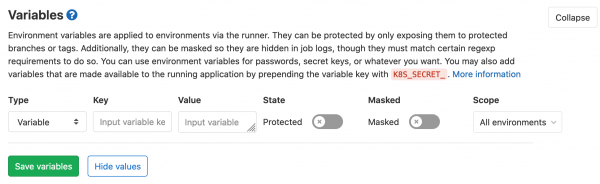
In group and project settings, variables can be defined as either 'file' or 'regular variable' with the options 'protected' and 'masked' checked.
Let's start with simple inheritance and gradually complicate it.
A final list of priority levels can be found at the end of the document.
Inheritance with groups [sources]
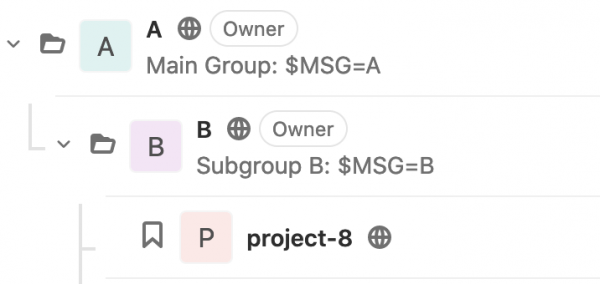
Variables from groups are inherited, with the rule that the closer the group is to the project, the more important its value is.
Groups with variables
.gitlab-ci.yml
image: busybox:latest
variables:
  GIT_STRATEGY: none

echo:
  stage: test
  script:
    - echo $MSG
Pipeline result
$ echo $MSG
B
If the variable was not specified in group B, we would see value A.
Inheritance of variables inside .gitlab-ci.yml [sources]
Here, it's quite simple: you can define a global variable or override it within the job.
Groups with variables

.gitlab-ci.yml
Now let's create 2 jobs, in one of which we explicitly specify $MSG.
image: busybox:latest
variables:
  GIT_STRATEGY: none
  MSG: "Custom in global .gitlab-ci.yml"

echo:
  stage: test
  script:
    - echo $MSG

echo with var:
  stage: test
  variables:
    MSG: "Custom in job .gitlab-ci.yml"
  script:
    - echo $MSG
Pipeline result
- echo:
$ echo $MSG Custom in global .gitlab-ci.yml Job succeeded - echo with vars:
$ echo $MSG
Custom in job .gitlab-ci.yml
Job succeeded
Inheritance with groups and inside .gitlab-ci.yml [sources]
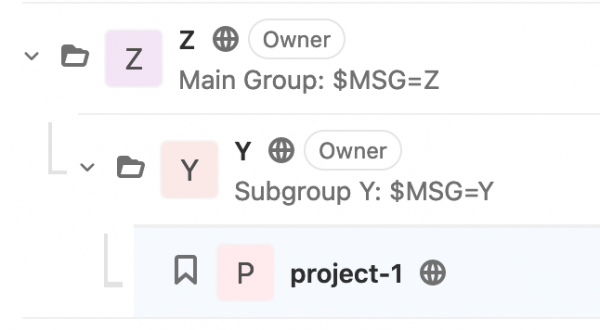
Let's try to combine the previous 2 examples. Group variables take precedence over variables inside .gitlab-ci.yml.
Groups with variables
.gitlab-ci.yml
image: busybox:latest
variables:
  GIT_STRATEGY: none
  MSG: "Custom in global .gitlab-ci.yml"

echo:
  stage: test
  script:
    - echo $MSG

echo with var:
  stage: test
  variables:
    MSG: "Custom in job .gitlab-ci.yml"
  script:
    - echo $MSG
Pipeline result
- echo:
$ echo $MSG Y Job succeeded - echo with vars:
$ echo $MSG
Y
Job succeeded
Inheritance with variable specification in project settings [sources]
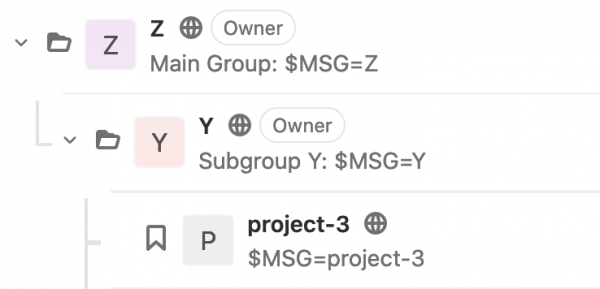
Variables in project settings ALWAYS have the highest priority! Variables specified inside .gitlab-ci.yml play no role.
Groups with variables
Group variables have lower priority.
.gitlab-ci.yml
We'll use the file from the previous example. Here again, there are variables specified inside .gitlab-ci.yml, but group variables still take precedence over them.
image: busybox:latest
variables:
  GIT_STRATEGY: none
  MSG: "Custom in global .gitlab-ci.yml"

echo:
  stage: test
  script:
    - echo $MSG

echo with var:
  stage: test
  variables:
    MSG: "Custom in job .gitlab-ci.yml"
  script:
    - echo $MSG
Pipeline result
- echo:
$ echo $MSG project-3 Job succeeded - echo with vars:
$ echo $MSG
project-3
Job succeeded
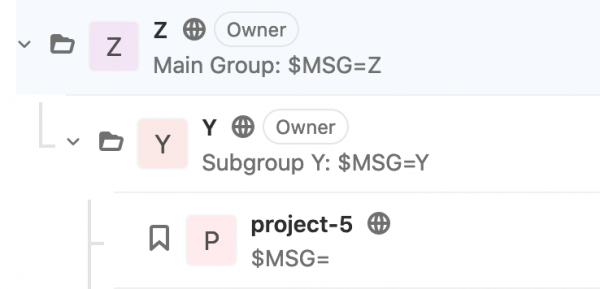
Inheritance with empty value [sources]
An empty value is still a value
An empty value is not Null
Groups with variables
.gitlab-ci.yml
image: busybox:latest
variables:
  GIT_STRATEGY: none
  MSG: "Custom in global .gitlab-ci.yml"

echo:
  stage: test
  script:
    - echo $MSG

echo with var:
  stage: test
  variables:
    MSG: "Custom in job .gitlab-ci.yml"
  script:
    - echo $MSG
Pipeline result
- echo:
$ echo $MSG Job succeeded - echo with vars:
$ echo $MSG
Job succeeded
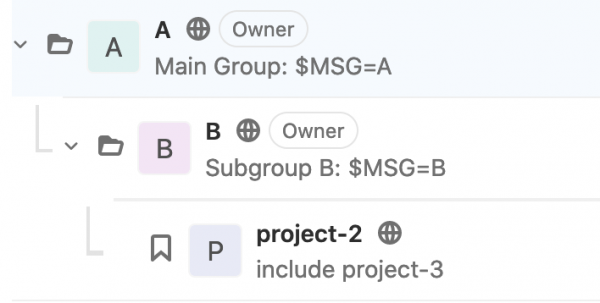
Inheritance with include and groups [sources]
Here we will try to include project-3 in project-2
Groups take precedence in this case.
Groups with variables
.gitlab-ci.yml
And we will define the variable globally in .gitlab-ci.yml
variables:
 MSG: "With include .gitlab-ci.yml"
include:
 - project: how-is-gitlab-ci-inherit-environment-variables/z/y/project-3
   file: '.gitlab-ci.yml'
Pipeline result
- echo:
$ echo $MSG B Job succeeded - echo with vars:
$ echo $MSG
B
Job succeeded
Inheritance with include [sources]
Here we will try to include project-3 in project-2.
With the condition that neither the groups nor the project itself have any variables.
Groups with variables

.gitlab-ci.yml
The same as in the previous example
variables:
 MSG: "With include .gitlab-ci.yml"
include:
 - project: how-is-gitlab-ci-inherit-environment-variables/z/y/project-3
   file: '.gitlab-ci.yml'
Pipeline result
- echo:
$ echo $MSG With include .gitlab-ci.yml Job succeeded - echo with vars:
$ echo $MSG
Custom in job .gitlab-ci.yml
Job succeeded
The following results in priorities:
- Variables in project settings
- Variables in groups
- Variables strictly specified within jobs (including included files)
- Global variables inside .gitlab-ci.yml
- Global variables inside included files
Conclusion
The least obvious point is that the rule "the closer the variable is to the code, the more important it is" applies first to groups, and then the same rule applies to variables within .gitlab-ci.yml, but only on the condition that variables in groups are not specified.
Furthermore, an important point is understanding that the global space for the main and included .gitlab-ci.yml is shared. And the file into which the include occurs has priority.
Source: habr.com
