

We live in an amazing time when it is possible to quickly and easily connect several ready-made open tools, configure them with 'disconnected consciousness' based on advice from stackoverflow, without getting bogged down in 'wordiness', and launch them into commercial operation. And when it's time to update/expand or if someone accidentally restarts a couple of machines, one realizes that some obsessive nightmare has started in reality, everything has suddenly become overwhelmingly complicated, there's no way back, the future is hazy, and instead of programming, it's safer to raise bees and make cheese.
It's no wonder that more experienced colleagues, with their heads gray from countless bugs, watching the improbably rapid deployment of 'containers' in 'cubes' across dozens of servers with 'trendy languages' featuring built-in support for asynchronous non-blocking I/O — smile modestly. And they quietly continue to reread 'man ps', strain their eyes digging into the sources of 'nginx', and write-write-write unit tests. Colleagues know that the most interesting part lies ahead when 'all this' one day becomes a stake on New Year’s Eve. And only a deep understanding of the nature of Unix, memorized TCP/IP state tables, and basic sorting-searching algorithms will help them to revive the system at the stroke of midnight.
Ah yes, I got a bit sidetracked, but I hope I conveyed the sense of anticipation.
Today, I want to share our experience in deploying a convenient and affordable stack for DataLake that addresses most analytical tasks in the company across completely different structural divisions.
Some time ago, we came to understand that companies increasingly need insights from both product and technical analytics (not to mention the cherries on top in the form of machine learning), and in order to grasp trends and risks, it's necessary to collect and analyze growing amounts of metrics.
Basic technical analytics in 'Bitrix24'
Several years ago, alongside the launch of the "Bitrix24" service, we actively invested time and resources in creating a simple and reliable analytics platform that would help quickly identify infrastructure issues and plan the next steps. Naturally, it was preferable to use ready-made tools that were as simple and understandable as possible. As a result, we chose Nagios for monitoring and Munin for analytics and visualization. Now we have thousands of checks in Nagios, hundreds of graphs in Munin, and colleagues use them successfully on a daily basis. The metrics are clear, the graphs are understandable, the system has been reliable for several years and new tests and graphs are regularly added: when we introduce a new service into operation, we add several tests and graphs. Here’s to a good start.
Keeping a Finger on the Pulse — Advanced Technical Analytics
The desire to receive information about issues "as quickly as possible" led us to actively experiment with simple and understandable tools — Pinba and Xhprof.
Pinba sent us statistics on the performance of parts of web pages on PHP in UDP packets, allowing us to see in real-time a short list of problems in the MySQL storage (the Pinba has its own MySQL engine for fast event analytics) and respond to them. And Xhprof automatically allowed us to gather execution graphs of the slowest PHP pages for clients and analyze what could have led to this — calmly, with a cup of tea or something stronger.
Some time ago, the toolkit was supplemented with another quite simple and understandable engine based on reverse indexing algorithms, excellently implemented in the legendary Lucene library — Elastic/Kibana. The straightforward idea of multi-threaded document recording into Lucene's inverted index based on events in logs and quick search through them using faceted division turned out to be quite useful.
Despite the rather technical appearance of the visualizations in Kibana, with low-level concepts like "bucket" and a newly reinvented language not yet forgotten from relational algebra — the tool has helped us well in the following tasks:
- How many PHP errors did the Bitrix24 client have on portal p1 in the last hour, and what were they? Understand, forgive, and quickly rectify.
- How many video calls were made on the portals in Germany over the past 24 hours, what was the quality, and were there any issues with the channel/network?
- How well is the system functionality (our extension in C for PHP) working, compiled from source code in the latest service update and rolled out to clients? Are there any segfaults?
- Are client data stored in PHP memory? Are there any errors related to exceeding the allocated process memory: 'out of memory'? Identify and neutralize them.
Here's a concrete example. Despite thorough multi-level testing, a client encountered an annoying and unexpected error due to a very non-standard case with corrupted input data; the siren went off, and the process of rapid correction began:
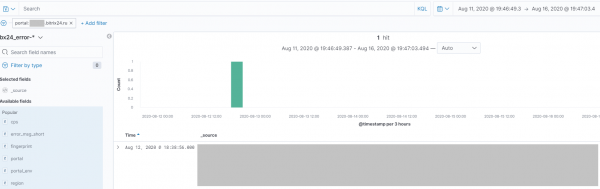
Additionally, Kibana allows organizing alerts based on specific events, and in a short time, dozens of employees from different departments — from technical support and development to QA — began using the tool.
The activity of any department within the company has become easy to track and measure — instead of manually analyzing logs on the servers, it's enough to set up log parsing and send them to the elastic cluster once, to enjoy, for example, watching the dashboard in Kibana showing the number of sold two-headed kittens printed on a 3D printer over the past lunar month.
Basic Business Analytics
Everyone knows that often business analytics in companies starts with the extremely active use of, yes, Excel. But the main thing is that it doesn’t end there. Cloud-based Google Analytics also adds fuel to the fire — you quickly get used to good things.
In our harmoniously growing company, 'prophets' of more intensive work with larger data sets began to appear here and there. There has been a regular need for deeper and more comprehensive reports, and through the efforts of people from different departments, a simple and practical solution was organized some time ago — the integration of ClickHouse and PowerBI.
For quite a long time, this flexible solution helped excellently, but gradually it became clear that ClickHouse is not elastic and can't be abused like that.
It is important to understand that ClickHouse, like Druid, Vertica, and Amazon RedShift (which is based on Postgres), is an analytical engine optimized for convenient analytics (sums, aggregations, min-max on columns, and a bit of joining), as they are organized for efficient storage of columns in relational tables, unlike known MySQL and other (row-oriented) databases.
Essentially, ClickHouse is just a more spacious 'database', with not-so-convenient point inserts (that's by design, all is well), but pleasant analytics and a set of interesting powerful data manipulation functions. Yes, you can even create a cluster — but you understand that hammering nails with a microscope is not quite right, and we started looking for other solutions.
Demand for Python and analysts
In our company, there are many developers who write code almost every day for 10-20 years in PHP, JavaScript, C#, C/C++, Java, Go, Rust, Python, Bash. There are also many experienced system administrators who have survived more than one completely unbelievable catastrophe that defies statistical laws (for example, when most disks in a RAID-10 are destroyed by a strong lightning strike). In such conditions, it has long been unclear what 'a Python analyst' is. Python is like PHP, just a slightly longer name and slightly fewer traces of substances altering consciousness in the interpreter's source code. However, as more and more analytical reports were created, experienced developers increasingly recognized the importance of narrow specialization in tools like numpy, pandas, matplotlib, seaborn.
The decisive role was probably played by the sudden fainting of employees at the combination of the words 'logistic regression' and the demonstration of effective report building on large datasets using, yes, pyspark.
Apache Spark and its functional paradigm, which fits well with relational algebra, made such an impression on developers accustomed to MySQL that the need to reinforce the ranks with experienced analysts became as clear as day.
Further attempts at Apache Spark/Hadoop to take off and what went not quite according to the script
However, it soon became clear that there was something fundamentally wrong with Spark, or perhaps we just needed to wash our hands better. While the Hadoop/MapReduce/Lucene stack was crafted by experienced programmers—evident if you closely examine the Java sources or Doug Cutting's ideas in Lucene—Spark, unexpectedly, is written in a rather controversial and currently stagnant language called Scala from a practical standpoint. The frequent crashes of computations on Spark clusters due to illogical and opaque memory allocation for reduce operations (many keys arrive at once) created an aura around it suggesting there is much room for improvement. Additionally, a large number of strange open ports, temporary files growing in inexplicable places, and a jar-dependency bloat exacerbated the situation—evoking a familiar and deep-seated feeling in system administrators: intense loathing (maybe we should have been washing our hands with soap).
As a result, we "survived" several internal analytical projects that actively utilized Apache Spark (including Spark Streaming, Spark SQL) and the Hadoop ecosystem (and more). Despite the fact that over time we learned to prepare and monitor "it" quite well and "it" nearly stopped crashing unexpectedly due to changes in data characteristics and RDD's uneven hashing, the desire to use something ready-made, updatable, and managed somewhere in the cloud grew stronger and stronger. It was during this time that we tried using Amazon Web Services' ready-made cloud build— and subsequently aimed to tackle tasks on it. EMR is a pre-packaged Apache Spark from Amazon with additional software from the ecosystem, somewhat like Cloudera/Hortonworks builds.
A "rubber" data warehouse for analytics—this is an urgent need.
The experience of "preparing" Hadoop/Spark with burns on various parts of the body did not go without consequence. The need for a single, inexpensive, and reliable data storage solution that is resilient to hardware failures and capable of storing files in different formats from various systems while allowing for efficient and timely queries for reports became increasingly clear.
We also wanted the software update for this platform not to turn into a New Year's nightmare of reading 20-page Java traces and analyzing kilometers of detailed logs from the cluster using Spark History Server and a magnifying glass with a spotlight. We wanted a simple and transparent tool that doesn't require regular dives under the hood, especially when a developer's standard MapReduce query fails due to the reduce worker's memory running out because of a poorly chosen data partitioning algorithm.
Is Amazon S3 a candidate for DataLake?
Experience with Hadoop/MapReduce taught us that we need a scalable, reliable file system and scalable workers that come closer to the data to avoid moving data over the network. Workers should be able to read data in different formats but, preferably, without reading unnecessary information and allowing data to be stored in convenient formats for the workers in advance.
Once again — the main idea. There is no desire to "dump" large data into a single clustered analytical engine that will inevitably choke sooner or later and will need to be sharded awkwardly. We want to store files, just files, in a clear format and run efficient analytical queries on them with various but understandable tools. And there will be more and more files in different formats. It's better to shard the source data, not the engine. We decided we need a scalable and universal DataLake...
What if we store files in the familiar and well-known scalable cloud storage Amazon S3, avoiding the hassle of preparing our own Hadoop meals?
Of course, personal data is "not allowed", but what about moving other data there and "processing it efficiently"?
The clustered big data analytics ecosystem of Amazon Web Services — in very simple terms.
Based on our experience with AWS, Apache Hadoop/MapReduce has long been actively used there under various guises, for instance, in the DataPipeline service (I envy my colleagues; they really know how to set it up right). Here we configured backups from various services from DynamoDB tables:
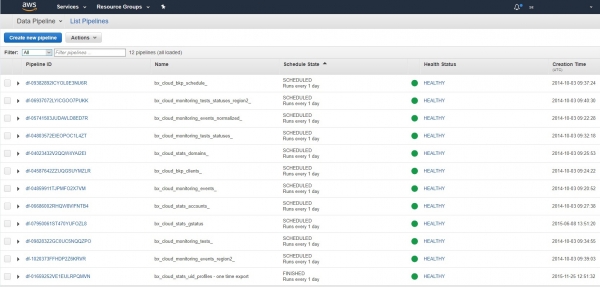
And they have been running regularly on built-in Hadoop/MapReduce clusters like clockwork for several years now. "Set it up and forget it":
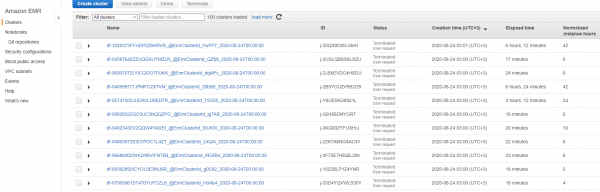
Additionally, one can effectively engage in data science by launching Jupiter notebooks in the cloud for analysts and using AWS SageMaker for training and deploying AI models. Here's how it looks with us:
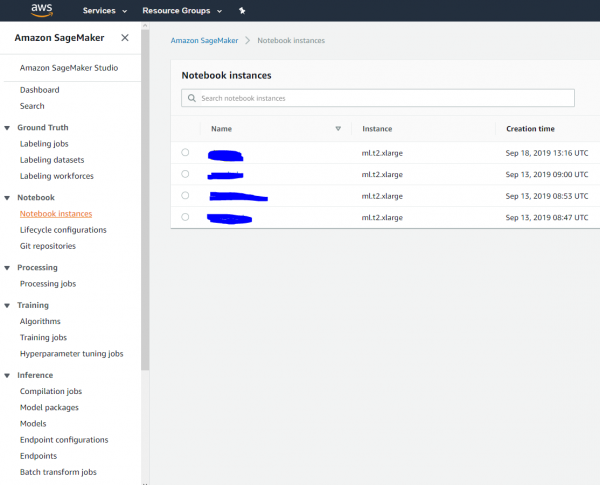
And yes, you can set up a notebook in the cloud or for an analyst and connect it to a Hadoop/Spark cluster, perform calculations, and then 'nail it all down':
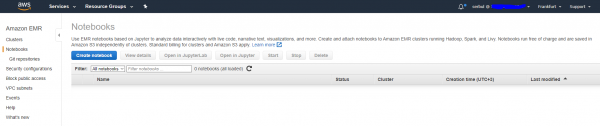
It's indeed convenient for individual analytical projects, and for some, we have successfully used the EMR service for large-scale calculations and analytics. But what about a systematic solution for DataLake? Would it work? At that moment, we were on the verge of hope and despair and continued our search.
AWS Glue is a neatly packaged Apache Spark 'on steroids.'
It turned out that AWS has its own version of the Hive/Pig/Spark stack. The role of Hive, i.e., the catalog of files and their types in DataLake, is performed by the 'Data Catalog' service, which does not hide its compatibility with the Apache Hive format. In this service, you need to add information about where your files are located and in what format they are. The data can be stored not only in S3 but also in a database, but that's not the topic of this post. Here's how our DataLake data catalog is organized:
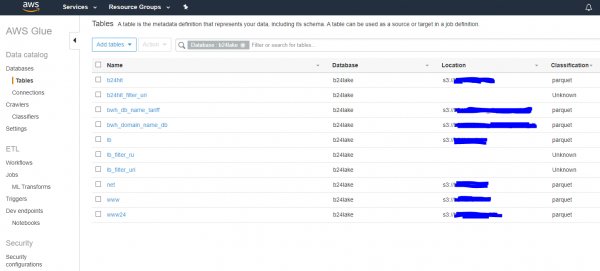
Files are registered, great. If the files are updated, we either run crawlers manually or on a schedule, which will refresh the information from the lake and save it. Next, the data from the lake can be processed and the results exported somewhere. In the simplest case, we export them to S3 as well. Data processing can be done anywhere, but it's suggested to set up the processing on an Apache Spark cluster using advanced features via the AWS Glue API. Essentially, you can take your trusty old Python code using the pyspark library and configure it to run on N nodes of a cluster with some power, along with monitoring, without digging into the depths of Hadoop and dragging around Docker containers and resolving dependency conflicts.
Once again — a simple idea. There's no need to configure Apache Spark; you just need to write Python code for pyspark, test it locally on your desktop, and then run it on a large cloud cluster, specifying where the source data is and where to place the results. Sometimes this is necessary and useful, and here's how it's set up with us:
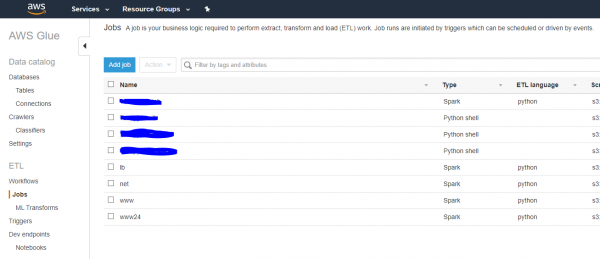
Thus, if you need to perform calculations on a Spark cluster with data in S3, you write Python/pyspark code, test it, and off you go to the cloud.
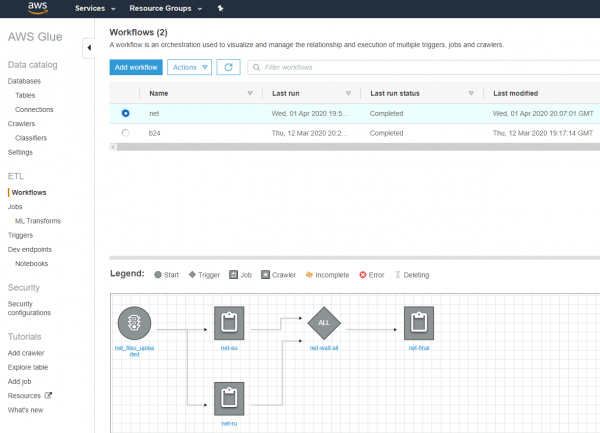
What about orchestration? What if a task fails and is lost? Yes, a nice pipeline in the style of Apache Pig is suggested, and we've tried it, but we've decided to continue using our deeply customized orchestration in PHP and JavaScript (I understand there’s a cognitive dissonance, but it has been working flawlessly for years).
The format of files stored in the lake is key to performance.
It is very, very important to understand two more key points. To ensure that data queries in the lake are executed as quickly as possible and performance does not degrade with the addition of new information, you need to:
- Store file columns separately (so you don't have to read all rows to understand what is in the columns). For this, we adopted the parquet format with compression.
- It is crucial to shard files into folders such as: language, year, month, day, week. Engines that understand this type of sharding will only look into the relevant folders, without sifting through all the data indiscriminately.
Essentially, in this way, you are providing the original data in the most efficient form for the analytical engines applied on top, which can selectively access sharded folders and read only the necessary columns from the files. There’s no need to 'upload' data anywhere (the storage will just burst) — simply place it smartly in the filesystem in the correct format. Of course, it should be clear that storing a huge CSV file in a DataLake, which needs to be read line by line to extract columns — is not very sensible. Think about the two aforementioned points once more, if you're still unclear on why this matters.
AWS Athena — the 'magic' from the box.
And here, while creating the lake, we stumbled upon Amazon Athena. It turned out that neatly arranging our large log files into sharded folders in the correct (parquet) columnar format allows for rapid, highly informative queries and report generation WITHOUT an Apache Spark/Glue cluster.
The Athena engine, working on data in S3, is based on the legendary. — a representative of the MPP (massive parallel processing) family of data processing approaches, which retrieves data from where it resides, from s3 and Hadoop to Cassandra and regular text files. You just need to ask Athena to execute an SQL query, and everything "works quickly and on its own." It's important to note that Athena is "smart," only accessing the necessary sharded folders and reading only the columns needed for the query.
The pricing for queries to Athena is also interesting. We pay for . That is, not by the number of machines in the cluster per minute, but… for the actual data scanned that is necessary to execute the query across 100-500 machines.
By querying only the required columns from the correctly sharded folders, it turned out that the Athena service costs us tens of dollars a month. Well, it's great, almost free compared to analytics on clusters!
Here, by the way, is how we shard our data in s3:
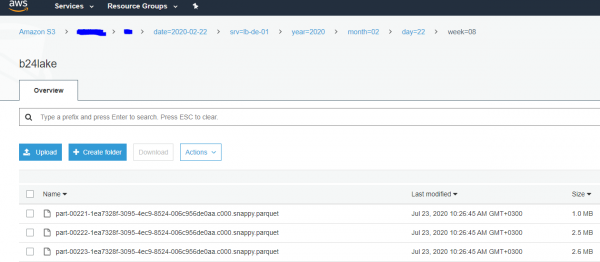
As a result, in a short time, completely different departments in the company, from information security to analytics, began actively querying Athena and quickly, in seconds, receiving useful answers from "big" data over quite lengthy periods: months, half-years, etc.
But we went further and started fetching answers from the cloud : an analyst writes an SQL query in the familiar console, which "cheaply" sifts through the data in s3 across 100-500 machines and usually returns an answer in a matter of seconds. Convenient. And fast. It's hard to believe.
As a result, having decided to store data in s3, in an efficient columnar format and with reasonable data sharding across folders… we created a DataLake and a fast and affordable analytical engine — for free. It became very popular in the company, as it understands SQL and works orders of magnitude faster than via launches/stops/settings of clusters. "And if the result is the same, why pay more?"
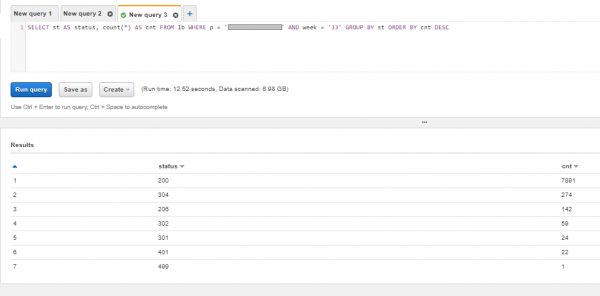
A query to Athena looks something like this. Of course, if desired, a sufficiently , can be formed, but we will limit ourselves to a simple grouping. Let's see what response codes the client had a few weeks ago in the web server logs and ensure that there are no errors:
Conclusions
Having gone through a journey that wasn't long but was painful, constantly assessing risks, complexity, and support costs, we found a solution for DataLake and analytics that continues to delight us with its speed and cost of ownership.
It turned out that building an efficient, fast, and cost-effective DataLake for the needs of completely different company departments is well within reach, even for experienced developers who have never worked as architects and don’t know how to draw boxes on boxes with arrows, nor do they know 50 terms from the Hadoop ecosystem.
At the beginning of the journey, my head was spinning from the multitude of wild open-source and proprietary software options and the burden of responsibility towards future generations. Just start building your DataLake from simple tools: nagios/munin -> elastic/kibana -> Hadoop/Spark/s3 …, gathering feedback and deeply understanding the physics of ongoing processes. Hand over everything complicated and murky to your enemies and competitors.
If you don’t want to go to the cloud and love maintaining, updating, and patching open-source projects, you can build a setup similar to ours locally on inexpensive office machines with Hadoop and Presto on top. The main thing is not to stop and keep moving forward, calculating, searching for simple and clear solutions, and everything will definitely work out! Good luck to everyone and see you again!
Source: habr.com
