


This article discusses a case study on accelerating a browser application by replacing JavaScript computations with WebAssembly.
What is WebAssembly?
In short, it is a binary instruction format for a stack-based virtual machine. Often referred to as a programming language, this is a misconception. The instruction format is executed in the browser alongside JavaScript.
Importantly, WebAssembly can be generated by compiling source code from languages like C/C++, Rust, and Go. It employs static typing and a so-called flat memory model. As mentioned above, the code is stored in a compact binary format, allowing it to run almost as fast as if the application were executed with command-line instructions. These capabilities have contributed to the growing popularity of WebAssembly.
Reminder: for all readers of 'Habr' - a discount of 10,000 rubles when enrolling in any Skillbox course with the promo code 'Habr'.
Skillbox recommends: Practical Course .
Currently, Wasm is used in many applications, ranging from games like Doom 3 to web-ported applications like Autocad and Figma. Wasm is also applied in areas such as serverless computing.
This article provides an example of using Wasm to speed up an analytical web service. For demonstration, we took a working application written in C, which will be compiled into WebAssembly. The result will be used to replace inefficient parts of JS.
Transforming the application
The example will use the browser service fastq.bio, designed for geneticists. The tool allows for assessing the quality of DNA sequencing.
Here’s an example of the application in action:
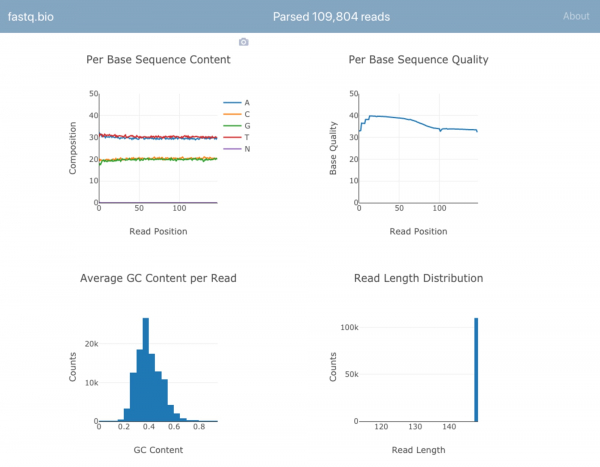
Details of the process do not need to be provided, as they are quite complex for non-specialists, but in brief, scientists can determine from the infographic above whether the DNA sequencing process went smoothly and what issues arose.
This service has alternatives, desktop programs. However, fastq.bio allows for accelerated work by visualizing data. In most other cases, one needs to be proficient in command-line operations, but not all geneticists have the necessary experience.
Everything works simply. At the input, there are data presented in the form of a text file. This file is generated by specialized sequencing tools. It contains a list of DNA sequences and a quality score for each nucleotide. The file format is .fastq, which is how the service got its name.
Implementation in JavaScript
The user's first step when using fastq.bio is to select the appropriate file. Using the File object, the application reads a random sample of data from the file and processes this batch. The task of JavaScript here is to perform simple string operations and calculate metrics. One of them is the count of nucleotides A, C, G, and T in different DNA fragments.
After calculating the necessary metrics, they are visualized using Plotly.js, and the service begins to work with the new data sample. The segmentation is done to improve UX quality. If all data were processed at once, the process would hang for some time, as sequencing result files take up hundreds of gigabytes of file space. Instead, the service takes data chunks ranging from 0.5 to 1 MB and processes them step by step, building graphical data.
Here's how it works:
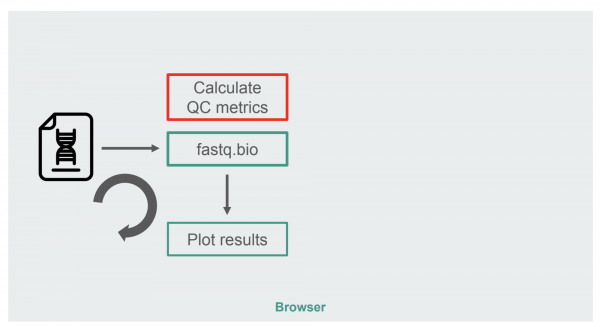
The red rectangle contains the string transformation algorithm to obtain the visualization. This is the most computation-intensive part of the service. It's worth trying to replace it with Wasm.
Testing WebAssembly
To evaluate the possibility of using Wasm, the project team looked for ready-made solutions to create a QC metric (QC — quality control) based on fastq files. The search was conducted among tools written in C, C++, or Rust, to allow for porting the code to WebAssembly. Additionally, the tool should not be 'raw', a service already validated by scientists was required.
As a result, the choice was made in favor of . The application is quite popular, it is open-source, and the source language is C.
Before converting to Wasm, it is worth looking at the compilation principle of seqtk for desktop. According to the Makefile, here’s what is needed:
# Compile to binary
$ gcc seqtk.c
   -o seqtk
   -O2
   -lm
   -lz
In principle, seqtk can be compiled using Emscripten. If it's not available, we can do it .
$ docker pull robertaboukhalil/emsdk:1.38.26
$ docker run -dt --name wasm-seqtk robertaboukhalil/emsdk:1.38.26
If desired, , but that requires time.
Within the container, emcc can be easily used as an alternative to gcc.
# Compile to WebAssembly
$ emcc seqtk.c
    -o seqtk.js
    -O2
    -lm
    -s USE_ZLIB=1
    -s FORCE_FILESYSTEM=1
Minimal changes:
Instead of outputting to a binary file, Emscripten generates .wasm and .js files that are used to run the WebAssembly module.
To support the zlib library, the USE_ZLIB flag is utilized. This library is widely adopted and has been ported to WebAssembly, and Emscripten includes it in the project.
The Emscripten virtual file system is activated. This , operating in memory within the browser. When the page is refreshed, the memory is cleared.
To understand the need for a virtual file system, one should compare the way seqtk is run from the command line to how the compiled WebAssembly module is executed.
# On the command line
$ ./seqtk fqchk data.fastq

# In the browser console
> Module.callMain(["fqchk", "data.fastq"])
Accessing the virtual file system is necessary to avoid rewriting seqtk for standard input rather than file input. In this case, the data fragment is represented as the file data.fastq in the virtual filesystem with a call to main() seqtk.
Here is the new architecture:
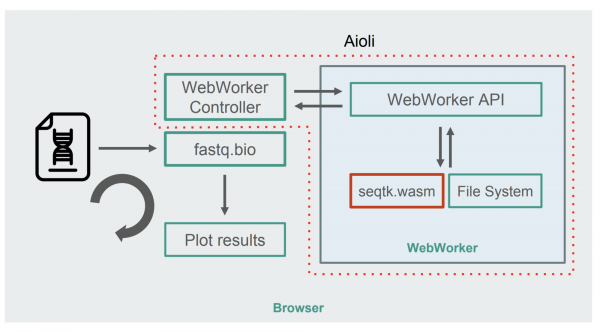
The illustration shows that calculations are performed using . This approach allows computations to run in the background, without degrading browser responsiveness. The WebWorker controller starts the Worker, managing its interaction with the main thread.
The seqtk command is executed using a Worker on the mounted file. Once the Worker finishes executing, it returns the result as a Promise. When the message is received by the main thread, the result is used to update graphs. This process repeats over several iterations.
What about WebAssembly performance?
To evaluate the change in performance, the project team used the number of read operations per second as a parameter. The time taken to build interactive graphs is not counted, as both implementations use JavaScript.
Using the out-of-the-box solution resulted in a ninefold performance increase.
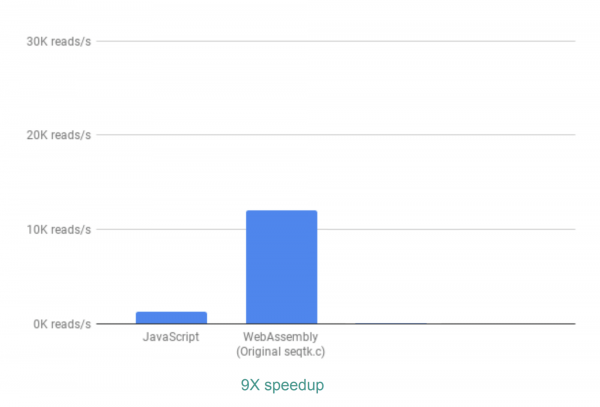
This is an excellent result, but it turned out there is also room for optimization. Many results from the QC analysis are not utilized by seqtk, so they can be removed. If this is done, the result improves 13 times compared to JS.
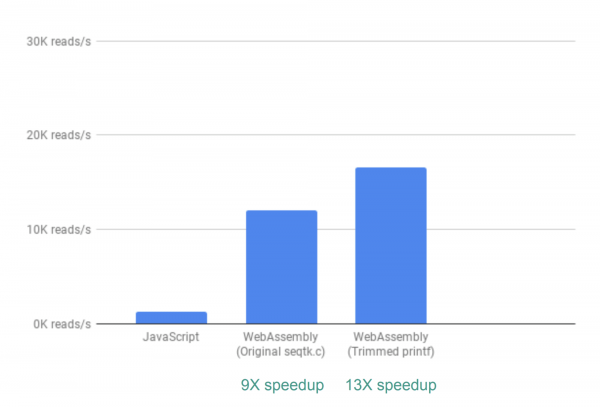
This was achieved simply by commenting out printf() commands.
But that's not all. The fact is that at this stage, fastq.bio obtains analysis results through calls to various C functions. Each of them computes its own set of characteristics, so each fragment of the file is read twice.
To address this issue, it was decided to combine two functions into one. As a result, performance increased by 20 times.
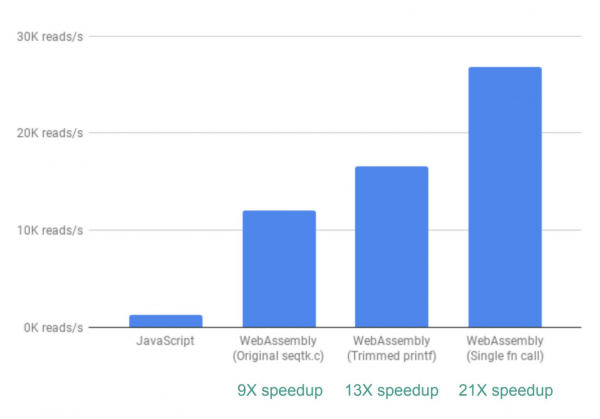
It is worth noting that such an outstanding result can hardly be achieved consistently. In some cases, performance may drop, so it's essential to evaluate each specific situation.
In conclusion, it can be said that Wasm truly provides an opportunity to enhance application performance, but it should be used wisely.
Skillbox recommends:
- Two-Year Practical Course .
- Online Course .
- Practical Year Course .
Source: habr.com
