

Note: translation.: this article, written by an SRE engineer from LinkedIn, details the 'internal magic' in Kubernetes — specifically, the interaction between CRI, CNI, and kube-apiserver — that occurs when a pod requires an IP address to be assigned.
One of the basic requirements is that each pod must have its own unique IP address, and any other pod in the cluster must be able to communicate with it at that address. There are many network 'providers' (Flannel, Calico, Canal, etc.) that help implement this networking model.
When I first started working with Kubernetes, I wasn't quite clear on how pods actually receive their IP addresses. Even with an understanding of how individual components function, it was challenging to visualize their collaborative operation. For example, I knew the purpose of CNI plugins, but I couldn't grasp how they were invoked. Therefore, I decided to write this article to share insights on the various networking components and their collaboration within a Kubernetes cluster that allows each pod to obtain its unique IP address.
There are various ways to organize network interaction in Kubernetes — similar to the different types of runtime environments for containers. This publication will use to organize the network in the cluster, and as the runtime environment — . I also assume that you know how network interaction between containers is structured, so I will only briefly touch on it for context.
Some basic concepts
Containers and networking: a brief overview
There are plenty of excellent publications online explaining how containers communicate with each other over the network. Thus, I will provide only a general overview of the key concepts and limit myself to one approach, which involves creating a Linux bridge and encapsulating packets. Details are omitted since the topic of container networking deserves an article of its own. Links to some particularly insightful and informative publications will be provided below.
Containers on a single host
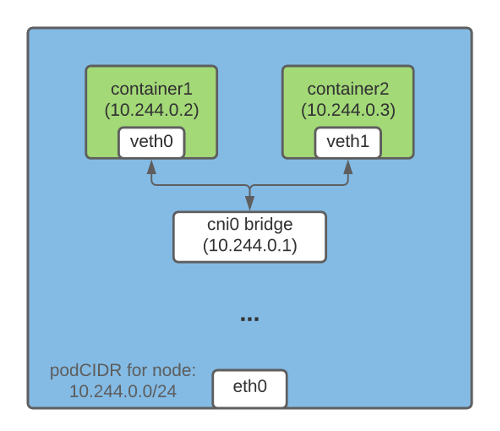
One way to organize communication via IP addresses between containers running on the same host involves creating a Linux bridge. For this, virtual devices are created in Kubernetes (and Docker) . One end of the veth device connects to the container's network namespace, while the other connects to on the host network.
All containers on the same host have one end of the veth connected to the bridge, through which they can communicate with each other via IP addresses. The Linux bridge also has an IP address and acts as a gateway for outgoing (egress) traffic from pods intended for other nodes.
Containers on different hosts
Packet encapsulation is one way that allows containers on different nodes to communicate with each other via IP addresses. In Flannel, this capability is handled by the technology , which "packages" the original packet in a UDP packet and then sends it to its destination.
In a Kubernetes cluster, Flannel creates a vxlan device and accordingly updates the routing table on each node. Each packet destined for a container on another host passes through the vxlan device and is encapsulated in a UDP packet. At the destination, the encapsulated packet is extracted and forwarded to the appropriate pod.
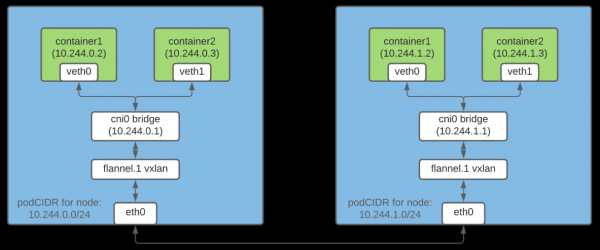
Note: This is just one way to organize network interaction between containers.
What is CRI?
is a plugin that allows the kubelet to use different container runtime environments. The CRI API is built into the various runtime environments, enabling users to choose the runtime as they see fit.
What is CNI?
is a is designed to provide a universal networking solution for Linux containers. Additionally, it includes , responsible for various functions when configuring the pod network. A CNI plugin is an executable that adheres to the specification (some plugins will be discussed below).
Allocating subnets to nodes for assigning IP addresses to pods
Since each pod in the cluster must have an IP address, it is important to ensure that this address is unique. This is achieved by allocating a unique subnet to each node from which IP addresses are then assigned to the pods on that node.
Node IPAM controller
Once nodeipam is passed as a flag parameter --controllers , it allocates a separate subnet (podCIDR) from the cluster's CIDR (i.e., the range of IP addresses for the cluster network) to each node. Since these podCIDRs do not overlap, it becomes possible to assign a unique IP address to each pod.
A Kubernetes node is assigned a podCIDR at the time of its initial registration in the cluster. To change the podCIDR for nodes, they must be deregistered and then re-registered, making the appropriate changes to the Kubernetes control plane configuration in the intervening period. You can retrieve a node's podCIDR using the following command:
$ kubectl get no  -o json | jq '.spec.podCIDR'
10.244.0.0/24
Kubelet, container runtime, and CNI plugins: how it all works
Scheduling a pod on a node involves carrying out many preparatory actions. In this section, I will focus only on those that are directly related to configuring the pod's network.
Scheduling a pod on a specific node triggers the following chain of events:
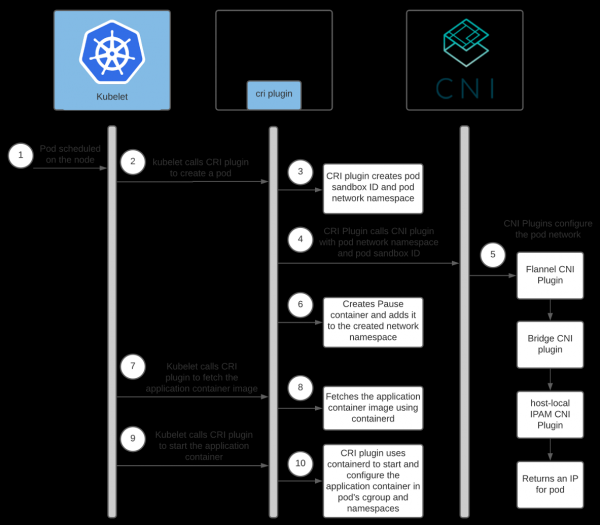
Note: .
Interaction between the container runtime and CNI plugins
Each network provider has its own CNI plugin. The container runtime invokes it to configure the network for the pod during its startup. In the case of containerd, the CNI plugin is managed by the plugin .
Each provider also has its own agent. This agent is installed on all Kubernetes nodes and is responsible for the network configuration of pods. The agent either comes with the CNI config or creates it independently on the node. The config helps the CRI plugin determine which CNI plugin to invoke.
The location of the CNI config can be configured; by default, it is located in /etc/cni/net.d/<config-file>. Cluster administrators are also responsible for installing CNI plugins on each cluster node. Their location can also be configured; the default directory is /opt/cni/bin.
When using containerd, paths for the config and plugin binaries can be specified in the section [plugins."io.containerd.grpc.v1.cri".cni] downward API support (simultaneously with this in .
Since we are using Flannel as the network provider, let’s talk a bit about its configuration:
- Flanneld (the Flannel daemon) is usually installed in the cluster as a DaemonSet with
install-cnias . Install-cnicreates (/etc/cni/net.d/10-flannel.conflist) on each node.- Flanneld creates a vxlan device, fetches network metadata from the API server, and monitors pod updates. As they are created, it disseminates routes for all pods throughout the cluster.
- These routes enable pods to communicate with each other via IP addresses.
For more detailed information on how Flannel operates, I recommend using the links at the end of the article.
Here is the interaction scheme between the Containerd CRI plugin and CNI plugins:
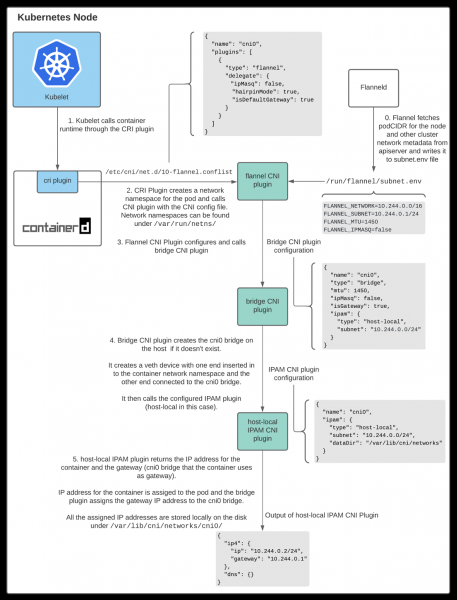
As seen above, the kubelet calls the Containerd CRI plugin to create a pod, which then calls the CNI plugin to configure the pod's network. The network provider's CNI plugin, in turn, calls other underlying CNI plugins to set up various network aspects.
Interaction between CNI plugins
There are various CNI plugins whose task is to help configure network communication between containers on the host. This article will discuss three of them.
CNI plugin Flannel
When using Flannel as the network provider, the Containerd CRI component calls , using the CNI configuration file /etc/cni/net.d/10-flannel.conflist.
$ cat /etc/cni/net.d/10-flannel.conflist
{
  "name": "cni0",
  "plugins": [
    {
      "type": "flannel",
      "delegate": {
         "ipMasq": false,
        "hairpinMode": true,
        "isDefaultGateway": true
      }
    }
  ]
}
The CNI plugin Flannel works together with Flanneld. During startup, Flanneld retrieves podCIDR and other network-related details from the API server and stores them in the file /run/flannel/subnet.env.
FLANNEL_NETWORK=10.244.0.0/16
FLANNEL_SUBNET=10.244.0.1/24
FLANNEL_MTU=1450
FLANNEL_IPMASQ=false
The CNI plugin Flannel uses data from /run/flannel/subnet.env to configure and call the bridge CNI plugin.
CNI Plugin Bridge
This plugin is called with the following configuration:
{
  "name": "cni0",
  "type": "bridge",
  "mtu": 1450,
  "ipMasq": false,
  "isGateway": true,
  "ipam": {
    "type": "host-local",
    "subnet": "10.244.0.0/24"
  }
}
Upon the first call, it creates a Linux bridge with "name": "cni0", as specified in the config. Then a pair of veth interfaces is created for each pod. One end connects to the container's network namespace, while the other enters the Linux bridge in the host's network. connects all host containers to the Linux bridge in the host's network.
Once the veth pair is configured, the Bridge plugin calls the local host (host-local) CNI IPAM plugin. The type of the IPAM plugin can be configured in the CNI config that the CRI plugin uses to call the CNI plugin Flannel.
Local host IPAM plugins CNI
Bridge CNI calls with the following configuration:
{
  "name": "cni0",
  "ipam": {
    "type": "host-local",
    "subnet": "10.244.0.0/24",
    "dataDir": "/var/lib/cni/networks"
  }
}
Host-local IPAM plugin (IP AAddress MManagement — handling IP addresses) returns an IP address for the container from the subnet and saves the allocated IP on the host in the directory specified in the dataDir — /var/lib/cni/networks/<network-name=cni0>/<ip>. This file contains the container ID to which this IP address is assigned.
When the host-local IPAM plugin is called, it returns the following data:
{
  "ip4": {
    "ip": "10.244.4.2",
    "gateway": "10.244.4.3"
  },
  "dns": {}
}
Summary
The kube-controller-manager assigns a podCIDR to each node. Pods of each node obtain IP addresses from the address space within the assigned podCIDR range. Since the podCIDRs of nodes do not overlap, all pods receive unique IP addresses.
The Kubernetes cluster administrator configures and installs kubelet, the container runtime environment, the network provider agent, and copies the CNI plugins to each node. During startup, the network provider agent generates the CNI config. When a pod is scheduled on a node, kubelet calls the CRI plugin for its creation. Then, if containerd is used, the Containerd CRI plugin calls the CNI plugin specified in the CNI config to set up the pod network. As a result, the pod receives an IP address.
It took me a while to understand all the nuances and intricacies of these interactions. I hope the experience I've gained will help you better understand how Kubernetes works. If I make a mistake, please reach out to me at or at . Feel free to contact me if you want to discuss aspects of this article or anything else. I would love to chat with you!
Links
Containers and Networking
How Flannel Works
CRI and CNI
P.S. from the translator
Also read in our blog:
- «»;
- Illustrated guide to networking in Kubernetes: , ;
- «».
Source: habr.com
