

In the previous article I explained how to obtain an authorization session and insert it into a local host macro. In this article, I will discuss how to integrate Zabbix with Asterisk without external scripts and software.
The idea of "integrating" these two systems arose long ago, without the need for additional software installations or scripts. A quick Google search yielded numerous solution options, all reduced to the same advice: throw some scripts (in PHP, Bash, Python, etc.) onto the server, and happiness will follow. However, I wanted to implement monitoring 'out of the box'—without external scripts or additional software installations on the monitoring server and PBX.
I spent a total of 4 working days on this, but the result was worth it. Working through the AMI interface, low-level discovery, triggers, and most importantly, connecting the PBX and all other settings now takes about 15 minutes.
I have Zabbix 4.4 running on around 100 Asterisks of version 13. Some PBXs come with the FreePBX web interface, while others have a bare console, a bunch of tricks, and integration via the dial plan.
Gathering Data from the PBX
The first and most essential issue to address is gathering data on peers and SIP registrations. For this, the PBX has AGI, AMI, ARI interfaces, and an SSH console. I did not consider additional modules for obvious reasons.
First, we need to understand what these AGI, AMI, ARI interfaces represent.
- AGI — using scripts in the dial plan. Mainly used for call control.
- AMI — provides all the necessary information, operates through port 5038, similar to Telnet. This is suitable for us!
- ARI — modern, trendy, JSON-based. Many features, with data formatted in an understandable way for Zabbix, but for me, it lacks one crucial element: it cannot control SIP registration. One more downside is that for peers, there are only two states: online/offline, even though there are more states, which are beneficial for diagnostics.
- SSH — can do everything, but sometimes it is not provided due to 'security concerns.' The reasons can vary, and I won't delve into them.
Nonetheless, despite all its shortcomings, ARI covers 90% of all monitoring needs.
Zabbix and Telnet — my disappointment
I know AMI well; at one time, I implemented loss tracking in conversations when splitting between remote offices, call management, etc. Telnet is also straightforward: open a connection, send commands, and read the response. That's what I did, but the result disappointed me.
Telnet in Zabbix is not like in the Linux console; it's a bit simpler and tailored for standard login/password authorization. If the authorization logic is different, and there is no request for a login/password pair, an error pops up. After futile attempts to bypass the authorization requirement, I looked at the source code of the Telnet module.
I realized that unless there is a traditional login/password request, I wouldn't get further. Out of curiosity, I removed everything related to authorization from the code and rebuilt it. It works! But it doesn't meet the requirements. Moving on...
Returning to the search.
I reread the ARI documentation, conducted additional tests — there are no SIP registrations here. There are peers, conversations, and bridges, but no registrations. At one point, I even wondered if we really needed SIP registrations.
In a funny turn of events, at that moment, I received another request from a user regarding issues with outgoing calls. The problem was with the SIP registration hanging and could be resolved with a simple module restart.
asterisk -rx "sip reload"It would be great to access AMI via the web: that would solve all problems, I thought. I start digging in this direction, and literally the first line of search leads to the official Asterisk documentation, which states that for my tasks there is an option webenabled in the file /etc/asterisk/manager.conf, which needs to be set to YES in the section [general]
After that, with a typical web request like we obtain all the necessary information.
When using the FreePBX interface, you can't enable this option via the web; it needs to be enabled through the console by editing the manager.conf file. FreePBX does not erase it when changing configurations via the web.
As long as I've worked with various Asterisk integrations, I've never seen this function mentioned anywhere. I was surprised that no one described this method of interacting with the PBX. I even went out of my way to search for information on this topic: there is practically nothing or it has been used for completely different tasks.
WEB AMI — what is this creature?
Adding the option webenabled in the file manager.conf provided full access to manage the PBX through the web. All commands available via the regular AMI are now accessible on the web; you can listen to events from the PBX through a socket. The working principle is no different from the console AMI. After activating this option, the PBX can be accessed at the following addresses:
— a web page with a simple interface for testing and manually sending requests. All responses are formatted in a readable HTML view. It is not very suitable for monitoring.
— text output only, the format is similar to the console AMI
— text output only, in XML format. This works for us!
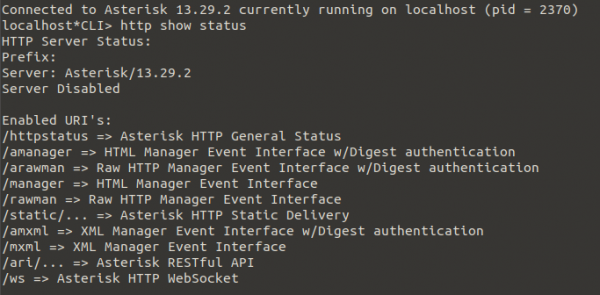
I thought to myself: “This is it – the solution! Everything will be ready now! Easy-peasy lemon squeezy,” but it was too early to celebrate. To get the information we need, it’s enough to use a GET request with the required action action, which returns XML with a list of all registrations and their status. This is all great, but it requires authorization with session memory from cookies. When testing in the browser, you don’t think about this process.
Authorization process
At first, we request the address , and the server responds by sending us a cookie with the authorization session. Here’s what the HTTP request looks like:
https://ats:8089/mxml?action=login&username=zabbix&secret=zabbix

Host: ats:8089
User-Agent: Mozilla/5.0 (X11; Ubuntu; Linux x86_64; rv:77.0) Gecko/20100101 Firefox/77.0
Accept: text/html,application/xhtml+xml,application/xml;q=0.9,image/webp,*/*;q=0.8
Accept-Language: ru-RU,ru;q=0.8,en-US;q=0.5,en;q=0.3
Accept-Encoding: gzip, deflate, br
DNT: 1
Connection: keep-alive
Upgrade-Insecure-Requests: 1
Response:
GET: HTTP/1.1 200 OK
Server: Asterisk/13.29.2
Date: Thu, 18 Jun 2020 17:41:19 GMT
Cache-Control: no-cache, no-store
Content-type: text/xml
Set-Cookie: mansession_id="6f5de42c"; Version=1; Max-Age=600
Pragma: SuppressEvents
Content-Length: 146
To work there, you need mansession_id="6f5de42c", meaning the actual authorization cookie.
The content simply needs to verify the presence of the response “Authentication accepted”. Then, for all requests to the PBX server, we will need to add the authorization cookie to the request.
https://ats:8089/mxml?action=SIPpeers

Host: ats:8089
Connection: close
Cookie: mansession_id="6f5de42c"
How to obtain the authorization cookie and use it in other requests is described here: “»
To create tracking elements in Zabbix, I will use auto-discovery.
Auto-discovery
For the auto-discovery of registrations and tracking the status of peers, you need to access the address: or
In response, the PBX returns an XML response:
...


...
The response contains a lot of unnecessary data, so we filter it during preprocessing according to a template. XPath: //response/generic[@host]
Next begins the most interesting part. To work with detection and dynamically create elements, the response needs to be in JSON format. XML is not supported for auto-detection.
To convert XML to JSON, I had to play around with auto-replacement, for which I wrote a script in JS.
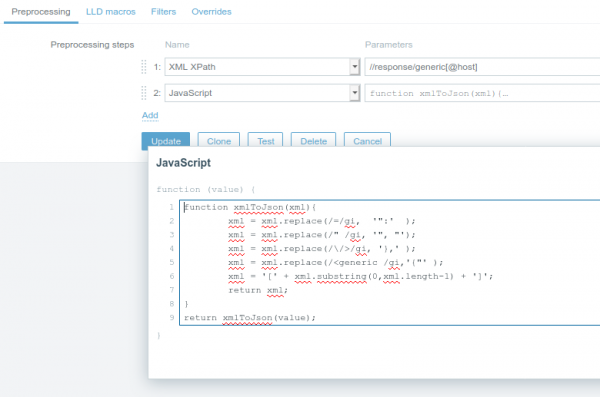
An interesting point is that in the response from the PBX, all parameters are enclosed in single quotes, and after applying the template, //response/generic[@host] they are replaced with double quotes.
To create elements, we use the variables from the XML response (now JSON).
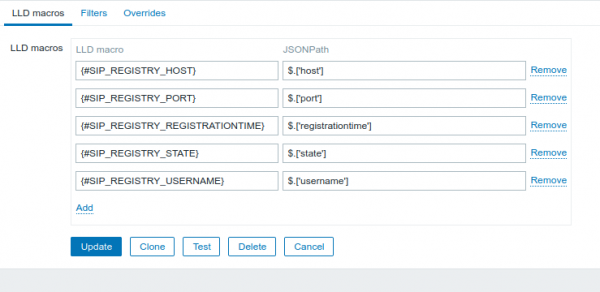
SIP Registry
For SIP registrations, we use three variables: username, host, port. I was satisfied with the name of the element 111111@login.mtt.ru:5060, I did not find situations where all five variables needed to be used.
The main element that receives information about all registrations, Asterisk — AMI SIPshowregistry. Once a minute, it makes a GET request to , after which the data from the XML response is sent to all dependent elements for analysis. I create the element for each registration as dependent on it. This is convenient, as we get the current information with one request instead of doing it for each separately. This implementation has a significant downside — CPU load.
During testing with up to 100 dependent elements, I did not notice load, but with 1700 elements, this caused a noticeable 15-second CPU load. Keep this in mind if you have a large number of dependent elements.
As an option for 'spreading' the load or setting different polling frequencies for the element, you can separate the handling logic into each element.
I do not store the received information in the main element. Firstly, I see no need for it, and secondly, if the response exceeds 64K, Zabbix truncates it.
Since we are using the full XML response for the dependent element, we need to retrieve the value of this element in preprocessing. Through XPath this is done like this:
string(//response/generic[@event="RegistryEntry"][@username="{#SIP_REGISTRY_USERNAME}"][@host="{#SIP_REGISTRY_HOST}"][@port="{#SIP_REGISTRY_PORT}"]/@state)
For registration statuses, I did not use text statuses but converted them to numeric form using JavaScript:
switch(value) {
  case 'Registered':
    return 1;
  case 'Unregistered':
    return 0;
  default:
    return -1;
}
SIP Peers
Similarly to SIP registrations, there is a main element in Asterisk — AMI SIPshowregistry, to which dependents are added.
Here, two dependent elements are created:
- Peer status in textual form
- Device response time — if the status is OK, the device's response time is written, otherwise '-1'
The path to the element is a bit simpler already XPath:
string(//response/generic[@objectname="{#SIP_PEER_OBEJECTNAME}"]/@status)
For the second element, I used JavaScript to separate response time from the peer status, since they are stored together:
if(value.substring(0,2) == 'OK'){
	return value.match(/(d+)/gm);
}
else {
	return -1;
}
Conclusion
The out-of-the-box solution may be complex and not immediately clear. Flexibility and portability between different systems increase.
Wishing everyone a pleasant and smooth integration! Template and setup instructions at .
Source: habr.com
