

Hello! In the previous post I described the operation of our MultiSIM service regarding reservation and balancing channels. As mentioned, we connect clients to the network via VPN, and today I'll share a bit more about VPN and our capabilities in this area.
To begin with, as a telecommunications operator, we have our own extensive MPLS network, which is divided into two main segments for fixed-line clients — one used directly for Internet access, and the other used for creating isolated networks — with IPVPN (L3 OSI) and VPLAN (L2 OSI) traffic flowing through this MPLS segment for our corporate clients.

Typically, client connections occur as follows.
An access line is laid to the client's office from the nearest Point of Presence (POP) of the network (MEN node, P2P link, BSSS, FTTB, etc.), and then, the channel is routed through the transport network to the corresponding PE-MPLS router, where it's assigned to a specifically created VRF for the client, taking into account their required traffic profile (profile tags are selected for each access port based on the values of IP precedence 0, 1, 3, 5).
If, for any reason, we cannot fully organize the last mile for the client, for example, if the client's office is in a business center where another provider is prioritized, or if there is simply no point of presence near them, clients previously had to create multiple IPVPN networks with different providers (not the most cost-effective architecture) or solve access issues to their VRF over the Internet.
Many did this by setting up an IPVPN Internet gateway — they installed a border router (hardware or some solution based on Linux), connected an IPVPN channel to one port and an Internet channel to another, launching their own VPN server and connecting users through their own VPN gateway. Naturally, such a scheme brings its own challenges: this infrastructure needs to be built correctly and, what's most inconvenient — maintained and developed.
To simplify life for our clients, we established a centralized VPN hub and organized support for connections over the internet using IPSec. Now, clients only need to configure their routers to work with our VPN hub via an IPSec tunnel through any public internet, and we will route that client's traffic into their VRF.
Who will benefit
- Those with an existing large IPVPN network looking for new connections in a short time frame.
- Anyone who, for various reasons, wants to shift some traffic from the public internet to IPVPN but has previously faced technical limitations with multiple service providers.
- Those who currently have several disconnected VPN networks with different operators. There are clients who successfully organized IPVPN from Beeline, MegaFon, and Rostelecom, etc. To simplify things, they can only rely on our unified network, VPN, switching all other channels from different operators to the internet, after which they can connect to Beeline's IPVPN via IPSec and these operators' internet.
- Those who already have an IPVPN network overlaying the internet.
If everything is deployed with us, clients receive full support for VPN, serious infrastructure redundancy, and standard settings that will work on any router they are accustomed to (whether it’s Cisco or Mikrotik, as long as it supports IPSec/IKEv2 with standardized authentication methods). By the way, regarding IPSec — we currently support only it, but we plan to fully implement OpenVPN and WireGuard, so clients won’t be dependent on the protocol and can more easily migrate everything to us. Additionally, we want to start connecting clients from computers and mobile devices (integrated OS solutions, Cisco AnyConnect, strongSwan, and similar). With this approach, de facto infrastructure construction can confidently be delegated to the operator, leaving only the configuration of CPE or host.
How the connection process works for the IPSec mode:
- The client submits a request to their manager, specifying the required connection speed, traffic profile, and IP address parameters for the tunnel (by default a subnet with a mask of /30) and the routing type (static or BGP). To transmit routes to the client's local networks in the connected office, IKEv2 phase mechanisms of the IPSec protocol are used with the appropriate settings on the client's router, or they are announced via BGP in MPLS from the private BGP AS specified by the client in the request. Thus, information about the routes of client networks is fully controlled by the client through the settings of the client router.
- In response from their manager, the client receives accounting data to include in their VRF, as follows:
- IP address of the VPN-HUB
- Login
- Authentication password
- Configure the CPE, below are two examples of basic configurations:Option for Cisco:
crypto ikev2 keyring BeelineIPsec_keyring
peer Beeline_VPNHub
address 62.141.99.183 – VPN hub Beeline
pre-shared-key
!
For the option with static routing, the routes to the networks accessible via the VPN hub can be specified in the IKEv2 setup and will automatically appear as static routes in the CPE's routing table. These settings can also be configured using the standard method for specifying static routes (see below).crypto ikev2 authorization policy FlexClient-author
The route to the networks behind the CPE router is a mandatory setting when using static routing between the CPE and PE. The transfer of routing data to the PE is performed automatically when the tunnel is established via IKEv2 interaction.
route set remote ipv4 10.1.1.0 255.255.255.0 – Local office network
!
crypto ikev2 profile BeelineIPSec_profile
identity local
authentication local pre-share
authentication remote pre-share
keyring local BeelineIPsec_keyring
aaa authorization group psk list group-author-list FlexClient-author
!
crypto ikev2 client flexvpn BeelineIPsec_flex
peer 1 Beeline_VPNHub
client connect Tunnel1
!
crypto ipsec transform-set TRANSFORM1 esp-aes 256 esp-sha256-hmac
mode tunnel
!
crypto ipsec profile default
set transform-set TRANSFORM1
set ikev2-profile BeelineIPSec_profile
!
interface Tunnel1
ip address 10.20.1.2 255.255.255.252 – Tunnel address
tunnel source GigabitEthernet0/2 – Internet access interface
tunnel mode ipsec ipv4
tunnel destination dynamic
tunnel protection ipsec profile default
!
Routes to the client's private networks accessible via the VPN hub Beeline can be specified statically.ip route 172.16.0.0 255.255.0.0 Tunnel1
ip route 192.168.0.0 255.255.255.0 Tunnel1Option for Huawei (ar160/120):
ike local-name
#
acl name ipsec 3999
rule 1 permit ip source 10.1.1.0 0.0.0.255 – Local office network
#
aaa
service-scheme IPSEC
route set acl 3999
#
ipsec proposal ipsec
esp authentication-algorithm sha2-256
esp encryption-algorithm aes-256
#
ike proposal default
encryption-algorithm aes-256
dh group2
authentication-algorithm sha2-256
authentication-method pre-share
integrity-algorithm hmac-sha2-256
prf hmac-sha2-256
#
ike peer ipsec
pre-shared-key simple
local-id-type fqdn
remote-id-type ip
remote-address 62.141.99.183 – VPN hub Beeline
service-scheme IPSEC
config-exchange request
config-exchange set accept
config-exchange set send
#
ipsec profile ipsecprof
ike-peer ipsec
proposal ipsec
#
interface Tunnel0/0/0
ip address 10.20.1.2 255.255.255.252 – Tunnel address
tunnel-protocol ipsec
source GigabitEthernet0/0/1 – Internet access interface
ipsec profile ipsecprof
#
Routes to the client's private networks available through the Beeline VPN gateway can be set staticallyip route-static 192.168.0.0 255.255.255.0 Tunnel0/0/0
ip route-static 172.16.0.0 255.255.0.0 Tunnel0/0/0
The resulting communication scheme looks something like this:
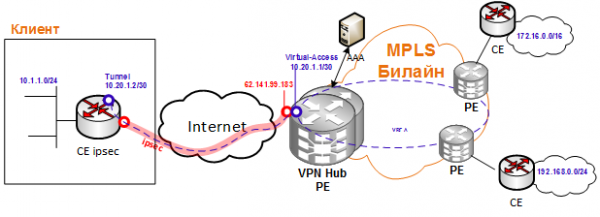
If there are no examples of basic configurations from the client, we usually help in creating them and make them available to everyone else.
Finally, connect the CPE to the Internet, ping the opposite side of the VPN tunnel and any host inside the VPN, and that's it, you can consider the connection established.
In the next article, we will discuss how we combined this scheme with IPSec and MultiSIM Resilience using Huawei CPE: we install our Huawei CPE for clients, which can use not only a wired internet channel but also 2 different SIM cards, and the CPE automatically rebuilds the IPSec tunnel either through wired WAN or via radio (LTE#1/LTE#2), achieving high service availability.
Special thanks for preparing this article (and, actually, to the authors of these technical solutions) to our RnD colleagues!
Source: habr.com
