

Many are familiar with the PostgreSQL database management system, and it has proven itself well in small installations. However, the trend towards Open Source has become increasingly palpable, even when it comes to large companies and enterprise requirements. In this article, we will discuss how to integrate Postgres into a corporate environment and share our experience of creating a backup system (BKP) for this database using Commvault’s backup system as an example.

PostgreSQL has already proven its worth — the database management system works excellently and is used by trendy digital businesses like Alibaba and TripAdvisor, while the absence of licensing fees makes it an attractive alternative to giants like MS SQL and Oracle DB. But as soon as we start thinking about PostgreSQL in the Enterprise landscape, we immediately run into stringent requirements: 'What about configuration redundancy? Disaster recovery? Where is the comprehensive monitoring? What about automated backups? And the use of tape libraries both directly and as secondary storage?'
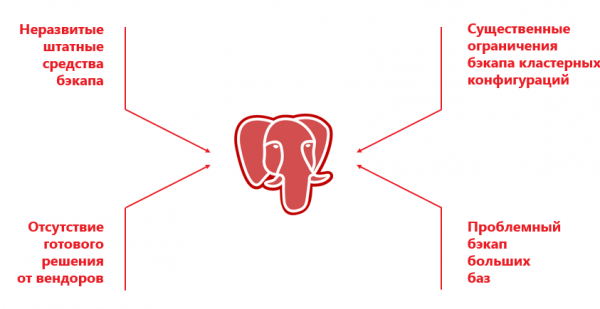
On one hand, PostgreSQL does not have built-in backup tools like the 'mature' database management systems such as RMAN for Oracle DB or SAP Database Backup. On the other hand, enterprise backup system providers (Veeam, Veritas, Commvault) do support PostgreSQL, but in reality, they only work with certain (usually standalone) configurations and with a set of various limitations.
Backup systems specifically designed for PostgreSQL, such as Barman, Wal-g, pg_probackup, are extremely popular in small PostgreSQL installations or where heavy backups of other IT landscape elements are not needed. For example, alongside PostgreSQL, the infrastructure may include physical and virtual servers, OpenShift, Oracle, MariaDB, Cassandra, etc. It is preferable to back all this up with a common tool. Implementing a separate solution solely for PostgreSQL is an unsuccessful endeavor: the data will be copied somewhere onto a disk, and then it has to be removed to tape. Such duplication of backups increases backup time and, more critically, restores. servers, OpenShift, Oracle, MariaDB, Cassandra, etc. It is advisable to back all of this up using a common tool. Setting up a separate solution exclusively for PostgreSQL is an unwise idea: data will be copied somewhere onto a disk, and then it needs to be transferred to tape. This duplication of backup increases the backup time, and, more critically, the restoration time.
In an enterprise solution, backing up the installation occurs with a certain number of nodes in a dedicated cluster. For example, Commvault can only work with a two-node cluster where the Primary and Secondary are tightly bound to specific nodes. Moreover, there is a rationale for backing up only from the Primary, as creating backup from the Secondary has its limitations. Due to the peculiarities of the DBMS, a dump is not created on the Secondary, leaving only the option of file backup.
To reduce downtime risks, a 'live' cluster configuration is created, allowing the Primary to gradually migrate between different servers. For instance, the Patroni software automatically starts the Primary on a randomly selected node in the cluster. The CRK has no way to track this 'out of the box', and if the configuration changes, the processes break. That is, the implementation of external management hinders the effective operation of the CRK, as the managing server simply doesn't understand where and what data needs to be copied.
Another issue is the implementation of backup in Postgres. It is possible through dump, and it works for small databases. However, for larger databases, dumping takes a long time, requires a lot of resources, and can lead to the database instance failing.
File backup solves the situation, but it runs slowly on large databases because it operates in single-threaded mode. Additionally, vendors impose a whole range of extra limitations. At times, it is not possible to use file and dump backups simultaneously, or deduplication is not supported. There are many problems, and often it is simpler to choose an expensive but proven DBMS instead of Postgres.
There's no turning back! The developers are behind in Moscow!
However, recently our team faced a challenging task: in the project to create the AIS OSAGO 2.0, where we were setting up the IT infrastructure, the developers chose PostgreSQL for the new system.
For large software developers, it is much easier to use 'trendy' open-source solutions. Facebook, for instance, has enough specialists on staff to support this DBMS. However, in the case of RSA, all the 'day two' tasks fell on our shoulders. We were required to ensure fault tolerance, assemble the cluster, and of course, establish backup. The logic of actions was as follows:
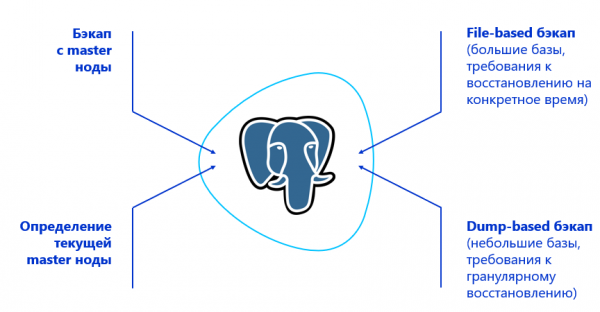
- Teach the SRK to back up from the Primary node of the cluster. For this, SRK needs to find it — thus, integration with some PostgreSQL cluster management solution is necessary. In the case of RSA, the software used was Patroni.
- Determine the type of backup based on data volumes and recovery requirements. For instance, when granular page recovery is needed, use dumps; if the databases are large and granular recovery is not required, operate at the file level.
- Add block backup capability to the solution to create backups in multi-threaded mode.
Initially, we aimed to create an efficient and straightforward system without a cumbersome setup of additional components. The fewer workarounds, the lower the personnel load and the risk of SRK failure. Approaches using Veeam and RMAN were excluded from the start, as a two-solution setup already hints at system unreliability.
A bit of magic for enterprises
Thus, we needed to ensure reliable backups for 10 clusters with 3 nodes each, while a mirrored infrastructure is located in the backup data center. The data centers operate on an active-passive principle in terms of PostgreSQL. The total database size was 50 TB. Any corporate-level SRK can easily handle this. However, the nuance is that PostgreSQL does not originally provide hooks for complete and deep compatibility with backup systems. Therefore, we had to look for a solution that initially has maximum functionality in conjunction with PostgreSQL and further enhance the system.
We conducted 3 internal hackathons — reviewed over fifty developments, tested them, made changes based on our hypotheses, and re-tested. After analyzing the available options, we chose Commvault. This product could work with a simple cluster installation of PostgreSQL right out of the box, and its open architecture gave us hope (which was justified) for successful enhancements and integrations. Commvault also has the capability to back up PostgreSQL logs. For instance, Veritas NetBackup can only perform full backups in terms of PostgreSQL.
Learn more about the architecture. Commvault management servers were installed in each of the two data centers in a CommServ HA configuration. The system is mirrored, managed through a single console, and meets all enterprise HA requirements.
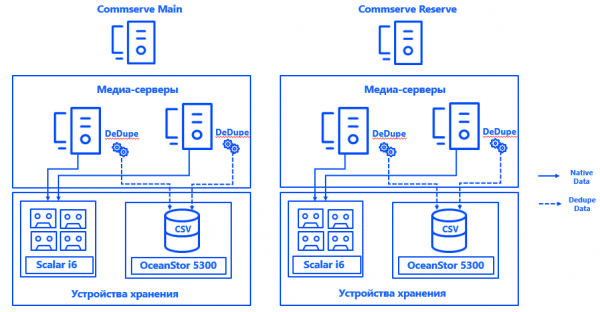
In each data center, we also launched two physical media servers, which were connected via SAN over Fibre Channel to dedicated disk arrays and tape libraries specifically for backups. The stretched deduplication pools provided fault tolerance for the media servers, and the connection of each server to each CSV ensured continuous operation in case any component fails. The system architecture allows for ongoing backups, even if one of the data centers goes down.
Patroni identifies the Primary node for each cluster. It can be any available node in the data center — but only in the primary location. In the standby location, all nodes are Secondary.
To ensure Commvault understands which cluster node is Primary, we integrated the system (thanks to the open architecture of the solution) with Postgres. A script was created to report the current location of the Primary node to the administrator. server Commvault.
Overall, the process looks like this:
Patroni selects Primary → Keepalived brings up the cluster IP and executes the script → the Commvault agent on the selected cluster node receives a notification that it is Primary → Commvault automatically reconfigures backup within the pseudoclient.
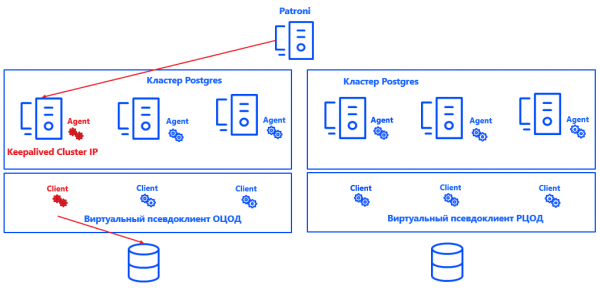
The advantage of this approach is that the solution does not affect the consistency or correctness of the logs, nor the restoration of the Postgres instance. It is also easily scalable, as there is no need to fix Primary and Secondary nodes for Commvault. It is sufficient for the system to understand where Primary is, and the number of nodes can be increased to practically any value.
The solution does not claim to be perfect and has its nuances. Commvault can only back up the entire instance, not individual databases. Therefore, a separate instance is created for each database. Real clients are consolidated into virtual pseudoclients. Each Commvault pseudoclient represents a UNIX cluster. It includes those cluster nodes where the Commvault agent for Postgres is installed. As a result, all virtual nodes of the pseudoclient are backed up as a single instance.
Inside each pseudo-client, there is an active node of the cluster. This is precisely what our integration solution for Commvault defines. The principle of its operation is quite simple: when a cluster IP is raised on the node, the script sets the parameter 'active node' in the Commvault agent binary — essentially, the script places '1' in the required part of the memory. The agent sends this data to CommServe, and Commvault backs up from the required node. Additionally, the script checks the correctness of the configuration, helping to avoid errors during the backup process.
At the same time, large databases are backed up in blocks across multiple streams, meeting RPO requirements and the backup window. The load on the system is minimal: Full copies do not occur very often, and on other days, only logs are collected, particularly during low-load periods.
By the way, we have applied separate policies for backing up PostgreSQL archive logs — they are stored under different rules, copied according to a different schedule, and deduplication is not enabled for them, as these logs contain unique data.
To ensure the consistency of the entire IT infrastructure, separate Commvault file clients are installed on each node of the cluster. They exclude Postgres files from the backups and are designed solely for backing up the OS and application software. This part of the data also has its own policy and storage duration.
Currently, the SRK does not impact productive services, but if the situation changes, a load limitation system can be enabled in Commvault.
Is that okay? That's okay!
So, we have obtained not just a functional but also a fully automated backup for the clustered PostgreSQL installation, meeting all the enterprise requirements.
The RPO and RTO parameters of 1 hour and 2 hours are comfortably exceeded, which means the system will meet them even with significant growth in the volume of stored data. Contrary to many doubts, PostgreSQL and the enterprise environment have proven to be quite compatible. And now we know from our experience that backups for such DBMS can be achieved in a wide variety of configurations.
Certainly, on this journey we had to wear out seven pairs of iron boots, overcome numerous difficulties, step on a few rakes, and correct a number of mistakes. But now the approach has been tested and can be applied to implement Open Source instead of proprietary DBMS in harsh enterprise conditions.
Have you tried working with PostgreSQL in a corporate environment?
Authors:
Oleg Lavrenov, data storage systems design engineer at 'Infosystems Jet'
Dmitry Yerykin, computing systems design engineer at 'Infosystems Jet'
Source: habr.com
