

This article is the fourth in the series "How to Take Control of Network Infrastructure." You can find the content of all articles in the series and links .
In In this chapter, we examined some aspects of network security in the "Data Center" segment. This part will focus on the "Internet Access" segment.
Internet access
The topic of security is undoubtedly one of the most complex in the world of data transmission networks. As in previous cases, without claiming depth and completeness, I will discuss here fairly simple, but, in my opinion, important questions, the answers to which I hope will help raise the security level of your network.
When auditing this segment, pay attention to the following aspects:
- design
- BGP configurations
- DOS/DDOS protection
- traffic filtering on the firewall
Design
As an example of the design for this segment for an enterprise network, I would recommend from Cisco within the .
Of course, other vendors' solutions may seem more appealing to you (see ), but, without urging you to follow this design in detail, I still believe it's useful to understand the principles and ideas underlying it.
Note
In the SAFE model, the "Remote Access" segment is part of the "Internet Access". However, in this series of articles, we will consider it separately.
The standard equipment set in this segment for an enterprise network includes
- border routers
- firewalls
Note 1
In this series of articles, when I mention firewalls, I mean .
Note 2
I will skip the discussion of various L2/L1 or overlay L2 over L3 solutions necessary for ensuring L1/L2 connectivity and will focus only on L3 issues and above. Partly, L1/L2 questions were covered in the chapter "«.
If you did not find a firewall in this segment, do not rush to conclusions.
Let's, as in the I can say that this seems to be the most justified place to use firewalls and to apply complex traffic filtering algorithms. In
part 1 We mentioned 4 factors that can hinder the use of firewalls in the data center segment. However, here they are not so significant.
Example 1. Latency
When it comes to the internet, it makes no sense to talk about latencies of even around 1 millisecond. Therefore, latency in this segment cannot be a limiting factor for using firewalls.
Example 2. Performance
In some cases, this factor may still be significant. Therefore, part of the traffic (for instance, traffic from load balancers) may need to bypass the firewall.
Example 3. Reliability
This factor still needs to be taken into account, but considering the unreliability of the internet itself, its significance for this segment is not as pronounced as for the data center.
So, let's assume your service operates over http/https (with short sessions). In this case, you can use two independent boxes (without HA) and route all traffic to the second one in case of an issue with the first.
Alternatively, you can use firewalls in transparent mode, and during their downtime while resolving the issue, route the traffic around the firewalls.
Therefore, it is likely that only price may be the factor that forces you to abandon the use of firewalls in this segment.
Important!
There is a temptation to combine this firewall with the data center firewall (using one firewall for these segments). This solution is theoretically possible, but one must understand that since the 'Internet Access' firewall is effectively at the forefront of your defense and 'takes on', at least, part of the malicious traffic, there is certainly an increased risk that this firewall could be taken offline. That is, using the same devices across these two segments significantly reduces the availability of your data center segment.
As usual, one must understand that depending on the service the company provides, the design of this segment can vary greatly. As usual, you can choose different approaches according to your requirements.
Example
If you are a content provider with a CDN network (see, for example, ), you might not want to establish dozens, or even hundreds, of presence points for infrastructure using separate devices for routing and traffic filtering. This would be expensive and could simply be excessive.
For BGP, you don't necessarily need dedicated routers; you can use open-source tools, for example, . So, perhaps all you really need is a server or several servers, a switch, and BGP.
In this case, your server or several servers can serve as not only a CDN server but also a router. Of course, there are still many details to consider (such as how to ensure load balancing), but it's feasible, and this approach has been successfully implemented for one of our partners.
You can have multiple data centers with full security (firewalls, DDoS protection services provided by your internet providers) and dozens or hundreds of 'simplified' presence points using only L2 switches and servers.
What about security in this case?
Let's consider, for example, the recently popular . Its danger lies in the fact that a large amount of traffic is generated, which effectively 'clogs' 100% of your uplinks.
What we have in the case of our design.
- If you use AnyCast, the traffic is distributed across your presence points. If your total bandwidth is in terabits, then this itself (after all, there have been some attacks recently with malicious traffic around a terabit) protects you from 'overloading' the uplinks.
- If some uplinks do get 'clogged', you simply take that site out of service (stop announcing the prefix).
- You can also increase the share of traffic delivered from your 'full' (and, consequently, protected) data centers, thus removing a significant portion of the malicious traffic from unprotected presence points.
And one more small note regarding this example. If you send a sufficient amount of traffic through IXes, this also reduces your susceptibility to such attacks.
BGP Configuration
Here we have two topics.
- Connectivity
- BGP Configuration
We've already discussed connectivity a bit. The essence is to direct traffic to your clients in the most optimal way. Although optimization is not always just about latency, low latency is typically a key indicator of optimality. For some companies, this is more important, while for others, it is less so. It all depends on the service you provide.
Example 1
If you are an exchange and your clients require intervals shorter than a millisecond, then it is clear that we cannot talk about the internet at all.
Example 2
If you are a gaming company and hundreds of milliseconds are important to you, then connectivity is certainly very important for you.
Example 3
It should also be understood that, due to the properties of the TCP protocol, the speed of data transmission within a single TCP session also depends on RTT (Round Trip Time). CDN networks are built, in part, to address this issue by bringing content delivery servers closer to the content consumers.
Researching connectivity is a separate interesting topic that deserves its own article or series of articles and requires a good understanding of how the internet is 'structured'.
Useful resources:
Example
I will provide just one small example.
Suppose your data center is located in Moscow, and you have a single uplink – Rostelecom (AS12389). In this case (single-homed), you do not need BGP, and as public addresses, you are likely using the address pool from Rostelecom.
Suppose you provide some service, and you have a sufficient number of clients from Ukraine, and they complain about high latencies. Upon investigation, you found that the IP addresses of some of them are in the range 37.52.0.0/21.
By performing a traceroute, you observed that the traffic goes through AS1299 (Telia), and by performing a ping, you received an average RTT of 70 – 80 milliseconds. You can also see this at .
Using the whois utility (on the ripe.net site or a local utility), you can easily determine that the block 37.52.0.0/21 belongs to AS6849 (Ukrtelecom).
Then, by going to you can see that AS6849 has no relations with AS12389 (they are neither clients nor uplinks to each other, and they have no peering either). But if you look at the for AS6849, you will see, for example, AS29226 (Mastertel) and AS31133 (Megafon).
By finding the looking glass of these providers, you can compare the path and RTT. For example, the RTT for Mastertel will be around 30 milliseconds.
So, if the difference between 80 and 30 milliseconds is significant for your service, you may need to consider connectivity, obtain your AS number from RIPE, your pool of addresses, and connect additional uplinks or establish points of presence at IXs.
By using BGP, you not only have the opportunity to improve connectivity, but you also ensure redundancy for your internet connection.
provides recommendations for configuring BGP. Although these recommendations were developed based on the best practices of providers, if your BGP settings are not overly basic, they are undoubtedly useful and should indeed be part of the hardening we discussed in .
DOS/DDOS protection
Nowadays, DOS/DDOS attacks have become a daily reality for many companies. In reality, you are quite often attacked in one form or another. The fact that you may not notice this yet suggests that a targeted attack against you has not been organized, and that the protective measures you are using, even if you are not aware of them (various built-in protections of operating systems), are sufficient to minimize the degradation of the service provided for you and your clients.
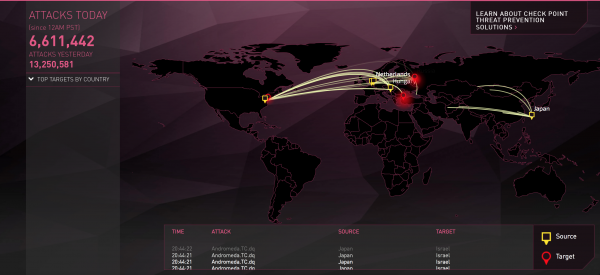
There are internet resources that, based on logs from equipment, create beautiful attack maps in real time.
You can find links to them.
My favorite from CheckPoint.
Protection against DDOS/DOS is typically layered. To understand why, you need to know what types of DOS/DDOS attacks exist (see, for example, or )
So we have three types of attacks:
- volumetric attacks
- protocol attacks
- application attacks
While you can protect yourself from the last two types of attacks using firewalls, you cannot defend against attacks aimed at overwhelming your uplinks (unless your total internet channel capacity is measured in terabits, preferably tens of terabits).
Therefore, the first line of defense is protection against volumetric attacks, and this protection should be provided by your provider or providers. If you haven’t realized this yet, you are just lucky so far.
Example
Let's say you have several uplinks, but only one of the providers can offer you this protection. However, if all the traffic is routed through one provider, what about the connectivity we briefly discussed earlier?
During the attack, you will have to partially sacrifice connectivity in this case. But
- this is only during the attack. You can manually or automatically reconfigure BGP in the event of an attack so that the traffic only goes through the provider that offers you the 'umbrella' protection. After the attack is over, you can revert the routing to its previous state.
- you don't necessarily have to route all the traffic. For instance, if you see that some uplinks or peerings are not under attack (or the traffic is negligible), you can continue to announce prefixes with competitive attributes to those BGP neighbors.
You can also delegate protection against 'protocol attacks' and 'application attacks' to partners.
Here You can read a good study (). True, the article is two years old, but it will give you an idea of the approaches you can take to protect yourself from DDoS attacks.
In principle, you can limit yourself to that, fully outsourcing your protection. This solution has its advantages, but there is also an obvious downside. The thing is, depending on what your company does, it might come down to business survival. Trusting such things to third-party organizations...
So, let's look at how to organize the second and third lines of defense (as an addition to provider protection).
Thus, the second line of defense is filtering and rate limiters (policers) at the entry point to your network.
Example 1
Let's assume you’ve 'closed yourself under an umbrella' from DDoS using one of the providers. Let’s say this provider uses Arbor for traffic filtering and has filters at the edge of their network.
The bandwidth that Arbor can 'handle' is limited, and the provider cannot constantly pass traffic from all its partners who have ordered this service through the filtering equipment. Therefore, under normal conditions, the traffic is not filtered.
Let's assume there is a SYN flood attack. Even if you have ordered a service that automatically reroutes traffic to filtering during an attack, this does not happen instantly. For a minute or more, you remain under attack. This can lead to your equipment failing or a degradation of service. In this case, traffic limitation at the edge routing will, though it may mean that some TCP sessions will not be established during this time, save your infrastructure from larger problems.
Example 2
An abnormally large number of SYN packets may not only be the result of a SYN flood attack. Let's assume you provide a service that can have about 100,000 TCP connections simultaneously (to one data center).
Suppose that due to a temporary problem with one of your main providers, half of your sessions are 'kicked' off. If your application is set up in such a way that it immediately (or after a consistent interval for all sessions) tries to re-establish the connection, you will receive at least 50,000 SYN packets approximately at the same time.
If, on top of these sessions, you need to perform an SSL/TLS handshake, which involves certificate exchange, from the perspective of resource exhaustion for your load balancer, this would be a much stronger 'DDoS' than a simple SYN flood. It would seem that load balancers should handle such events, but... unfortunately, we have faced this problem head-on.
And of course, a policer on the edge router will save your equipment in this case.
The third level of protection against DDoS/DOS is your firewall settings.
Here you can mitigate both second and third type attacks. In general, anything that reaches the firewall can be filtered here.
Advice
Try to give the firewall as little work as possible by filtering as much as you can at the first two lines of defense. And here's why.
Have you ever experienced the situation where, while generating traffic to test, for instance, how resilient your servers' operating system is to DDoS attacks, you 'overloaded' your firewall, pushing it to 100% capacity with normally intense traffic? If not, maybe it's simply because you haven't tried?
Overall, as I've mentioned, firewalls are complicated devices that work well against known vulnerabilities and tested solutions, but if you send something unusual, just some random garbage or packets with incorrect headers, you might very likely, based on my experience, confuse even top-tier equipment. Therefore, at phase 2, using standard ACLs (at the L3/L4 level), only allow the traffic that should legitimately enter your network.
Traffic Filtering on the Firewall
Continuing our discussion about firewalls, it's important to understand that DoS/DDoS attacks are just one type of cyber attack.
In addition to DoS/DDoS protection, we can also have something like the following list of capabilities:
- application firewalling
- threat prevention (antivirus, anti-spyware, and vulnerability)
- URL filtering
- data filtering (content filtering)
- file blocking (file types blocking)
It's up to you to decide what from this list you need.
To be continued
Source: habr.com
