

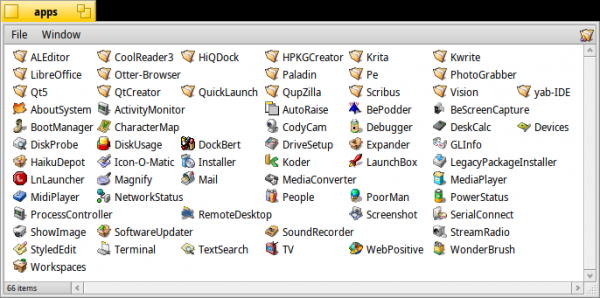
TL;DR: can Haiku receive proper support for application packages, such as application catalogs (like .app on Mac) and/or application images (Linux AppImage)? I think this would be a worthy addition that is easier to implement compared to other systems, since most of the infrastructure is already in place.
I discovered Haiku, a surprisingly good system. And since I've been interested in application catalogs and images (inspired by the simplicity of Macintosh) for a long time, it’s no wonder that the idea popped into my head…
For full disclosure: I am the creator and author of AppImage, a Linux application distribution format aimed at the simplicity of Mac, giving complete control to application authors and end-users (if you want to know more—see and ).
What if we create AppImage for Haiku?
Let’s ponder a bit, purely theoretically: what needs to be done to get , or something similar, on Haiku? There’s no rush to create something right away, as the system currently available in Haiku works surprisingly well, while an imagined experiment would still be interesting. It also showcases the sophistication of Haiku compared to Linux desktop environments, where such things can be incredibly difficult (I have the right to say this: I've been struggling with debugging for 10 years).
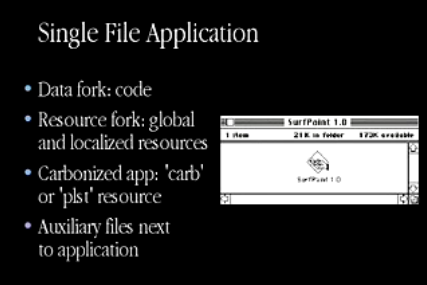
On Macintosh System 1, each application was a separate file, 'managed' in the Finder. Using AppImage, I am trying to recreate that same user experience on Linux.
First of all, what is AppImage? It’s a system for the distribution of third-party applications (for example, ), allowing applications to be released whenever and however they want: there is no need to know the intricacies of various distributions, build policies, or build infrastructure, no need for support maintainers, and they don’t dictate to users what (not) to install on their computers. AppImage should be understood as something akin to a package for Mac formatted .app inside a disk image .dmg. The main difference is that applications are not copied but remain within the AppImage at all times, similar to how Haiku packages .hpkg are mounted and never installed in the traditional sense.
AppImage has gained some appeal and popularity over its more than 10 years of existence: Linus Torvalds himself publicly endorsed it, and popular projects (for example, LibreOffice, Krita, Inkscape, Scribus, ImageMagick) have adopted it as the primary method for distributing continuous or nightly builds without interfering with users' installed or uninstalled applications. However, desktop environments and Linux distributions often still cling to the traditional, centralized distribution model based on packages and/or promote their own corporate business and/or engineering programs. (RedHat, Fedora, GNOME) and (Canonical, Ubuntu). It reaches .
How it works
- Each AppImage contains 2 parts: a small executable ELF (also known as
runtime.c), followed by a filesystem image. .
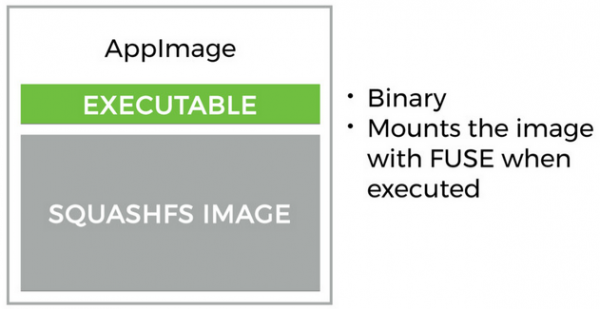
- The SquashFS filesystem contains the payload in the form of the application and everything necessary to launch it, which cannot really be considered part of the default installation for every sufficiently fresh target system (Linux distribution). It also includes metadata, such as the application name, icons, MIME types, etc.
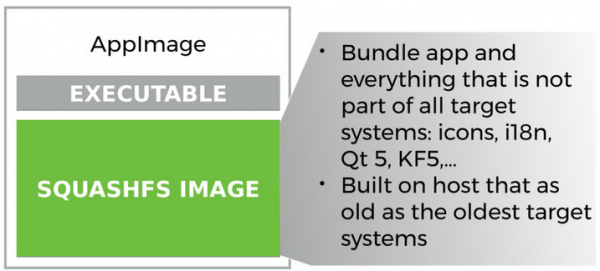
- When launched, the runtime uses FUSE and squashfuse to mount the filesystem, after which it processes the execution of a specific entry point (the so-called AppRun) inside the mounted AppImage.
The filesystem is unmounted after the process completes.
Seems simple enough.
But these things complicate it all:
- with such a variety of Linux distributions, nothing can be called 'part of the default installation for every fresh target system' in good faith anymore. We work around this issue by building , which allows us to determine what will be packaged in the AppImage and what needs to be sourced elsewhere. However, we sometimes miss the mark, even though everything generally works well. For this reason, we recommend package creators to test AppImages on all target systems (distributions).
- Payload applications must be relocatable within the filesystem. Unfortunately, many applications have hardcoded absolute paths to resources in
/usr/share. This needs to be fixed somehow. Additionally, we need to either exportLD_LIBRARY_PATH, or fixrpathfor the loader to locate the associated libraries. The first method has its drawbacks (which are circumvented through complex methods), while the second is simply cumbersome. - The biggest UX trap for users is that they need to on the AppImage file after downloading. Believe it or not, this is a real barrier for some. The requirement to set the executable bit is cumbersome even for experienced users. As a workaround, we proposed installing a small service that monitors AppImage files and sets their executable bit. In its pure form, it’s not the best solution since it won't work ‘out of the box.’ Linux distributions do not supply this service, making the experience poor for users ‘out of the box.’
- Linux users expect that new applications will have an icon in the launcher. You can’t tell the system: ‘Look, there’s a new application, let’s get to work.’ Instead, according to the XDG specification, you need to copy the file
.desktopto the appropriate location in/usrfor system-wide installation, or in$HOMEfor individual use. Icons of specific sizes, according to the XDG specification, need to be placed in designated locations inusror$HOME, after which you must run commands in the working environment to update the icon cache, or hope that the desktop environment will recognize and automatically discover everything. The same goes for MIME types. As a workaround, the same service is suggested, which, in addition to setting the executable flag, will copy icons and other relevant files from AppImage to the required locations according to XDG when present. Upon deletion or relocation, the service is expected to clean up everything. Of course, there are differences in behavior across different desktop environments, in graphic file formats, their sizes, storage locations, and methods of cache updating, which creates the problem. In short, this method is a workaround. - If the above is not enough, there is still no AppImage icon in the file manager. The Linux community has yet to reach a decision about the implementation of elficon (despite and ), so it is impossible to embed an icon directly into the application. Thus, applications in the file manager do not have their own icons (regardless of whether it's AppImage or something else), they only exist in the launcher menu. As a workaround, we use thumbnails—a mechanism initially developed for desktop managers to show reduced images as previews for graphic files as their icons. Consequently, the service for setting executable bits also acts as a 'thumbnailer', creating and saving icon thumbnails in the appropriate places.
/usrand$HOME. This service also cleans up if the AppImage is deleted or moved. Because each desktop manager behaves slightly differently, for example, in the formats it accepts for icons, sizes, or locations, this can be quite painful. - The application simply crashes during execution if errors occur (for instance, if there is a library that is not part of the base system and not included in the AppImage), and no one informs the user in the GUI about what is happening. We started to work around this by using on the desktop, which means we need to catch errors from the command line, convert them into user-friendly messages, and then display them on the desktop. And of course, each desktop environment handles these a little differently.
- At the moment (September 2019, — translator's note), I have not found a simple way to tell the system that the file
1.pngshould be opened with Krita, and2.png— with GIMP.

The storage place for cross-desktop specifications used in , and is freedesktop.org.
Achieving a level of sophistication that is deeply integrated into the Haiku desktop environment is hindered, to say the least, due to the specifications for cross-desktop, as well as implementations of desktop managers based on these specifications. For example, take a common system icon for Firefox: evidently, the authors of XDG did not consider that a user might have multiple versions of the same application installed.

Icons for different versions of Firefox.
I was curious about what the Linux world could learn from Mac OS X to avoid pitfalls in system integration. If you have the time and are working on something like this, definitely check out what Arno Gurdol, one of the early engineers of Mac OS X, said:
We wanted installing an app to be as simple as dragging the app icon from anywhere (server, external drive) to your computer's drive. To achieve this, the application package contains all the information, including icons, version, file type handled, and URL scheme type that the system needs to know to handle the app. This also includes information for 'centralized storage' in the Icon Services and Launch Services database. For performance support, applications are 'discovered' in several 'well-known' locations: in the system and user Applications directory, as well as in some others automatically, if the user navigates to the directory containing the app in Finder. In practice, this has worked very well.
Apple WWDC 2000 Session 144 — Mac OS X: Packaging Applications and Printing Documents.
There is nothing similar in the infrastructure of Linux work environments, so we seek workarounds for structural limitations in the AppImage project.

Is Haiku rushing to help?
Moreover, Linux platforms as the basis for work environments are typically so under-specified that many things that would be straightforward in a consistent system with a full stack are frustrated by fragmentation and complexity in Linux. I dedicated an entire presentation to issues related to the Linux platform for work environments (experienced developers confirmed: this will remain the case for a very long time).
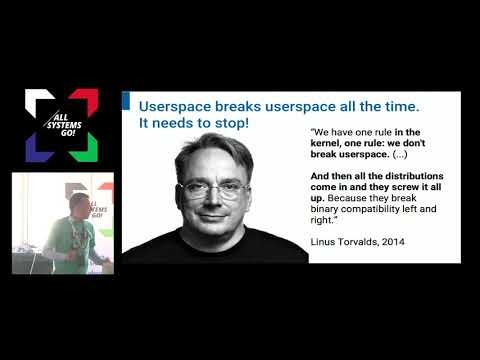
My presentation on issues in Linux work environments in 2018
Even Linus Torvalds acknowledged that the idea of work environments failed precisely because of fragmentation.
It's nice to see Haiku!
With Haiku, everything becomes incredibly simple.
Although the naive approach to 'porting' AppImage to Haiku involves simply trying to build (mainly runtime.c and its components) it, which may even be possible, it won't be particularly useful for Haiku. Most of these issues are actually resolved in Haiku and are conceptually justified. Haiku provides exactly the building blocks for system infrastructure that I have long sought in Linux working environments and couldn't believe were missing.

Believe it or not, but many Linux users struggle with this. On Haiku, everything is done automagically!
- ELF files without the executable bit automatically acquire it on double-clicking in the file manager.
- Applications can have built-in resources, such as icons, that are displayed in the file manager. There's no need to copy a bunch of images into special icon directories, so there's no need to clean them up after deleting or moving the application.
- There's a database to link applications with documents, eliminating the need to copy any files for that purpose.
- By default, libraries are searched for in the lib/ directory next to the executable file.
- There are no numerous distributions and desktop environments; everything that works, works everywhere.
- There is no separate launcher module that differs from the Applications directory.
- Applications do not have absolute paths built into their resources; there are special functions to determine the location at runtime.
- The idea of compressed filesystem images is implemented: this is any hpkg package. They are all mounted by the kernel.
- Each file is opened by the application that created it, unless explicitly stated otherwise. How cool is that!
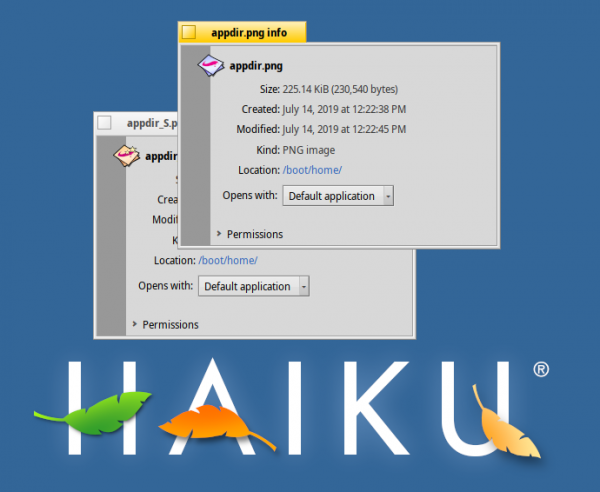
Two PNG files. Note the different icons indicating they will open with different applications on double-click. Also notice the 'Open with:' dropdown menu, where the user can select a specific application. So simple!
It seems that many of the hacks and workarounds necessary for AppImage on Linux become unnecessary on Haiku, which, at its core, is simple and elegant, allowing it to meet most of our needs.
Do Haiku application packages really need to exist in the end?
This leads to a big question. If creating a system like AppImage on Haiku turned out to be significantly easier than on Linux, would it be worth pursuing? Or does Haiku with its hpkg package system effectively eliminate the need for such an idea? Well, to answer that, we need to look at the motivation for the existence of AppImages.
User Perspective
Let's consider our end user:
- I want to install an application without prompting for an administrator (root) password. On Haiku, there is no concept of an administrator; the user has full control, as it is a personal system! (In principle, this could also be imagined in multi-user mode; I hope the developers maintain simplicity)
- I want to get the latest and greatest versions of applications without waiting for them to appear in my distribution (most often this means 'never', at least unless I update the entire operating system). On Haiku, this is 'resolved' through rolling releases. This means there is the possibility to get the latest and greatest versions of applications, but it requires constantly updating the rest of the system, effectively turning it into a 'moving target'..
- I would like to have multiple versions of the same application alongside each other, because you can't know what was broken in the latest version, or for example, as a web developer, I need to test my work under different browser versions. Haiku solves the first problem but not the second. Updates can be rolled back, but only for the entire system; it is impossible (as far as I know) to run, for example, multiple versions of WebPositive or LibreOffice at the same time.
One of the developers writes:
Essentially, the justification is this: the use case is so rare that optimizing for it does not make sense; handling it as a special case in HaikuPorts seems more than acceptable.
- I need to store applications where I like, not on the boot disk. I often run out of space on disks, so I need to connect an external drive or network folder to store applications (all versions that I have downloaded). If I connect such a drive, I need the applications to launch with a double click. Haiku keeps old versions of packages, but I don't know how to move them to an external drive, or how to invoke applications from there afterward.
Developer's comment:
Technically, this is already possible with the mount command. Of course, we will create a GUI for this as soon as we have enough interested users.
- I don't want millions of files scattered across the file system that I can't manage manually. I want one file per application that I can easily download, move, or delete. On Haiku, this issue is resolved using packages
.hpkg, which consolidate, for example, Python, from thousands of files into one. But if there is, for example, Scribus, which uses Python, then I have to deal with at least two files. And I need to ensure that I keep their compatible versions working together.
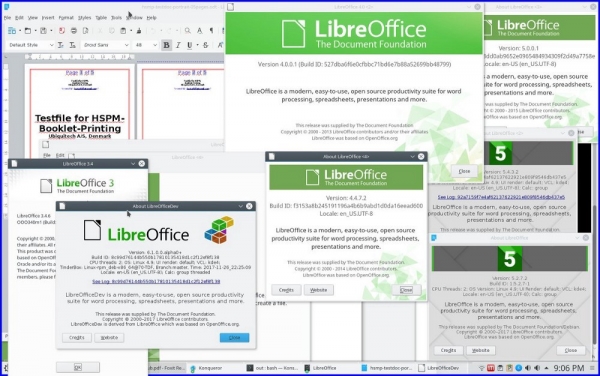
Multiple versions of AppImages running side by side on one Linux
A developer's perspective
Let's look at it from a developer's perspective:
- I want to have full control over the user experience. I don't want to depend on the operating system telling me when and how I should release applications. In Haiku, developers can work with their own hpkg repositories, but that means users will have to set them up manually, which makes this concept 'less appealing'.
- I have a download page on my website where I distribute
.exefor Windows,.dmgfor Mac, and.AppImagefor Linux. Or maybe I want to monetize access to this page; anything is possible. What do I need to host there for Haiku? Just a file.hpkgwith dependencies only from HaikuPorts - My software requires specific versions of other software. For example, it’s known that Krita needs a patched version of Qt, or Qt that is precisely configured for a specific version of Krita, at least until the fixes are merged back into Qt. You can package your own Qt for the application in the package
.hpkg, but this is likely not welcomed.
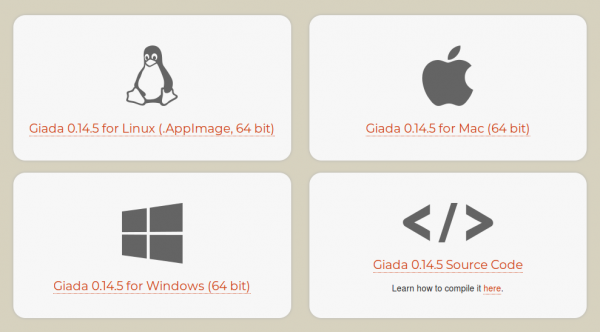
A typical application download page. What should I put here for Haiku?
Will kits (existing as application directories like AppDir or .app in Apple style) and/or images (in the form of heavily modified AppImages or .dmg from Apple) applications a useful addition to the workspace of Haiku? Or will it dilute the overall picture and lead to fragmentation, thus adding complexity? I'm torn: on one hand, the beauty and sophistication of Haiku lie in the fact that there's usually one way to do something, not many. On the other hand, much of the infrastructure for catalogs and/or application packages is already in place, so the system calls for the remaining few percent to fall into place.
According to the developer
On Linux they (catalogs and application packages — note from the translator) are likely a technical solution to system problems. At Haiku, we prefer to simply solve system issues.
What do you think?
Before you answer…
Wait, let's do a quick reality check: in fact application catalogs — are already part of Haiku:
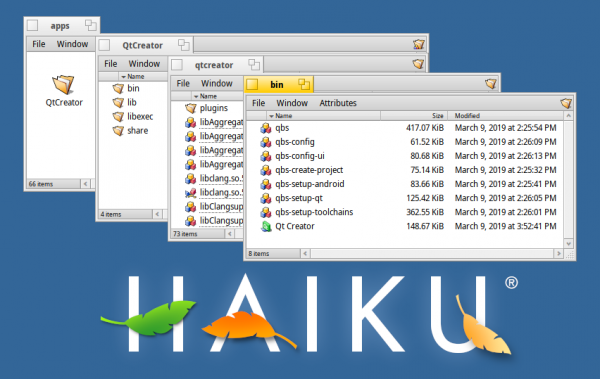
Application catalogs already exist on Haiku, but are not yet supported in the file manager.
They are just not as well-supported as, say, in the Macintosh Finder. How cool would it be if the QtCreator catalog had the name and icon 'QtCreator' in the top left corner, launching the application with a double-click?
Earlier, I :
Are you sure you can run your decade-old applications today when all the app stores and distribution repositories might forget about them and their dependencies? Are you sure you can still access your current work in the future?
Is there already a response from Haiku, or can catalogs and application packages help here? I think they can.
According to Mr. waddlesplash:
Yes, we have an answer to the question: we will simply support these applications as long as needed until someone can properly read their file formats or provide one-to-one functionality. Our commitment to maintaining BeOS R5 applications on Haiku is direct evidence of this...
That's right!
What course of action should Haiku take?
I can envision a peaceful coexistence of hpkg, catalogs, and application images:
- System software uses
.hpkg - For the most frequently used software (especially for those needing scheduled floating releases),
.hpkg(approximately 80% of all cases) - Some are installed through
.hpkg, applications will benefit from transitioning to an infrastructure with app catalogs (for example, QtCreator): they will be distributed as.hpkg, just like before.
mr. waddlesplash writes:
If all that is needed is to view applications in
/system/apps, instead, it is necessary to make catalogs in Deskbar more manageable for users since/system/appsit is not meant for users to regularly open and view it (unlike MacOS). For such situations, Haiku has a different paradigm, but this option should be acceptable.
- Haiku provides infrastructure for running application images, nightly, continuous, and testing software builds, as well as for instances when the user wants to 'freeze it in time', for private and internal software, and other special use cases (about 20% of all). These images contain the necessary files to run the application
.hpkg, mounted by system tools, and after the application finishes — unmounted. (Perhaps, the file manager could place files.hpkgin application images, automatically or on user demand — just like when dragging an application to a network folder or external drive. It's pure poetry — haiku.) On the other hand, the user may want to install the contents of the image as files.hpkg, after which they will be updated and processed just like if they were installed through HaikuDepot… Brainstorm needed).
Quote from mr. waddlesplash:
Running applications from external drives or network folders could potentially be useful. And adding the ability to configure more 'zones' for pkgman will definitely be a great feature.
Such a system will leverage the advantages of hpkg, catalogs, and application images. They are good on their own, but together will be unbeatable.
Conclusion
For Haiku, there is infrastructure providing a simple and sophisticated user interface for PCs, far exceeding what is typically offered for Linux PCs. The package system .hpkg — one such example, but the other parts of the system are also infused with sophistication. However, Haiku would benefit from proper support for directories and application bundles. The best way to achieve this is worth discussing with people who know Haiku, its philosophy and architecture much better than I do. After all, I have been using Haiku for just over a week. Nevertheless, I think this fresh perspective will be useful for designers, developers, and architects of Haiku. At the very least, I am happy to serve as a 'sparring partner' for them. I have over 10 years of practical experience with directories and application bundles for Linux, and I would like to find applications for them in Haiku, for which I believe they are perfectly suited. The potential solutions I propose are by no means the only correct ones for the problems I have described, and if the Haiku team decides to find other, more elegant ones — I am all for it. Basically, I am already contemplating the idea of how to make the system. hpkg even more amazing without changing how it works. It turns out that the Haiku team has been thinking about application bundles for a long time when implementing the package management system, but unfortunately, (it seems to me) the idea has become 'outdated'. Perhaps it's time to revive it?
Try it yourself! After all, the Haiku project provides images for download from DVD or USB, created .
Have questions? We invite you to our Russian-speaking .
Error Overview:
From translation: this is the eighth and final article in the series about Haiku.
List of Articles:
Only registered users can participate in the survey. , please.
Is there a point in porting the hpkg system to Linux?
Yes
No
Already implemented, I will write in the comments.
20 users voted. 5 users abstained.
Source: habr.com
