


Clients increasingly ask for solutions similar to "Amazon RDS, but cheaper"; or "We want something like RDS, but everywhere in any infrastructure." To implement such a managed solution on Kubernetes, we examined the current state of the most popular operators for PostgreSQL (Stolon, operators from Crunchy Data and Zalando) and made our choice.
This article shares our experience from both a theoretical perspective (solution overview) and a practical standpoint (what was chosen and what the outcome was). But first, let’s clarify what requirements are generally expected from a potential RDS replacement…
What is RDS?
When people mention RDS, in our experience, they refer to a managed database service that:
- is easy to configure;
- has the ability to work with snapshots and restore from them (preferably with support for );
- allows for master-slave topologies;
- has a rich list of extensions;
- provides auditing and user/access management.
In general, the approaches to implementing the task can vary significantly, but the approach with conditional Ansible is not for us. (Colleagues at 2GIS came to a similar conclusion following to create a "tool for quickly deploying a fault-tolerant cluster based on Postgres.")
Operators are the widely accepted approach for solving such tasks in the Kubernetes ecosystem. More about their application for databases running within Kubernetes has already been shared by the technical director of "Flanta" in , in .
NB: For quickly creating simple operators, we recommend checking our Open Source utility . With it, you can do this without needing knowledge of Go, using more familiar methods for sysadmins: like Bash, Python, etc.
There are several popular K8s operators for PostgreSQL:
- Stolon;
- Crunchy Data PostgreSQL Operator;
- Zalando Postgres Operator.
Let's take a closer look at them.
Operator Selection
In addition to the important features already mentioned above, we— as infrastructure operations engineers in Kubernetes— also expected the following from the operators:
- deployment from Git and using ;
- support for pod anti-affinity;
- node affinity or node selector installation;
- tolerations installation;
- availability of tuning options;
- understandable technologies and even teams.
Without delving into the details of each item (feel free to ask questions in the comments if anything remains unclear after reading the entire article), I will note in general that these parameters are needed for a more detailed description of the specialization of the cluster nodes so that we can order them for specific applications. This way, we can achieve an optimal balance in performance and cost.
Now — let's talk about the PostgreSQL operators themselves.
1. Stolon
from the Italian company Sorint.lab in was considered a benchmark among database operators. This is a rather old project: its first public release was way back in November 2015(!), and the GitHub repository boasts nearly 3000 stars and over 40 contributors.
And indeed, Stolon is an excellent example of thoughtful architecture:
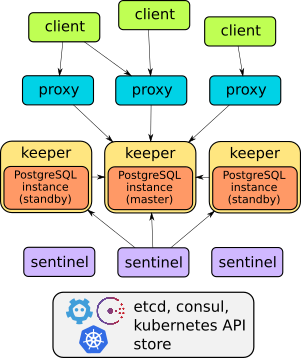
Details about the setup of this operator can be found in the report or . In general, it is enough to say that it can do everything described: failover, proxies for transparent client access, backups… Moreover, the proxies provide access through a single service endpoint — unlike the two other solutions discussed later (which have two services for database access).
However, Stolon , which makes it impossible to deploy it so that you can quickly and easily — "like hotcakes" — create database instances in Kubernetes. Management is done through the utility stolonctl, deployment is done via a Helm chart, and user definitions are set in a ConfigMap.
On one hand, it turns out that the operator isn't really an operator (since it doesn't use CRD). But on the other hand, it's a flexible system that allows you to configure resources in K8s as you see fit.
In summary, it didn't seem optimal for us to create a separate chart for each database. So we started looking for alternatives.
2. Crunchy Data PostgreSQL Operator
, a young American startup, looked like a logical alternative. Its public history starts with the first release in March 2017, since then the GitHub repository has gained just under 1300 stars and over 50 contributors. The latest release from September has been tested for compatibility with Kubernetes 1.15—1.18, OpenShift 3.11+ and 4.4+, GKE, and VMware Enterprise PKS 1.3+.
The architecture of the Crunchy Data PostgreSQL Operator also meets the stated requirements:
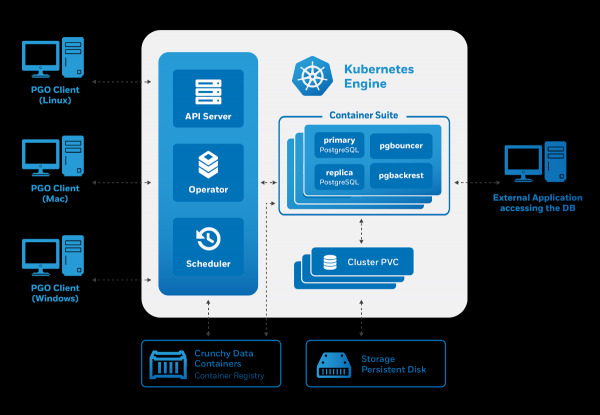
Management is done through the utility pgo, however, it generates Custom Resources for Kubernetes. Therefore, as potential users, we were pleased with the operator:
- management via CRD;
- convenient user management (also through CRD);
- integration with other components — a specialized collection of container images for PostgreSQL and utilities for working with it (including pgBackRest, pgAudit, contrib extensions, etc.).
However, attempts to start using the operator from Crunchy Data revealed several issues:
- There was no option for tolerations — only nodeSelector was provided.
- The created pods were part of a Deployment, even though we were deploying a stateful application. Unlike StatefulSets, Deployments cannot create disks.
This last drawback leads to amusing moments: in the test environment, it was possible to run 3 replicas with one disk local storage, resulting in the operator reporting that 3 replicas were running (although this was not the case).
Another feature of this operator is its built-in integration with various auxiliary systems. For example, pgAdmin and pgBounce can be easily installed, while pre-configured Grafana and Prometheus are under consideration. In the recent the improved integration with the project , which provides the operator with a visual representation of metrics for PgSQL 'out of the box'.
Nevertheless, the strange choice of generated Kubernetes resources led us to seek an alternative solution.
3. Zalando Postgres Operator
We have been familiar with Zalando’s products for a long time: we have experience with Zalenium and, of course, we have tried — their popular HA solution for PostgreSQL. One of its authors, Alexey Klyukin, talked about the company’s approach to creating the in the broadcast of , and we liked it.
This is the youngest solution among those discussed in the article: the first release was in August 2018. However, despite the small number of formal releases, the project has come a long way, already surpassing the Crunchy Data solution with 1300+ stars on GitHub and the highest number of contributors (70+).
‘Under the hood’ of this operator are time-tested solutions:
- Patroni and for management,
- for backups,
- — as a connection pool.
Here is how the architecture of the operator from Zalando is presented:
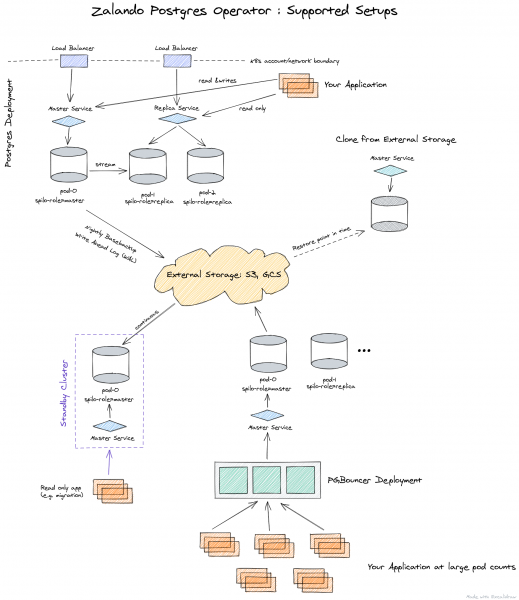
The operator is fully managed through Custom Resources, automatically creating a StatefulSet of containers that can then be customized by adding various sidecars to the pod. This is a significant advantage compared to the operator from Crunchy Data.
Since we chose Zalando's solution from the three options considered, a further description of its capabilities will be presented below, along with practical application.
Practice with the Postgres Operator from Zalando
The deployment of the operator is very simple: just download the latest release from GitHub and apply the YAML files from the directory . Alternatively, you can also use .
After installation, it's important to address the configuration of . This is done through a ConfigMap postgres-operator in the namespace where you installed the operator. Once the storages are configured, you can deploy your first PostgreSQL cluster.
For example, our standard deployment looks like this:
apiVersion: acid.zalan.do/v1
kind: postgresql
metadata:
 name: staging-db
spec:
 numberOfInstances: 3
 patroni:
   synchronous_mode: true
 postgresql:
   version: "12"
 resources:
   limits:
     cpu: 100m
     memory: 1Gi
   requests:
     cpu: 100m
     memory: 1Gi
 sidecars:
 - env:
   - name: DATA_SOURCE_URI
     value: 127.0.0.1:5432
   - name: DATA_SOURCE_PASS
     valueFrom:
       secretKeyRef:
         key: password
         name: postgres.staging-db.credentials
   - name: DATA_SOURCE_USER
     value: postgres
   image: wrouesnel/postgres_exporter
   name: prometheus-exporter
   resources:
     limits:
       cpu: 500m
       memory: 100Mi
     requests:
       cpu: 100m
       memory: 100Mi
 teamId: staging
 volume:
   size: 2Gi
This manifest deploys a cluster of 3 instances with a sidecar in the form of , from which we collect application metrics. As you can see, everything is very simple, and if desired, you can create literally an unlimited number of clusters.
It's also worth noting the web panel for administration — . It comes bundled with the operator and allows you to create and delete clusters, as well as work with backups created by the operator.
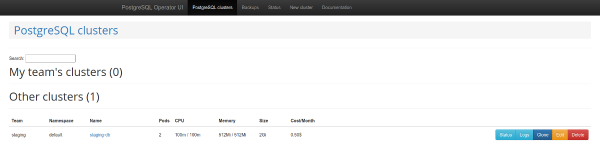
List of PostgreSQL clusters
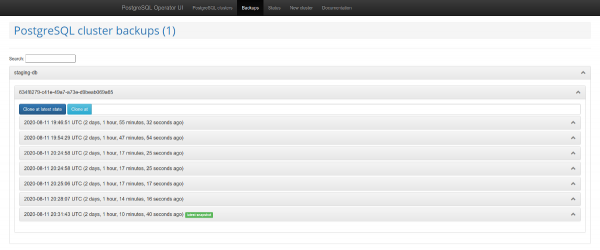
Backup management
Another interesting feature is the support for . This mechanism automatically creates roles in PostgreSQL, based on the retrieved list of usernames. After that, the API allows for returning a list of users for whom roles are automatically created.
Issues and solutions
However, the use of the operator soon revealed several significant drawbacks:
- lack of nodeSelector support;
- inability to disable backups;
- using the database creation function does not grant default privileges;
- periodically, documentation is lacking or is out of date.
Fortunately, many of these issues can be resolved. Let’s start at the end — problems with documentation.
You will likely encounter that it is not always clear how to specify a backup and how to connect the backup bucket to the Operator UI. This is briefly mentioned in the documentation, while a real description can be found in :
- you need to create a secret;
- pass it to the operator as a parameter
pod_environment_secret_namein the CRD with the operator settings or in the ConfigMap (depending on how you decided to install the operator).
However, it turned out that at this point it is impossible. That’s why we have created with some additional third-party contributions. More about it — see below.
If you pass backup parameters to the operator, namely — wal_s3_bucket and access keys in AWS S3, then it will back up everything: not only databases in production but also staging. We were not satisfied with that.
In the parameter description for Spilo, which is the basic Docker wrapper for PgSQL when using the operator, it turned out: you can pass the parameter WAL_S3_BUCKET empty, thus disabling backups. Moreover, to our great joy, we found a , which we immediately accepted in our fork. Now it’s enough just to add enableWALArchiving: false to the PostgreSQL cluster resource.
Yes, it was possible to do otherwise by launching 2 operators: one for staging (without backups) and the other for production. But this way we managed to get by with one.
Okay, we learned to grant S3 access to databases, and the backups began to go into storage. How can we make the backup pages work in the Operator UI?

In the Operator UI, you will need to add 3 variables:
-
SPILO_S3_BACKUP_BUCKET -
AWS_ACCESS_KEY_ID -
AWS_SECRET_ACCESS_KEY
After that, backup management will become available, which in our case simplifies working with staging, allowing us to deliver snapshots from production without additional scripts.
As an additional plus, the work with the Teams API and the extensive capabilities for creating databases and roles using the operator were mentioned. However, the created roles did not have default permissions.Accordingly, a user with read permissions could not read new tables.
Why is that? Despite the fact that in the code necessary GRANT, they are not applied consistently. There are 2 methods: syncPreparedDatabases and syncDatabases. In syncPreparedDatabases — despite the fact that in the section preparedDatabases there is a condition defaultRoles and defaultUsers for creating roles, — default permissions are not applied. We are in the process of preparing a patch to ensure these permissions are applied automatically.
And the last point in our relevant updates — , adding Node Affinity to the created StatefulSet. Our clients often prefer to cut costs by using spot instances, and it’s definitely not advisable to host database services on them. This issue could also be addressed through tolerations, but having Node Affinity provides greater assurance.
What has been achieved?
As a result of resolving the aforementioned issues, we forked the Postgres Operator from Zalando into , where it is built with such useful patches. For added convenience, we collected the .
List of PRs accepted in the fork:
- ;
- ;
- ;
- .
It would be great if the community supports these PRs so they can be included in upstream with the next version of the operator (1.6).
Bonus! Success story with production migration
If you are using Patroni, you can migrate live production to the operator with minimal downtime.
Spilo allows for creating standby clusters through S3 storage with , where the PgSQL binary log is first stored in S3 and then downloaded by the replica. But what if you do not use Wal-E in the old infrastructure? The solution to this problem has already on Habr.
Logical replication of PostgreSQL comes to the rescue. However, we won't go into detail about how to create publications and subscriptions because… our plan failed.
The issue is that there were several heavily loaded tables in the database containing millions of rows, which were also constantly being added to and deleted. with copy_data, where the new replica copies all content from the master, simply couldn’t keep up with the master. The content copying worked for a week, but never caught up with the master. In the end, the issue was resolved thanks to colleagues from Avito: data could be transferred using pg_dumpI will describe our (slightly modified) version of this algorithm.
The idea is that you can create a disabled subscription tied to a specific replication slot and then correct the transaction number. We had replicas available for production work. This is important because the replica will help create a consistent dump and continue to receive changes from the master.
The following notation will be used in the subsequent commands describing the migration process for hosts:
- master — source server;
- replica1 — streaming replica on old production;
- replica2 — new logical replica.
Migration Plan
1. Create a subscription on the master for all tables in the schema public of the database dbname:
psql -h master -d dbname -c "CREATE PUBLICATION dbname FOR ALL TABLES;"
2. Create a replication slot on the master:
psql -h master -c "select pg_create_logical_replication_slot('repl', 'pgoutput');"
3. Stop replication on the old replica:
psql -h replica1 -c "select pg_wal_replay_pause();"
4. Get the transaction number from the master:
psql -h master -c "select replay_lsn from pg_stat_replication where client_addr = 'replica1';"
5. Take a dump from the old replica. We will do this in multiple streams to speed up the process:
pg_dump -h replica1 --no-publications --no-subscriptions -O -C -F d -j 8 -f dump/ dbname
6. Load the dump onto the new server:
pg_restore -h replica2 -F d -j 8 -d dbname dump/
7. After loading the dump, you can start replication on the streaming replica:
psql -h replica1 -c "select pg_wal_replay_resume();"
7. Create a subscription on the new logical replica:
psql -h replica2 -c "create subscription oldprod connection 'host=replica1 port=5432 user=postgres password=secret dbname=dbname' publication dbname with (enabled = false, create_slot = false, copy_data = false, slot_name='repl');"
8. Obtain oid of the subscription:
psql -h replica2 -d dbname -c "select oid, * from pg_subscription;"
9. Assuming you received oid=1000. Apply the transaction number to the subscription:
psql -h replica2 -d dbname -c "select pg_replication_origin_advance('pg_1000', 'AA/AAAAAAAA');"
10. Start replication:
psql -h replica2 -d dbname -c "alter subscription oldprod enable;"
11. Check the subscription status; replication should be working:
psql -h replica2 -d dbname -c "select * from pg_replication_origin_status;"
psql -h master -d dbname -c "select slot_name, restart_lsn, confirmed_flush_lsn from pg_replication_slots;"
12. Once replication has started and databases are synchronized, switching can be performed.
13. After disabling replication, the sequences need to be fixed. This is well described .
With such a plan, the switch went smoothly with minimal delays.
Conclusion
Kubernetes operators simplify various tasks by reducing them to the creation of K8s resources. However, after achieving remarkable automation with their help, it is important to remember that it can also bring unexpected nuances, so choose your operators wisely.
After reviewing the three most popular Kubernetes operators for PostgreSQL, we chose the project from Zalando. We encountered some challenges, but the result was truly satisfying, so we plan to extend this experience to some other PgSQL installations. If you have experience with similar solutions, we would love to see the details in the comments!
P.S.
Also read in our blog:
- «»;
- «»;
- «».
Source: habr.com
