


Kubectl is an efficient command-line tool for Kubernetes that we use daily. It has many features and can be used to deploy a Kubernetes system or its basic functionalities.
Here are some useful tips for coding and deploying faster in Kubernetes.
Kubectl Autocomplete
You'll be using kubectl constantly, so with autocomplete, you won’t have to keep typing out commands.
First, install the bash-completion package (it's not installed by default).
- Linux
## Install
apt-get install bash-completion
## Bash
echo 'source <(kubectl completion bash)' >>~/.bashrc
## Zsh
source <(kubectl completion zsh)- MacOS
## Install
brew install bash-completion@2
As seen in the output from brew install (Caveats section), you need to add the following lines to the file ~/.bashrc or ~/.bash_profile:
export BASH_COMPLETION_COMPAT_DIR=/usr/local/etc/bash_completion.d
[[ -r /usr/local/etc/profile.d/bash_completion.sh ]] && . /usr/local/etc/profile.d/bash_completion.sh
Kubectl Aliases
When you start using kubectl, the best part is the plethora of aliases, starting with this one:
alias k='kubectl'Once added, check out kubectl-aliases on GitHub. Ahmet Alp Balkan understands them well, learn more about his aliases on GitHub)
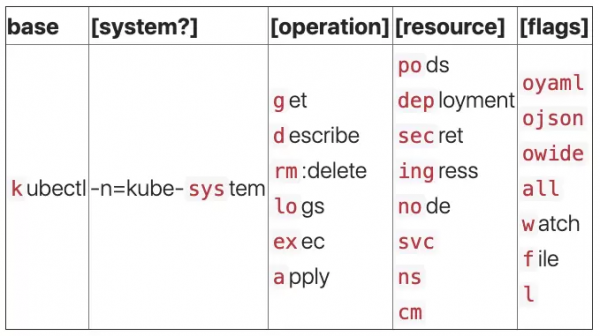
Just don’t set up a kubectl alias for beginners, or they’ll never grasp all the commands. Let them practice for a week or two first.
Kubernetes + Helm Charts
« — is the best way to find, share, and use software created for Kubernetes.
When you have numerous Kubernetes applications, deploying and updating them can become cumbersome, especially if you need to update the Docker image tag before deploying. Helm charts create packages that allow you to define, install, and update applications and configurations as they run on a cluster through the release system.
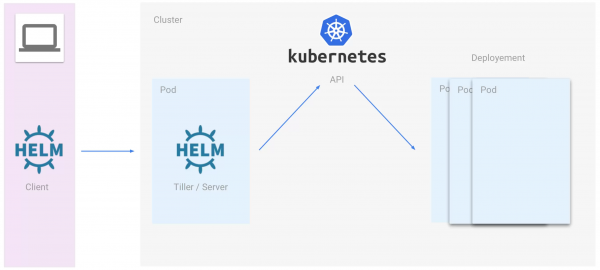
A Kubernetes package in Helm is called a chart and contains a lot of information used to create a Kubernetes instance.
The configuration is very helpful: it contains dynamic information about the chart configuration. A release is an existing instance in the cluster combined with a specific configuration.
Unlike apt or yum, Helm charts (i.e., packages) are built on top of Kubernetes and leverage all the advantages of its cluster architecture. The best part is the ability to account for scalability from the outset. All images used by Helm charts are stored in a registry called Helm Workspace. After deployment, your DevOps teams will be able to quickly find charts and add them to their projects.
Helm can be installed in different ways:
- Snap / Linux :
sudo snap install helm --classic- Homebrew / macOS :
brew install kubernetes-helm- Script:
curl -L https://git.io/get_helm.sh | bash- File:
- Initialize Helm and install Tiller in the cluster:
helm init --history-max 200- Install an example chart:
helm repo update
helm install --name releasemysql stable/mysql
These commands release the stable/mysql chart, and the release is called releasemysql.
Check the helm release with helm list.
- Finally, the release can be deleted:
helm delete --purge releasemysqlFollow these tips, and working with Kubernetes will become easier. Dedicate the time you save to the main goals of your applications in the Kubernetes cluster. If you have questions about Kubernetes or Helm, .
Source: habr.com
