

Who is this article intended for
This article may be of interest to system administrators tasked with creating a service for 'disposable' workplaces.
Prologue
The IT support department of a young, dynamically developing company with a small regional network was approached with a request to organize 'self-service stations' for use by their external clients. These stations were intended for registration on the company's external portals, transferring data from external devices, and interacting with government portals.
An important aspect was the fact that most software is designed for MS Windows (for example, 'Declaration'), and despite the shift towards open formats, MS Office remains the dominant standard for exchanging electronic documents. Therefore, we could not abandon MS Windows for this task.
The main concern was the possibility of accumulating various user session data, which could lead to leaks to third parties. . However, unlike the quasi-governmental (state autonomous institution) MFC, non-governmental organizations would be punished much more severely for such oversights. The next critical issue was the requirement to work with external data carriers, which would undoubtedly contain many malicious threats. The likelihood of malware being introduced from the Internet was considered less likely due to restricted access to a whitelist of addresses. Employees from other departments joined in refining the requirements, contributing their needs and wishes, resulting in the following requirements:
Security Requirements
- After use, all user data (including temporary files and registry keys) must be deleted.
- All processes initiated by the user must be terminated upon completion.
- Internet access must be restricted to a whitelist of addresses.
- Restrictions on the possibility of running third-party code.
- If a session is idle for more than 5 minutes, it must be automatically terminated, and the station must perform a cleanup.
Client requirements
- The number of client stations per branch is no more than 4.
- Minimum waiting time for the system to be ready, from the moment you "sit down" to the start of working with client software.
- The ability to connect peripheral devices (scanners, USB drives) directly from the installation site of the "self-service station."
- Customer requests
- Demonstration of advertising materials (images) during the downtime of the complex.
The pains of creativity
After extensively experimenting with Windows live CDs, we reached a unanimous conclusion: the resulting solution does not satisfy at least 3 critical points. They either boot slowly, aren't truly live, or customizing them was fraught with significant difficulties. Perhaps we didn't search well enough, and you might be able to recommend a set of tools; I would be grateful.
Next, we started looking towards VDI, but for this task, most solutions are either too expensive or require close attention. We wanted a simple tool, with minimal magic, where most issues could be resolved by simply rebooting or restarting the service. Fortunately, we had low-end server equipment in the branches, from a decommissioned service, which we could use as a technological foundation.
So what did we ultimately achieve? Well, I can't tell you what we ended up with due to NDA, but during our search, we developed an interesting scheme that performed well in laboratory tests, even though it didn't go into production.
A few disclaimers: the author does not claim that the proposed solution fully addresses all the tasks and does so voluntarily and cheerfully. The author agrees in advance with the statement that Sein Englishe sprache is zehr schlecht. Since the solution is no longer being developed, there is no expectation of bug fixes or changes in functionality; everything is in your hands. The author assumes that you are at least somewhat familiar with KVM and have read an overview article on the Spice protocol as well as have some experience working with CentOS or another GNU Linux distribution.
In this article, I would like to discuss the core of the resulting solution, specifically the interaction between the client and server, and the essence of the processes related to the lifecycle of virtual machines within the framework of the discussed solution. If the article proves to be interesting to the audience, I will describe the implementation details of live images for creating thin clients based on Fedora and will talk about the specifics of configuring virtual machines. KVM servers for performance optimization and security.
If we take colored paper,
Paints, brushes, and glue,
And just a bit of skill…
One can make a hundred rubles!
Diagram and description of the test stand
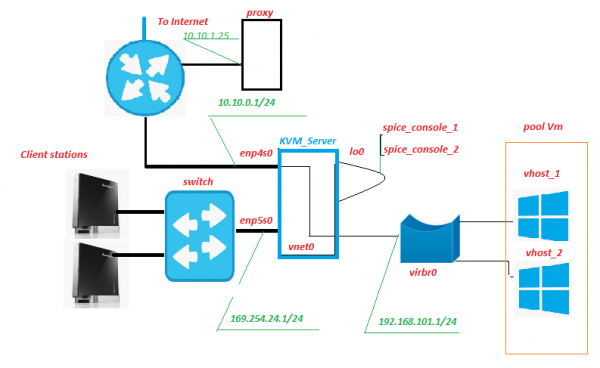
All equipment is located within the branch's network, with only the internet channel going outside. A proxy server has historically been in place, and it is nothing extraordinary. However, this server will, among other things, filter traffic from virtual machines (abbreviated as VM throughout the text). There is nothing preventing us from placing this service on a KVM server; the only thing to consider is how the load from it may affect the disk subsystem.
Client Station – essentially, the "self-service stations," the "frontend" of our service. They consist of Lenovo IdeaCentre nettops. What’s good about this device? Almost everything, especially the large number of USB ports and a card reader on the front panel. In our scheme, an SD card with enabled write protection is inserted into the card reader, containing a modified live image of Fedora 28. Naturally, a monitor, keyboard, and mouse are connected to the nettops.
Switch – an unremarkable second-level hardware switch, located in the server room and blinking its lights. It is not connected to any networks other than the "self-service stations" network.
KVM_Server – the core of the scheme; during stand testing, a Core 2 Quad Q9650 with 8 GB of RAM confidently handled 3 virtual machines running Windows 10. The disk subsystem consists of an Adaptec 3405 with 2 disks in Raid 1 and SSD. In field testing, a Xeon 1220 with a more robust LSI 9260 and SSD easily supported 5-6 VMs. The servers came from a discontinued service, and capital costs would be minimal. On this (these) server(s), a KVM virtualization system is deployed with a pool of virtual machines known as pool_Vm.
VM – a virtual machine, the backend of our service. This is where user operations take place.
Enp5s0 – a network interface facing the 'self-service stations' network, hosting dhcpd, ntpd, httpd, and xinetd listens on the 'signal' port.
Lo0 – a pseudo-interface for the loopback. Standard.
Spice_console – A very interesting feature, as unlike classical RDP, when deploying a KVM+Spice protocol bundle, an additional entity appears – the virtual machine console port. In fact, by connecting to this TCP port, we gain access to the VM console without the need to connect through its network interface. All interaction with the VM for signal transmission is handled by the server. The closest functional analogue is IPKVM. Thus, the VM monitor's image is transmitted to this port, mouse movement data is sent there as well, and (most importantly) interaction through the Spice protocol allows seamless USB device redirection to the virtual machine, as if the device is connected directly to the VM. This has been tested for flash drives, scanners, and webcams.
Vnet0, virbr0, and the virtual network cards of the VM form a network of virtual machines.
How THIS works
From the Client Station's Perspective
The client station boots in graphical mode from a modified live image of Fedora 28, obtaining an IP address via DHCP from the address space of the network 169.254.24.0/24. During the boot process, firewall rules are created that allow connections to the server's 'signal' and 'spice' ports. After booting, the station waits for the user 'Client' to log in. Upon user authentication, the desktop manager 'openbox' starts, along with the autostart script named remote.sh under the authenticated user's account. Among other things, the autostart script triggers the remote.sh script.
$HOME/.config/openbox/scripts/remote.sh
#!/bin/sh

server_ip=$(/usr/bin/cat /etc/client.conf |/usr/bin/grep "server_ip"
|/usr/bin/cut -d "=" -f2)
vdi_signal_port=$(/usr/bin/cat /etc/client.conf |/usr/bin/grep "vdi_signal_port"
 |/usr/bin/cut -d "=" -f2)
vdi_spice_port=$(/usr/bin/cat /etc/client.conf |/usr/bin/grep "vdi_spice_port"
|/usr/bin/cut -d "=" -f2)
animation_folder=$(/usr/bin/cat /etc/client.conf |/usr/bin/grep "animation_folder"
|/usr/bin/cut -d "=" -f2)

process=/usr/bin/remote-viewer

while true
do
 if [ -z `/usr/bin/pidof feh` ]
 then
 /usr/bin/echo $animation_folder
 /usr/bin/feh -N -x -D1 $animation_folder &
 else
 /usr/bin/echo
 fi
/usr/bin/nc -i 1 $server_ip $vdi_signal_port |while read line
 do
  if /usr/bin/echo "$line" |/usr/bin/grep "RULE ADDED, CONNECT NOW!"
  then
   /usr/bin/killall feh
   pid_process=$($process "spice://$server_ip:$vdi_spice_port"
   "--spice-disable-audio" "--spice-disable-effects=animation"
   "--spice-preferred-compression=auto-glz" "-k"
   "--kiosk-quit=on-disconnect" | /bin/echo $!)
   /usr/bin/wait $pid_process
   /usr/bin/killall -u $USER
   exit
  else
   /usr/bin/echo $line >> /var/log/remote.log
  fi
 done
done
/etc/client.conf
server_ip=169.254.24.1
vdi_signal_port=5905
vdi_spice_port=5906
animation_folder=/usr/share/backgrounds/animation
background_folder=/usr/share/backgrounds2/fedora-workstation
Description of variables in the client.conf file
server_ip — Address of the KVM_Server
vdi_signal_port — Port of the KVM_Server where xinetd 'lives'
vdi_spice_port — Network port of the KVM_Server from which connection requests from the remote-viewer client will be redirected to the spice port of the dedicated VM (details below)
animation_folder — The folder from which images are taken for the demonstration of bullshit animation
background_folder — The folder from which images are taken for the demonstration of presentations in waiting mode. More about the animation in the next part of the article.
The remote.sh script takes settings from the configuration file /etc/client.conf and establishes a connection to the KVM server on the "vdi_signal_port" port using nc, expecting to receive data streams from the server, among which it anticipates the string "RULE ADDED, CONNECT NOW". Upon receiving the desired string, it launches the remote-viewer process in kiosk mode, connecting to the server's "vdi_spice_port" port. The execution of the script is paused until the remote-viewer process is completed.
When connecting to the "vdi_spice_port" port, the remote-viewer, through redirection on the server side, accesses the port for the "spice_console" interface lo0, i.e., the console of the virtual machine, allowing user interaction to occur. During the connection wait, the user is shown a filler animation in the form of a slideshow of JPEG files, with the path to the picture directory determined by the value of the animation_folder variable from the configuration file.
If the connection to the "spice_console" port of the virtual machine is lost, signaling that the virtual machine has been shut down/restarted (i.e., the actual end of the user session), all processes initiated by the authenticated user are terminated, leading to a restart of lightdm and returning to the authorization screen.
From the KVM Server side
On the "signal" port of the network card enp5s0, xinetd waits for a connection. After connecting to the "signal" port, xinetd launches the vm_manager.sh script without passing any input parameters and redirects the script's output to the nc session of the Client Station.
/etc/xinetd.d/test-server
service vdi_signal

{
port	=	5905
socket_type	=	stream
protocol	=	tcp
wait	=	no
user	=	root
server	=	/home/admin/scripts_vdi_new/vm_manager.sh
}
/home/admin/scripts_vdi_new/vm_manager.sh
#!/usr/bin/sh

#<SET LOCAL VARIABLES FOR SCRIPT>#
SRV_SCRIPTS_DIR=$(/usr/bin/cat /etc/vm_manager.conf
|/usr/bin/grep "srv_scripts_dir" |/usr/bin/cut -d "=" -f2)
/usr/bin/echo "SRV_SCRIPTS_DIR=$SRV_SCRIPTS_DIR"
export SRV_SCRIPTS_DIR=$SRV_SCRIPTS_DIR
SRV_POOL_SIZE=$(/usr/bin/cat /etc/vm_manager.conf
|/usr/bin/grep "srv_pool_size" |/usr/bin/cut -d "=" -f2)
/usr/bin/echo "SRV_POOL_SIZE=$SRV_POOL_SIZE"
export "SRV_POOL_SIZE=$SRV_POOL_SIZE"
SRV_START_PORT_POOL=$(/usr/bin/cat /etc/vm_manager.conf
|/usr/bin/grep "srv_start_port_pool" |/usr/bin/cut -d "=" -f2)
/usr/bin/echo SRV_START_PORT_POOL=$SRV_START_PORT_POOL
export SRV_START_PORT_POOL=$SRV_START_PORT_POOL
SRV_TMP_DIR=$(/usr/bin/cat /etc/vm_manager.conf
|/usr/bin/grep "srv_tmp_dir" |/usr/bin/cut -d "=" -f2)
/usr/bin/echo "SRV_TMP_DIR=$SRV_TMP_DIR"
export SRV_TMP_DIR=$SRV_TMP_DIR
date=$(/usr/bin/date)
#</SET LOCAL VARIABLES FOR SCRIPT>#

/usr/bin/echo "# $date START EXECUTE VM_MANAGER.SH #"

make_connect_to_vm() {

#<READING CLEAR.LIST AND CHECK PORT FOR NETWORK STATE>#
/usr/bin/echo "READING CLEAN.LIST AND CHECK PORT STATE"
#<CHECK FOR NO ONE PORT IN CLEAR.LIST>#

if [ -z `/usr/bin/cat $SRV_TMP_DIR/clear.list` ]
then
 /usr/bin/echo "NO AVALIBLE PORTS IN CLEAN.LIST FOUND"
 /usr/bin/echo "Will try to make housekeeper, and create new vm"
 make_housekeeper
else
 #<MINIMUN ONE PORT IN CLEAR.LIST FOUND>#
  /usr/bin/cat $SRV_TMP_DIR/clear.list |while read line
   do
    clear_vm_port=$(($line))
    /bin/echo "FOUND PORT $clear_vm_port IN CLEAN.LIST. TRY NETSTAT"
    "CHECK FOR PORT=$clear_vm_port"

    #<NETSTAT LISTEN CHECK FOR PORT FROM CLEAN.LIST>#
    if /usr/bin/netstat -lnt |/usr/bin/grep ":$clear_vm_port" > /dev/null
     then
     /bin/echo "$clear_vm_port IS LISTEN"
     #<PORT IS LISTEN. CHECK FOR IS CONNECTED NOW>#
     if /usr/bin/netstat -nt |/usr/bin/grep ":$clear_vm_port"
     |/usr/bin/grep "ESTABLISHED" > /dev/null
       then
#<PORT LISTEN AND ALREADY CONNECTED! MOVE PORT FROM CLEAR.LIST
# TO WASTE.LIST>#
       /bin/echo "$clear_vm_port IS ALREADY CONNECTED, MOVE PORT TO WASTE.LIST"
       /usr/bin/sed -i "/$clear_vm_port/d" $SRV_TMP_DIR/clear.list
       /usr/bin/echo $clear_vm_port >> $SRV_TMP_DIR/waste.list
       else
#<PORT LISTEN AND NO ONE CONNECT NOW. MOVE PORT FROM CLEAR.LIST TO
# CONN_WAIT.LIST AND CREATE IPTABLES RULES>##
       /usr/bin/echo "OK, $clear_vm_port IS NOT ALREADY CONNECTED"
       /usr/bin/sed -i "/$clear_vm_port/d" $SRV_TMP_DIR/clear.list
       /usr/bin/echo $clear_vm_port >> $SRV_TMP_DIR/conn_wait.list
       $SRV_SCRIPTS_DIR/vm_connect.sh $clear_vm_port
#<TRY TO CLEAN VM IN WASTE.LIST AND CREATE NEW WM>#
       /bin/echo "TRY TO CLEAN VM IN WASTE.LIST AND CREATE NEW VM"
       make_housekeeper
       /usr/bin/echo "# $date STOP EXECUTE VM_MANAGER.SH#"
       exit
       fi
     else
     #<PORT IS NOT A LISTEN. MOVE PORT FROM CLEAR.LIST TO WASTE.LIST>#
     /bin/echo " "$clear_vm_port" is NOT LISTEN. REMOVE PORT FROM CLEAR.LIST"
     /usr/bin/sed -i "/$clear_vm_port/d" $SRV_TMP_DIR/clear.list
     /usr/bin/echo $clear_vm_port >> $SRV_TMP_DIR/waste.list
    make_housekeeper
     fi
   done
fi
}

make_housekeeper() {
/usr/bin/echo "=Execute housekeeper="
/usr/bin/cat $SRV_TMP_DIR/waste.list |while read line
 do
 /usr/bin/echo "$line"
 if /usr/bin/netstat -lnt |/usr/bin/grep ":$line" > /dev/null
  then
  /bin/echo "port_alive, vm is running"
  if /usr/bin/netstat -nt |/usr/bin/grep ":$line"
   |/usr/bin/grep "ESTABLISHED" > /dev/null
    then
    /bin/echo "port_in_use can't delete vm!!!"
    else
    /bin/echo "port_not in use. Deleting vm"
    /usr/bin/sed -i "/$line/d" $SRV_TMP_DIR/waste.list
    /usr/bin/echo $line >> $SRV_TMP_DIR/recycle.list
    $SRV_SCRIPTS_DIR/vm_delete.sh $line
    fi
  else
  /usr/bin/echo "posible vm is already off. Deleting vm"
  /usr/bin/echo "MOVE VM IN OFF STATE $line FROM WASTE.LIST TO"
  "RECYCLE.LIST AND DELETE VM"
  /usr/bin/sed -i "/$line/d" $SRV_TMP_DIR/waste.list
  /usr/bin/echo $line >> $SRV_TMP_DIR/recycle.list
  $SRV_SCRIPTS_DIR/vm_delete.sh "$line"
 fi
done
create_clear_vm
}

create_clear_vm() {
/usr/bin/echo "=Create new VM="
while [ $SRV_POOL_SIZE -gt 0 ]
do
 new_vm_port=$(($SRV_START_PORT_POOL+$SRV_POOL_SIZE))
 /usr/bin/echo "new_vm_port=$new_vm_port"
 if /usr/bin/grep "$new_vm_port" $SRV_TMP_DIR/clear.list > /dev/null
  then
  /usr/bin/echo "$new_vm_port port is already defined in clear.list"
  else
  if /usr/bin/grep "$new_vm_port" $SRV_TMP_DIR/waste.list > /dev/null
   then
   /usr/bin/echo "$new_vm_port port is already defined in waste.list"
   else
    if /usr/bin/grep "$new_vm_port" $SRV_TMP_DIR/recycle.list > /dev/null
    then
    /usr/bin/echo "$new_vm_port PORT IS ALREADY DEFINED IN RECYCLE LIST"
    else
    if  /usr/bin/grep "$new_vm_port" $SRV_TMP_DIR/conn_wait.list > /dev/null
     then
     /usr/bin/echo "$new_vm_port PORT IS ALREADY DEFINED IN CONN_WAIT LIST"
     else
     /usr/bin/echo "PORT IN NOT DEFINED IN NO ONE LIST WILL CREATE"
     "VM ON PORT $new_vm_port"
     /usr/bin/echo $new_vm_port >> $SRV_TMP_DIR/recycle.list
     $SRV_SCRIPTS_DIR/vm_create.sh $new_vm_port
     fi
    fi
   fi
 fi
 SRV_POOL_SIZE=$(($SRV_POOL_SIZE-1))
done
/usr/bin/echo "# $date STOP EXECUTE VM_MANAGER.SH #"
}
make_connect_to_vm |/usr/bin/tee -a /var/log/vm_manager.log
/etc/vm_manager.confsrv_scripts_dir=/home/admin/scripts_vdi_new
srv_pool_size=4
srv_start_port_pool=5920
srv_tmp_dir=/tmp/vm_state
base_host=win10_2
input_iface=enp5s0
vdi_spice_port=5906
count_conn_tryes=10
Description of the variables in the configuration file vm_manager.conf
srv_scripts_dir — the folder where the scripts vm_manager.sh, vm_connect.sh, vm_delete.sh, vm_create.sh, vm_clear.sh are located
srv_pool_size — the size of the VM pool
srv_start_port_pool — the starting port after which the ports of spice consoles for virtual machines will be allocated
srv_tmp_dir — the folder for storing temporary files
base_host — the base VM (golden image) from which VM clones will be created in the pool
input_iface — the network interface of the server facing the Client Stations
vdi_spice_port — the network port of the server from which the connection request from the remote-viewer client will be redirected to the spice port of the allocated VM
count_conn_tryes — the timeout after which it is considered that no connection to the VM has occurred (see vm_connect.sh for details).
The vm_manager.sh script reads the configuration file from vm_manager.conf, evaluates the state of the virtual machines in the pool based on several parameters, namely: how many VMs are deployed, and whether there are free clean VMs. To do this, it reads the clear.list file, which contains the numbers of the "spice_console" ports of the "newly created" virtual machines (see below the VM creation cycle) and checks for an established connection with them. When a port with an established network connection is detected (which should categorically not happen), a warning is issued and the port is moved to waste.list. Upon detecting the first port from the clear.list file with which there is currently no connection, vm_manager.sh calls the vm_connect.sh script and passes the port number as a parameter.
/home/admin/scripts_vdi_new/vm_connect.sh
#!/bin/sh

date=$(/usr/bin/date)

/usr/bin/echo "#" "$date" "START EXECUTE VM_CONNECT.SH#"

#<SET LOCAL VARIABLES FOR SCRIPT>#
free_port="$1"

input_iface=$(/usr/bin/cat /etc/vm_manager.conf |/usr/bin/grep "input_iface"
|/usr/bin/cut -d "=" -f2)
/usr/bin/echo "input_iface=$input_iface"

vdi_spice_port=$(/usr/bin/cat /etc/vm_manager.conf
|/usr/bin/grep "vdi_spice_port" |/usr/bin/cut -d "=" -f2)
/usr/bin/echo "vdi_spice_port=$vdi_spice_port"

count_conn_tryes=$(/usr/bin/cat /etc/vm_manager.conf
|/usr/bin/grep "count_conn_tryes" |/usr/bin/cut -d "=" -f2)
/usr/bin/echo "count_conn_tryes=$count_conn_tryes"
#</SET LOCAL VARIABLES FOR SCRIPT>#

#<CREATE IPTABLES RULES AND SEND SIGNAL TO CONNECT>#
/usr/bin/echo "create rule for port" $free_port
/usr/sbin/iptables -I INPUT -i $input_iface -p tcp -m tcp --dport
$free_port  -j ACCEPT
/usr/sbin/iptables -I OUTPUT -o $input_iface -p tcp -m tcp --sport
$free_port -j ACCEPT
/usr/sbin/iptables -t nat -I PREROUTING -p tcp -i $input_iface --dport
$vdi_spice_port -j DNAT --to-destination 127.0.0.1:$free_port
/usr/bin/echo "RULE ADDED, CONNECT NOW!"
#</CREATE IPTABLES RULES AND SEND SIGNAL TO CONNECT>#

#<WAIT CONNECT ESTABLISHED AND ACTIVATE CONNECT TIMER>#
while [ $count_conn_tryes -gt 0 ]
do
if /usr/bin/netstat -nt |/usr/bin/grep ":$free_port"
|/usr/bin/grep "ESTABLISHED" > /dev/null
 then
  /bin/echo "$free_port NOW in use!!!"
  /usr/bin/sleep 1s
  /usr/sbin/iptables -t nat -D PREROUTING -p tcp -i $input_iface --dport
  $vdi_spice_port -j DNAT --to-destination 127.0.0.1:$free_port
  /usr/sbin/iptables -D INPUT -i $input_iface -p tcp -m tcp --dport
  $free_port  -j ACCEPT
  /usr/sbin/iptables -D OUTPUT -o $input_iface -p tcp -m tcp --sport
  $free_port -j ACCEPT
  /usr/bin/sed -i "/$free_port/d" $SRV_TMP_DIR/conn_wait.list
  /usr/bin/echo $free_port >> $SRV_TMP_DIR/waste.list
  return
 else
   /usr/bin/echo "$free_port NOT IN USE"
   /usr/bin/echo "RULE ADDED, CONNECT NOW!"
   /usr/bin/sleep 1s
 fi
count_conn_tryes=$((count_conn_tryes-1))
done
#</WAIT CONNECT ESTABLISED AND ACTIVATE CONNECT TIMER>#

#<IF COUNT HAS EXPIRED. REMOVE IPTABLES RULE AND REVERT
# VM TO CLEAR.LIST>#
/usr/bin/echo "REVERT IPTABLES RULE AND REVERT VM TO CLEAN
LIST $free_port"
/usr/sbin/iptables -t nat -D PREROUTING -p tcp -i $input_iface --dport
$vdi_spice_port -j DNAT --to-destination 127.0.0.1:$free_port
/usr/sbin/iptables -D INPUT -i $input_iface -p tcp -m tcp --dport $free_port
-j ACCEPT
/usr/sbin/iptables -D OUTPUT -o $input_iface -p tcp -m tcp --sport
$free_port -j ACCEPT
/usr/bin/sed -i "/$free_port/d" $SRV_TMP_DIR/conn_wait.list
/usr/bin/echo $free_port >> $SRV_TMP_DIR/clear.list
#</COUNT HAS EXPIRED. REMOVE IPTABLES RULE AND REVERT VM
#TO CLEAR.LIST>#
/usr/bin/echo "#" "$date" "END EXECUTE VM_CONNECT.SH#"

# Attention! Must Be!  sysctl net.ipv4.conf.all.route_localnet=1
The vm_connect.sh script adds firewall rules that create a redirect of the "vdi_spice_port" of the enp5s0 server interface to the "spice console port" of the VM located on the lo0 interface of the server, passed as a launch parameter. The port is moved to conn_wait.list, and the VM is considered to be waiting for a connection. A string "RULE ADDED, CONNECT NOW" is sent to the Client Station on the server's "signal" port, which the remote.sh script running on it expects. A connection wait cycle begins with the number of attempts defined by the "count_conn_tryes" variable from the configuration file. Every second, the string "RULE ADDED, CONNECT NOW" will be sent to the nc session and will check for an established connection to the "spice_console" port.
If a connection was not established within the specified number of attempts, the "spice_console" port is moved back to clear.list. The execution of vm_connect.sh completes, and the execution of vm_manager.sh resumes, which starts the cleanup cycle.
If the connection of the Client Station to the 'spice_console' port on the lo0 interface is established, the firewall rules that create a redirect between the server's 'spice' port and the 'spice_console' port are removed, and further maintenance of the connection occurs through the firewall state detection mechanism. In case of a connection drop, reconnecting to the 'spice_console' port will not be possible. The 'spice_console' port is moved to waste.list, the VM is considered 'dirty', and it cannot return to the pool of 'clean' virtual machines without undergoing a cleanup. The execution of vm_connect.sh is completed, and vm_manager.sh resumes execution, which starts the cleanup loop.
The cleanup loop begins by checking the waste.list file to which the numbers of the 'spice_console' ports of virtual machines that had established connections are transferred. The presence of an active connection on each 'spice_console' port from the list is determined. If no connection exists, it is considered that the virtual machine is no longer in use, and the port is moved to recycle.list, triggering the process of deleting the virtual machine (see below) to which this port belonged. If an active network connection is found on the port, it is considered that the virtual machine is in use, and no actions are taken for it. If the port is not being listened to, it is considered that the VM is turned off and is no longer needed. The port is moved to recycle.list, and the process of deleting the virtual machine is initiated. To do this, the vm_delete.sh script is called, passing the number of the 'spice_console' port of the VM to be deleted as a parameter.
/home/admin/scripts_vdi_new/vm_delete.sh
#!/bin/sh

#<Set local VARIABLES>#
port_to_delete="$1"
date=$(/usr/bin/date)
#</Set local VARIABLES>#

/usr/bin/echo "# $date START EXECUTE VM_DELETE.SH#"
/usr/bin/echo "TRY DELETE VM ON PORT: $vm_port"

#<VM NAME SETUP>#
vm_name_part1=$(/usr/bin/cat /etc/vm_manager.conf |/usr/bin/grep 'base_host'
|/usr/bin/cut -d'=' -f2)
vm_name=$(/usr/bin/echo "$vm_name_part1""-""$port_to_delete")
#</VM NAME SETUP>#

#<SHUTDOWN AND DELETE VM>#
/usr/bin/virsh destroy $vm_name
/usr/bin/virsh undefine $vm_name
/usr/bin/rm -f /var/lib/libvirt/images_write/$vm_name.qcow2
/usr/bin/sed -i "/$port_to_delete/d" $SRV_TMP_DIR/recycle.list
#</SHUTDOWN AND DELETE VM>#

/usr/bin/echo "VM ON PORT $vm_port HAS BEEN DELETE AND REMOVE"
 "FROM RECYCLE.LIST. EXIT FROM VM_DELETE.SH"
/usr/bin/echo "# $date STOP EXECUTE VM_DELETE.SH#"
exit
Deleting a virtual machine is a relatively trivial operation; the vm_delete.sh script determines the name of the virtual machine to which the port passed as a launch parameter belongs. The VM is forcibly stopped, removed from the hypervisor, and the virtual hard disk of this VM is deleted. The 'spice_console' port is removed from recycle.list. The execution of vm_delete.sh is completed, and the execution of vm_manager.sh is resumed.
The vm_manager.sh script, upon completing operations to clean up excess virtual machines from the waste.list, starts a loop to create virtual machines in the pool.
The process begins with the identification of available "spice_console" ports for hosting. This is done based on the configuration file parameter "srv_start_port_pool" which specifies the initial port for the "spice_console" pool of virtual machines, and the parameter "srv_pool_size" which defines the maximum number of virtual machines. A sequential check is performed on all possible port options. For each identified port, a search is conducted in the clear.list, waste.list, conn_wait.list, and recycle.list. If the port is found in any of these files, it is considered occupied and skipped. If the port is not found in the specified files, it is added to the recycle.list and the process of creating a new virtual machine begins. This involves calling the script vm_create.sh, passing the port number "spice_console" for which the VM needs to be created as a parameter.
/home/admin/scripts_vdi_new/vm_create.sh
#!/bin/sh
/usr/bin/echo "#" "$date" "START RUNNING VM_CREATE.SH#"

new_vm_port=$1
date=$(/usr/bin/date)
a=0
/usr/bin/echo SRV_TMP_DIR=$SRV_TMP_DIR

#<SET LOCAL VARIABLES FOR SCRIPT>#
base_host=$(/usr/bin/cat /etc/vm_manager.conf |/usr/bin/grep "base_host"
|/usr/bin/cut -d "=" -f2)
/usr/bin/echo "base_host=$base_host"
#</SET LOCAL VARIABLES FOR SCRIPT>#

hdd_image_locate() {

/bin/echo "Run STEP 1 - hdd_image_locate"

hdd_base_image=$(/usr/bin/virsh dumpxml $base_host
|/usr/bin/grep "source file" |/usr/bin/grep "qcow2" |/usr/bin/head -n 1
|/usr/bin/cut -d "'" -f2)
if [ -z "$hdd_base_image" ]
then
 /bin/echo "base hdd image not found!"
else
 /usr/bin/echo "hdd_base_image found is a $hdd_base_image. Run next step 2"

#< CHECK FOR SNAPSHOT ON BASE HDD >#

  if [ 0 -eq `/usr/bin/qemu-img info "$hdd_base_image" | /usr/bin/grep -c "Snapshot"` ]
  then
  /usr/bin/echo "base image haven't snapshot, run NEXT STEP 3"
  else
  /usr/bin/echo "base hdd image have a snapshot, can't use this image"
  exit
  fi
#</ CHECK FOR SNAPSHOT ON BASE HDD >#

#< CHECK FOR HDD IMAGE IS LINK CLONE >#
  if [ 0 -eq `/usr/bin/qemu-img info "$hdd_base_image" |/usr/bin/grep -c "backing file"
  then
  /usr/bin/echo "base image is not a linked clone, NEXT STEP 4"
  /usr/bin/echo "Base image check complete!"
  else
  /usr/bin/echo "base hdd image is a linked clone, can't use this image"
  exit
  fi
fi
#</ CHECK FOR HDD IMAGE IS LINK CLONE >#
cloning
    }

cloning() {
# <Step_1 turn the base VM off >#
 /usr/bin/virsh shutdown $base_host > /dev/null 2>&1
 # </Step_1 turn the base VM off >#

#<Create_vm_config>#

/usr/bin/echo "Free port for Spice VM is $new_vm_port"

 #<Setup_name_for_new_VM>#
new_vm_name=$(/bin/echo $base_host"-"$new_vm_port)
#</Setup_name_for_new_VM>#

#<Make_base_config_as_clone_base_VM>#
/usr/bin/virsh dumpxml $base_host > $SRV_TMP_DIR/$new_vm_name.xml
#<Make_base_config_as_clone_base_VM>#

##<Setup_New_VM_Name_in_config>##
/usr/bin/sed -i "s%<name>$base_host</name>%<name>$new_vm_name</name>%g" $SRV_TMP_DIR/$new_vm_name.xml
#</Setup_New_VM_Name_in_config>#

#<UUID Changing>#
old_uuid=$(/usr/bin/cat $SRV_TMP_DIR/$new_vm_name.xml |/usr/bin/grep "<uuid>")
/usr/bin/echo old UUID $old_uuid
new_uuid_part1=$(/usr/bin/echo "$old_uuid" |/usr/bin/cut -d "-" -f 1,2)
new_uuid_part2=$(/usr/bin/echo "$old_uuid" |/usr/bin/cut -d "-" -f 4,5)
new_uuid=$(/bin/echo $new_uuid_part1"-"$new_vm_port"-"$new_uuid_part2)
/usr/bin/echo $new_uuid
/usr/bin/sed -i "s%$old_uuid%$new_uuid%g" $SRV_TMP_DIR/$new_vm_name.xml
#</UUID Changing>#


#<Spice port replace>#
old_spice_port=$(/usr/bin/cat  $SRV_TMP_DIR/$new_vm_name.xml
|/usr/bin/grep "graphics type='spice' port=")
/bin/echo old spice port $old_spice_port
new_spice_port=$(/usr/bin/echo "<graphics type='spice' port='$new_vm_port' autoport='no' listen='127.0.0.1'>")
/bin/echo $new_spice_port
/usr/bin/sed -i "s%$old_spice_port%$new_spice_port%g" $SRV_TMP_DIR/$new_vm_name.xml
#</Spice port replace>#

#<MAC_ADDR_GENERATE>#
mac_new=$(/usr/bin/hexdump -n6 -e '/1 ":%02X"' /dev/random|/usr/bin/sed s/^://g)
/usr/bin/echo New Mac is $mac_new
#</MAC_ADDR_GENERATE>#

#<GET OLD MAC AND REPLACE>#
mac_old=$(/usr/bin/cat $SRV_TMP_DIR/$new_vm_name.xml |/usr/bin/grep "mac address=")
/usr/bin/echo old mac is $mac_old
/usr/bin/sed -i "s%$mac_old%$mac_new%g" $SRV_TMP_DIR/$new_vm_name.xml
#<GET OLD MAC AND REPLACE>#

#<new_disk_create>#
/usr/bin/qemu-img create -f qcow2 -b $hdd_base_image /var/lib/libvirt/images_write/$new_vm_name.qcow2
#</new_disk_create>#

#<attach_new_disk_in_confiig>#
/usr/bin/echo hdd base image is $hdd_base_image
/usr/bin/sed -i "s%<source file='$hdd_base_image'/>%<source file='/var/lib/libvirt/images_write/$new_vm_name.qcow2'/>%g" $SRV_TMP_DIR/$new_vm_name.xml
#</attach_new_disk_in_confiig>#

starting_vm
    #</Create_vm config>#
}

starting_vm() {

/usr/bin/virsh define $SRV_TMP_DIR/$new_vm_name.xml
/usr/bin/virsh start $new_vm_name
while [ $a -ne 1 ]
do
if /usr/bin/virsh list --all |/usr/bin/grep "$new_vm_name" |/usr/bin/grep "running" > /dev/null 2>&1
then
a=1
/usr/bin/sed -i "/$new_vm_port/d" $SRV_TMP_DIR/recycle.list
/usr/bin/echo $new_vm_port >> $SRV_TMP_DIR/clear.list
/usr/bin/echo "#" "$date" "VM $new_vm_name IS STARTED #"
else
 /usr/bin/echo "#VM $new_vm_name is not ready#"
a=0
/usr/bin/sleep 2s
fi
done
/usr/bin/echo "#$date  EXIT FROM VM_CREATE.SH#"
exit
}

hdd_image_locate
The process of creating a new virtual machine
The script vm_create.sh reads the value of the variable "base_host" from the configuration file, which defines the template of the virtual machine from which a clone will be made. It retrieves the XML configuration of the VM from the hypervisor database, performs a series of checks on the VM's qcow disk image, and upon successful completion of these checks, creates an XML configuration file for the new VM and a "linked clone" disk image of the new VM. Subsequently, the XML config of the new VM is uploaded to the hypervisor database and the VM is started. The "spice_console" port is moved from recycle.list to clear.list. The execution of vm_create.sh concludes, and the execution of vm_manager.sh ends.
The next connection starts from the beginning.
For emergency cases, there is a script vm_clear.sh that forcefully iterates through all VMs in the pool and removes them, resetting the values of the lists. Calling it at the loading stage allows the (under)VDI to start from a clean slate.
/home/admin/scripts_vdi_new/vm_clear.sh
#!/usr/bin/sh

#set VARIABLES#
SRV_SCRIPTS_DIR=$(/usr/bin/cat /etc/vm_manager.conf
|/usr/bin/grep "srv_scripts_dir" |/usr/bin/cut -d "=" -f2)
/usr/bin/echo "SRV_SCRIPTS_DIR=$SRV_SCRIPTS_DIR"
export SRV_SCRIPTS_DIR=$SRV_SCRIPTS_DIR

SRV_TMP_DIR=$(/usr/bin/cat /etc/vm_manager.conf
|/usr/bin/grep "srv_tmp_dir" |/usr/bin/cut -d "=" -f2)
/usr/bin/echo "SRV_TMP_DIR=$SRV_TMP_DIR"
export SRV_TMP_DIR=$SRV_TMP_DIR

SRV_POOL_SIZE=$(/usr/bin/cat /etc/vm_manager.conf
|/usr/bin/grep "srv_pool_size" |/usr/bin/cut -d "=" -f2)
/usr/bin/echo "SRV_POOL_SIZE=$SRV_POOL_SIZE"

SRV_START_PORT_POOL=$(/usr/bin/cat /etc/vm_manager.conf
|/usr/bin/grep "srv_start_port_pool" |/usr/bin/cut -d "=" -f2)
/usr/bin/echo SRV_START_PORT_POOL=$SRV_START_PORT_POOL
#Set VARIABLES#


/usr/bin/echo "= Cleanup ALL VM="

/usr/bin/mkdir $SRV_TMP_DIR

/usr/sbin/service iptables restart
/usr/bin/cat /dev/null > $SRV_TMP_DIR/clear.list
/usr/bin/cat /dev/null > $SRV_TMP_DIR/waste.list
/usr/bin/cat /dev/null > $SRV_TMP_DIR/recycle.list
/usr/bin/cat /dev/null > $SRV_TMP_DIR/conn_wait.list

port_to_delete=$(($SRV_START_PORT_POOL+$SRV_POOL_SIZE))

        while [ "$port_to_delete" -gt "$SRV_START_PORT_POOL" ]
          do
		$SRV_SCRIPTS_DIR/vm_delete.sh $port_to_delete
		port_to_delete=$(($port_to_delete-1))
        done

/usr/bin/echo "= EXIT FROM VM_CLEAR.SH="
I would like to conclude the first part of my story here. What has been covered should be sufficient for system administrators to try out the underVDI in action. If the community finds this topic interesting, I will discuss the modification of the livecd Fedora and its transformation into a kiosk in the second part.
Source: habr.com
