

One of the main challenges in developing and subsequently operating microservices is the proper and careful configuration of their instances. In my opinion, a new framework could help with this. . It elegantly addresses some routine configuration tasks of applications.
If you have many microservices, each accompanied by its own configuration file(s), there's a high probability of making a mistake in one of them, which can be very difficult to catch without sufficient skill and a logging system. The main goal of the framework is to minimize duplicative configuration parameters of instances, thereby reducing the likelihood of introducing an error.
Let's consider an example. Suppose there's a simple application with a configuration file yaml. This can be any microservice in any language. Let's see how the framework can be applied to this service.
But first, for convenience, let's create an empty project in the Idea IDE, having previously installed the microconfig.io plugin:
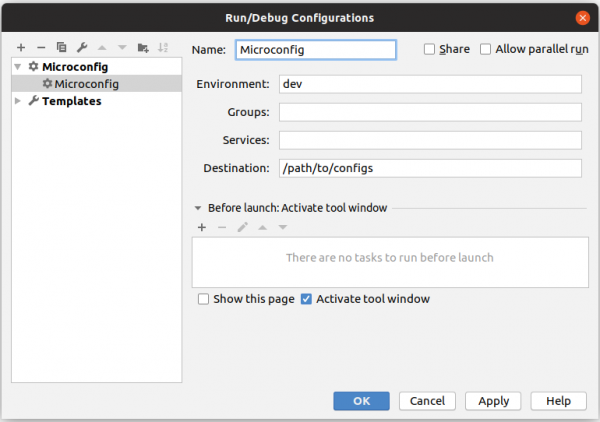
Configure the plugin's launch settings; you can use the default configuration, as shown in the screenshot above.
Our service is called order, so in the new project, we will create a structure like this:
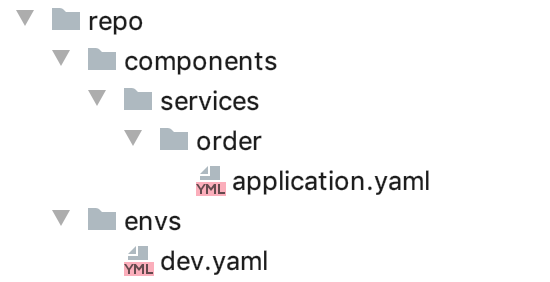
We place the configuration file in a folder named after the service — application.yaml. All microservices run in some environment, so besides creating the service's config, it is necessary to describe the environment itself: for this, we will create a folder envs and add a file named after our working environment. Thus, the framework will create configuration files for services in the environment dev, as this parameter is set in the plugin settings.
File Structure dev.yaml will be quite simple:
mainorder:
    components:
         - order
The framework works with configurations that are grouped together. For our service, we will choose a name for the group mainorder. The framework finds each of these application groups in the environment file and creates configurations for all of them, which it finds in the corresponding folders.
In the service's configuration file order we will specify only one parameter for now:
spring.application.name: orderNow let's run the plugin, and it will generate the desired configuration for our service according to the specified path in the properties:
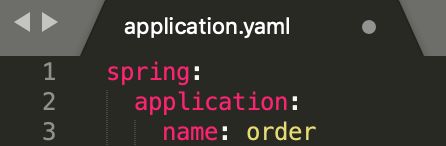
You can without installing a plugin, simply by downloading the framework distribution and running it from the command line.
This solution is suitable for use on a build server.
It is worth noting that the framework understands property syntax, meaning regular property files that can be used together with yaml configurations.
Let's add another service payment and simultaneously complicate the existing one.
In order:
eureka:
 instance.preferIpAddress: true
 client:
   serviceUrl:
     defaultZone: http://192.89.89.111:6782/eureka/
server.port: 9999
spring.application.name: order
db.url: 192.168.0.100
In payment:
eureka:
 instance.preferIpAddress: true
 client:
   serviceUrl:
     defaultZone: http://192.89.89.111:6782/eureka/
server.port: 9998
spring.application.name: payments
db.url: 192.168.0.100
The main problem with these configurations is the presence of a large amount of copy-pasting in the service settings. Let's see how the framework can help eliminate this. Let's start with the most obvious one — the presence of the configuration eureka in the description of each microservice. We'll create a new directory with a settings file and add a new configuration to it:
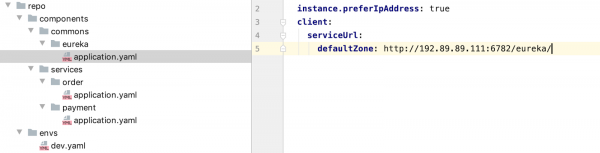
And in each of our projects, we will now add the line #include eureka.
The framework will automatically find the eureka configuration and copy it into the service configuration files, while a separate eureka configuration will not be created since we won't specify it in the environment file dev.yaml. The service order:
#include eureka
server.port: 9999
spring.application.name: order
db.url: 192.168.0.100
We can also extract the database settings into a separate configuration by changing the import line to #include eureka, oracle.
It is worth noting that the framework tracks every change when regenerating configuration files and places it in a special file next to the main configuration file. The log entry looks like this: “Stored 1 property changes to order/diff-application.yaml”. This allows for quick detection of changes in large configuration files.
Extracting common configuration parts helps eliminate a lot of unnecessary copy-pasting, but does not allow for flexible creation of configurations for different environments — our service endpoints are unique and hardcoded, which is not ideal. Let's try to fix this.
A good solution would be to keep all endpoints in a single configuration that the others can reference. For this, the framework has support for placeholders. Here’s how the configuration file will change eureka:
 client:
   serviceUrl:
     defaultZone: http://${endpoints@eurekaip}:6782/eureka/
Now let's see how this placeholder works. The system finds the component named endpoints and looks for the value in it eurekaip, after which it is inserted into our configuration. But what about different environments? For this, we will create a settings file in endpoints the following format application.dev.yaml. The framework automatically determines which environment this configuration belongs to based on the file extension and loads it:
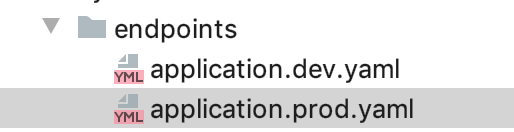
Contents of the dev file:
eurekaip: 192.89.89.111
dbip: 192.168.0.100
We can create a similar configuration for the ports of our services:
server.port: ${ports@order}.All important settings are in one place, thereby reducing the likelihood of errors caused by scattered parameters across configuration files.
The framework provides many ready-made placeholders, for example, you can get the name of the directory where the configuration file is located and assign it:
#include eureka, oracle
server.port: ${ports@order}
spring.application.name: ${this@name}
Thanks to this, it is not necessary to specify the application name in the configuration, and it can also be moved to a common module, for example, to the same eureka:
client:
   serviceUrl:
     defaultZone: http://${endpoints@eurekaip}:6782/eureka/
 spring.application.name: ${this@name}
The configuration file order will reduce to one line:
#include eureka, oracle
server.port: ${ports@order}
In case any setting from the parent configuration is not needed, we can specify it in our configuration, and it will be applied during generation. That is, if for some reason we need a unique name for the order service, we just leave the parameter spring.application.name.
For example, the service may need to add customized logging settings stored in a separate file, such as logback.xml. We will create a separate group of settings for it:
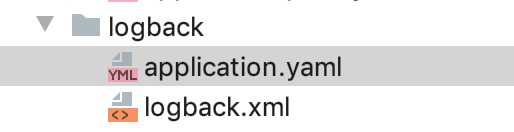
In the basic configuration, we will tell the framework where to place the desired logging settings file using the placeholder @ConfigDir:
microconfig.template.logback.fromFile: ${logback@configDir}/logback.xmlIn the file logback.xml we configure the standard appenders, which in turn may also contain placeholders that the framework will change during configuration generation, for example:
logs/${this@name}.logBy adding import logback, we automatically get configured logging for each service:
#include eureka, oracle, logback
server.port: ${ports@order}
It is time to take a closer look at all available placeholders of the framework:
${this@env} — returns the name of the current environment.
${…@name} — returns the name of the component.
${…@configDir} — returns the full path to the config component directory.
${…@resultDir} returns the full path to the destination directory of the component (the received files will be placed in this directory).
${this@configRoot} returns the full path to the root directory of the configuration storage.
The system also allows obtaining environment variables, for example, the path to java:
${env@JAVA_HOME}
Alternatively, since the framework is written in JAVA, we can obtain system variables similar to the call System::getProperty using a construction like this:
${system@os.name}
It is worth mentioning support for the expression language Spring EL. Similar expressions apply in the configuration:
connection.timeoutInMs: #{5 * 60 * 1000}
datasource.maximum-pool-size: #{${this@datasource.minimum-pool-size} + 10}
and you can use local variables in configuration files with the expression #var:
#var feedRoot: ${system@user.home}/feed
folder:
 root: ${this@feedRoot}
 success: ${this@feedRoot}/archive
 error: ${this@feedRoot}/error
Thus, the framework serves as quite a powerful tool for fine-tuning microservice configurations flexibly. The framework effectively accomplishes its primary task—eliminating copy-pasting in settings, consolidating settings, and consequently minimizing potential errors, while allowing easy combination of configurations and modifications for different environments.
If you are interested in this framework, I recommend visiting its official page and getting acquainted with the full , or digging into the source code. .
Source: habr.com
