

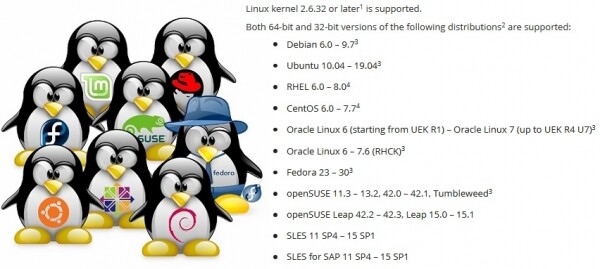
Creating a backup application that works on any distribution is no easy task. To ensure that Veeam Agent for Linux operates on distributions from Red Hat 6 and Debian 6 to OpenSUSE 15.1 and Ubuntu 19.04, one must tackle a range of challenges, especially considering that the software product includes a kernel module.
This article is based on materials from a presentation at the conference .
Linux is not just one of the most popular operating systems. Essentially, it is a platform on which one can create something unique, something of their own. Because of this, there are numerous distributions of Linux, differing in their set of software components. This creates a problem: to ensure that the software product functions on any distribution, one must take into account the peculiarities of each.
Package Managers: .deb vs .rpm
Let's start with the obvious issue of distributing products for different distributions.
The most typical way to distribute software products is to upload a package to a repository so that the built-in package manager can install it from there.
However, we have two popular package formats: rpm and deb. This means we must support each.
In the world of deb packages, compatibility is astonishing. The same package installs and works equally well on both Debian 6 and Ubuntu 19.04. The standards for package building and handling established in older Debian distributions remain relevant in the trendy Linux Mint and elementary OS. Therefore, for Veeam Agent for Linux, a single deb package for each hardware platform is sufficient.
On the other hand, in the world of rpm packages, the differences are significant. Firstly, because there are two completely independent distributors, Red Hat and SUSE, for which compatibility is not required. Secondly, these distributors have distributions with tech support and experimental ones. Compatibility is also not needed between them. We ended up with separate packages for el6, el7, and el8. A separate package for Fedora. Packages for SLES11 and 12 and a separate one for openSUSE. The main issue lies in dependencies and package names.
Dependency Issues
Unfortunately, the same packages often have different names in different distributions. Below is an incomplete list of dependencies for the veeam package.
For EL7:
For SLES 12:
- libblkid
- libgcc
- libstdc++
- ncurses-libs
- fuse-libs
- file-libs
- veeamsnap = 3.0.2.1185
- libblkid1
- libgcc_s1
- libstdc++6
- libmagic1
- libfuse2
- veeamsnap-kmp = 3.0.2.1185
As a result, the list of dependencies turns out to be unique to the distribution.
It gets worse when an updated version starts hiding under the old package name.
Example:
In Fedora 24, the package has been updated ncurses from version 5 to version 6. Our product was built specifically with version 5 to ensure compatibility with older distributions. To use the old version 5 of the library on Fedora 24, it was necessary to use the package ncurses-compat-libs.
As a result, two packages with different dependencies appear for Fedora.
It gets more interesting. After another update of the distribution, the package ncurses-compat-libs with version 5 of the library becomes unavailable. For the distributor, dragging old libraries into the new version of the distribution is costly. After some time, the problem repeated in SUSE distributions.
As a result, for some distributions, it was necessary to abandon the explicit dependency on ncurses-libs, and adjust the product to work with any version of the library.
By the way, in version 8 of Red Hat, there is no longer a meta-package python, which referred to the old good python 2.7. There is python2 and python3.
An alternative to package managers
The dependency problem is old and well-known. Just think of Dependency hell.
To combine various libraries and applications so that they all work reliably and do not conflict is essentially what any Linux distributor is trying to solve.
The package manager approaches this problem in a completely different way Snappy from Canonical. The main idea: the application runs in an isolated sandbox that is protected from the main system. If the application needs libraries, they are supplied along with the application itself.
Flatpak also allows applications to run in a sandbox using Linux Containers. The sandboxing concept is also utilized by AppImage.
These solutions allow creating a single package for any distribution. In the case of Flatpak installation and running of the application is possible even without the administrator's knowledge.
The main problem is that not all applications can work in a sandbox. Some need direct access to the platform. Not to mention kernel modules that tightly depend on the kernel and do not fit into the sandbox concept.
The second issue is that popular distributions in the enterprise environment from Red Hat and SUSE do not yet include support for Snappy and Flatpak.
As a result, Veeam Agent for Linux is not available on nor on .
To conclude the topic of package managers, I will note that there is an option to completely abandon package managers by combining binaries and installation scripts into a single package.
This type of bundle allows for the creation of a single package for different distributions and platforms, enabling an interactive installation process with necessary customization. I've encountered such packages for Linux only from VMware.
The update problem

Even if all dependency issues are resolved, a program may perform differently even on the same distribution. The issue lies in the updates.
There are three update strategies:
- The simplest strategy is to never update. You set up the server and forget about it. Why update if everything works? The problems begin the first time you call technical support. The distributor only supports the updated release.
- You can trust the distributor and set up automatic updates. In this case, a call to support is likely right after a failed update.
- The manual update option only after it has been tested in a testing infrastructure is the most reliable but expensive and labor-intensive. Not everyone can afford it.
Since different users employ different update strategies, it is necessary to support both the latest release and all previously released versions. This complicates both the development process and the testing process, adding headaches for technical support.
Diversity of hardware platforms
Various hardware platforms are an issue that is largely specific to native code. At the very least, it is necessary to compile binaries for each supported platform.
In the Veeam Agent for Linux project, we are still unable to support any RISC-based systems.
I will not dwell on this issue in detail. I will only highlight the main problems: platform-dependent types such as size_t, structure alignment, and byte order.
Static and/or dynamic linking

Now, the question of 'How to link with libraries — dynamically or statically?' needs to be discussed.
Typically, C/C++ applications on Linux use dynamic linking. This works well if the application is built specifically for a particular distribution.
However, if the goal is to cover various distributions with a single binary file, you need to target the oldest supported distribution. For us, that is Red Hat 6. It contains gcc 4.4, which does not fully support the C++11 standard. .
We build our project using gcc 6.3, which fully supports C++14. Naturally, in this case, we have to bring along the libstdc++ library and boost for Red Hat 6. It's easiest to link with them statically.
But unfortunately, not all libraries can be linked statically.
Firstly, system libraries such as libfuse, libblkid must be linked dynamically to ensure compatibility with the kernel and its modules.
Secondly, there is a nuance with licenses.
The GPL license essentially allows linking libraries only with open-source code. MIT and BSD permit static linking and allow including libraries in the project. On the other hand, LGPL seemingly does not oppose static linking but requires providing access to the files necessary for linking.
In general, using dynamic linking will protect against the need to provide anything.
Building C/C++ Applications
To build C/C++ applications for different platforms and distributions, it is sufficient to select or build an appropriate version of gcc and use cross-compilers for specific architectures, collecting the entire set of libraries. The work is entirely feasible but quite cumbersome. And there are no guarantees that the chosen compiler and libraries will yield a working variant.
An obvious advantage is that the infrastructure is greatly simplified, as the entire build process can be performed on a single machine. Additionally, it is enough to build one set of binary files for one architecture, and they can be packaged into packages for different distributions. This is how the veeam packages for Veeam Agent for Linux are built.
In contrast to this option, one can simply prepare a build farm, that is, several machines for building. Each of these machines will handle compiling the application and creating a package for a specific distribution and architecture. In this case, the compilation is carried out using the tools prepared by the distributor. This means that the stage of preparing the compiler and selecting libraries is eliminated. Moreover, the build process can be easily parallelized.
However, there is a downside to this approach: for each distribution within the same architecture, it will be necessary to compile its own set of binary files. Another drawback is that this multitude of machines needs to be maintained, requiring a large amount of disk space and RAM.
This is how KMOD packages for the veeamsnap kernel module are built for Red Hat distributions.
Open Build Service
Colleagues from SUSE tried to implement a sort of middle ground by creating a special service for compiling applications and building packages — .
Essentially, this is a hypervisor that creates a virtual machine, installs all the necessary packages in it, compiles the application, and builds the package in this isolated environment, after which the virtual machine is released.
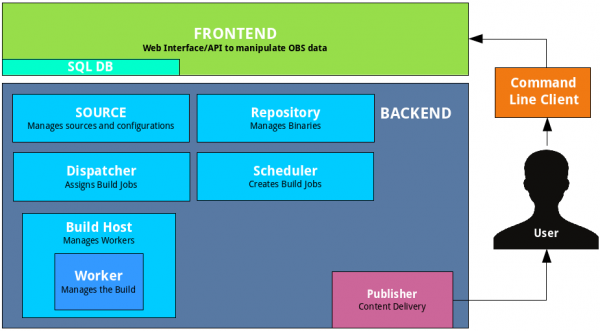
The scheduler implemented in OpenBuildService will determine how many virtual machines it can run for optimal package build speed. The built-in signing mechanism will automatically sign the packages and upload them to the integrated repository. The built-in version control system will maintain the history of changes and builds. You simply need to add your source code to this system. There’s no need to set up a server yourself; you can use the open one.
However, there is a problem: such a combine does not fit well into the existing infrastructure. For example, version control is not needed; we already have our own for the sources. Our signing mechanism is different: it uses a special server. A repository is also unnecessary.
Additionally, support for other distributions—such as Red Hat—is implemented rather poorly, which is quite understandable.
The advantage of this service is the quick support for the next version of the SUSE distribution. Before the official release announcement, the necessary packages for building are made available in a public repository. A new entry shows up in the list of available distributions on OpenBuildService. We check the box, and it gets added to the build plan. Thus, adding a new version of the distribution can be done in virtually one click.
In our infrastructure, using OpenBuildService, we compile the full range of KMP packages for the veeamsnap kernel module for SUSE distributions.
Next, I would like to address issues specific to kernel modules.
kernel ABI
Linux kernel modules have historically been distributed in the form of source code. The fact is that the kernel creators do not burden themselves with maintaining a stable API for kernel modules, let alone at the binary level, which is known as kABI.
To build a module for a vanilla kernel, you need the headers specifically for that kernel, and it will only work on that kernel.
DKMS allows for the automation of the module building process when updating the kernel. As a result, Debian repository users (and its numerous derivatives) use kernel modules either from the distributor's repository or compiled from source using DKMS.
However, this situation is not particularly satisfactory for the enterprise segment. Proprietary code distributors want to distribute their products in the form of compiled binaries.
Administrators do not want to keep development tools on production servers for security reasons. Distributors of enterprise Linux—such as Red Hat and SUSE—have decided that they can support a stable kABI for their users. As a result, KMOD packages for Red Hat and KMP packages for SUSE have emerged.
The essence of such a solution is quite simple. For a specific version of the distribution, the kernel API is frozen. The distributor states that it uses a specific kernel, for example, 3.10, and only makes corrections and improvements that do not affect the kernel interfaces, allowing modules compiled for the very first kernel to be used for all subsequent ones without recompilation.
Red Hat claims kABI compatibility for the distribution throughout its lifecycle. This means that a module compiled for RHEL 6.0 (released in November 2010) should also work on version 6.10 (released in June 2018). That’s almost 8 years. Naturally, this task is quite complex.
We have observed several cases where the veeamsnap module stopped working due to kABI compatibility issues.
After the veeamsnap module compiled for RHEL 7.0 was found to be incompatible with the kernel from RHEL 7.5, yet it would load and guaranteed to crash the server, we completely abandoned the use of kABI compatibility for RHEL 7.
Currently, the KMOD package for RHEL 7 contains a build for each release version and a script that ensures the module loads.
SUSE approached the kABI compatibility issue more cautiously. They provide kABI compatibility only within a single service pack.
For instance, the SLES 12 release was in September 2014. SLES 12 SP1 followed in December 2015, meaning just over a year had passed. Despite both releases using kernel 3.12, they are kABI incompatible. Clearly, maintaining kABI compatibility for just a year is significantly easier. A yearly kernel module update cycle should not pose problems for module developers.
As a result of this policy by SUSE, we have not recorded any kABI compatibility issues with our veeamsnap module. However, the number of packages for SUSE is almost an order of magnitude higher.
Patches and Backports
Although distributors strive to ensure kABI compatibility and kernel stability, they also aim to improve performance and eliminate defects in this stable kernel.
Moreover, aside from their own 'bug fixes', Linux enterprise kernel developers track changes in the vanilla kernel and port them to their 'stable' version.
Sometimes this leads to new .
In the latest minor update of Red Hat 6, an error was introduced. It caused the veeamsnap module to reliably crash the system when releasing a snapshot. By comparing the kernel source code before and after the update, we discovered that it was all due to a backport. A similar fix was made in the vanilla kernel version 4.19. However, in the vanilla kernel, this fix worked fine, but when ported to the 'stable' 2.6.32, it caused a spin-locking issue.
Of course, mistakes occur to everyone all the time, but was it worth dragging code from 4.19 into 2.6.32, risking stability? I'm not sure...
The worst part is when marketing gets involved in the tug-of-war between 'stability' and 'modernization.' The marketing department needs the core of the updated distribution to be stable on one hand, while also being better in performance and featuring new functionalities on the other. This leads to strange compromises.
When I tried to build a module on the 4.4 kernel from SLES 12 SP3, I was surprised to find features from the vanilla 4.8 kernel. In my view, the block I/O implementation of the 4.4 kernel from SLES 12 SP3 is more akin to the 4.8 kernel than to the previous stable 4.4 release from SLES 12 SP2. I can't judge the percentage of code ported from the 4.8 kernel to the SLES 4.4 for SP3, but I can't bring myself to call the kernel the same stable 4.4.
The most unpleasant thing about this is that when writing a module that should work well on different kernels, you can no longer rely on the kernel version. You also have to consider the distribution. It's good that sometimes you can tie the code to a define that appears with new functionality, but this opportunity doesn't always arise.
As a result, the code accumulates quirky conditional compilation directives.
There are also patches that change the documented kernel API.
I came across the distribution 5.16 and was very surprised to see that the call to lookup_bdev in this kernel version had changed the list of input parameters.
To compile, I had to add a script in the makefile that checks whether the mask parameter exists for the lookup_bdev function.
Kernel module signatures
But let's return to the issue of package distribution.
One of the advantages of the stable kABI is that kernel modules in binary form can be signed. In this case, the developer can be sure that the module has not been accidentally damaged or intentionally altered. This can be checked with the modinfo command.
Red Hat and SUSE distributions allow checking the module's signature and loading it only if the corresponding certificate is registered in the system. The certificate is a public key that signs the module. We distribute it as a separate package.
The issue here is that certificates can either be embedded in the core (used by distributors) or must be written to non-volatile EFI memory using a utility. mokutil. Utility mokutil when installing the certificate, it requires a system reboot and even before the operating system kernel loads, prompts the administrator to permit loading the new certificate.
Thus, adding a certificate requires physical access to the system by the administrator. If the machine is located somewhere in the cloud or simply in a remote server and access is only available over the network (e.g., via ssh), then adding the certificate will not be possible.
EFI on virtual machines
Despite the fact that EFI has been supported by almost all motherboard manufacturers for a long time, the administrator may not consider the need for EFI during system installation, and it may be disabled.
Not all hypervisors support EFI. VMWare vSphere supports EFI starting from version 5.
Microsoft Hyper-V also gained EFI support starting with Hyper-V for Windows Server 2012R2.
However, in the default configuration, this functionality for Linux machines is disabled, which means the certificate cannot be installed.
In vSphere 6.5, the option Secure Boot can only be set in the old version of the web interface, which works through Flash. The HTML-5 Web UI is still significantly lagging behind.
Experimental distributions
Finally, let’s consider the issue of experimental distributions and distributions without official support. On one hand, such distributions are hardly found on the servers of serious organizations. They lack official support. Therefore, technical support for products on such distributions cannot be provided.
However, these distributions become a convenient platform for trying out new experimental solutions. For example, Fedora, OpenSUSE Tumbleweed, or Unstable versions of Debian. They are quite stable. They always have the latest versions of software and always have a new kernel. A year later, this experimental functionality may appear in the updated RHEL, SLES, or Ubuntu.
So if something doesn’t work on an experimental distribution, it’s a reason to investigate the problem and resolve it. One must be prepared for the fact that this functionality will soon appear on users' production servers.
You can explore the currently existing list of officially supported distributions for version 3.0. However, the actual list of distributions on which our product can operate is much broader.
Personally, I was interested in experimenting with the 'Elbrus' OS. After adapting the Veeam package, our product was installed and ran successfully. I wrote about this experiment on Habr in .
The support for new distributions continues. We expect the release of version 4.0 soon. A beta should be available shortly, so stay tuned for !
Source: habr.com
