

If you are like most people, you are likely using resources that function outside of your cluster. You may be utilizing the Taleo API to send text messages or analyzing images with the Google Cloud Vision API.
If you are using the same endpoint — the request receiving point on the server side across all your environments and do not plan to move your servers to Kubernetes, then it is perfectly fine to have the service endpoint directly in your code. However, there are many other scenarios. In this 'Kubernetes Best Practices' series, you will learn how to use Kubernetes' built-in mechanisms for service discovery both inside and outside the cluster.
An example of a widely used external service is a database operating outside a Kubernetes cluster. Unlike cloud databases such as Google Cloud Datastore or Google Cloud Spanner, which use a single endpoint for all access types, most databases have separate endpoints for different circumstances.
The best practice for using traditional databases like MySQL and MongoDB typically involves connecting to different components for different environments. You might have a large machine for production data and a smaller machine for the testing environment. Each will have its own IP address or domain name, but you certainly do not want to change your code when switching from one environment to another. Instead, you can use Kubernetes' built-in service discovery for external services based on DNS just like for native Kubernetes services.
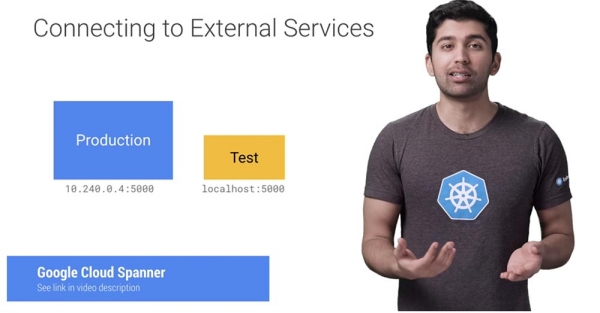
Suppose you are running a MongoDB database on Google Compute Engine. You will remain in this hybrid world until you can migrate it to the cluster.
Fortunately, you can use static Kubernetes services to ease your life a bit. In this example, I created a MongoDB server using Google Cloud Launcher. Since it is created in the same network (or VPC of the Kubernetes cluster), it is accessed via a high-performance internal IP address.
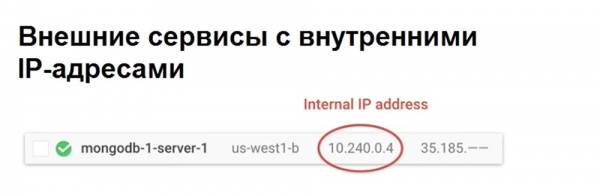
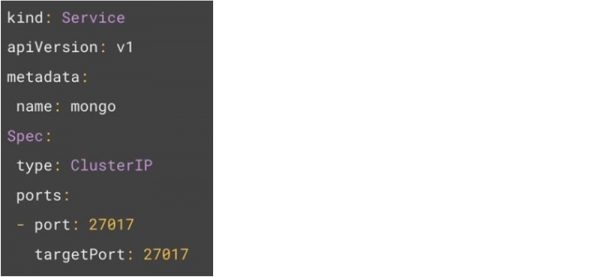
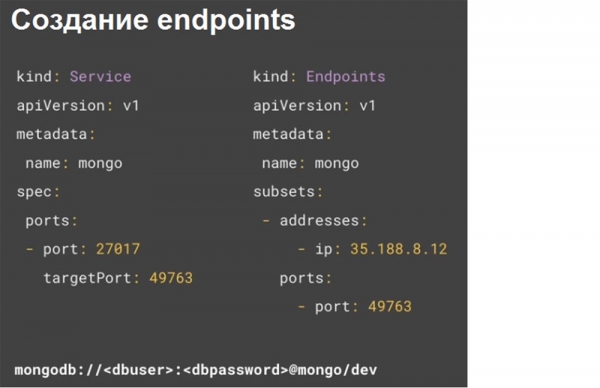
In Google Cloud, this is the default setting, so you don't have to configure anything. Now that there is an IP address, the first step is to create a service. You may notice that there are no pod selectors for this service. This means we have created a service that won't know where to send traffic. This will allow you to manually create an endpoint object that will receive traffic from this service.
The next code example shows that endpoints define the IP address for the database, using the same mongo name as the service.
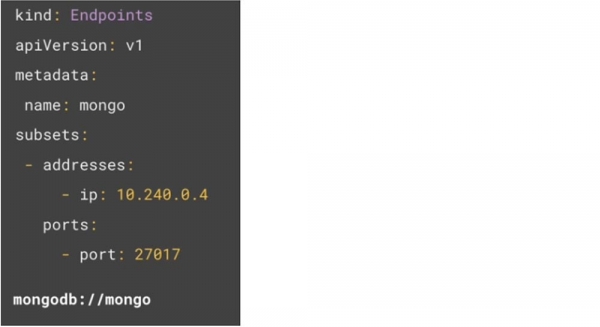
Kubernetes will use all IP addresses to find endpoints as if they were regular Kubernetes pods, so now you can access the database with a simple connection string to the above-mentioned name mongodb://mongo. There is no need to use IP addresses in your code at all.
If the IP addresses change in the future, you can simply update the endpoints with the new IP address, and your applications won't need to be modified in any additional way.
If you are using a database hosted by a third party, the host owners likely provided you with a unified resource identifier URI for the connection. So if you were given an IP address, you can simply use the previous method. This example shows that I have two MongoDB databases hosted on mLab.
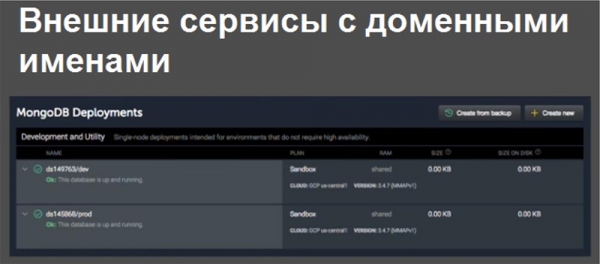
One is the developer database, and the other is the production database. The connection strings for these databases look as follows — mLab provides you with a dynamic URI and a dynamic port. As you can see, they are different.

To abstract from this, we use Kubernetes and connect to the developer database. You can create an external Kubernetes service name that will provide you with a static service that will redirect traffic to the external service.
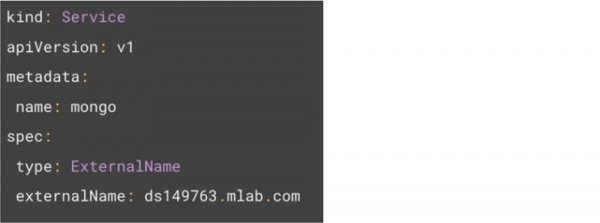
This service will perform a simple CNAME redirection at the kernel level, which will have minimal impact on performance. Thanks to this, you can use a simpler connection string.

However, since the external name uses CNAME redirection, it cannot perform port remapping. Therefore, this solution is applicable only for static ports and cannot be used with dynamic ports. However, the free mLab Free Tier by default provides a dynamic port number to the user, and you cannot change this. This means that you need different connection string commands for dev and prod. The downside is that this requires hardcoding the port number. So how do you get port remapping to work?
The first step is to obtain the IP address from the URI. By executing the nslookup command, hostname, or pinging the URI, you can get the database's IP address. If the service returns multiple IP addresses, all of these can be used in the object endpoints.
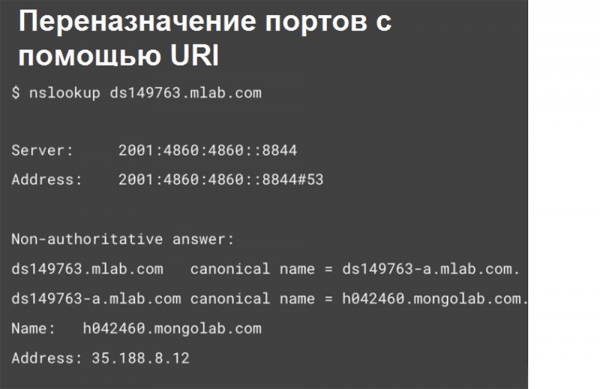
It is important to remember that URI IP addresses can change without prior notice, making them quite risky to use in prod. With such an IP address, you can connect to a remote database without specifying a port. Thus, the Kubernetes service transparently performs port remapping.
Mapping, or associating external resources with internal ones, allows you to flexibly use these services within the cluster in the future while minimizing refactoring efforts. It also facilitates management and provides insight into the external services your company utilizes.
Continuation will be available very soon…
A little advertisement 🙂
Thank you for staying with us. Do you enjoy our articles? Want to see more interesting content? Support us by placing an order or recommending us to your friends, , a unique entry-level server alternative that we have created for you: (options available with RAID1 and RAID10, up to 24 cores and up to 40GB DDR4).
Dell R730xd at half the price in the Equinix Tier IV data center in Amsterdam? Only with us in the Netherlands! Dell R420 — 2x E5-2430 2.2GHz 6C 128GB DDR3 2x960GB SSD 1Gbps 100TB — from $99! Read about how
Source: habr.com
