

In May of this year, I participated as a player in . I noticed that when the number of players reached a certain amount, a portion of them would disconnect every few minutes. Fortunately for you (but not for me), I was one of those players who got disconnected every time, even with a good connection. I took this as a personal challenge and began to search for the causes of the problem. After three weeks of debugging, testing, and fixes, the error was finally resolved, but it was not an easy journey.
Multiplayer gaming issues are very difficult to trace. They typically arise under very specific network conditions and particular game states (in this case, involving more than 200 players). And even when you manage to reproduce the problem, it can't be properly debugged since inserting checkpoints halts the game, confuses timers, and usually leads to connection dropouts due to timeout. But thanks to persistence and a wonderful tool called , I was able to figure out what was happening.
In short: due to a bug and incomplete implementation of lag state simulation, the client sometimes found itself in a situation where it had to send a network packet containing player input actions for about 400 game entities in a single tick (we call this a "mega packet"). After this, the server not only had to properly receive all these input actions but also send them to all the other clients. If you have 200 clients, this quickly becomes a problem. The channel to the server quickly gets congested, leading to packet loss and a cascade of retried packets. The input action delays then cause even more clients to start sending mega packets, and their avalanche becomes even worse. The lucky clients manage to recover, while all the others disconnect.
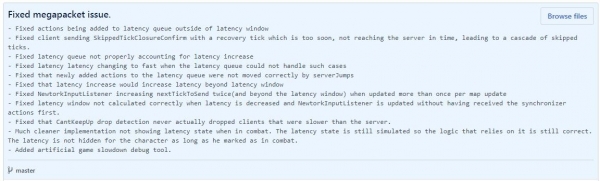
The problem was quite fundamental, and it took me two weeks to resolve it. It's rather technical, so I'll explain the juicy technical details below. But first, you need to know that since version 0.17.54, released on June 4th, under conditions of temporary connection issues, multiplayer has become more stable, and latency hiding is much less glitchy (less stuttering and teleporting). Additionally, I changed the way latency is hidden in combat and hope that this will make it a bit smoother.
Multiplayer Megapack - Technical Details
To simplify, multiplayer in the game works as follows: all clients simulate the game state, receiving and sending only player input (referred to as "Input Actions," Input Actions). The primary task of the server is to relay Input Actions and ensure that all clients perform the same actions in one tick. You can read more about this in the post .
Since the server must make decisions about what actions to execute, the player's actions follow a path like this: player action -> game client -> network -> server -> network -> game client. This means that each player action is executed only after it makes a round trip through the network. Because of this, the game would feel terribly sluggish, so almost immediately after the introduction of multiplayer, a latency hiding mechanism was implemented. Latency hiding simulates player input without taking into account the actions of other players and server decision-making.
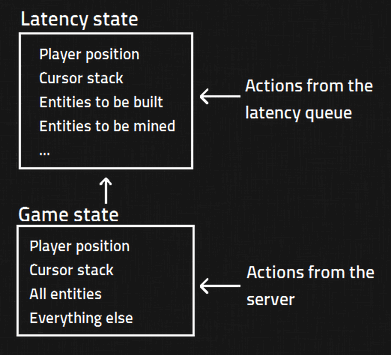
In Factorio, there is a game state Game State — this is the complete state of the map, player, entities, and everything else. It is deterministically simulated across all clients based on the actions received from the server. The game state is sacred, and if it ever starts to differ from the server or any other client, a desynchronization occurs.
Besides Game State we have a latency state Latency State. It contains a small subset of the main state. Latency State It is not sacred and simply represents a picture of what the game state will look like in the future based on the input from the player. Input Actions.
To achieve this, we keep a copy of the created Input Actions in the latency queue.
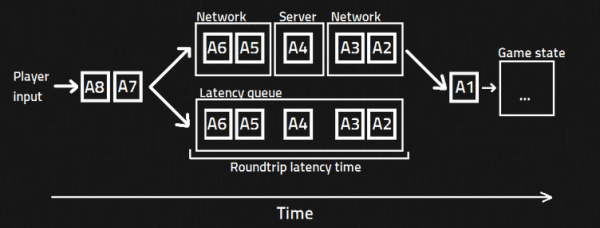
At the end of the process, the client-side looks approximately like this:
- Applying Input Actions all actions to Game State as if these input actions were received from the server.
- Remove from the delay queue all Input Actions, which, according to the server, have already been applied to Game State.
- Remove Latency State and reset it to make it look exactly like Game State.
- Apply all actions from the delay queue to Latency State.
- Based on the data Game State and Latency State we render the game for the player.
All of this is repeated in every tick.
Too complicated? Don’t relax, that’s not all. To compensate for unreliable Internet connections, we created two mechanisms:
- Missed ticks: when the server decides that Input Actions will be executed in the game tick, if it hasn’t received Input Actions any player (for example, due to increased latency), it won’t wait, but will inform that client, ‘I didn’t account for your Input Actions, I’ll try to add them in the next tick.’ This is done so that the map update is not slowed down for all others due to connection (or computer) issues of one player. It’s worth noting that Input Actions are not ignored, but simply postponed.
- Round-trip latency: the server tries to estimate what the round-trip data transmission delay is between the client and the server for each client. Every 5 seconds, it discusses a new delay with the client if necessary (depending on how the connection behaved in the past) and accordingly increases or decreases the round-trip data transmission delay.
These mechanisms on their own are quite simple, but when used together (which often occurs during connection problems), the logic of the code becomes difficult to manage and has many edge cases. Additionally, when these mechanisms come into play, the server and the delay queue must properly implement a special Input Action called StopMovementInTheNextTick. This way, in case of connection issues, the character won’t run away by itself (e.g., under a train).
Now I need to explain to you how entity selection works. One of the transmitted types Input Action — this is a change in the selection state of an entity. It notifies everyone about which entity the player has hovered over with their cursor. As you can understand, this is one of the most common input actions sent by clients, so to save bandwidth, we optimized it to take up as little space as possible. This is achieved by saving a low-precision relative offset from the previous selection instead of storing the absolute, high-precision map coordinates with each selection of an entity. This works well because mouse selections typically happen very close to the previous one. This leads to two important requirements: Input Actions they must never be skipped and must be executed in the correct order. These requirements are satisfied for Game State. But since the task Latency state is to 'look good enough' for the player, in latency states they are not met. Latency State does not consider , related to skipping ticks and variations in round-trip latency.
You may already guess where this is going. Finally, we are starting to see the reasons for the mega packet issue. The root of the problem lies in the decision-making process regarding whether to transmit the selection change action, as the entity selection logic relies on Latency State, and this state does not always contain accurate information. Therefore, a mega packet is generated approximately as follows:
- The player is experiencing connection issues.
- Tick skipping and round-trip delay adjustment mechanisms come into play.
- The latency state queue does not account for these mechanisms. This leads to some actions being prematurely discarded or executed out of order, resulting in incorrect Latency State.
- The player loses connection and simulates up to 400 ticks to catch up with the server.
- In each tick, a new action for changing the entity selection is generated and prepared for sending to the server.
- The client sends the server a mega packet of over 400 entity selection changes (along with other actions: shooting state, walking, etc., also suffered from this problem).
- The server receives 400 input actions. Since it's not allowed to skip any input action, it instructs all clients to perform these actions and sends them over the network.
The irony is that the mechanism designed to save bandwidth ended up creating enormous network packets.
We resolved this issue by fixing all edge cases related to updates and delay queue support. Although it took quite a bit of time, it was ultimately worth implementing everything correctly instead of relying on quick hacks.
Source: habr.com
