

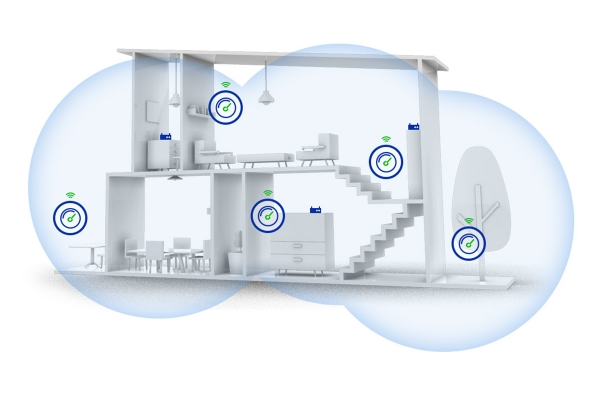
When I lived in an apartment building, I faced the issue of low speed in rooms far from the router. Many routers are placed in the hallway, where the provider brought in fiber or UTP, and typically, a standard device was installed there. It's better when the owner replaces the router with their own, as the standard devices provided by the ISP are usually the most budget-friendly or basic models. One shouldn't expect high performance from them — they just work, and that's it. However, I installed a router with gigabit ports and a radio module that supports operation on 2.4GHz and 5GHz frequencies. Yet, the internet connection speed within the apartment, especially in distant rooms, was quite disappointing. Part of the issue lies in the noisy 2.4GHz band, and part comes from the attenuation and multiple reflections of the signal when passing through reinforced concrete structures. That's when I decided to expand the network with additional devices. The question arose: a Wi-Fi network or a Mesh system? I decided to investigate, conduct tests, and share my experience. Welcome.
Theory of Wi-Fi and Mesh
For an average user who connects to a network via Wi-Fi to watch videos on YouTube, there won't be any difference in which system to use. However, in terms of organizing proper Wi-Fi coverage, these systems are fundamentally different, and each has its pros and cons. Let's start with the Wi-Fi system.
Wi-Fi System
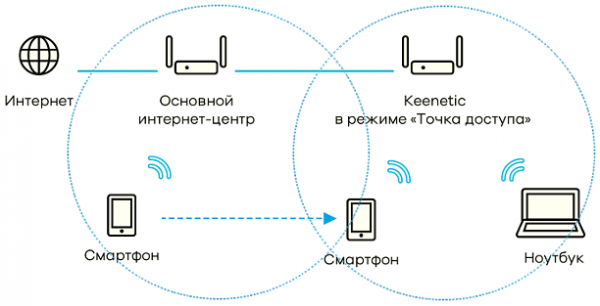
This is a network of standard routers that can operate independently. In this system, one router is designated as the primary, while the others become secondary. The transition between routers remains seamless for the client, and from the routers' perspective, the client shifts from one cell to another. This system can be compared to cellular networks, as it forms a unified local network with relay routers. The advantages of this system are evident: the network can be gradually expanded by adding new devices as needed. Moreover, it will only require the purchase of inexpensive routers that support this technology. One significant drawback, however, is that each router must be connected to Ethernet and power. Therefore, if you have already done renovations without laying out UTP cables, you will have to either run them along the baseboard where possible or consider an alternative system.
Mesh System
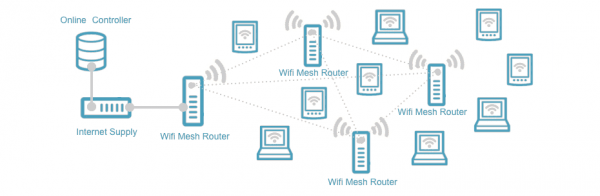
This is a network of specialized equipment that also creates a network from multiple devices, providing seamless Wi-Fi signal coverage. These points are generally dual-band, allowing operation in both 2.4 GHz and 5 GHz networks. A major advantage is that there’s no need to run cables for each new device - they connect through a separate transmitter, forming their own network and transmitting data through it. Subsequently, this data is sent to a standard Wi-Fi adapter, reaching the user. The benefit is clear: no additional wires are needed - just plug the new point's adapter into an outlet, link it to the main router, and you’re good to go. However, there are drawbacks. For example, the cost. The price of the main router is significantly higher than that of a standard router, and the cost of an additional adapter is also considerable. However, you won’t need to redo renovations, pull cables, or worry about wires.
Let's move on to the practical part
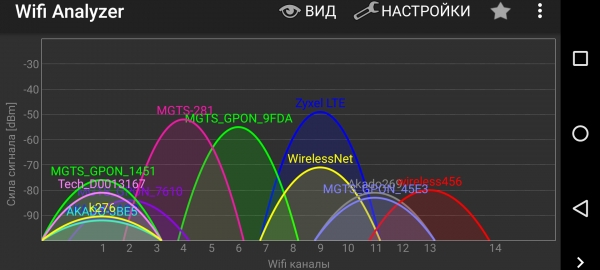
I have already moved from a concrete apartment to my own house and also faced the problem of wireless network speed drops. While previously the interference from neighboring Wi-Fi routers significantly affected the signal (as everyone tries to crank up the power to 'drown out' their neighbors and boost their speed), now distance and walls have started to have an impact. Instead of a 45-square-meter apartment, I have moved to a two-story house with 200 square meters. There is much to say about living in a house, and even the fact that the neighbor's Wi-Fi point only occasionally appears in my smartphone's menu, with no other wireless networks detected, speaks volumes. In any case, I tried to place the router in the geographical center of the house, and on the 2.4GHz band, it provides coverage everywhere, but the signal on the property is already lacking. However, when watching a movie from home server on my laptop in the room far from the router, there are sometimes pauses. It turns out that the 5GHz network is unstable with several walls and obstructions, and the laptop prefers to switch to the 2.4GHz network, which has greater stability but lower data transfer speed. 'I need more speed!', as Jeremy Clarkson likes to say. So I went looking for a way to extend and speed up the wireless connection. I decided to compare head-to-head two systems: the Wi-Fi system from Keenetic and the Mesh system from Zyxel.
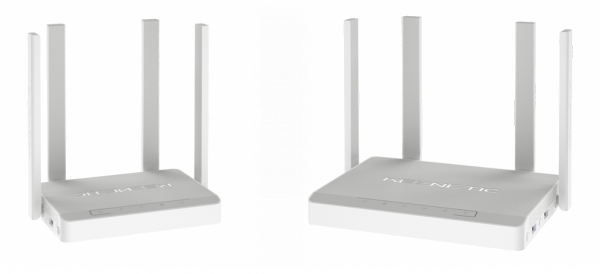
On the Keenetic side, the routers Keenetic Giga and Keenetic Viva were involved. One of them acted as the network organizer, while the other was a slave point. Both routers have gigabit Ethernet and a dual-band radio module. Additionally, they come with USB ports and a very wide range of firmware settings. At the time of testing, the latest available firmware was installed, and the leading router was the Keenetic Giga. They were connected to each other via a gigabit wired Ethernet cable.
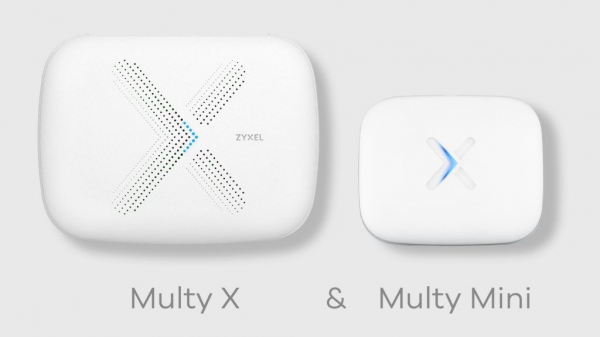
On the Zyxel side, the Mesh system consists of Multy X and Multi mini. The primary unit, Multy X, was connected to the Internet, while the 'younger' one, Multi mini, was installed in the far corner of the house. The main point was connected to the network, and the additional unit provided network coverage through both wireless and wired channels. This means the additional connected point can also serve as a wireless adapter for devices that lack a Wi-Fi module but have an Ethernet port.
Functional capabilities
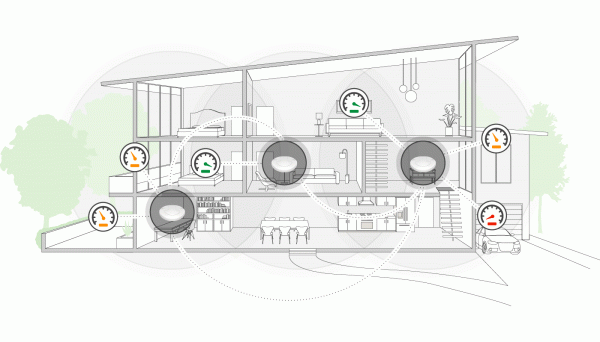
Manufacturers often claim in press releases about the extraordinarily wide wireless coverage of their devices. However, this applies in open spaces without walls, reflecting surfaces, or radio interference. In reality, many have experienced reduced speed and packet loss in apartments where one can see a dozen or so wireless networks on their smartphone. For this reason, it's more effective to utilize the less crowded 5 GHz band.
For simplicity, I will refer to Wi-Fi and Mesh system devices as routers. Each router can simply be a wireless device. But I'm curious about how many devices and at what speed the router can provide network access. Regarding the first question, the situation is as follows. The number of supported devices depends on the Wi-Fi module. For Zyxel Multy X and Multy mini, this will be 64+64 devices for each band (2.4+5 GHz), meaning with two points, you can connect 128 devices on 2.4 GHz and 128 devices on 5 GHz.
Creating a Mesh network has been made as simple and visual as possible: all you need is a smartphone and to install the Zyxel Multi app. It doesn't matter whether you have an iOS or Android device. By following the installation wizard's prompts, a network is created, and all subsequent devices are connected. Surprisingly, to initially create the network, you need to enable geolocation and have an Internet connection. So, at the very least, you need to have network access from your smartphone.
For Keenetic routers, the situation looks somewhat different. The number of client devices that can be connected depends on the model. Below, I will list the router names and their client connection capabilities in the 2.4 and 5 GHz bands.
Giga III and Ultra II: 99+99
Giga KN-1010 and Viva KN-1910: 84 for both bands
Ultra KN-1810: 90+90
Air, Extra II, Air KN-1610, Extra KN-1710: 50+99
City KN-1510: 50+32
Duo KN-2110: 58+99
DSL KN-2010: 58
Lite KN-1310, Omni KN-1410, Start KN-1110, 4G KN-1210: 50
Routers can be configured from both a computer and a smartphone. While this is easily accomplished through a web interface in a local network, a special application exists for smartphones that allows access to additional features, such as torrent downloading or accessing files on a connected USB storage device. Keenetic has a great feature called KeenDNS, which enables connection to the web services of published services from an external network even when you have a dynamic IP address. This means you can connect to the router's interface behind NAT, as well as to the interface of a DVR or a web server behind NAT. However, since this material is about networking, it's important to note that setting up a Wi-Fi network is also very simple: the main router acts as the leading device, while the other routers are set in the mode of subordinate adapters. Subordinate routers can create VLANs, operate in a unified address space, and have the output power of each wireless adapter set in increments of 10%. This way, the network can be expanded significantly. But there is one caveat: to organize a Wi-Fi network, all routers must be connected using Ethernet.
Testing methodology
Since the wireless network from the client side does not differ, yet from a technical organization standpoint, the principles are fundamentally different, a user-oriented methodology was chosen. Testing was conducted separately with the Zyxel Multy X+ Multy mini and the Keenetic Giga+Keenetic Viva devices. To avoid the influence of the provider, a local network was set up before the main device. server On the user device, a client was organized. As a result, the topology was as follows: server-leading router-access point-client.
All tests were conducted using the Iperf utility, which emulates continuous data transmission. Each time, tests were performed for 1, 10, and 100 streams, allowing for an assessment of the wireless network's performance under varying loads. Both single-threaded data transmission was emulated, such as watching a video on YouTube, and multi-threaded, such as torrent downloading. Tests were conducted separately for networks operating at 2.4 and 5 GHz.
In addition, since the Zyxel Multy and Zyxel mini devices can act as adapters, they were connected via Ethernet interface to the user’s computer at a speed of 1000 Mbps, and three speed tests were also conducted. In a similar test, the Keenetic Vivo router was involved as a Wi-Fi adapter, connected with a patch cord to a laptop.
The distances between points were about 10 meters, with reinforced concrete ceilings and two walls. The distance from the laptop to the final access point was 1 meter.
All data was entered into a table and graphs of the speed were constructed.

Results
Now it's time to look at the numbers and the graphs. The graph is more visual, so I will show it right away.
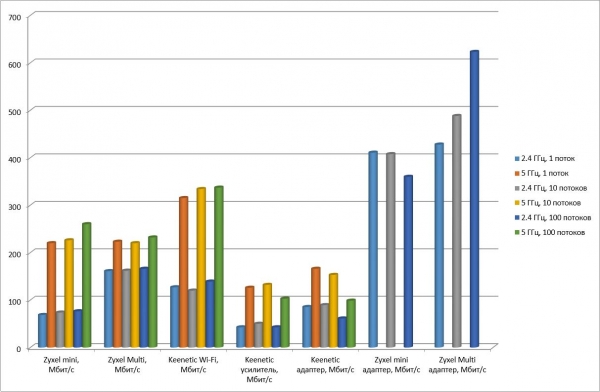
The connection chain on the graphs is as follows:
Zyxel mini: server — wired — Zyxel Multy X — wireless — Zyxel Multy mini — laptop (Intel Dual Band Wireless-AC 7265 adapter)
Zyxel Multy: server — wired — Zyxel Multy X — wireless — Zyxel Multy X — laptop (Intel Dual Band Wireless-AC 7265 adapter)
Keenetic Wi-Fi: server — wired — Keenetic Giga — wired — Keenetic Viva — laptop (Intel Dual Band Wireless-AC 7265 adapter)
Keenetic extender: server — wired — Keenetic Giga — wireless — Keenetic Viva (as a repeater) — laptop (Intel Dual Band Wireless-AC 7265 adapter)
Keenetic adapter: server — wired — Keenetic Giga — wireless — Keenetic Viva (in adapter mode) — wired — laptop
Zyxel mini adapter: server — wired — Zyxel Multy X — wireless — Zyxel Multy mini — wired — laptop
Zyxel Multy adapter: server — wired — Zyxel Multy X — wireless — Zyxel Multy X — wired — laptop
The picture shows that all devices operating on the 2.4 GHz frequency are less efficient than those on the 5 GHz frequency. This is despite the absence of noise from neighboring interfering networks, as the results would have been noticeably worse in the presence of noise on the 2.4 GHz frequency. Nevertheless, it is clearly visible that the data transfer speed at 5 GHz is almost twice as high as at 2.4 GHz. Additionally, it is noticeable that the number of simultaneous download streams also has some impact, meaning that increasing the number of streams uses the data transfer channel more densely, although the difference is not so significant.
It is very clear that when the Keenetic router acted as a repeater, the transfer speed was halved, so this should be taken into account if you want to transfer large volumes of information quickly, rather than just expanding the coverage of the Wi-Fi network.
In the latest test, where the Zyxel Multy X and Zyxel Multy mini served as adapters for a wired connection to a remote device (the connection between the base Zyxel Multy X and the receiving device was wireless), the advantages of Multy X were demonstrated, especially during multi-threaded data transmission. The larger number of antennas on the Zyxel Multy X made a difference: 9 compared to 6 on the Zyxel Multy mini.
Conclusion
Thus, it is clear that even in an uncongested environment at a frequency of 2.4 GHz, switching to 5 GHz makes sense when large volumes of information need to be transmitted quickly. At the same time, it is entirely possible to watch movies in Full HD quality using a router as a repeater, even at 2.4 GHz. However, 4K movies with a normal bitrate will start to stutter, so both the router and the playback device must be capable of operating at the 5 GHz frequency. The highest speed is achieved when using a pair of Zyxel Multy X or Zyxel Multy X + Multy mini as a wireless adapter.
And now about the prices. The tested pair of routers Keenetic Giga + Keenetic Viva costs 14,800 rubles. The set of Zyxel Multy X + Multy mini costs 21,900 rubles.
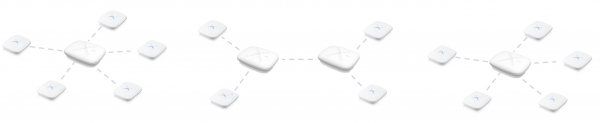
The Zyxel mesh system can provide wide coverage at a very decent speed without the need to lay additional cables. This is particularly relevant when renovations have already been completed, and additional twisted pairs have not been installed. Additionally, setting up such a network is extremely simple via a smartphone app. It should be noted that a mesh network can consist of 6 devices and have both star and tree topologies. This means that the end device can be located very far from the starting router connected to the Internet.
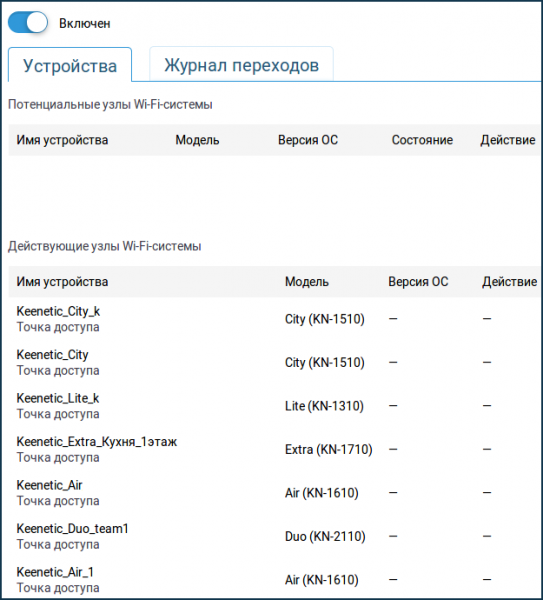
At the same time, the Wi-Fi system based on Keenetic routers is much more functional and allows for a more cost-effective network setup. However, this requires a wired connection. The distance between routers can be up to 100 meters, and the speed will not decrease due to the gigabit wired connection. Furthermore, there can be more than 6 devices in such a network, and roaming of Wi-Fi devices while moving will be seamless.
Thus, everyone decides for themselves what to choose: functionality and the need to lay a network cable, or the simplicity of expanding a wireless network for a bit more money.
Source: habr.com
