


Is it time? Such a question eventually arises among colleagues who use Lotus as an email client or document management system. A request for migration (based on our experience) can come from various levels of the organization: from top management to end users (especially if there are many of them). Here are several reasons why migration from Lotus to Exchange is not such a simple task:
- The RTF format of IBM Notes is not compatible with the RTF format of Exchange;
- IBM Notes uses the SMTP address format only for external emails, whereas Exchange uses it for all;
- The need to preserve delegations;
- The need to preserve metadata;
- Some emails may be encrypted.
And if Exchange is already in place but Lotus is still in use, coexistence issues arise:
- The need to use scripts or third-party systems to synchronize address books between Domino and Exchange;
- Domino uses plain text to send emails to other mail systems;
- Domino uses the iCalendar format to send invitations to other mail systems;
- The inability to make Free-Busy requests and jointly book resources (without using third-party solutions).
In this article, we will review specialized software products from Quest for migration and coexistence: and respectively. At the end of the article, you will find a link to a page where you can apply for a free trial migration of several mailboxes to demonstrate the ease of the process. Below is a step-by-step algorithm for migration and other details about the migration process.
If we differentiate the approaches to migration, we can assume that there are three main types:
- Transition without migration. Users receive empty mailboxes, while the original mail service continues to operate in read-only mode.
- Migration with coexistence. Integration is set up between the source and target systems, after which the data from the mailboxes is gradually transferred to the new system.
- Migration in offline mode. The original system is turned off, and the data of all users is transferred to the new system.
Below, we will discuss offline migration and migration with coexistence. For these processes, as mentioned above, two Quest products are responsible: Coexistence Manager for Notes and Migrator for Notes to Exchange respectively.
Coexistence Manager for Notes (CMN)
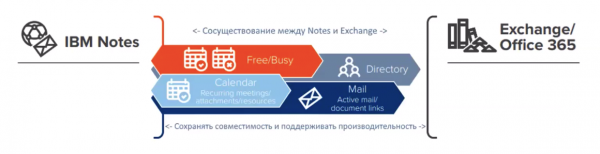
This solution performs bidirectional synchronization of LDAP directories, creates contacts for mail objects (mailboxes, lists, distribution groups, resources) from the source system. There is the possibility of custom attribute mapping and real-time data transformation. As a result, you will have identical address books in Lotus and Exchange.
CMN also provides SMTP connectivity between infrastructures:
- It modifies emails in real time;
- It converts to the correct RTF format;
- It handles DocLinks;
- It packages Notes data into NSF;
- It processes invitations and resource requests.
CMN can be used in a clustering mode for fault tolerance and performance improvement. As a result, you will retain email formatting, support for complex schedules, and resource requests between email systems.
Another important feature of CMN is Free-Busy emulation. This allows colleagues not to worry about who is using what: Lotus or Exchange. Emulation enables the mail client to obtain user availability data from another mail system. Instead of synchronizing data, requests between systems are forwarded in real time. Consequently, Free-Busy can still be used even after part of the users has migrated.
Migrator for Notes to Exchange (MNE)
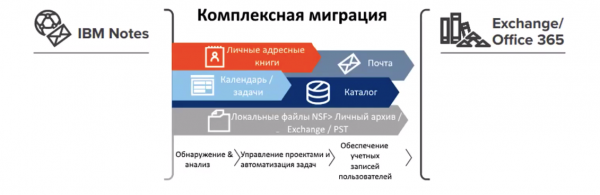
This tool performs direct migration. The migration process can be conditionally divided into several stages: pre-migration, migration, and post-migration.
Pre-migration
At this stage, an analysis of the source infrastructure is conducted: domains, addresses, groups, etc., mailbox collections for migration are created, and accounts are set up while merging contacts with the AD account.
Migration
During migration, mailbox data is copied in multiple streams while preserving ACL and metadata. Groups are also migrated. If necessary, a delta migration can be performed if it was not possible to complete it all at once for any reason. MNE also takes care of mail redirection. The entire migration occurs at the speed of the network connection, so having the Lotus and Exchange environments in the same data center provides a significant speed advantage.
Post-migration
In the post-migration phase, local/encrypted data is migrated via self-service. This is a special utility that decrypts messages. During a subsequent delta migration, these emails will be transferred to Exchange.
Another optional migration step is application migration. For this, Quest has a specialized product - . In a separate article, we will discuss how to work with it.
A step-by-step example of the migration procedure using MNE and CMN solutions
Step 1. Performing an AD update using Coexistence Manager. Extracting data from the Domino directory and creating user accounts (contacts) with email support enabled in Active Directory. At this stage, user mailboxes in Exchange have not yet been created. User records in AD contain the current addresses of Notes users.
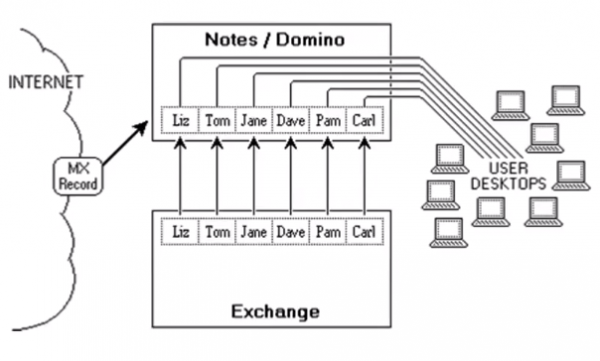
Step 2. Exchange can redirect messages to the Notes user mailboxes immediately after changing the MX record. This is a temporary solution to redirect incoming mail in Exchange until the first users are migrated.
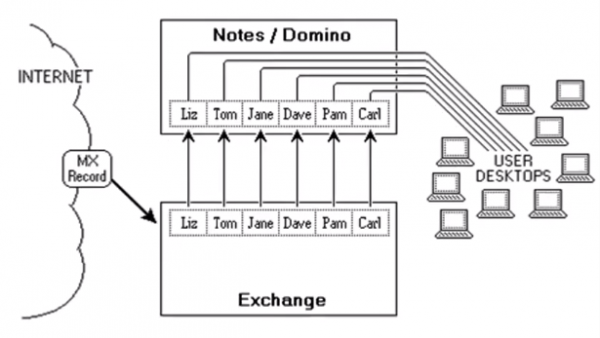
Step 3. The Migrator for Notes to Exchange data transfer wizard includes the AD accounts of migrating users and establishes mail forwarding rules in Notes so that mail addressed to Notes addresses of already migrated users is redirected to their active Exchange mailboxes.
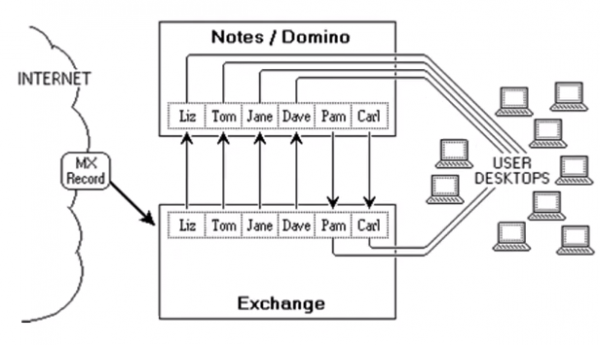
Step 4. The process is repeated for each group of users transitioning to the new server.
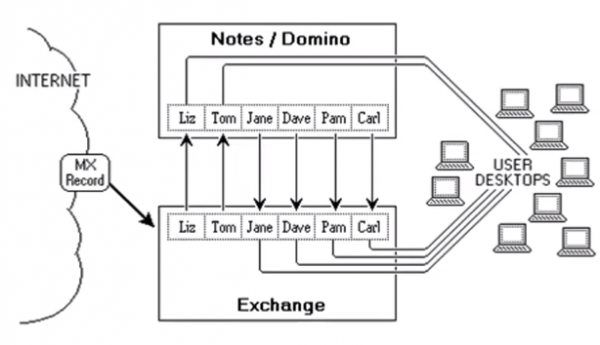
Step 5. The Domino server can be shut down (actually it cannot if applications remain).
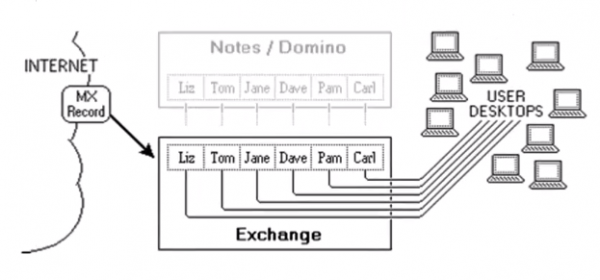
Migration is complete; you can go home and open the Exchange client there. If you are already considering migrating from Lotus to Exchange, we recommend reading our blog . And if you want to see a test migration in action and ensure the ease of use of Quest products, leave a request in and we will conduct a free test migration to Exchange for you.
Source: habr.com
