

 Minimizing the Risks of Using DoH and DoT
Protection Against DoH and DoT
Are you monitoring your DNS traffic? Organizations invest a lot of time, money, and effort in securing their networks. However, one area that often gets overlooked is DNS.
A good overview of the risks posed by DNS is at the Infosecurity conference.
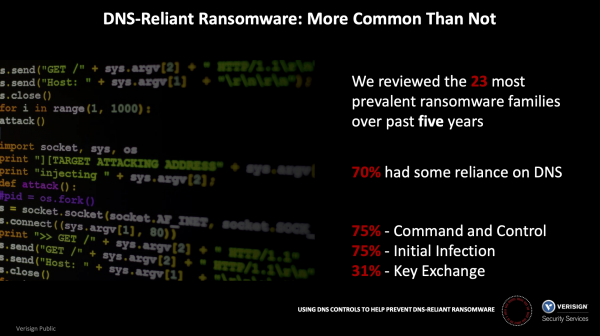 31% of surveyed ransomware families used DNS for key exchange. Findings of the study
31% of surveyed ransomware families used DNS for key exchange.
The problem is serious. According to research by Palo Alto Networks Unit 42, approximately 85% of malware use DNS to establish command and control channels, allowing attackers to easily deploy malware in your network and exfiltrate data. Since its inception, DNS traffic has mainly been unencrypted and easily analyzed by NGFW mechanisms.
New protocols for DNS have emerged, aimed at enhancing the privacy of DNS connections. They are actively supported by leading browser vendors and other software providers. Soon, there will be an increase in encrypted DNS traffic within corporate networks. Unmonitored and improperly configured encrypted DNS traffic poses a security threat to companies. For example, one such threat is ransomware, which uses DNS for encryption key exchanges. Attackers are currently demanding ransoms in the millions of dollars to regain access to your data. For instance, Garmin paid out $10 million.
When properly configured, NGFW can block or protect the use of DNS-over-TLS (DoT) and can be used to prohibit DNS-over-HTTPS (DoH), allowing for the analysis of all DNS traffic in your network.
What is Encrypted DNS?
What is DNS
The Domain Name System (DNS) translates human-readable domain names (like the address ) to the IP address (for example, to 34.107.151.202). When a user enters a domain name in a web browser, the browser sends a DNS request to the DNS server, asking for the IP address associated with that domain name. In response, the DNS server returns the IP address that the browser will use.
DNS requests and responses are transmitted over the network as plain text in an unencrypted form, making them vulnerable to eavesdropping or altering responses and redirecting the browser to malicious servers. DNS encryption makes it difficult to track DNS requests or alter them during transmission. Encrypting DNS requests and responses protects you from Man-in-the-Middle attacks while serving the same functions as the traditional DNS (Domain Name System) protocol in plain text.
In recent years, two DNS encryption protocols have been implemented:
DNS-over-HTTPS (DoH)
DNS-over-TLS (DoT)
These protocols share one common feature: they deliberately hide DNS requests from any interception… including from the organization’s security personnel. The protocols primarily use the TLS (Transport Layer Security) protocol to establish an encrypted connection between the client making the requests and the DNS server resolving the requests, through a port that is generally not used for DNS traffic.
The privacy of DNS requests is a significant advantage of these protocols. However, they create challenges for security personnel who need to monitor network traffic and detect and block malicious connections. Since the protocols differ in their implementation, the analysis methods will vary for DoH and DoT.
DNS over HTTPS (DoH)
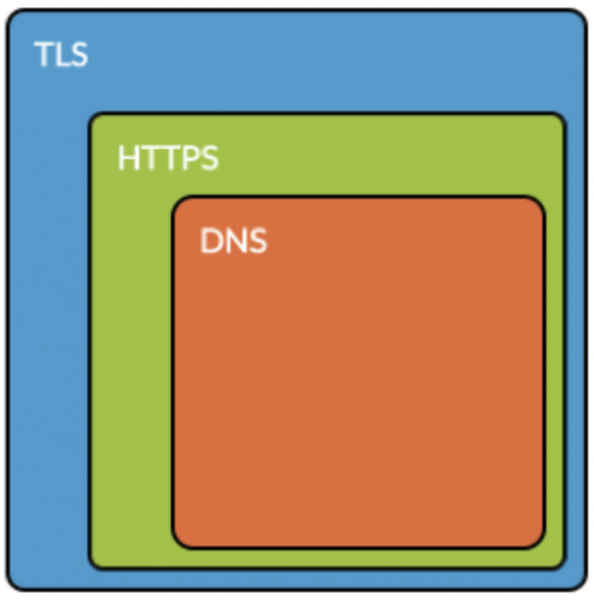 DNS inside HTTPS
DoH uses the well-known port 443 for HTTPS, for which the RFC specifically states that the goal is to "mix DoH traffic with other HTTPS traffic in the same connection," "make DNS traffic analysis difficult," and thereby circumvent corporate control measures ( ). The DoH protocol uses TLS encryption and the request syntax provided by common HTTPS and HTTP/2 standards, adding DNS requests and responses on top of standard HTTP requests.
Risks associated with DoH
If you cannot distinguish regular HTTPS traffic from DoH requests, then applications within your organization may (and will) bypass local DNS settings by redirecting requests to external servers that respond to DoH requests, which circumvents any monitoring, thus eliminating the ability to control DNS traffic. Ideally, you should manage DoH using HTTPS decryption features.
I can use in the latest versions of their browsers, and both companies are working towards using DoH by default for all DNS requests. to integrate DoH into its operating systems. The downside is that not only reputable software development companies but also malicious actors have begun using DoH as a means to bypass traditional corporate firewall measures. ( For example, see the following articles: , and .) In any case, both good and malicious DoH traffic will remain undetected, leaving the organization blind to the nefarious use of DoH as a channel for controlling malware (C2) and stealing sensitive data.
Ensuring visibility and control over DoH traffic
As the best solution for controlling DoH, we recommend configuring HTTPS traffic decryption and blocking DoH traffic in NGFW (application name: dns-over-https).
First, ensure that NGFW is configured for HTTPS decryption, according to .
Second, create a rule for the application traffic ‘dns-over-https’, as shown below:
 Palo Alto Networks NGFW rule to block DNS-over-HTTPS
As an interim alternative (if your organization has not fully implemented HTTPS decryption), NGFW can be configured to apply the 'deny' action to the application identifier 'dns-over-https', but the effect will be limited to blocking certain well-known DoH servers by their domain name, as without HTTPS decryption, DoH traffic cannot be fully inspected (see. and search for the phrase ‘dns-over-https’).
DNS over TLS (DoT)
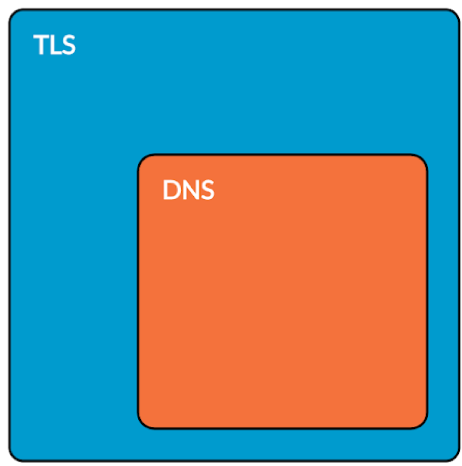 DNS within TLS
While the DoH protocol aims to blend in with other traffic on the same port, DoT, by contrast, uses a dedicated port reserved for this sole purpose by default, even specifically prohibiting the use of the same port for traditional unencrypted DNS traffic ( ).
The DoT protocol uses the TLS protocol to provide encryption that encapsulates standard DNS protocol queries, with traffic using the well-known port 853 ( ). The DoT protocol was designed to simplify organizations' ability to block traffic on the port, either agreeing to its use but including decryption on that port.
Risks associated with DoT
Google implemented DoT in its client , with automatic use of DoT enabled by default if available. If you have assessed the risks and are ready to use DoT at the organizational level, then network administrators will need to explicitly allow outbound traffic on port 853 through their perimeter for this new protocol.
Ensuring visibility and control over DoT traffic
As best practices for controlling DoT, we recommend any of the following, based on your organization's requirements:
Configure your NGFW to decrypt all traffic to destination port 853. With traffic decrypted, DoT will display as a DNS application to which you can apply any action, such as enabling logging. for controlling DGA domains or an existing and anti-spyware.
Alternatively, you can completely block 'dns-over-tls' traffic through port 853 using the App-ID engine. This is usually blocked by default, so no action is needed unless you have explicitly allowed the 'dns-over-tls' application or traffic through port 853.
Source: habr.com
