

When a business operates with large data volumes, the unit of storage becomes not a single disk, but a set of disks, their aggregate forming the needed volume. It must be managed as a cohesive entity. The logic of scaling storage in large block aggregates is well illustrated by the example of JBOD — both as a format for grouping disks and as a physical device.
You can scale the disk infrastructure not only 'upward' by cascading JBOD, but also 'inward' using various filling scenarios. We will examine how this works using the Western Digital Ultastar Data60 as an example.
About Filling
JBOD is a distinct class of server equipment designed for high-density disk placement, with multi-channel access to them by managing hosts via SAS. JBOD manufacturers sell them empty, partially, or fully filled with disks — depending on the vendor. Gradually filling storage with disks as needs grow allows for capital expenditures to be spread over time. With Western Digital, it is advantageous to purchase JBOD with all 60 disks — it is significantly cheaper this way. However, you can also buy a partially filled model: the minimum configuration of the Ultastar Data60 consists of 24 drives.
Why 24? The answer is simple: aerodynamics. The 'gold standard' JBOD 4U / 60 x 3.5” has become established in the industry for practical reasons — reasonable device size, access organization, and good cooling. 60 disks are arranged as 5 rows of 12 HDDs each. Partially filled rows or insufficient disks in a JBOD (for example, just one row) can lead to poor heat dissipation or even reversed airflow in the central channel — a design feature of the Ultastar Data60, its distinctive characteristic.
In its JBOD, WD uses ArcticFlow disk cooling technology, carefully modeled and fine-tuned. Everything is designed for HDDs — for their performance, longevity, and data integrity.
The essence of ArcticFlow lies in creating two independent airflow streams using fans: the front one cools the front rows of drives, while the air entering through the internal air corridor deep into the chassis is used to cool the drives in the rear zone of the JBOD.
It's clear why monitoring the filling of free bays is essential for the effective operation of ArcticFlow. In a minimal configuration of 24 disks, the arrangement in Ultastar Data60 should start from the rear zone.
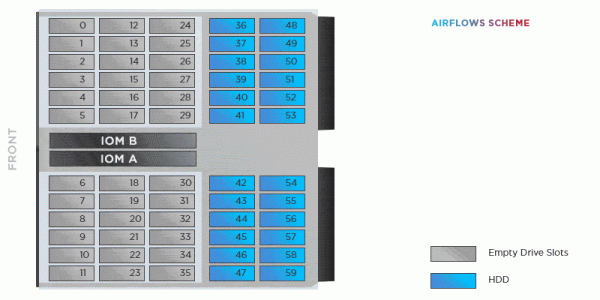
In a configuration with 12 drives, without the resistance that a dual-row layout should create, the airflow exiting the JBOD once again enters the cooling system through the front zone.
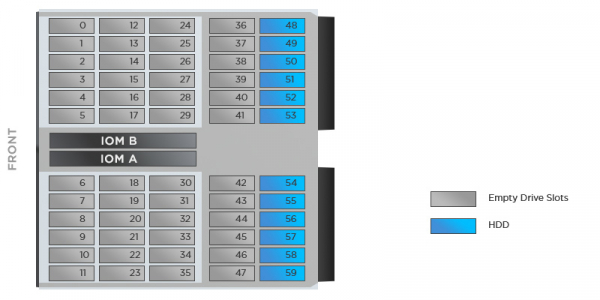
There is a way to improve the situation — more on that later.
On hybridization
It should be accepted as an axiom that the purpose of JBOD is in scalable data storage. From this follows: we use it for populating homogeneous devices. With the goal of eventually reaching the project-wide storage capacity by filling all bays.
And what about SSDs? The best (and correct) solution is to build a separate high-performance storage on JBOF. Solid-state drives are more comfortable there. At the same time, Ultastar Data60 allows the installation of flash drives as well. Before proceeding with the hybridization of JBOD, it is advisable to weigh all the pros — choose SSDs from the compatible list (unlike HDDs, the situation with SSD support is full of nuances). You will also have to spend money on mounting 2.5-inch drives in 3.5-inch bays.
Single SSD devices should be placed in the rear zone of the JBOD, covering unused bays with special plugs — Drive Blanks. This blocks the free flow of cooling air, thereby preventing its recirculation as mentioned above.
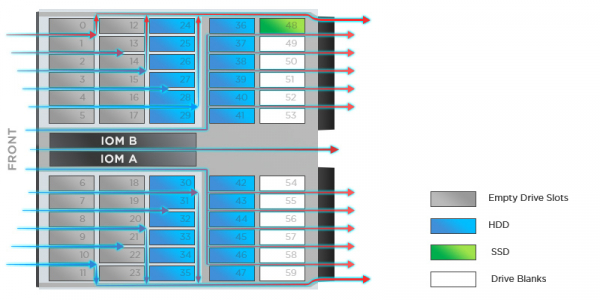
A maximum of 24 solid-state drives can be installed in the Ultastar Data60 chassis. In any case, they should be placed in the last rows of the rear zone.
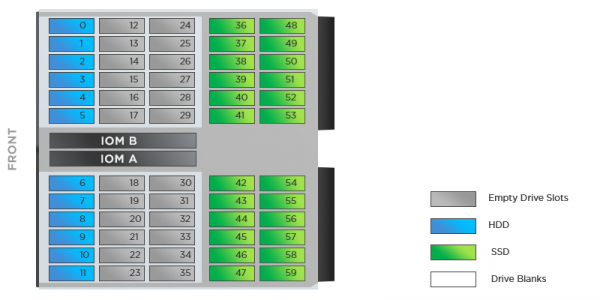
Why 24? The heat dissipation of solid-state drives is higher than that of analogous HDD characteristics, which is why a multi-row arrangement of disks with different types of media will not be effectively ventilated by ArcticFlow. And heat dissipation will become a risk factor for the operation of JBOD.
It's worth noting that using Drive Blanks can reduce the effect of hot air recirculation. A JBOD configuration with 12 HDDs will be better cooled if the empty bays are covered with plugs. The manufacturer has not mentioned such a trick, but the right to experiment is always ours. Interestingly, WD does not prohibit filling with 12 disks, although it does not recommend it.
Practical Conclusions
Even a superficial acquaintance with JBOD aerodynamics provides insight that relying on the developer's experience and recommendations is best for reliable storage operation. The processes occurring within the disk enclosure require fundamental research. Ignoring the acquired knowledge can lead to problems, especially when dealing with storage volumes in the hundreds of terabytes.
It's known how military regulations are written. Something similar happens with JBOD architecture. While solutions from recent years suffered from designs where the interface was in the 'exhaust' zone, exposed to hot air, today, the Ultastar Data60 is free from this drawback. All other design innovations are simply a technological marvel. This is the perspective to embrace.
Source: habr.com
