

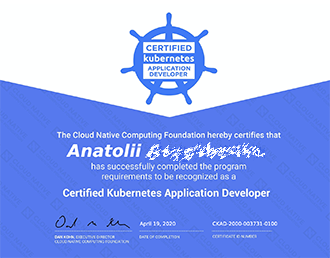
 Recently, I successfully passed the Certified Kubernetes Application Developer (CKAD) exam and received my certification. Today, I want to share my experience regarding the certification process and how I prepared for it. For me, it was an interesting experience taking an online exam under close supervision. This article will not provide valuable technical insights, as it has a purely narrative character. I also did not have a strong background in working with Kubernetes and did not prepare together with colleagues; I studied and practiced on my own in my free time.
I am relatively new to web development, but I quickly realized that without at least basic knowledge of Docker and K8s, I wouldn’t get far. Taking the course and preparing for this type of exam seemed like a good entry point into the world of containers and their orchestration.
If you still think that Kubernetes is too complicated and not for you, please read on.
What is it?
There are two types of Kubernetes certification from the Cloud Native Computing Foundation (CNCF):
- Certified Kubernetes Application Developer (CKAD) — a test of the ability to design, build, configure, and deploy cloud-native applications for Kubernetes. The exam lasts 2 hours, consists of 19 tasks, and the passing score is 66%. Basic knowledge of fundamental primitives is required. Cost: $300.
- Certified Kubernetes Administrator (CKA) — a verification of the skills, knowledge, and competence necessary to perform the duties of Kubernetes administrators. The exam lasts 3 hours, consists of 24 tasks, and the passing score is 74%. Deeper knowledge of system architecture and configuration is required. Cost is also $300.
The CKAD and CKA certification programs were developed by the Cloud Native Computing Foundation to expand the Kubernetes ecosystem through standardized training and certification. This foundation was created by Google in partnership with the Linux Foundation, which at one time received Kubernetes as an initial technological contribution and is supported by companies like Microsoft, Apple, Facebook, Cisco, Intel, Red Hat, and many others (c) Wiki.
In short, these are exams from the 'main organization' for Kubernetes. Of course, there are certifications from other companies as well.
Why?
This is probably the most controversial point in this whole endeavor. I don't want to spark a debate about the necessity of certifications; I just want to believe that having such a certificate will positively impact my value in the job market. Everything is subjective—you never know what might be the turning point in the decision to hire you.
PS: I'm not looking for a job, I am happy with my current situation… except maybe relocating somewhere in the USA.
Preparation
The CKAD test consists of 19 questions distributed across the following topics:
- 13% – Core Concepts
- 18% – Configuration
- 10% – Multi-Container Pods
- 18% – Observability
- 20% – Pod Design
- 13% – Services & Networking
- 8% – State Persistence
On the Udemy platform, there is a fantastic course by an Indian named Mumshad Mannambeth (the link will be at the end of the article). It's truly high-quality material for a small fee. What’s particularly great is that throughout the course, practical exercises are offered in a test environment, allowing you to develop your console skills.
I completed the entire course and worked through all the practical exercises (of course, there was some peeking at the answers), and right before the exam, I reviewed all the lectures at an increased speed and retook the last two mock exams. It took me about a month at a relaxed pace. This material was enough for me to confidently pass the exam with a score of 91%. I made a mistake on one task (NodePort didn’t work), and I ran out of time to complete another task involving a ConfigMap from a file, even though I knew the solution.
How the exam is conducted
The exam takes place in a browser, with a webcam on and screen sharing activated. The exam rules require that no outsiders are in the room. I took the exam when a lockdown was already in effect in the country, so it was important for me to find a quiet moment when my wife wouldn’t walk in or my child wouldn’t cry. I chose the deep night, as thankfully, there's a time option available for any preference.
At the very beginning, the examiner requires you to show your Primary ID containing a photo and your full name (in Latin letters)—for me, it was my passport—and to pan the webcam around the desk and room to ensure no outside items are present.
During the exam, it's allowed to keep another browser tab open with one of the resources:,or . I used the documentation, which was quite enough.
In the main window, besides the task text, the terminal, and the chat with the examiner, there is also a notes window where you can copy important names or commands — it came in handy a couple of times.
Tips
- Use aliases to save time. Here’s what I used:
export ns=default # namespace variable alias ku='kubectl' # shorten the main command alias kun='ku -n=$ns' # kubectl + namespace alias kudr='kun --dry-run -o=yaml' # very necessary flags to generate yaml description for the object - Remember the flag combinations for the command run, to quickly generate yaml for different objects — pod/deploy/job/cronjob (though it's not necessary to memorize them, you can just check the help with the flag -h):
kudr run pod1 --image=nginx --restart=Never > pod1.yaml kudr run deploy1 --image=nginx > deploy1.yaml kudr run job1 --image=nginx --restart=OnFailure > job1.yaml kudr run cronjob1 --image=nginx --restart=OnFailure --schedule="*/1 * * * *" > cronjob1.yaml - Use short resource names:
ku get ns # instead of namespaces ku get deploy # instead of deployments ku get pv # instead of persistentvolumes ku get pvc # instead of persistentvolumeclaims ku get svc # instead of services # etc., you can find the complete list by the command: kubectl api-resources - Allocate your time wisely for completing all tasks, don't get stuck on one, skip questions and move on. At first, I thought I was going at a very high pace and would finish the exam early, but in the end, I didn't manage to complete two tasks. The truth is, the time allocated for the exam is tight, and all 2 hours go by in tension.
- Don't forget to switch contexts — at the beginning of each task, there is a command to switch to work in the correct cluster.
Also, keep an eye on the namespace. For this, I used another hack:alias kun='echo namespace=$ns && ku -n=$ns' # when executing each command, the current namespace was displayed in the first line - Don’t rush to pay for the certification, wait for discounts. The course author often sends promo codes with discounts of 20-30% via email.
- Finally learn vim 🙂
Links:
- — this is the certification page
- — a very good course for preparation, everything is clear and with illustrations
- — useful links and notes about the exam
- — a story from colleagues on Habr about passing the more complex CKA exam
Source: habr.com
