

In this article, we will discuss monitoring IBM Storwize storage systems and other storage systems that support CIM/WBEM protocols. The necessity of such monitoring is assumed; we will take it as an axiom. We will use Zabbix as the monitoring system.
In the latest versions of Zabbix, the company has paid much more attention to templates — templates for monitoring services, DBMS, and server hardware (IMM/iBMC) via IPMI have emerged. Storage monitoring is still not included in the out-of-the-box templates, so to integrate information about the status and performance of storage system components into Zabbix, custom templates need to be used. One such template I present for your consideration.
First, a little theory.
To access the status and statistics of IBM Storwize storage systems, you can use:
- CIM/WBEM protocols;
- (supported in IBM Storwize starting from software version 8.1.3);
- SNMP Traps (limited set of traps, no statistics);
- SSH connection followed by remote .
Those interested can learn more about various monitoring methods in the corresponding sections of the vendor documentation, as well as in the document .
We will use CIM/WBEM protocols, which allow us to obtain storage system operation parameters without significant software changes for various storage systems. CIM/WBEM protocols operate in accordance with . The Storage Management Initiative Specification is based on open standards and , defined by .
WBEM works over the HTTP protocol. Through WBEM, it is possible to work not only with storage systems but also with HBAs, switches, and tape libraries.
According to and , the main component of SMI implementation is the WBEM server that processes CIM-XML requests from WBEM clients (in our case, from monitoring scripts):
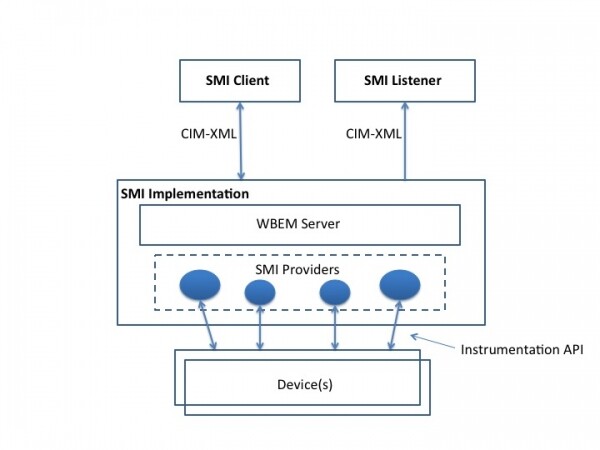
CIM is an object-oriented model based on the Unified Modeling Language (UML).
Managed elements are defined as CIM classes that have properties and methods to represent managed data and functions.
According to , to access the storage system via CIM/WBEM, you can use PyWBEM — an open-source library written in Python that allows developers and system administrators to implement the CIM protocol for accessing CIM objects and performing various operations with the WBEM server compliant with SMI-S or other CIM specifications.
To connect to the WBEM server, we use the class constructor :
conn = pywbem.WBEMConnection(server_uri, (self.login, self.password),
            namespace, no_verification=True)
This is a virtual connection, as CIM-XML/WBEM operates over HTTP; the actual connection occurs when invoking methods for the WBEMConnection class instance. According to the IBM System Storage SAN Volume Controller and Storwize V7000 Best Practices and Performance Guidelines (Example C-8, p. 412), we will use 'root/ibm' as the CIM namespace for the IBM Storwize storage system.
Note that to collect statistics via CIM-XML/WBEM, the user must be included in the appropriate security group. Otherwise, when executing WBEM queries, the output of the class instance attributes will be empty..
To access the storage system statistics, the user under whose account the constructor call , must have at least RestrictedAdmin rights (available for code_level > 7.8.0) or Administrator rights (not recommended for security reasons).
We connect to the storage system via SSH and check the group numbers:
> lsusergrp
id name            role            remote
0  SecurityAdmin   SecurityAdmin   no
1  Administrator   Administrator   no
2  CopyOperator    CopyOperator    no
3  Service         Service         no
4  Monitor         Monitor         no
5  RestrictedAdmin RestrictedAdmin no
We add the user zabbix to the required group:
> chuser -usergrp 5 zabbix
Additionally, according to the IBM System Storage SAN Volume Controller and Storwize V7000 Best Practices and Performance Guidelines (p. 415), it is necessary to enable statistics collection on the storage system. To collect statistics every minute:
> startstats -interval 1
Checking:
> lssystem | grep statistics
statistics_status on
statistics_frequency 1
To retrieve all existing storage system classes, you need to use the EnumerateClassNames() method.
Example:
classnames = conn.EnumerateClassNames(namespace='root/ibm', DeepInheritance=True)
for classname in classnames:
     print(classname)
To obtain the values of the storage system parameters, the method of the WBEMConnection class is intended, returning a list of instances .
Example:
instances = conn.EnumerateInstances(classname,
                   namespace=nd_parameters['name_space'])
for instance in instances:
     for prop_name, prop_value in instance.items():
          print('  %s: %r' % (prop_name, prop_value))
For certain classes that contain a large number of instances, such as IBMTSSVC_StorageVolume, a complete query of all instances can be quite slow. It may generate large volumes of data that need to be prepared by the storage system, transmitted over the network, and processed by the script. In such cases, there is a method , which allows us to retrieve only the properties of the class instance that interest us. This method assumes the use of a query language similar to SQL — either CIM Query Language (DMTF:CQL) or WBEM Query Language (WQL) — to query CIM objects from the storage system:
request = 'SELECT Name FROM IBMTSSVC_StorageVolumeStatistics'
objects_perfs_cim = wbem_connection.ExecQuery('DMTF:CQL', request)
To determine which classes we need to obtain the parameters of the storage objects, we read the documentation, for example, .
Thus, to obtain parameters (not performance counters) of physical disks (Disk Drives), we will query Class IBMTSSVC_DiskDrive, for parameters of Volumes — Class IBMTSSVC_StorageVolume, for parameters of Arrays — Class IBMTSSVC_Array, for parameters of MDisks — Class IBMTSSVC_BackendVolume, and so on.
You can read about performance (specifically — ) and IBM System Storage SAN Volume Controller and Storwize V7000 Best Practices and Performance Guidelines (Example C-11, p. 415).
To obtain statistics from the storage system regarding Volumes, you need to set IBMTSSVC_StorageVolumeStatistics as the ClassName parameter value. The necessary properties for collecting statistics of the IBMTSSVC_StorageVolumeStatistics class can be found in .
Additionally, for performance analysis, you can use the classes IBMTSSVC_BackendVolumeStatistics, IBMTSSVC_DiskDriveStatistics, and IBMTSSVC_NodeStatistics.
To write data to the monitoring system, we will use the mechanism , implemented in Python in the module . We will place the structure of the storage classes and their properties in a dictionary in JSON format.
We are uploading the template to the Zabbix server, ensuring that the monitoring server has access to the storage system via the WEB protocol (TCP/5989), placing the configuration files and monitoring detection scripts on the monitoring server. Next, we add the script execution to the scheduler. As a result, we detect storage system objects (arrays, physical and virtual disks, enclosures, and much more), transmit them to Zabbix discoveries, read the status of their parameters, collect performance statistics (performance counters), and pass all of this to the corresponding Zabbix Items of our template.
The Zabbix template, Python scripts, the structure of storage system classes and their properties, as well as examples of configuration files can be .
Source: habr.com
