

Background
We have vending machines of our own design. Inside are Raspberry Pi and some additional circuitry on a separate board. They are connected to a coin acceptor, bill validator, and a bank terminal… A custom program manages everything. The entire operation history is logged onto a flash drive (MicroSD), which is then transmitted via the internet (using a USB modem) to a server, where it is stored in a database. Sales information is uploaded to 1C, and there's also a simple web interface for monitoring and so on.
In other words, the journal is vital — for accounting (it contains revenue, sales, etc.), monitoring (various malfunctions and other force majeure circumstances); this is, so to speak, all the information we have about this machine.
The Problem
Flash drives have proven to be very unreliable devices. They fail with enviable regularity. This leads to both downtime for the machines and (if, for some reason, the journal could not be transmitted online) data loss.
This is not the first experience with using flash drives; before, there was another project with more than a hundred devices, where the journal was stored on USB flash drives, which also had reliability issues, at times the number of failures per month was in the dozens. We tried various flash drives, including some branded ones with SLC memory; yes, some models are more reliable than others, but replacing the flash drives did not fundamentally solve the problem.
Attention! Long read! If you are not interested in 'why' and are only interested in 'how', you can go straight articles.
Solution
The first thing that comes to mind: abandon MicroSD and use, for example, an SSD, and boot from it. Theoretically possible, I suppose, but relatively expensive, and not that reliable (a USB-SATA adapter is added; the failure statistics for budget SSDs are not encouraging either).
USB HDD also does not seem like a particularly attractive solution.
Therefore, we arrived at this option: keep the boot from MicroSD but use them in read-only mode, and store the operational journal (and other unique information specific to the hardware — serial number, sensor calibrations, etc.) somewhere else.
The topic of read-only file systems for Raspberry Pi has already been studied from top to bottom; I won’t dwell on implementation details in this article. (but if there is interest, I might write a mini-article on this topic)One important point to note is that based on both personal experience and feedback from those who have implemented it, there are wins in terms of reliability. Yes, it is impossible to completely eliminate breakdowns, but significantly reducing their frequency is quite feasible. Additionally, the cards are becoming standardized, which noticeably simplifies replacement for maintenance personnel.
Hardware components
There were no particular doubts about the type of memory chosen — NOR Flash.
Arguments:
- simple connection (most often SPI protocol, which we already have experience with, so no 'hardware' issues are anticipated);
- funny price;
- standard operational protocol (there is already an implementation in the Linux kernel, if desired, one can take third-party options that are also available, or even write one’s own, as it’s quite straightforward);
- reliability and resource:
from a typical datasheet: data is stored for 20 years, 100,000 erase cycles for each block;
from external sources: extremely low BER, the absence of a need for error correction codes is postulated (in some works, ECC for NOR is discussed, but usually they refer to MLC NOR, which does exist).
Let’s consider the requirements for volume and resource.
I want to ensure data is reliably saved for several days. This is necessary so that in the event of any communication problems, the sales history is not lost. We will aim for 5 days, during which (even considering weekends and holidays) the problem can be solved.
Currently, we collect about 100KB of logs per day (3-4 thousand entries), but this number is gradually increasing — the level of detail is rising, new events are being added. Plus, there are sometimes spikes (for example, a sensor starts spamming false alarms). We will calculate for 10 thousand entries at 100 bytes — a megabyte per day.
In total, that comes to 5MB of pure (easily compressible) data. To this, we can add (rough estimate) 1MB of overhead data.
So, we need a chip with 8MB if we do not use compression, or 4MB if we do. These are quite feasible numbers for this type of memory.
As for the resource: if we plan for the memory to be rewritten no more than once every 5 days, then over 10 years of operation we would get less than a thousand rewrite cycles.
I remind you that the manufacturer promises one hundred thousand.
A bit about NOR vs NAND
Today, of course, NAND memory is much more popular, but for this project, I wouldn't use it: unlike NOR, NAND inevitably requires the use of error correction codes, bad block tables, etc., and typically, NAND chips have a lot more pins.
The disadvantages of NOR can include:
- small capacity (and, accordingly, high price per megabyte);
- low data transfer speed (largely due to the use of a serial interface, usually SPI or I2C);
- slow erase (depending on the block size, it takes from fractions of a second to several seconds).
It seems nothing critical for us, so let's continue.
If you're interested in details, the chip chosen is (however, this is not significant; there are plenty of analogs on the market that are compatible in pinout and command set; even if we want to install a chip from another manufacturer and/or with a different capacity, everything will work without changing the code).
I use the driver built into the Linux kernel; on Raspberry, thanks to device tree overlay support, it's very simple — you just need to place the compiled overlay in /boot/overlays and modify /boot/config.txt a bit.
An example of a dts file
To be honest, I'm not sure if it's written without errors, but it works.
/*
 * Device tree overlay for at25 at spi0.1
 */

/dts-v1/;
/plugin/;

/ {
    compatible = "brcm,bcm2835", "brcm,bcm2836", "brcm,bcm2708", "brcm,bcm2709";

    /* disable spi-dev for spi0.1 */
    fragment@0 {
        target = <&spi0>;
        __overlay__ {
            status = "okay";
            spidev@1{
                status = "disabled";
            };
        };
    };

    /* the spi config of the at25 */
    fragment@1 {
        target = <&spi0>;
        __overlay__ {
            #address-cells = <1>;
            #size-cells = <0>;
            flash: m25p80@1 {
                    compatible = "atmel,at25df321a";
                    reg = <1>;
                    spi-max-frequency = <50000000>;

                    /* default to false:
                    m25p,fast-read ;
                    */
            };
        };
    };

    __overrides__ {
        spimaxfrequency = <&flash>,"spi-max-frequency:0";
        fastread = <&flash>,"m25p,fast-read?";
    };
};
And one more line in config.txt
dtoverlay=at25:spimaxfrequency=50000000I'll skip the description of how to connect the chip to the Raspberry Pi. On one hand, I'm not an electronics specialist; on the other hand — it's all quite simple even for me: the chip has only 8 pins, of which we need ground, power, SPI (CS, SI, SO, SCK); the levels match those of the Raspberry Pi, no additional components are needed — just connect the specified 6 contacts.
Task Definition
As usual, the task setting goes through several iterations; I feel that it's time for another one. So let's pause, gather together what has already been written, and clarify the remaining details that are in the shadows.
So, we have decided that the log will be stored in SPI NOR Flash.
What is NOR Flash for those who don't know
This is non-volatile memory, from which you can perform three operations:
- Reading:
The most basic read: we send the address and read as many bytes as we need; - Writing:
Writing to NOR flash appears normal, but it has one unique feature: you can only change 1 to 0, but not the other way around. For instance, if we had 0x55 stored in a memory cell, after writing 0x0f to it, it will now hold 0x05. (see table slightly below); - Erase:
Of course, we also need to perform the reverse operation — changing 0 to 1, and that's exactly what the erase operation is for. Unlike the first two operations, it works on blocks (the minimum erase block in the selected chip is 4KB). Erase destroys the entire block, and this is the only way to change 0 to 1. Therefore, when working with flash memory, it is often necessary to align data structures to the erase block boundary.
Writing to NOR Flash:
Binary data
Was
01010101
Written
00001111
Became
00000101
The log itself consists of a sequence of variable-length records. The typical length of a record is about 30 bytes (though sometimes records can be several kilobytes long). In this case, we treat them simply as a set of bytes, but if you're curious, CBOR is used within the records.
Besides the log, we need to store some 'configuration' information, both updatable and non-updatable: some device ID, sensor calibration, a flag indicating 'device temporarily disabled', etc.
This information consists of a set of key-value records, also stored in CBOR. We don't have a lot of this information (a maximum of a few kilobytes), and it is updated infrequently.
From now on, we will refer to this as context.
Recalling the beginning of this article, it is crucial to ensure reliable data storage and, if possible, uninterrupted operation even in the event of hardware failures/data corruption.
What sources of problems can we consider?
- Power loss during write/erase operations. This falls under the category of 'There's no defense against a battering ram.'
Information from on stackexchange: When power is lost during flash operations, both erase (setting to 1) and write (setting to 0) can lead to undefined behavior: data may be written, partially written (for instance, we sent 10 bytes/80 bits, but only 45 bits managed to be written), and it is also possible that some bits end up in an 'intermediate' state (reading may yield either 0 or 1); - Errors in the flash memory itself.
BER, while very low, cannot be zero; - Bus errors.
The data transmitted over SPI is not protected in any way and can experience both single-bit errors and synchronization issues—loss or insertion of bits (leading to massive data distortions); - Other errors/failures
Code errors, Raspberry glitches, alien interference...
I have formulated the requirements that I believe are necessary to ensure reliability:
- records must go to flash memory immediately; deferred writing is not considered; - if an error occurs, it must be detected and processed as early as possible; - the system should restore operation after errors whenever possible.
(a real-life example of "how it shouldn't be," with which I think everyone has encountered: after an emergency reboot, the file system got corrupted and the operating system won't boot)
Ideas, approaches, reflections
When I started thinking about this task, a bunch of ideas rushed through my mind, for example:
- using data compression;
- utilizing clever data structures, for instance, storing record headers separately from the actual records, so that in the event of an error in any record, the others could still be read without issues;
- using bit fields to control the completion of a record during a power outage;
- keeping checksums for everything;
- employing some form of error-correcting coding.
Some of these ideas were implemented, while others were decided against. Let's go in order.
Data compression
The events that we log are fairly uniform and repetitive ("tossed a 5 ruble coin", "pressed the change return button", ...). Therefore, compression should prove to be quite effective.
The overhead for compression is negligible (our processor is powerful enough; even the first Pi had a single core with a frequency of 700MHz, and recent models have several cores with frequencies over a gigahertz), the storage exchange speed is low (a few megabytes per second), and the size of the records is small. In general, if compression does affect performance, it will only be a positive impact. (not critical at all, just stating a fact). Plus, we don't have a real embedded system, but a regular Linux — so the implementation shouldn't require much effort (just linking the library and using a few functions from it).
A piece of log from a working device (1.7MB, 70 thousand records) was taken and initially checked for compressibility using gzip, lz4, lzop, bzip2, xz, zstd available on the computer.
- gzip, xz, and zstd showed similar results (40KB).
It was surprising that the trendy xz performed at the level of gzip or zstd; - lzip with default settings gave a slightly worse result;
- lz4 and lzop showed not very good results (150KB);
- bzip2 surprisingly showed a good result (18KB).
So, the data compresses very well.
Therefore, (if we do not find fatal flaws) compression is on! Simply because more data can fit on the same flash drive.
Let's consider the drawbacks.
The first problem: we have already agreed that each record must immediately go to the flash drive. Usually, an archiver gathers data from the input stream until it decides it's time to write to the output. However, we need to immediately get a compressed block of data and save it to non-volatile memory.
I see three approaches:
- Compress each record using dictionary compression instead of the algorithms discussed above.
A workable option, but I don't like it. To ensure a reasonably decent level of compression, the dictionary must be 'tuned' to the specific data; any change will lead to a catastrophic drop in compression level. Yes, this problem is solved by creating a new version of the dictionary, but it's a headache — we would need to store all versions of the dictionary; in each record, we would have to indicate which version of the dictionary it was compressed with… - Compress each record using 'classic' algorithms, but independently of each other.
The compression algorithms considered are not designed to work with records of such small size (dozens of bytes); the compression ratio will clearly be less than 1 (i.e., an increase in data volume instead of compression); - Perform a FLUSH after each record.
Many compression libraries support FLUSH. This is a command (or parameter to the compression procedure) that, when received, allows the archiver to form a compressed stream so that it can restore all the uncompressed data that has already been received. Such an analogysyncin file systems orcommitin SQL.
Importantly, subsequent compression operations will be able to use the accumulated dictionary, and the compression rate will not suffer as much as in the previous version.
It's obviously clear that I chose the third option, let's elaborate on it in more detail.
Found about FLUSH in zlib.
I conducted a test inspired by an article, taking 70 thousand log entries from a real device, with a page size of 60KB (we will return to the page size later) I obtained:
Source Data
Gzip compression -9 (without FLUSH)
zlib with Z_PARTIAL_FLUSH
zlib with Z_SYNC_FLUSH
Size, KB
1692
40
352
604
At first glance, the price imposed by FLUSH appears excessively high; however, in reality, our options are limited — either not compress at all or compress (and quite effectively) with FLUSH. We shouldn't forget that we have 70 thousand records, and the overhead introduced by Z_PARTIAL_FLUSH is only 4-5 bytes per record. The compression ratio turned out to be almost 5:1, which is more than an excellent result.
It may seem surprising, but actually Z_SYNC_FLUSH is a more effective way to perform FLUSH.
When using Z_SYNC_FLUSH, the last 4 bytes of each record will always be 0x00, 0x00, 0xff, 0xff. If we know them, we can omit storing them, thus the final size ends up being just 324KB.
In the article I refer to, there is an explanation:
A new type 0 block with empty contents is appended.
A type 0 block with empty contents consists of:
- the three-bit block header;
- 0 to 7 bits equal to zero, to achieve byte alignment;
- the four-byte sequence 00 00 FF FF.
As is easily noticeable, in the last block before these 4 bytes, there are between 3 to 10 zero bits. However, practice has shown that there are in fact at least 10 zero bits.
It turns out that such short data blocks are usually (always?) encoded using a type 1 block (fixed block), which must end with 7 zero bits, totaling 10-17 guaranteed zero bits (and the rest will be zero with a probability of about 50%).
So, with the test data, in 100% of cases before 0x00, 0x00, 0xff, 0xff, there is one zero byte and in more than a third of cases — two zero bytes (perhaps the issue is that I'm using binary CBOR, while using textual JSON would more frequently encounter type 2 blocks — dynamic blocks, accordingly, blocks without additional zero bytes before 0x00, 0x00, 0xff, 0xff).
Thus, with the existing test data, we can fit in less than 250KB of compressed data.
You can save a little more by juggling bits: right now, we're ignoring the presence of several zero bits at the end of the block; several bits at the beginning of the block also remain unchanged...
But then I made a decisive decision to stop, otherwise at this pace I might end up developing my own archiver.
In total, from my test data, I got 3-4 bytes per write, and the compression ratio turned out to be more than 6:1. To be honest, I wasn't counting on such a result; in my opinion, anything better than 2:1 is already a result justifying the use of compression.
Everything is great, but zlib (deflate) is still an archaic, venerable, and somewhat old-fashioned compression algorithm. The very fact that it uses the last 32KB from the stream of uncompressed data as a dictionary looks strange today (meaning if some block of data is very similar to what was in the input stream 40KB ago, it will start to be archived anew rather than reference the past occurrence). In trendy modern archivers, the dictionary size is often measured in megabytes rather than kilobytes.
So, let's continue our mini-research on archivers.
The next one tested was bzip2 (let me remind you, without FLUSH it showed a fantastic compression degree, nearly 100:1). Sadly, with FLUSH, it performed very poorly, and the size of the compressed data turned out to be larger than the uncompressed.
My assumptions about the reasons for failure.
Libbz2 offers only one flush option, which apparently clears the dictionary (analogous to Z_FULL_FLUSH in zlib), making it difficult to speak of any effective compression afterwards.
Finally, zstd was tested. Depending on the parameters, it either compresses at the gzip level but much faster, or better than gzip.
Unfortunately, with FLUSH, it also showed itself 'not very well': the size of the compressed data came out to around 700KB.
I on the project's GitHub page, and received a response that one should expect up to 10 bytes of overhead data for each block of compressed data, which is close to the results obtained; catching up with deflate isn't possible.
At this point, I decided to stop experimenting with archivers (let me remind you, xz, lzip, lzo, lz4 did not perform well even during testing without FLUSH, and I did not consider more exotic compression algorithms).
Let’s return to the issues of archiving.
The second problem (as mentioned in order, not significance) is that compressed data forms a single stream, where references to previous segments continuously occur. Thus, if a certain segment of the compressed data is corrupted, we lose not only the related block of uncompressed data but also all subsequent data.
There are approaches to solving this problem:
- Preventing the emergence of problems — adding redundancy to the compressed data that will allow for error detection and correction; we will discuss this later;
- Minimizing the consequences in case a problem arises
We've mentioned earlier that we can compress each data block independently, which would eliminate the problem (corruption of one block would only lead to data loss for that block). However, this is an extreme case where data compression would be ineffective. The opposite extreme would be to use all 4MB of our chip as a single archive, which would provide excellent compression but catastrophic consequences in the event of data corruption.
Yes, a compromise is needed in terms of reliability. But we must remember that we are developing a data storage format for non-volatile memory with an exceptionally low BER and a declared data lifespan of 20 years.
During experiments, I found that noticeable losses in compression levels begin with compressed data blocks smaller than 10KB.
It was previously mentioned that the memory used has a paged organization; I see no reason not to use the correspondence of "one page — one block of compressed data."
This means that the minimum reasonable page size is 16KB (with a buffer for metadata). However, such a small page size imposes significant restrictions on the maximum record size.
While I do not foresee any records larger than one kilobyte in compressed form, I decided to use page sizes of 32KB (resulting in a total of 128 pages per chip).
Summary:
- We store data compressed using zlib (deflate);
- For each record, we set Z_SYNC_FLUSH;
- For each compressed record, we trim the trailing bytes (for example, 0x00, 0x00, 0xff, 0xff); we specify in the header how many bytes we trimmed;
- Data is stored in pages of 32KB; within each page, there is a single stream of compressed data; compression starts anew on each page.
And, before concluding with the compression, I'd like to emphasize that we only obtain a few bytes of compressed data per record, so it's crucial not to bloat the metadata; every byte counts.
Storage of data headers
Since we have variable-length records, we need to determine the placement/boundaries of the records somehow.
I know three approaches:
- All records are stored in a continuous stream; first comes the record header, which contains the length, followed by the actual record.
In this variant, both headers and data can have variable lengths.
Essentially, we end up with a singly linked list that is used frequently; - Headers and the records themselves are stored in separate streams.
By using fixed-length headers, we ensure that the corruption of one header does not affect the others.
This approach is used, for example, in many file systems; - Records are stored in a continuous stream, with the boundary defined by a certain marker (symbol/sequence of symbols that are prohibited within data blocks). If a marker appears within a record, we replace it with a specific sequence (we escape it).
This approach is used, for example, in the PPP protocol.
Let me illustrate.
Variant 1:

Here, everything is very simple: knowing the length of the record allows us to calculate the address of the next header. This way, we traverse the headers until we encounter a region filled with 0xff (free space) or the end of the page.
Variant 2:

Due to the variable length of records, we cannot predict how many records (and therefore headers) we will need per page. We could place headers and data on different pages, but I prefer another approach: both headers and data are placed on the same page, however, the headers (fixed size) start from the beginning of the page, while the data (variable length) comes from the end. Once they 'meet' (if there is not enough free space for a new record) — we consider this page full.
Variant 3:

There is no need to store the length or any other information about the data location in the header; markers indicating the boundaries of the records are sufficient. However, data needs to be processed when writing/reading.
I would use 0xff as a marker (which fills the page after erase), thus the free area will definitely not be interpreted as data.
Comparison table:
Option 1
Option 2
Option 3
Error resilience
—
+
+
Compactness
+
—
+
Implementation complexity
*
**
**
Variant 1 has a fatal flaw: if one of the headers is corrupted, the entire subsequent chain is lost. Other variants allow for recovery of part of the data even in the event of widespread corruption.
But here it is appropriate to recall that we decided to store data in a compressed form, and we lose all data on the page after a 'broken' record anyway, so even though the table shows a minus, we do not take it into account.
Compactness:
- In the first variant, we only need to store the length in the header; if using variable-length integers, in most cases we can manage with just one byte;
- In the second variant, we need to store the starting address and the length; the record must be a fixed size, I estimate it to be 4 bytes per record (two bytes for offset and two bytes for length);
- The third variant only requires a single character to denote the start of a record, plus the record itself will grow by 1-2% due to escaping. Overall, it's roughly on par with the first variant.
Initially, I considered the second variant as the primary one (and even wrote an implementation). I only abandoned it when I finally decided to use compression.
Perhaps someday I will actually use such a variant. For example, if I have to deal with data storage for a ship traveling between Earth and Mars — entirely different reliability requirements, cosmic radiation, ...
As for the third variant: I rated it with two stars for implementation complexity simply because I dislike dealing with escaping, changing lengths in the process, etc. Yes, perhaps it’s biased, but I’m the one who has to write the code — why force myself to do something I don’t enjoy.
Summary: We choose the storage option in the form of chains 'header with length — variable-length data' due to efficiency and simplicity of implementation.
Using bit fields to control the success of write operations
I can't remember where I first saw the idea, but it looks something like this:
For each record, we allocate a few bits to store flags.
As we mentioned earlier, after erase, all bits are set to 1, and we can change 1 to 0, but not vice versa. So for 'flag not set' we use 1, and for 'flag set' — 0.
Here's what a variable-length record placement in flash might look like:
- We set the flag 'length recording started';
- We write the length;
- We set the flag 'data recording started';
- We write the data;
- We set the flag 'recording finished'.
In addition, we will have a flag 'error occurred', totaling 4 bit flags.
In this case, we have two stable states '1111' — recording has not started and '1000' — recording was successful; in the event of an unexpected interruption of the write process, we will obtain intermediate states that we can then detect and handle.
The approach is interesting, but it only protects against sudden power loss and similar failures, which is important, but these are far from the only (or even main) causes of possible failures.
Summary: Let's continue searching for a good solution.
Checksums
Checksums also allow us to ensure (with a high probability) that we are reading exactly what was supposed to be written. Unlike the bit fields considered above, they always work.
Considering the list of potential problem sources we discussed earlier, a checksum can detect an error regardless of its origin (except perhaps for malicious aliens — they could also forge a checksum).
So, if our goal is to check that the data is intact, checksums are an excellent idea.
The choice of the checksum calculation algorithm was clear — CRC. On one hand, its mathematical properties allow it to catch certain types of errors 100% of the time, while on the other, with random data, this algorithm usually shows a collision probability not significantly greater than the theoretical limit.  While this may not be the fastest algorithm, nor always the minimal in terms of collisions, it has a very important quality: in the tests I've encountered, there were no patterns on which it clearly failed. Stability is the main quality in this case.
Example of a comprehensive study: , (links to narod.ru, sorry).
However, the task of selecting a checksum is not finished; CRC is a whole family of checksums. One needs to determine the length first, and then choose the polynomial.
Choosing the length of the checksum is not as simple a question as it may seem at first glance.
Let me illustrate:
Assume the probability of an error in each byte is  and the ideal checksum, let's calculate the average number of errors per million records:
Data, byte
Checksum, byte
Undetected errors
False positives
Total false activations
1
0
1000
0
1000
1
1
4
999
1003
1
2
≈0
1997
1997
1
4
≈0
3990
3990
10
0
9955
0
9955
10
1
39
990
1029
10
2
≈0
1979
1979
10
4
≈0
3954
3954
1000
0
632305
0
632305
1000
1
2470
368
2838
1000
2
10
735
745
1000
4
≈0
1469
1469
It seems simple — just choose the length of the checksum based on the length of the data being protected for minimal false activations — and you're done.
However, with short checksums, a problem arises: while they detect single-bit errors well, they can, with a sufficiently large probability, mistakenly accept entirely random data as valid. There was already an article on Habr describing .
Therefore, to make random checksum matches practically impossible, one needs to use checksums of at least 32 bits or more (for lengths greater than 64 bits, cryptographic hash functions are usually used)..
Despite the fact that I previously wrote that we should save space at all costs, we will still use a 32-bit checksum (16 bits is too little, with a collision probability of over 0.01%; and 24 bits, as they say, is neither here nor there).
An objection may arise: did we save every byte when choosing compression only to give away 4 bytes now? Wouldn't it have been better not to compress and not add a checksum? Of course not; the absence of compression does not meanthat integrity checks are unnecessary.
We won't reinvent the wheel for polynomial selection, but will take the currently popular CRC-32C.
This code detects 6 bit errors on packets up to 22 bytes (probably the most common case for us), 4 bit errors on packets up to 655 bytes (also a frequent case for us), 2 or any odd number of bit errors on packets of any reasonable length.
If anyone is interested in the details
on CRC.
to — probably the leading expert on CRC in the world.
In there are , providing slightly better parameters for packet lengths relevant to us, but I didn't find the difference significant, and I feel competent enough to choose a custom code instead of the standard, well-studied one.
Also, since our data is compressed, the question arises: should we calculate the checksum on compressed or uncompressed data?
Arguments for calculating the checksum on uncompressed data:
- we ultimately need to verify data integrity — that's what we check directly (this will also verify possible errors in compression/decompression implementation, damage caused by faulty memory, etc.);
- the deflate algorithm in zlib has a sufficiently mature implementation and should not fail with "bad" input data; moreover, it often can detect errors in the input stream by itself, reducing the overall likelihood of undetected errors (I performed a test by inverting a single bit in a short record, and zlib detected the error about a third of the time).
Arguments against calculating the checksum on uncompressed data:
- CRC is specifically tuned for infrequent bit errors, which are characteristic of flash memory (a bit error in a compressed stream can lead to a massive change in the output stream, where theoretically, we could "catch" a collision);
- I don't really like the idea of passing potentially corrupted data to the decompressor, , how it will react.
In this project, I decided to deviate from the common practice of storing the checksum of uncompressed data.
Summary: we use CRC-32C, calculating the checksum from the data in the form in which it is recorded in flash (after compression).
Redundancy
The use of redundancy coding does not eliminate the possibility of data loss, but it can significantly (often exponentially) reduce the likelihood of unrecoverable data loss.
We can use different types of redundancy to correct errors.
Hamming codes can correct single-bit errors, Reed-Solomon codes can correct symbol errors, and multiple copies of data combined with checksums or RAID-6-like encoding can help recover data even in cases of massive corruption.
Initially, I was inclined towards the widespread use of error-correcting codes, but then I realized that we first need to understand what types of errors we want to protect against before choosing the encoding.
We mentioned earlier that errors need to be detected as quickly as possible. When might we encounter errors?
- Incomplete write (for any reason, such as power loss during writing, Raspberry freeze, etc.)
Unfortunately, in the case of such an error, there is no option but to ignore invalid entries and consider the data lost; - Write errors (for any reason, the flash memory recorded something other than what was being written)
Such errors can be detected immediately if we perform a verification read right after writing; - Data distortion in memory during storage;
- Read errors
To correct this, it is sufficient to repeat the reading multiple times in case of a checksum mismatch.
Thus, only errors of the third type (spontaneous data corruption during storage) cannot be corrected without error-correcting coding. It seems that such errors are still highly unlikely.
Summary: It was decided to forgo redundancy coding, but if operational experience shows that this decision is erroneous, the issue will be revisited (with accumulated statistics on failures that will allow choosing the optimal type of coding).
Other
Of course, the format of the article does not allow for justifying every bit in the format (and I have already run out of energy), so I will briefly cover some points that were not previously addressed.
- It has been decided to make all pages "equal".
That is, there will be no special pages with metadata, separate streams, etc.; instead, a single stream that rewrites all the pages sequentially.
This ensures uniform wear on the pages, the absence of a single point of failure, and simply appeals to us. - Versioning of the format must be planned for.
A format without a version number in the header is detrimental!
It is sufficient to add a field with a Magic Number (signature) to the page header, which indicates the format version being used. (I don't think there will even be a dozen of them in practice.); - Use a variable-length header for the records (of which there are many), aiming to keep it to 1 byte in most cases.
- Use variable-length binary codes to encode the header length and the length of the trimmed part of the compressed record.
The online generator In just a few minutes, I was able to find the right variable-length codes.
Data storage format description
Byte order
Fields larger than one byte are stored in big-endian format (network byte order), meaning 0x1234 is written as 0x12, 0x34.
Page division
All flash memory is divided into pages of equal size.
The default page size is 32KB, but no more than 1/4 of the total memory chip size (for a 4MB chip, this results in 128 pages).
Each page stores data independently from the others (i.e., the data on one page does not refer to data on another page).
All pages are numbered in natural order (in increasing address order), starting from number 0 (the zero page starts at address 0, the first starts at 32KB, the second at 64KB, and so on).
The memory chip is used as a cyclic buffer (ring buffer), meaning that the write process starts with page number 0, then goes to page number 1, ... When we fill the last page, a new cycle begins and writing continues from the zero page.
Inside the page

At the beginning of the page, there is a 4-byte page header, followed by a header checksum (CRC-32C), and then the records are stored in the format of “header, data, checksum.”
The page header (in the diagram, dirty green) consists of:
- a two-byte Magic Number field (which also indicates the format version)
which for the current version of the format is considered as0xed00 ⊕ page number; - two-byte counter 'Page Version' (memory rewrite cycle number).
Records on the page are stored in compressed form (using the deflate algorithm). All records on one page are compressed in a single stream (using a shared dictionary), and compression starts anew on each new page. This means that to decompress any record, all previous records from this page (and only from this page) are required.
Each record is compressed with the Z_SYNC_FLUSH flag, resulting in 4 bytes 0x00, 0x00, 0xff, 0xff at the end of the compressed stream, possibly preceded by one or two zero bytes.
This sequence (of length 4, 5, or 6 bytes) is discarded when writing to flash memory.
The record header consists of 1, 2, or 3 bytes, storing:
- one bit (T), indicating the type of record: 0 — context, 1 — journal;
- a variable-length field (S) from 1 to 7 bits, determining the length of the header and the 'tail' that needs to be added to the record for unpacking;
- the length of the record (L).
Value table for S:
S
Header length, bytes
Discarded when writing, bytes
0
1
5 (00 00 00 ff ff)
10
1
6 (00 00 00 00 ff ff)
110
2
4 (00 00 ff ff)
1110
2
5 (00 00 00 ff ff)
11110
2
6 (00 00 00 00 ff ff)
1111100
3
4 (00 00 ff ff)
1111101
3
5 (00 00 00 ff ff)
1111110
3
6 (00 00 00 00 ff ff)
I tried to illustrate it; I'm not sure how clear it turned out:
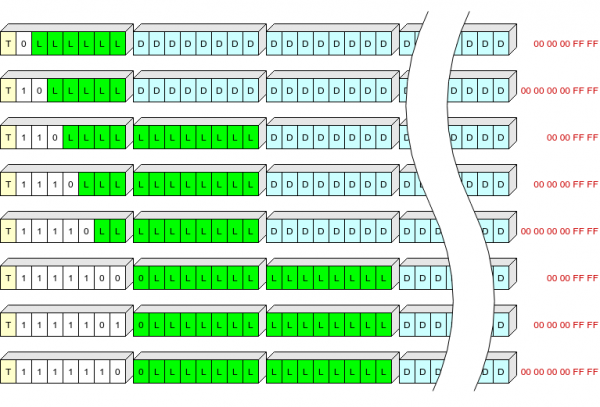
Yellow indicates field T here, white indicates field S, green L (length of compressed data in bytes), blue indicates compressed data, and red indicates final bytes of compressed data that are not written to flash memory.
Thus, we can store headers of the most common length (up to 63 + 5 bytes in compressed form) in one byte.
After each record, a CRC-32C checksum is stored, where the initial value (init) uses the inverted value of the previous checksum.
CRC has the property of 'continuity', acting (plus or minus bit inversion in the process) in such a formula:  .
.
So, we are essentially calculating the CRC of all previous bytes of headers and data on this page.
Immediately following the checksum is the header of the next record.
The header is constructed so that its first byte is always different from 0x00 and 0xff (if we encounter 0xff instead of the first byte of the header, it means this is an unused area; 0x00 signals an error).
Approximate algorithms
Reading from flash memory
Any reading is done with a checksum verification.
If the checksum does not match, the reading is repeated several times in hopes of reading the correct data.
(this makes sense, Linux does not cache reads from NOR Flash, verified)
Writing to flash memory
We are writing data.
We are reading them.
If the read data does not match the written data, we fill the area with zeros and signal an error.
Preparing the new chip for operation
To initialize, a header with version 1 is written to the first (or rather, zero) page.
After that, the initial context is written to this page (contains the UUID of the device and default settings).
Everything, the flash memory is ready for operation.
Loading the device
During loading, the first 8 bytes of each page (header + CRC) are read; pages with unknown Magic Numbers or incorrect CRCs are ignored.
From the 'correct' pages, pages with the maximum version are selected, and from them, the page with the highest number is taken.
The first entry is read, the correctness of the CRC is checked, and the presence of the 'context' flag is verified. If everything is fine, this page is considered current. If not, we roll back to the previous one until we find a 'live' page.
On the found page, we read all entries, and those with the 'context' flag are applied.
We save the zlib dictionary (it will be needed for writing to this page).
All done, loading is complete, context restored, ready to work.
Adding an entry to the log
We compress the entry with the correct dictionary, specifying Z_SYNC_FLUSH. We check if the compressed entry fits on the current page.
If it does not fit (or there were CRC errors on the page), we start a new page (see below).
We write the entry and CRC. If an error occurs, we start a new page.
New page
We select a free page with the minimum number (we consider a page free if its header has an incorrect checksum or a version less than the current one). If there are no such pages, we select a page with the minimum number among those that have a version equal to the current one.
We make the selected page erase. We compare the contents with 0xff. If something is wrong, we take the next free page, and so on.
We write the header to the erased page, the first entry the current state of the context, then the unwritten log entry (if there is one).
Applicability of the format
In my opinion, this is a decent format for storing any somewhat compressible streams of information (plain text, JSON, MessagePack, CBOR, possibly protobuf) in NOR Flash.
Of course, the format is tailored for SLC NOR Flash.
It should not be used with media that have a high BER, such as NAND or MLC NOR. (Is such memory even available for sale? I've only seen mentions in coding correction works.).
Moreover, it shouldn't be used with devices that have their own FTL: USB flash, SD, MicroSD, etc. (For such memory, I created a format with a page size of 512 bytes, a signature at the beginning of each page, and unique entry numbers — sometimes, it was possible to recover all data from a 'glitchy' flash drive through simple sequential reading.).
Depending on the tasks, the format can be used without changes on flash drives from 128 Kbit (16 Kb) to 1 Gbit (128 Mb). If desired, it can also be used on larger chips, but perhaps the page size needs to be adjusted. (But here the question of economic feasibility arises; the price of large-capacity NOR Flash is not pleasing.).
If anyone finds the format interesting and wishes to use it in an open project — just write, and I will try to find time to tidy up the code and upload it to GitHub.
Conclusion
As we can see, in the end, the format turned out to be simple. And even boring..
It's hard to reflect the evolution of my viewpoint in the article, but believe me: initially, I wanted to create something sophisticated, indestructible, capable of surviving even after a nuclear explosion in close proximity. However, reason (I hope) ultimately prevailed, and priorities gradually shifted towards simplicity and compactness.
Could it be that I made a mistake? Yes, of course. It might turn out, for example, that we bought a batch of low-quality chips. Or for some other reason, the equipment might not meet expectations in terms of reliability.
Do I have a plan for this case? I think, after reading the article, you have no doubt that a plan exists. And not just one.
If we're being a bit more serious, the format was developed simultaneously as both a working option and a 'trial balloon.'
At the moment, everything is working fine on the table; the solution will literally be deployed in the coming days. (approximately) on hundreds of devices, we will see what happens in 'combat' operation (thankfully, I hope the format allows reliable failure detection; so we should be able to gather complete statistics). In a few months, we will be able to draw conclusions. (and if we're unlucky — maybe sooner).
If serious issues arise from the usage results and modifications are needed, I'll definitely write about it.
Literature
I didn't want to compile a long tedious list of the works I used; after all, everyone has Google.
Here, I've decided to leave a list of findings that seemed particularly interesting to me; however, they gradually made their way into the article text, and only one point remained in the list:
- Utility by author zlib. It displays the contents of deflate/zlib/gzip archives in an understandable format. If you have to delve into the internal structure of the deflate (or gzip) format, I highly recommend it.
Source: habr.com
