

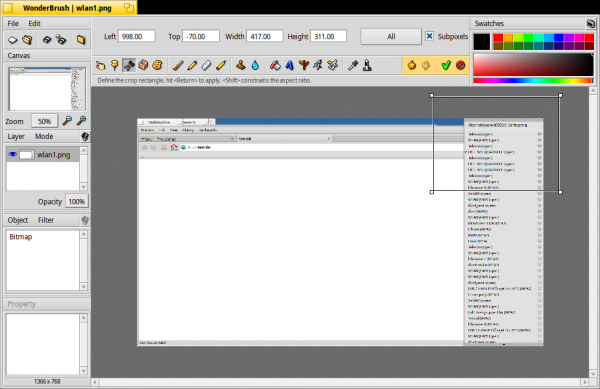
Editing the screenshot for this article in Haiku
TL;DR: Performance is much better than initially expected. The issue was with ACPI. Booting in a virtual machine works great for screen sharing. Git and the package manager are integrated into the file manager. Public Wi-Fi networks do not work. Frustration with Python.
I discovered Haiku, an unexpectedly good system. Even now, in my second week, I continue to find many hidden gems and pleasant surprises, along with my weekly dose of various quirks.
Performance
It turns out that the poor performance during the first week, especially in the browser (like delays while typing), could be linked to the buggy implementation of ACPI in my computer's BIOS.
To disable ACPI, I do the following:
sed -i -e 's|#acpi false|acpi false|g' /boot/home/config/settings/kernel/drivers/kerneland reboot. Now my system finally responds quickly, as noted by others in the past. However, as a result, I can no longer reboot without a kernel panic (I can turn it off with the message 'The computer can now be powered off').
ACPI, DSDT, iasl
Well, I probably need to debug ACPI; I vaguely remember this from the days when I worked on PureDarwin, since the xnu kernel often needed patched files. DSDT.aml
Let's go…
Downloading and building iasl, Actually, no, it has already been ported:
~> pkgman install iaslSaving ACPI tables:
~> acpidump -o DSDT.dat
Cannot open directory - /sys/firmware/acpi/tables
Could not get ACPI tables, AE_NOT_FOUND
It turns out it still doesn't work in Haiku, so I decide to reboot into Linux to dump the contents of ACPI there. I then fixed the errors using iasl, a text editor, and some knowledge (you can search in Google for 'patch dsdt fix') and a deep well of patience. Nevertheless, I still couldn't load the patched DSDT using the Haiku bootloader. The proper solution might be transferring , into the Haiku bootloader (much like how , fixing DSDT on the fly via tags and templates). I opened .
Virtual machines
In general, I'm not a fan of virtual machines as they often consume more RAM and other resources that I have available. Additionally, I dislike the overhead they bring. However, I had to take the plunge and use a VM because Haiku cannot currently record video streams with sound (since the sound drivers do not work with my hardware and I have a USB1 (first version) card whose driver needs to be compiled manually). What I want to say is that for I managed to achieve a really good result when creating my video stream. It turned out that Virtual Machine Manager is a real marvel. Perhaps, in this software (which I've ignored for about 15 years), RedHat invested all of its engineering resources. In any case, to my great surprise, the virtualized Haiku runs slightly faster than on the same hardware (it's hard to believe, but that's how it seems to me). [It seems I had a similar experience in 2007 with the freshly released Centos5, which could be installed virtually in Xen. — translator's note]
Video stream
It required quite a bit of maneuvering, so I recorded a step-by-step guide (mostly for myself, to replicate it later), but you can also use this information for recording your Haiku video streams (which is definitely worth trying).
In short:
- Use decent headphones and a C-Media USB sound card
- Boot the computer using the Pop!OS NVIDIA live image (for hardware-accelerated encoding with nvenc)
- Download the Haiku Anyboot 64bit nightly image
- Set up KVM as described in the article above
- Download the OBS Studio AppImage (don’t forget to tell the developers you want an official one)
- Add a noise suppression filter to Desktop Audio (right-click on Desktop Audio, then ‘Filters’, then ‘+’, then ‘Noise Suppression’, leave the level at default)
- Go through the sound settings in XFCE
- Right-click on Desktop Audio, then ‘Properties’, select the device ‘Audio Adapter Analog Stereo’
- Go to the XFCE menu, in ‘Workspaces’
- Set the number of workspaces to: 2
- Ctr-Alt-RightArrow will switch to the second workspace
- Fix the shortcut to launch Virtual Machine Manager so that it runs as root (by adding at the beginning
sudo), otherwise it didn’t work for me - Run Haiku on the second desktop
- Boot up to its desktop, set the resolution to FullHD (I couldn't get Haiku to do this automatically; there might be a way to get QEMUKVM to pass through the EDID from the monitor, but I didn't find such a setting in Virtual Machine Manager) [I should have installed another graphics card and passed it through to Haiku... — translator's note]
- Press Ctrl+Alt to 'return' the keyboard and mouse to Linux
- Ctrl-Alt-LeftArrow switches to the first desktop
- In OBS, add 'Window Capture (XComposite)', and select the window 'Haiku on QEMUKVM', check the box 'Swap red and blue'.
- Record video, edit it using Shotcut (run it as root for NVENC hardware acceleration to work)
- Audio track from YouTube's music library 'Timelapsed Tides'. Filters: 'Audio fade in', 'Audio fade out', volume -35db (okay, enough, this isn't a Shotcut tutorial)
- Export, 'YouTube', upload. The video will be FullHD on YouTube without special post-processing
Voila!
Live streaming Haiku using QEMUKVM, a USB sound card, OBS Studio, and Shotcut
I'm happy, although I would be much happier if the sound card, OBS Studio, and Shotcut worked natively in Haiku, and I didn't have to go through this lengthy setup. [I would have taken VirtualBox; everything is set up for recording streaming directly in the virtual machine settings. — translator's note]
Tracker and its add-ons
Tracker for Haiku is like Finder on Mac or Explorer on Windows. I'll try to search for it tracker add-on in HaikuDepot.
Integration of Git in the file manager
I'm just quoting images from its homepage
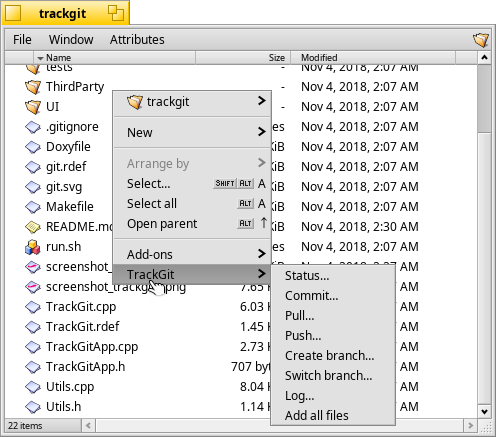
TrackGit is integrated into Haiku's file manager
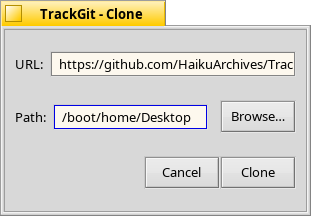
You can even clone the repository
Is this a joke?! A plain text password? It's surprising they don't use a 'keychain'; there is BKeyStore for this in Haiku. .
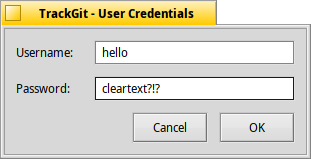
A plain text password?
Integration of the package manager into the file manager
According to the project's homepage:
Finds the package(s) of any selected file(s), opening it in the preferred application. By default, this is HaikuDepot, where you can see the package description, and on the 'Contents' tab, you can see other files that are part of this package, as well as their locations.
Probably just one step left to uninstall the package...
Autostart/rc.local.d
How to launch something automatically on boot?
- rc.local.d = /boot/home/config/settings/boot/userbootscript
- Autostart = /boot/home/config/settings/boot/user/launch
I need to find the command to synchronize local time via NTP… I heard it should work automatically, but for some reason, it's not working for me. This is quite bad since my RTC battery is dead, which means the time resets when the power is off.
More tips
Application displays useful tips and recommendations (check them out!).
Public wireless networks
I couldn't connect to the wireless networks during my walk even though my home wireless network is working. Public places (airports, hotels, train stations) are usually covered by many wireless networks, each typically consisting of multiple access points.

Frankfurt Central Train Station
What will we find at ? Кучу разных сетей:
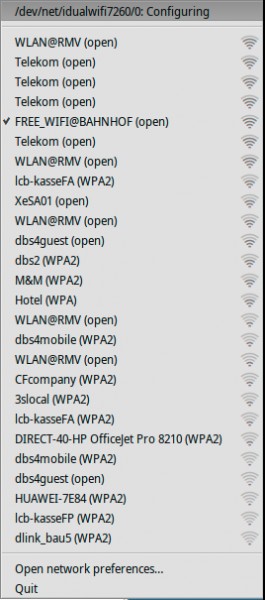
A common situation for public places. Here: Frankfurt Central Train Station
There are plenty of opportunities for connectivity. But what does Haiku do with these networks? Actually, not much: it gets really confused by them. I was disconnected from the network the whole time.
Is access point hopping not working?
It all starts with each access point being displayed separately, even if they belong to the same network with a common SSID, unlike any other operating system I'm familiar with.
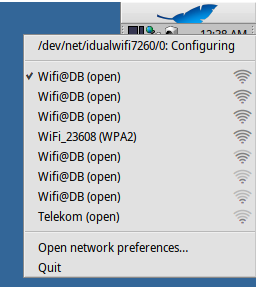
Several points with the same SSID are displayed. So, how will roaming work under such conditions?
Only one SSID should be displayed, for which an access point with the strongest signal will be selected. The client should choose another point with a stronger signal but the same SSID (if available) if the connection with the current access point becomes too weak—everything works even while moving (client handover between access points). .
No open networks?
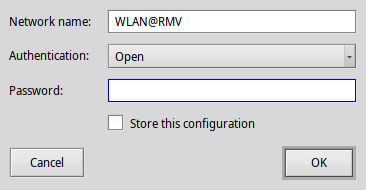
Haiku insists that a password should be required even if the network is open.
Haiku keeps asking for the network password, even though the network itself doesn't need any passwords. Also .
Confusion due to captive portals?
Many wireless networks use captive portals, where users are redirected to a login page to accept terms and agreements before accessing the network. This may have confused my OS even more. After all, it seems that my wireless subsystem has completely locked up.
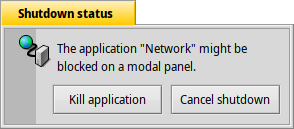
After a while, the entire wireless subsystem became completely unresponsive.
No network access while traveling, it's quite sad.
Frustration with Python
How can I easily and casually launch a 'randomly' chosen program in Python? It turned out not to be that simple. At least I didn't fully understand it myself...
git clone https://github.com/micahflee/onionshare.git
cd onionsharepython3 -m venv venv
pkgman i setuptools_python36 # pkgman i setuptools_python installs for 3.7
pip3 install -r install/requirements.txt

Could not find a version that satisfies the requirement PyQt5==5.12.1 (from -r install/requirements.txt (line 15)) (from versions: )
No matching distribution found for PyQt5==5.12.1 (from -r install/requirements.txt (line 15))

# stalled here - does not continue or exit

pkgman i pyqt

# No change, same error; how do I get it into the venv?
# Trying outside of venv

Could not find a version that satisfies the requirement PyQt5==5.12.1 (from -r install/requirements.txt (line 15)) (from versions: )
No matching distribution found for PyQt5==5.12.1 (from -r install/requirements.txt (line 15))
Stalled pip — a known issue (it needs support for hardlinks, which are not supported in Haiku). I was advised to use python3.6 (I would say it's a mess). I opened
Where do we go from here?
Haiku is an example of a focused operating system for PCs, and as such, it has excellent principles that significantly simplify common workflows. Its development has been stable but slow — for the past decade, resulting in limited hardware support and the system itself being relatively unknown. However, the situation is changing: hardware support enables Haiku to run on a relatively wide range of machines (albeit with errors), and given that the version of the system is not 1.0, it requires greater public attention. How can I best help? I believe this series of articles will be useful. After 2 weeks, I , and I also started a series of video broadcasts.
Once again, I would like to express my immense gratitude to the Haiku development team; you are the best! Please let me know if you come up with any ideas on how I can contribute to the project's development, even though I do not plan to write in C++ anytime soon.
Try it yourself! After all, the Haiku project provides images for download from DVD or USB, created .
Have questions? We invite you to our Russian-speaking .
probono – the founder and lead developer of the AppImage project, founder of the PureDarwin project, and participant in various open-source projects. The screenshots were taken on Haiku. Thanks to the developers in the #haiku channel on irc.freenode.net.
Error Overview:
From translation: this is the ninth and final article in the Haiku series.
List of Articles:
Source: habr.com
