

Wait! Wait! Really, this is not just another article about SQL Server backup types. I won't even talk about the differences in recovery models or how to deal with a bloated 'log.'
Perhaps (just perhaps), after reading this post, you will be able to make your backups taken with the standard tools run, well, 1.5 times faster tomorrow night. And only because you're using just a few more BACKUP DATABASE parameters.
If the content of the post was obvious to you — sorry. I read everything I could find on Google with the phrase 'habr sql server backup', and I didn't find any mention that the backup time can somehow be influenced by parameters.
I immediately want to draw your attention to Alexander Gladchenko's comment ():
Never change the BUFFERCOUNT, BLOCKSIZE, MAXTRANSFERSIZE parameters in production. They are only meant for writing articles like this. In practice, you'll run into memory problems.
It would be, of course, great to be the smartest one and post exclusive content, but unfortunately, that's not the case. There are both English and Russian articles/posts (I always mix up how to call them correctly) dedicated to this topic. Here are some of those that I came across: , , .
So, to start, I will include some trimmed BACKUP syntax from (by the way, earlier I mentioned BACKUP DATABASE, but all this applies to the transaction log backup as well as to differential backup, although maybe with less obvious effect):
BACKUP DATABASE { database_name | @database_name_var }
  TO  [ ,...n ]

  [ WITH {
           |  [ ,...n ] } ]
[;]

 [ ,...n ]::=

--Media Set Options

 | BLOCKSIZE = { blocksize | @blocksize_variable }

--Data Transfer Options
   BUFFERCOUNT = { buffercount | @buffercount_variable }
 | MAXTRANSFERSIZE = { maxtransfersize | @maxtransfersize_variable }
— means that something was there, but I've removed it because it doesn't relate to the topic now.
How do you usually take a backup? How is it 'taught' to take a backup in billions of articles? In general, if I need to take a backup of some not very large database just once, I will automatically write something like this:
BACKUP DATABASE smth
TO DISK = 'D:Backupsmth.bak'
WITH STATS = 10, CHECKSUM, COMPRESSION, COPY_ONLY;
-- okay, I only wrote CHECKSUM to seem smarter
In general, this probably lists about 75-90% of all the parameters usually mentioned in articles about backups. Well, there are INIT, SKIP, and so on. Have you checked MSDN? Did you see that there are options spanning one and a half screens? I’ve seen that too…
You’ve probably guessed that the following discussion will be about three parameters that remained in the first block of code — BLOCKSIZE, BUFFERCOUNT, and MAXTRANSFERSIZE. Here are their descriptions from MSDN:
BLOCKSIZE = { blocksize | @ blocksize_variable } indicates the size of the physical block in bytes. Supported sizes are 512, 1024, 2048, 4096, 8192, 16,384, 32,768, and 65,536 bytes (64 KB). The default value is 65,536 for tape devices and 512 for other devices. Generally, there is no need for this parameter, as the BACKUP command automatically selects a block size appropriate for the device. Explicitly setting the block size overrides the automatic block size selection.
BUFFERCOUNT = { buffercount | @ buffercount_variable } defines the total number of input-output buffers that will be used for the backup operation. Any positive integer value can be specified; however, a large number of buffers may cause a memory shortage error due to excessive virtual address space in the Sqlservr.exe process.
The total space used by the buffers is determined by the following formula:
BUFFERCOUNT * MAXTRANSFERSIZE.
MAXTRANSFERSIZE = { maxtransfersize | @ maxtransfersize_variable } specifies the maximum size of data packets in bytes for data exchange between SQL Server and the backup media. Values that are multiples of 65,536 bytes (64 KB) are supported, up to 4,194,304 bytes (4 MB).
I swear — I read this before, but it never crossed my mind what impact they could have on performance. Moreover, it seems that I need to make some kind of ‘coming out’ and admit that even now I don’t fully understand what they do. I guess I need to read more about buffered I/O and how hard drives work. Someday I’ll do that, but for now, I can just write a script that checks how these values affect the speed at which backups are taken.
I created a small database, around 10 GB, placed it on an SSD, and stored the backup directory on an HDD.
I am creating a temporary table to store the results (it's not actually temporary for me, so I can dig into the results in more detail, but you decide for yourselves):
DROP TABLE IF EXISTS ##bt_results;

CREATE TABLE ##bt_results (
    id              int IDENTITY (1, 1) PRIMARY KEY,
    start_date      datetime NOT NULL,
    finish_date     datetime NOT NULL,
    backup_size     bigint NOT NULL,
    compressed_size bigint,
    block_size      int,
    buffer_count    int,
    transfer_size   int
);
The script works on a simple principle — nested loops, each changing the value of one parameter, feeding these parameters into the BACKUP command, saving the last record with the history from msdb.dbo.backupset, deleting the backup file, and then moving on to the next iteration. Since the backup execution data is taken from backupset, the accuracy is somewhat lost (there are no sub-second details), but we can manage that.
First, you need to enable xp_cmdshell to delete backups (don't forget to disable it later if you don't need it):
EXEC sp_configure 'show advanced options', 1;
EXEC sp_configure 'xp_cmdshell', 1;
RECONFIGURE;
EXEC sp_configure 'show advanced options', 0;
GO
And, well:
DECLARE @tmplt AS nvarchar(max) = N'
BACKUP DATABASE [bt]
TO DISK = ''D:SQLServerbackupbt.bak''
WITH
    COMPRESSION,
    BLOCKSIZE = {bs},
    BUFFERCOUNT = {bc},
    MAXTRANSFERSIZE = {ts}';

DECLARE @sql AS nvarchar(max);

/* BLOCKSIZE values */
DECLARE @bs     int = 4096,
        @max_bs int = 65536;

/* BUFFERCOUNT values */
DECLARE @bc     int = 7,
        @min_bc int = 7,
        @max_bc int = 800;

/* MAXTRANSFERSIZE values */
DECLARE @ts     int = 524288,   --512KB, default = 1024KB
        @min_ts int = 524288,
        @max_ts int = 4194304;  --4MB

SELECT TOP 1
    @bs = COALESCE (block_size, 4096),
    @bc = COALESCE (buffer_count, 7),
    @ts = COALESCE (transfer_size, 524288)
FROM ##bt_results
ORDER BY id DESC;

WHILE (@bs <= @max_bs)
BEGIN
    WHILE (@bc <= @max_bc)
    BEGIN
        WHILE (@ts <= @max_ts)
        BEGIN
            SET @sql = REPLACE (REPLACE (REPLACE(@tmplt, N'{bs}', CAST(@bs AS nvarchar(50))), N'{bc}', CAST (@bc AS nvarchar(50))), N'{ts}', CAST (@ts AS nvarchar(50)));

            EXEC (@sql);

            INSERT INTO ##bt_results (start_date, finish_date, backup_size, compressed_size, block_size, buffer_count, transfer_size)
            SELECT TOP 1 backup_start_date, backup_finish_date, backup_size, compressed_backup_size,  @bs, @bc, @ts
            FROM msdb.dbo.backupset
            ORDER BY backup_set_id DESC;

            EXEC xp_cmdshell 'del "D:SQLServerbackupbt.bak"', no_output;

            SET @ts += @ts;
        END

        SET @bc += @bc;
        SET @ts = @min_ts;

        WAITFOR DELAY '00:00:05';
    END

    SET @bs += @bs;
    SET @bc = @min_bc;
    SET @ts = @min_ts;
END
If you need explanations about what's happening here — feel free to write in the comments or in a private message. For now, I'll only discuss the parameters that I feed into BACKUP DATABASE.
For BLOCKSIZE, we have a "closed" list of values, and I did not perform a backup with BLOCKSIZE < 4KB. MAXTRANSFERSIZE can be any number that is a multiple of 64KB — from 64KB to 4MB. By default, it is 1024KB on my system, I took 512 — 1024 — 2048 — 4096.
It was more complicated with BUFFERCOUNT — it can be any positive number, but the link states It also details how to get information on the actual BUFFERCOUNT from which the backup is taken — for me, it's 7. There was no point in reducing it, and the upper limit was discovered empirically — with BUFFERCOUNT = 896 and MAXTRANSFERSIZE = 4194304, the backup failed with an error (which is described in the link above):
Msg 3013, Level 16, State 1, Line 7 BACKUP DATABASE is terminating abnormally.
Msg 701, Level 17, State 123, Line 7 There is insufficient system memory in resource pool ‘default’ to run this query.
For comparison, first I will show the results of running the backup without specifying any parameters at all:
BACKUP DATABASE [bt]
TO DISK = 'D:SQLServerbackupbt.bak'
WITH COMPRESSION;
Well, a backup is a backup:
Processed 1070072 pages for database ‘bt’, file ‘bt’ on file 1.
Processed 2 pages for database ‘bt’, file ‘bt_log’ on file 1.
BACKUP DATABASE successfully processed 1070074 pages in 53.171 seconds (157.227 MB/sec).
The script itself, testing the parameters, ran for a couple of hours, all measurements in . Here are the results, featuring the three best execution times (I tried to create a nice graph, but in the post I’ll have to settle for a table, and in the comments added ).
SELECT TOP 7 WITH TIES
    compressed_size,
    block_size,
    buffer_count,
    transfer_size,
    DATEDIFF(SECOND, start_date, finish_date) AS backup_time_sec
FROM ##bt_results
ORDER BY backup_time_sec ASC;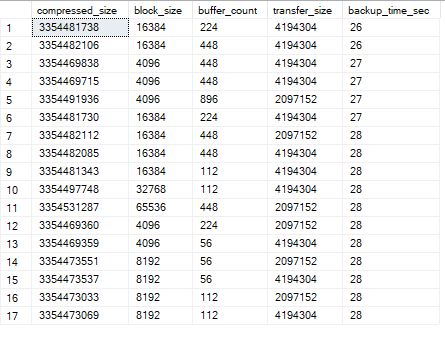
Attention, a very important note from from :
it can be confidently said that the relationship between the parameters and the speed of the backup within these value ranges is random, there is no pattern. However, deviation from the built-in parameters has clearly had a positive impact on the result.
That is, by merely managing the standard BACKUP parameters, a 2-fold gain in backup time was achieved: 26 seconds compared to 53 at the beginning. Not bad, right? But we need to see what is happening with recovery. What if it now takes four times longer to restore?
First, let’s measure how long the recovery of the backup with the default settings takes:
RESTORE DATABASE [bt]
FROM DISK = 'D:SQLServerbackupbt.bak'
WITH REPLACE, RECOVERY;
Well, you know that yourself, paths there, replace or not replace, recovery or not recovery. And this is how it runs for me:
Processed 1070072 pages for database ‘bt’, file ‘bt’ on file 1.
Processed 2 pages for database ‘bt’, file ‘bt_log’ on file 1.
RESTORE DATABASE successfully processed 1070074 pages in 40.752 seconds (205.141 MB/sec).
Now I will try to restore backups taken with modified BLOCKSIZE, BUFFERCOUNT, and MAXTRANSFERSIZE.
BLOCKSIZE = 16384, BUFFERCOUNT = 224, MAXTRANSFERSIZE = 4194304RESTORE DATABASE successfully processed 1070074 pages in 32.283 seconds (258.958 MB/sec).
BLOCKSIZE = 4096, BUFFERCOUNT = 448, MAXTRANSFERSIZE = 4194304RESTORE DATABASE successfully processed 1070074 pages in 32.682 seconds (255.796 MB/sec).
BLOCKSIZE = 16384, BUFFERCOUNT = 448, MAXTRANSFERSIZE = 2097152RESTORE DATABASE successfully processed 1070074 pages in 32.091 seconds (260.507 MB/sec).
BLOCKSIZE = 4096, BUFFERCOUNT = 56, MAXTRANSFERSIZE = 4194304RESTORE DATABASE successfully processed 1070074 pages in 32.401 seconds (258.015 MB/sec).
The RESTORE DATABASE command does not change during restoration; these parameters are not specified, SQL Server determines them from the backup itself. It can be seen that even during restoration, gains can occur — almost 20% faster (Honestly, I didn't spend much time on restoration; I just checked a few of the 'fastest' backups and confirmed there was no degradation.).
Just to clarify — the parameters described here aren't optimal for everyone. You can only determine the optimal parameters for yourself through testing. I received these results; you will get different ones. But you can see that you can 'tune' your backups, and they can indeed be created and restored faster.
I also strongly recommend reading the documentation in full because there may be nuances specific to your system.
Since I started writing about backups, I want to mention another 'optimization' that occurs more often than 'tuning' parameters (which, as far as I understand, is used by at least some backup utilities, possibly along with the parameters described earlier), but it hasn't been described on Habr yet.
If we look at the second line in the documentation, right below BACKUP DATABASE, we see:
TO [ ,...n ]What do you think will happen if you specify multiple backup_device's? The syntax allows it. An interesting thing will happen — the backup will just be 'spread' across several devices. That is, each 'device' separately will be useless; if you lose one, you lose the entire backup. But how will this spreading affect backup speed?
Let's try to create a backup on two 'devices' located next to each other in one folder:
BACKUP DATABASE [bt]
TO
    DISK = 'D:SQLServerbackupbt1.bak',
    DISK = 'D:SQLServerbackupbt2.bak'
WITH COMPRESSION;
Good heavens, what is going on here?
Processed 1070072 pages for database ‘bt’, file ‘bt’ on file 1.
Processed 2 pages for database ‘bt’, file ‘btlog’ on file 1.
BACKUP DATABASE successfully processed 1070074 pages in 40.092 seconds (208.519 MB/sec).
Was the backup completed 25% faster just like that? What if we add a couple more devices?
BACKUP DATABASE [bt]
TO
    DISK = 'D:SQLServerbackupbt1.bak',
    DISK = 'D:SQLServerbackupbt2.bak',
    DISK = 'D:SQLServerbackupbt3.bak',
    DISK = 'D:SQLServerbackupbt4.bak'
WITH COMPRESSION;
BACKUP DATABASE successfully processed 1070074 pages in 34.234 seconds (244.200 MB/sec).
In total, there's a gain of about 35% in backup time just by writing the backup to 4 files on one disk. I checked with a larger number — on my laptop, there's no gain; 4 devices are optimal. For you — I don’t know, it needs testing. And, by the way, if these devices are really different disks, congratulations, the gain should be even more significant.
Now let's talk about how to restore this happiness. For that, you'll need to change the restore command and list all the devices:
RESTORE DATABASE [bt]
FROM
    DISK = 'D:SQLServerbackupbt1.bak',
    DISK = 'D:SQLServerbackupbt2.bak',
    DISK = 'D:SQLServerbackupbt3.bak',
    DISK = 'D:SQLServerbackupbt4.bak'
WITH REPLACE, RECOVERY;
RESTORE DATABASE successfully processed 1070074 pages in 38.027 seconds (219.842 MB/sec).
A little faster, but pretty similar, not significantly so. Overall, the backup is taken faster, while the restoration speed remains the same — success? I think it’s quite a success. This isimportant , so I'll repeat — if you.
lose any one of these files — you lose the entire backup.
If you look at the log information about the backup output by Trace Flag 3213 and 3605, you'll notice that when backing up to multiple devices, at least the BUFFERCOUNT increases. It's probably worth trying to adjust more optimal parameters for BUFFERCOUNT, BLOCKSIZE, MAXTRANSFERSIZE, but I couldn't do it right away, and I was too lazy to conduct such testing again for different file counts. Plus, I feel sorry for the disks. If you want to set up such testing yourself, it’s not hard to modify the script.
Jokes aside, I fully understand that I haven't revealed anything groundbreaking. What is written above is simply a demonstration of how to select optimal parameters for backups.
Remember that everything you do is at your own risk. Verify your backups and don't forget about DBCC CHECKDB.
Source: habr.com
