

Gone are the days when there was no need to worry about optimizing database performance. Time doesn’t stand still. Every new entrepreneur in the tech industry wants to create the next Facebook while striving to collect all the data they can reach. This data is essential for businesses to improve the training of models that help generate revenue. In such conditions, programmers need to create APIs that can efficiently and reliably operate with massive volumes of information.
If you have been designing server-side applications or databases for some time, you have probably written code to execute paginated queries. For example, like this:
SELECT * FROM table_name LIMIT 10 OFFSET 40
Is that so?
But if you have implemented pagination in this way, I regret to inform you that you have done it in a far from optimal manner.
Do you want to argue with me? . , and are already employing the techniques that I want to discuss today.
Name at least one backend developer who has never used OFFSET and LIMIT for executing paginated queries. In MVP (Minimum Viable Product) and in projects where small data volumes are used, this approach is perfectly valid. It 'just works,' so to speak.
However, if you need to create reliable and efficient systems from scratch, it’s essential to consider the efficiency of database queries used in such systems ahead of time.
Today we will discuss the issues associated with the widely used (unfortunately) implementations of pagination query mechanisms, and how to achieve high performance when executing such queries.
What’s wrong with OFFSET and LIMIT?
As mentioned earlier, OFFSET and LIMIT perform excellently in projects that do not need to handle large data volumes.
The problem arises when the database grows to such sizes that it can no longer fit into the server's memory. Yet during the work with this database, it is necessary to use paginated queries.
For this issue to occur, a situation must arise in which the DBMS resorts to the inefficient operation of a full table scan when executing each paginated query (while there may also be operations for inserting and deleting data, and we do not need outdated data!).
What is a 'full table scan' (or 'sequential table scan')? It is an operation in which the DBMS sequentially reads each row of the table, in other words, the data contained within it, and checks them against a given condition. It is known that this type of table scanning is the slowest. The reason is that many input/output operations are performed, involving the server's disk subsystem. The situation is worsened by delays associated with working with data stored on disks, and the fact that transferring data from disk to memory is a resource-intensive operation.
For example, you have records of 100,000,000 users, and you execute a query with the structure OFFSET 50000000. This means that the DBMS will have to load all these records (which we don’t even need!), place them in memory, and only after that retrieve, say, 20 results as mentioned in LIMIT.
Let's say it might look like this: 'select rows from 50000 to 50020 of 100000'. In other words, for the system to execute the query, it first needs to load 50000 rows. Do you see how much unnecessary work it will have to do?
If you don't believe it — take a look at the example I created using the capabilities of .
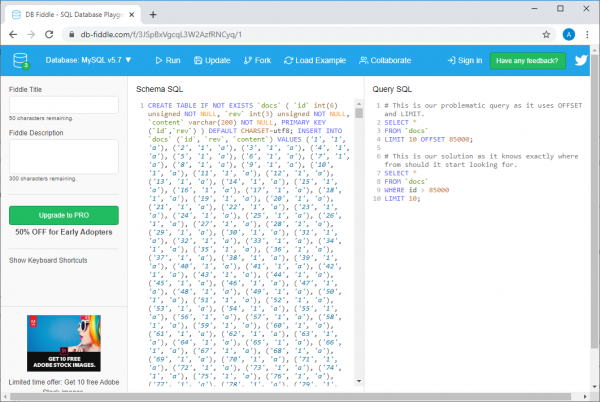
Example on db-fiddle.com
There, on the left in the field Schema SQL, there is code inserting 100,000 rows into the database, and on the right, in the field Query SQL, there are two queries displayed. The first, slow one, looks like this:
SELECT *
FROM `docs`
LIMIT 10 OFFSET 85000;
And the second, which is an efficient solution to the same problem, is:
SELECT *
FROM `docs`
WHERE id > 85000
LIMIT 10;
To execute these queries, simply press the button Run at the top of the page. By doing this, we can compare the execution time of queries. It turns out that executing an inefficient query takes at least 30 times longer than executing the second one (from run to run, this time varies; for example, the system might report that the first query took 37 ms and the second took 1 ms).
And if there is more data, it will look even worse (to see this, take a look at my with 10 million rows).
What we just discussed should give you some understanding of how database queries are actually processed.
Keep in mind that the higher the value OFFSET the longer the query will take to execute.
What should be used instead of the OFFSET and LIMIT combination?
Instead of the combination OFFSET and LIMIT it is better to use a structure built according to this scheme:
SELECT * FROM table_name WHERE id > 10 LIMIT 20
This is pagination based on a cursor (Cursor based pagination).
Instead of storing the current ones locally OFFSET and LIMIT and passing them with each query, you should store the last received primary key (usually, it is ID) and LIMIT, resulting in queries similar to the one above.
Why? The reason is that by explicitly specifying the identifier of the last read row, you tell your DBMS where to start looking for the required data. Moreover, the search will be efficient thanks to the use of the key, and the system won’t have to sift through rows outside the specified range.
Let’s look at the following performance comparison of different queries. Here is an inefficient query.
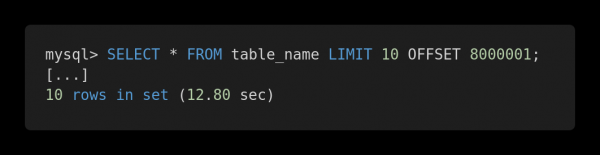
Slow query
And here is the optimized version of this query.
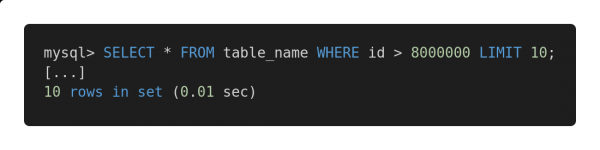
Fast query
Both queries return exactly the same amount of data. However, the first one takes 12.80 seconds to execute, while the second one takes 0.01 seconds. Can you feel the difference?
Possible issues
To ensure the effective operation of the proposed query execution method, the table should have a column (or columns) containing unique, sequentially arranged indexes, like an integer identifier. In some specific cases, this can determine the success of applying such queries to enhance database performance.
Naturally, when constructing queries, one must take into account the architectural features of the tables and choose the mechanisms that will perform best on the existing tables. For example, if you need to work with large volumes of related data in queries, you might find it interesting the article.
If we face the issue of a missing primary key, for example, if there is a table with a "many-to-many" relationship, then the traditional approach involving the use of OFFSET and LIMIT, will reliably suit us. However, its application may lead to potentially slow query executions. In such cases, I would recommend using a primary key with auto-increment, even if it is only needed for organizing paginated query executions.
If you are interested in this topic — , and — here are several useful resources.
Summary
The main conclusion we can draw is that, regardless of the size of the databases in question, it is essential to analyze query execution speed. In today's world, scalability of solutions is critically important, and if everything is designed correctly from the outset of a system, it can save developers from many issues in the future.
How do you analyze and optimize database queries?
Source: habr.com
