

There is a lot of information on SMART and the meanings of its attributes available online. However, I haven't come across mentions of several important points that I've learned from people engaged in data storage research.
When I once again explained to a friend why we shouldn't take SMART readings at face value and why it's better not to constantly use traditional SMART monitoring tools, the idea struck me to document my words in the form of a series of bullet points with explanations. This way, I can provide references instead of retelling everything each time. And for the awareness of a broader audience.
1) Programs for automatically monitoring SMART attributes should be used with great caution.
What you recognize as SMART attributes isn't stored as is; it's generated at the moment you request it. It's calculated based on internal statistics accumulated and used by the drive's firmware during operation.
Some of this data is not needed by the device for its basic functionality. It isn't stored but is generated each time it's required. Therefore, when a request for SMART attributes is made, the firmware triggers a large number of processes needed to obtain the missing data.
However, these processes do not work well with the procedures performed during drive load from read-write operations.
In an ideal world, this should not lead to any problems. But in reality, hard drive firmware is written by regular people who can and do make mistakes. So, when you request SMART attributes while the device is actively performing read-write operations, the likelihood of something going wrong increases sharply. For example, user data in the read or write buffer may become corrupted.
The assertion regarding the increased risks is not a theoretical conclusion but rather a practical observation. For instance, there is a known bug that occurred in the firmware of the Samsung HDD 103UI, where, during the execution of a SMART attributes request, user data became corrupted.
Therefore, do not set up automatic checks of SMART attributes unless you are absolutely sure that a cache flush command (Flush Cache) precedes it. If it's absolutely necessary, set the check to occur as infrequently as possible. In many monitoring programs, the default interval between checks is about 10 minutes. This is too frequent. These checks are not a cure-all for unexpected disk failures (the cure-all is only redundancy). Once a day is quite sufficient in my view.
Requesting the temperature to initiate attribute calculation processes does not lead to issues and can be done frequently. This happens correctly via the SCT protocol. Only what is already known is returned via SCT. This data is updated automatically in the background.
2) SMART attribute data is often unreliable.
The hard drive firmware shows you what it considers necessary to display, rather than what is actually happening. The most illustrative example is the 5th attribute, which indicates the number of reallocated sectors. Data recovery specialists know well that a hard drive can display a zero count for realocated sectors in the fifth attribute, while they exist and continue to occur.
I asked a specialist who studies hard drives and researches their firmware. I inquired about the principle by which the device's firmware decides when to hide the fact of sector reallocations, and when it can reveal this through SMART attributes.
He replied that there is no general rule regarding when devices display or hide the real picture. The logic of programmers who write hard drive firmware sometimes appears very strange. While studying the firmware of different models, he noticed that the decision to 'hide or show' is often based on a set of parameters that are completely unclear in how they are related to each other and the remaining lifespan of the hard drive.
3) Interpretation of SMART indicators is vendor-specific.
For example, when assessing signals, do not focus on the 'bad' raw values of attributes 1 and 7, as long as the others are within normal ranges. For drives from this manufacturer, their absolute values may increase during normal operation.
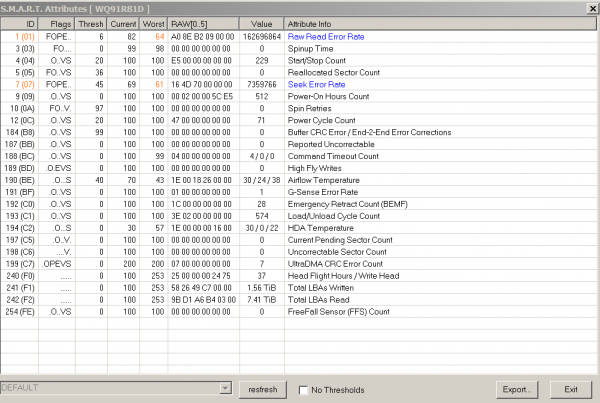
To evaluate the state and remaining lifespan of a hard drive, it's primarily advisable to pay attention to parameters 5, 196, 197, and 198. It's important to rely specifically on the absolute, raw values instead of the derived ones. Derivation of attributes can occur through various non-obvious methods, differing across algorithms and firmware.
In fact, among information storage specialists, when discussing attribute values, the absolute value is usually what is meant.
Source: habr.com
