

I am publishing the original article on Habr, the translation of which is posted on the corporate site. .
The need to do something asynchronously, without waiting for results here and now, or to split large tasks among several executing units existed even before computers. With their advent, this need became very pronounced. Now, in 2019, as I type this article on a laptop with an 8-core Intel Core processor, which is simultaneously running hundreds of processes, and even more threads. Nearby lies a slightly worn, purchased a couple of years ago phone, equipped with an 8-core processor. Thematic resources are full of articles and videos where their authors marvel at flagship smartphones this year that feature 16-core processors. MS Azure offers a virtual machine with a 128-core processor and 2 TB of RAM for less than $20/hour. Unfortunately, it is impossible to extract maximum power and harness this capability without managing thread interactions.
Terminology
Process — an OS object, an isolated address space that contains threads.
Thread — an OS object, the smallest unit of execution, part of a process, threads share memory and other resources among themselves within a process.
Multitasking — a property of the OS, the ability to run multiple processes simultaneously.
Multicore — a property of the processor, the ability to use multiple cores for data processing.
Multiprocessing — a property of the computer, the ability to work simultaneously with multiple physical processors.
Multithreading — a property of a process, the ability to distribute data processing among several threads.
Parallelism — performing multiple actions physically at the same time in a given time unit.
Asynchronicity — performing an operation without waiting for the completion of that processing; the result of execution can be processed later.
Metaphor
Not all definitions are good, and some require further explanation, so I will add a metaphor about making breakfast to the formally introduced terminology. In this metaphor, making breakfast is the process.
While preparing breakfast in the morning I (CPU) come to the kitchen (Computer). I have 2 hands (Cores). There are several devices in the kitchen (IO): oven, kettle, toaster, refrigerator. I turn on the gas, place a frying pan on it, and pour oil into it without waiting for it to heat up (asynchronously, Non-Blocking-IO-Wait), I take eggs out of the refrigerator and crack them into a plate, then I whisk them with one hand (Thread#1), while with the other hand (Thread#2) I hold the plate (Shared Resource). Right now, I would like to turn on the kettle, but I don't have enough hands (Thread Starvation) By this time, the frying pan is heating up (Processing Result) into which I pour what I have whisked. I reach for the kettle and turn it on, and just watch as the water boils in it (Blocking-IO-Wait), although I could have washed the plate where I whisked the omelet during this time.
I cooked an omelet using only 2 hands, but that’s all I have, yet at the moment of whisking the omelet, three operations were happening simultaneously: whisking the omelet, holding the plate, and heating the frying pan. The CPU is the fastest part of the computer; IO is what often lags, so an effective solution is often to keep the CPU occupied while data is being retrieved from IO.
Continuing the metaphor:
- If during the omelet cooking process I were also trying to change clothes, that would be an example of multitasking. An important nuance: computers handle this much better than humans.
- A kitchen with several chefs, like in a restaurant, is a multi-core computer.
- Numerous restaurants in a food court in a shopping mall are a data center.
.NET Tools
In working with threads, as with many other things, .NET is good. With each new version, it introduces more tools for working with them, new layers of abstraction over OS threads. When building abstractions, framework developers use an approach that allows for descending one or more levels below when using high-level abstraction. Most of the time, this is unnecessary; moreover, it opens the possibility of shooting oneself in the foot with a shotgun, but sometimes, in rare cases, this may be the only way to solve a problem not resolvable at the current level of abstraction.
By tools, I mean both the software interfaces (APIs) provided by the framework and third-party packages, as well as entire software solutions simplifying the search for issues related to multi-threaded code.
Starting a thread
The Thread class is the most basic one in .NET for working with threads. Its constructor accepts one of two delegates:
- ThreadStart — No parameters
- ParametrizedThreadStart — with one parameter of type object.
The delegate will be executed in the newly created thread after calling the Start method. If a ParametrizedThreadStart type delegate was passed to the constructor, an object must be passed to the Start method. This mechanism is needed to pass local information into the thread. It is worth noting that creating a thread is an expensive operation, and the thread itself is a heavy object, primarily because 1MB of memory is allocated on the stack, and it requires interaction with the OS API.
new Thread(...).Start(...);
The ThreadPool class represents the concept of a pool. In .NET, the thread pool is a piece of engineering art, and Microsoft developers have invested a lot of effort to make it work optimally in a wide range of scenarios.
General concept:
From the moment the application starts, it creates several spare threads in the background and provides the ability to utilize them. If threads are frequently used and in large quantities, the pool expands to meet the request of the calling code. When there are no free threads available in the pool at a given time, it will either wait for one of the threads to return or create a new one. This means that the thread pool is great for short actions and poorly suited for operations working as services throughout the application's lifetime.
To use a thread from the pool, there is a method called QueueUserWorkItem, which accepts a delegate of type WaitCallback, which has a signature matching that of ParametrizedThreadStart, and the parameter passed to it serves the same purpose.
ThreadPool.QueueUserWorkItem(...);
A lesser-known method of the thread pool, RegisterWaitForSingleObject, is used to organize non-blocking IO operations. The delegate passed to this method will be invoked when the WaitHandle passed to the method is released.
ThreadPool.RegisterWaitForSingleObject(...)
In .NET, there is a thread timer that differs from WinForms/WPF timers in that its handler will be invoked in a thread taken from the pool.
System.Threading.Timer
There is also a rather exotic way to send a delegate for execution in a pool thread — the BeginInvoke method.
DelegateInstance.BeginInvoke
I want to briefly touch on the function that many of the methods mentioned above hinge on — CreateThread from the Kernel32.dll Win32 API. There is a way, thanks to the extern method mechanism, to call this function. I've only seen such a call once in a horrendous example of legacy code, and the motivation of the author who did it this way still remains a mystery to me.
Kernel32.dll CreateThread
Viewing and debugging threads
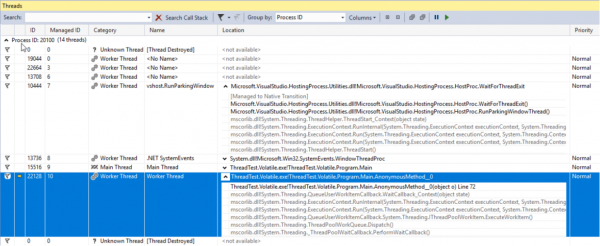
Threads that you personally created, as well as those created by all third-party components and the .NET pool, can be viewed in the Visual Studio Threads window. This window will display thread information only when the application is in debug mode and in break mode. Here, you can conveniently view the stack, names, and priorities of each thread and switch debugging to a specific thread. The Priority property of the Thread class can be used to set the thread's priority, which the OS and CLR will interpret as a recommendation for distributing CPU time among threads.
Task Parallel Library
The Task Parallel Library (TPL) was introduced in .NET 4.0. It is now the standard and primary tool for working with asynchronous programming. Any code that uses older approaches is considered legacy. The core unit of TPL is the Task class from the System.Threading.Tasks namespace. A Task represents an abstraction over a thread. With the new version of C#, we got an elegant way to work with Tasks — the async/await operators. These concepts allow developers to write asynchronous code as if it were simple and synchronous, enabling even those with a limited understanding of threads to write applications that use them without hanging during long operations. Using async/await is a topic for one or even several articles, but I will try to summarize the essence in a few sentences:
- async is a method modifier that returns a Task or void
- and await is the operator for non-blocking waiting for a Task.
Again: the await operator will generally (with exceptions) release the current execution thread, and when the Task finishes its execution and the thread (actually more accurately, the context, but more on that later) is free, it will continue executing the method. Inside .NET, this mechanism is implemented similarly to yield return, where the method being written is transformed into a whole class that acts as a state machine and can be executed in separate chunks depending on these states. Anyone interested can write any simple code using async/await, compile it, and inspect the assembly using JetBrains dotPeek with Compiler Generated Code enabled.
Let's consider the options for launching and using a Task. In the example code below, we create a new task that doesn't do anything useful (Thread.Sleep(10000)), but in real life this should be some complex CPU-intensive work.
using TCO = System.Threading.Tasks.TaskCreationOptions;

public static async void VoidAsyncMethod() {
    var cancellationSource = new CancellationTokenSource();

    await Task.Factory.StartNew(
        // Code of action will be executed on another context
        () => Thread.Sleep(10000),
        cancellationSource.Token,
        TCO.LongRunning | TCO.AttachedToParent | TCO.PreferFairness,
        scheduler
    );

    // Code after await will be executed on the captured context
}
A Task is created with a number of options:
- LongRunning — a hint that the task will not be completed quickly, and thus it may be worth considering not to take a thread from the pool, but to create a separate one for this Task to avoid harming others.
- AttachedToParent — Tasks can be structured in hierarchies. If this option was used, then the Task can be in a state where it has completed itself but is waiting for its children to complete.
- PreferFairness — means that it's better to execute Tasks sent for execution earlier before those sent later. But this is merely a recommendation and the outcome is not guaranteed.
The second parameter passed to the method is the CancellationToken. For proper handling of the cancellation of the operation after its start, the executing code must be filled with checks for the state of the CancellationToken. If there are no checks, the Cancel method called on the CancellationTokenSource object will only be able to stop the execution of the Task before its start.
The last parameter is an object of type TaskScheduler. This class and its derivatives are intended for managing the scheduling strategies of Tasks across threads; by default, a Task will be executed on a random thread from the pool.
The created Task is applied with the await operator, which means that the code written after it, if any, will run in the same context (often implying the same thread) as the code before await.
The method is marked as async void, which means that it allows the use of the await operator, but the calling code cannot wait for its completion. If such capability is necessary, the method should return a Task. Methods marked async void are quite common: usually, these are event handlers or other methods that operate on a 'fire and forget' principle. If it is essential not only to allow waiting for completion but also to return a result, then Task should be used.
On the Task returned by the StartNew method, as well as on any other, you can invoke the ConfigureAwait method with the parameter false; then, execution after await will continue not on the captured context but on any arbitrary one. This should always be done when the execution context after await is not critical for the code. This is also a recommendation from MS when writing code that will be packaged as a library.
Let's pause a bit longer on how to wait for the completion of Tasks. Below is a code example, with comments on when waiting is done conditionally well and when conditionally poorly.
public static async void AnotherMethod() {

    int result = await AsyncMethod(); // good

    result = AsyncMethod().Result; // bad

    AsyncMethod().Wait(); // bad

    IEnumerable tasks = new Task[] {
        AsyncMethod(), OtherAsyncMethod()
    };

    await Task.WhenAll(tasks); // good
    await Task.WhenAny(tasks); // good

    Task.WaitAll(tasks.ToArray()); // bad
}
In the first example, we wait for the Task to complete without blocking the calling thread; we will return to process the result only when it is available, leaving the calling thread to operate on its own until then.
In the second option, we block the calling thread until the result of the method is computed. This is problematic not only because we've occupied a thread, a valuable resource of the program, with simple idleness, but also because if the method we're calling has an await statement and the synchronization context expects to return to the calling thread after the await, we will encounter a deadlock: the calling thread waits for the result of the asynchronous method, while the asynchronous method futilely attempts to continue its execution in the calling thread.
Another drawback of this approach is the complicated error handling. The issue is that errors in asynchronous code using async/await are very easy to handle—they behave as if the code were synchronous. However, if we apply synchronous waiting to a Task, the original exception is wrapped in an AggregateException. Thus, to handle the exception, one has to examine the type of InnerException and write a chain of if statements within a single catch block, or use the catch when construct instead of the more familiar chain of catch blocks in C#.
The third and final examples are also marked as poor for the same reason and contain all the same issues.
The WhenAny and WhenAll methods are extremely useful for waiting on a group of Tasks. They wrap a group of Tasks into one, which will trigger either upon the first Task in the group that completes or when all have finished executing.
Stopping Threads
For various reasons, there may be a need to stop a thread after it has started. There are several ways to do this. The Thread class has two methods with suitable names—namely, Abort and Interrupt. The first is strongly discouraged to use, as it will throw an exception at any random moment during the processing of any instruction after it is called. ThreadAbortedException. You wouldn't expect such an exception to be thrown during the increment of any integer variable, would you? However, when using this method, that is a very real possibility. If it is necessary to prevent the CLR from generating such an exception in a certain section of code, you can wrap it in calls to Thread.BeginCriticalRegion, Thread.EndCriticalRegionAny code written in the finally block becomes wrapped in such calls. For this reason, you can find blocks with empty try statements but not empty finally statements in the depths of the framework code. Microsoft advises against using this method to such an extent that they did not include it in .NET Core.
The Interrupt method operates more predictably. It can interrupt a thread with an exception. ThreadInterruptedException only at points when the thread is in a waiting state. It enters this state when it is suspended waiting on a WaitHandle, lock, or after calling Thread.Sleep.
Both of the above options are poor due to their unpredictability. The solution is to use the structure CancellationToken and the class CancellationTokenSource. The essence is as follows: an instance of the CancellationTokenSource class is created, and only the owner can stop the operation by calling the Cancel. The operation itself is passed only the CancellationToken. Owners of the CancellationToken cannot cancel the operation themselves but can only check whether the operation has been canceled. For this, there is a boolean property IsCancellationRequested and the method ThrowIfCancelRequested. The latter will generate an exception TaskCancelledException if the Cancel method was called on the corresponding CancellationTokenSource instance. This is the method I recommend using. It is better than the previous options for gaining complete control over the moments when the exception can interrupt the operation.
The most severe way to stop a thread is to call the Win32 API function TerminateThread. The behavior of the CLR after calling this function can be unpredictable. MSDN states about this function: “TerminateThread is a dangerous function that should only be used in the most extreme cases.”
Transforming legacy APIs into Task Based using the FromAsync method.
If you are fortunate enough to work on a project that was started after Tasks were introduced and no longer instill the quiet horror in most developers, then you won't have to deal with a lot of old APIs, both third-party and those your team has struggled with in the past. Fortunately, the .NET Framework development team took care of us, although perhaps their aim was to take care of themselves. Regardless, .NET offers a number of tools for seamlessly converting code written in old asynchronous programming approaches to the new ones. One such tool is the FromAsync method of TaskFactory. In the example code below, I wrap the old asynchronous methods of the WebRequest class in a Task using this method.
object state = null;
WebRequest wr = WebRequest.CreateHttp("http://github.com");
await Task.Factory.FromAsync(
    wr.BeginGetResponse,
    wr.EndGetResponse
);
This is just an example, and you are unlikely to have to do something like this with built-in types, but any old project is simply filled with methods that start with BeginDoSomething returning IAsyncResult and methods that end with EndDoSomething accepting it.
Transforming legacy APIs into Task-Based with the TaskCompletionSource class
Another important tool to consider is the class TaskCompletionSource. Functionally, in purpose and operation, it can somewhat resemble the RegisterWaitForSingleObject method of the ThreadPool class that I mentioned earlier. This class allows you to easily and conveniently wrap old asynchronous APIs in Tasks.
You might say that I've already mentioned the FromAsync method of the TaskFactory class meant for these purposes. Here, we need to recall the entire history of the development of asynchronous models in .NET that Microsoft has proposed over the last 15 years: before the Task-Based Asynchronous Pattern (TAP), there was the Asynchronous Programming Pattern (APP), which dealt with the BeginDoSomething returning IAsyncResult and methods EndDoSomething that accepted it; for the legacy of those years, the FromAsync method fits perfectly, but over time, it was replaced by the Event-Based Asynchronous Pattern (EAP), which assumed that once an asynchronous operation was completed, an event would be raised.
TaskCompletionSource is ideally suited for wrapping legacy APIs built around an event-driven model into Tasks. Its operation is as follows: the object of this class has a public property of type Task, the state of which can be controlled through the SetResult, SetException methods, etc. of the TaskCompletionSource class. In places where the await operator was applied to this Task, it will either complete successfully or throw an exception based on the method used on the TaskCompletionSource. If that’s still unclear, let’s look at this code example where an old EAP-era API is wrapped in a Task using TaskCompletionSource: when the event is triggered, the Task will be transitioned to the Completed state, and the method that applied the await operator to this Task will resume execution with the obtained object. result.
public static Task DoAsync(this SomeApiInstance someApiObj) {

    var completionSource = new TaskCompletionSource();
    someApiObj.Done +=
        result => completionSource.SetResult(result);
    someApiObj.Do();

    return completionSource.Task;
}
TaskCompletionSource Tips & Tricks
Wrapping old APIs is not the only thing you can achieve with TaskCompletionSource. Using this class opens up interesting design opportunities for various APIs based on Tasks that do not occupy threads. And as we know, threads are costly resources, and their number is limited (mostly by the amount of RAM). This limitation can easily be reached when developing, for example, a heavily loaded web application with complex business logic. Let’s consider the possibilities I’m talking about on the implementation of such a trick as Long-Polling.
In brief, the essence of the trick is as follows: you need to receive information from the API about certain events occurring on its side, while for some reasons the API cannot notify about the event, but can only return the state. An example of such scenarios is all APIs built on top of HTTP before the advent of WebSocket or when it's impossible to use this technology for some reason. The client can query the HTTP server. The HTTP server cannot initiate communication with the client by itself. A simple solution is to poll the server at regular intervals, but this creates additional load on the server and extra latency of about TimerInterval / 2. To work around this, the trick known as Long Polling was invented, which suggests delaying the server response until either the Timeout expires or an event occurs. If the event occurs, it gets processed; if not, the request is sent again.
while(!eventOccures && !timeoutExceeded) {

  CheckTimeout();
  CheckEvent();
  Thread.Sleep(1);
}
However, this solution proves to be terrible as soon as the number of clients waiting for an event increases, since each such client occupies a whole thread while waiting for the event. We also incur an additional delay of 1 ms upon the event triggering, which is often negligible, but why make software worse than it could be? If we remove Thread.Sleep(1), we will unnecessarily load one CPU core to 100% in a futile cycle. With TaskCompletionSource, we can easily refactor this code and solve all the aforementioned problems:
class LongPollingApi {

    private Dictionary<int, TaskCompletionSource> tasks;

    public async Task AcceptMessageAsync(int userId, int duration) {

        var cs = new TaskCompletionSource();
        tasks[userId] = cs;
        await Task.WhenAny(Task.Delay(duration), cs.Task);
        return cs.Task.IsCompleted ? cs.Task.Result : null;
    }

    public void SendMessage(int userId, Msg m) {

        if (tasks.TryGetValue(userId, out var completionSource))
            completionSource.SetResult(m);
    }
}
This code is not production-ready, but merely demonstrational. For use in real scenarios, you still need to address the situation when a message arrives at a time when no one is expecting it: in that case, the AcceptMessageAsync method should return an already completed Task. If this case is indeed the most frequent, you might also consider using ValueTask.
When receiving a message request, we create and place a TaskCompletionSource in the dictionary, then we wait for one of two things to happen: either the specified time interval expires or a message is received.
ValueTask: Why and How
Async/await operators, like the yield return operator, generate a state machine from the method, which means creating a new object. This is usually unimportant, but in rare cases, it can create a problem. This can occur when a method is called very frequently, in the tens or hundreds of thousands of calls per second. If such a method is written so that it most often returns a result bypassing all await methods, .NET provides a tool to optimize this — the ValueTask structure. To make it clear, let's consider an example of its use: there is a cache that we access very frequently. If certain values are in it, we simply return them; if not, we go to some slow I/O for them. The latter should ideally be done asynchronously, which makes the entire method asynchronous. Thus, an obvious way to write the method would be as follows:
public async Task GetById(int id) {

    if (cache.TryGetValue(id, out string val))
        return val;
    return await RequestById(id);
}
In an effort to slightly optimize and due to a slight concern about what Roslyn will generate when compiling this code, this example can be rewritten as follows:
public Task GetById(int id) {

    if (cache.TryGetValue(id, out string val))
        return Task.FromResult(val);
    return RequestById(id);
}
In fact, the optimal solution in this case would be to optimize the hot path, specifically the retrieval of values from the dictionary without unnecessary allocations and GC overhead, while during those rare cases where we still need to go to I/O for data, everything will remain more or less the same as before:
public ValueTask GetById(int id) {

    if (cache.TryGetValue(id, out string val))
        return new ValueTask(val);
    return new ValueTask(RequestById(id));
}
Let’s take a closer look at this code fragment: when there is a value in the cache, we create a structure; otherwise, a real task will be wrapped in a meaningful one. The calling code does not care which path this code executed: from the syntax perspective of C#, a ValueTask will behave just like a regular Task in this case.
TaskSchedulers: Managing Task Execution Strategies
The next API we would like to consider is the class TaskScheduler and its derivatives. I mentioned earlier that in TPL, there is a way to manage the distribution strategies of tasks across threads. Such strategies are defined in subclasses of the TaskScheduler class. Virtually any strategy that might be needed can be found in the library. ParallelExtensionsExtras, developed by Microsoft but not a part of .NET, and supplied as a NuGet package. Let's briefly look at some of them:
- CurrentThreadTaskScheduler — executes tasks on the current thread.
- LimitedConcurrencyLevelTaskScheduler — limits the number of concurrently executing tasks based on the parameter N, which it takes in the constructor.
- OrderedTaskScheduler — defined as LimitedConcurrencyLevelTaskScheduler(1), meaning tasks will be executed sequentially.
- WorkStealingTaskScheduler — implements the approach to task distribution. It essentially acts as a separate ThreadPool. It addresses the issue that in .NET, the ThreadPool is a static class, shared among all applications, which means that overloading or incorrect use in one part of the program can lead to side effects in another. Moreover, understanding the cause of such defects is extremely difficult. Thus, there may be a need to use separate WorkStealingTaskSchedulers in parts of the program where using the ThreadPool can be aggressive and unpredictable.
- QueuedTaskScheduler — allows tasks to be executed based on queue rules with priorities.
- ThreadPerTaskScheduler — creates a separate thread for each task that it executes. This can be useful for tasks that may take an unpredictable amount of time to complete.
There is a good detailed about TaskSchedulers on the Microsoft blog.
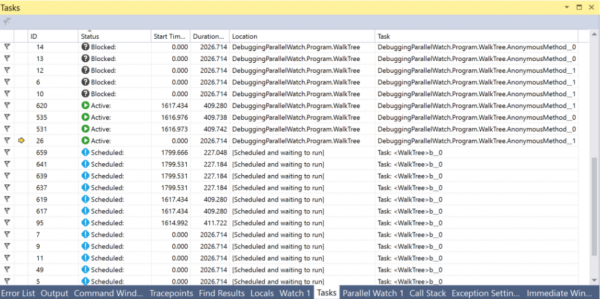
For convenient debugging of anything related to tasks in Visual Studio, there is a Tasks window. In this window, you can see the current state of a task and navigate to the currently executing line of code.
PLinq and the Parallel class
In addition to the Tasks and everything mentioned with .NET, there are two more interesting tools: PLinq (Linq2Parallel) and the Parallel class. The first promises parallel execution of all Linq operations across multiple threads. The number of threads can be configured using the extension method WithDegreeOfParallelism. Unfortunately, most of the time, PLinq, in its default operating mode, lacks sufficient information about the internals of your data source to provide significant speed gains. On the other hand, the cost of trying it out is very low: you just need to call the AsParallel method before your chain of Linq methods and conduct performance tests. Furthermore, there is an option to pass additional information about the nature of your data source to PLinq using the Partitions mechanism. You can find more details to read about. and .
The static Parallel class provides methods for parallel iteration over collections using Foreach, executing For loops, and running multiple delegates in parallel with Invoke. The current thread will be blocked until the calculations are complete. The number of threads can be configured by passing ParallelOptions as the last argument. Using options, you can also specify TaskScheduler and CancellationToken.
Conclusions
When I started writing this article based on my presentation materials and the information I gathered during my work after it, I didn't expect it to turn out to be so long. Now, as the text editor I'm using to type this article chastises me with a note that I've reached page 15, I'll summarize the intermediate results. Other tricks, APIs, visual tools, and pitfalls will be covered in the next article.
Conclusions:
- It's important to understand the tools for working with threads, asynchrony, and parallelism to utilize the resources of modern PCs effectively.
- .NET has many different tools for these purposes.
- Not all of them appeared at once, so you can often encounter legacy tools; however, there are ways to convert old APIs with minimal effort.
- Working with threads in .NET is represented by the Thread and ThreadPool classes.
- The methods Thread.Abort, Thread.Interrupt, and the Win32 API function TerminateThread are dangerous and not recommended for use. Instead, it's better to utilize the CancellationToken mechanism.
- Flow is a valuable resource, and its availability is limited. It is important to avoid situations where threads are tied up waiting for events. To manage this effectively, the TaskCompletionSource class is quite useful.
- The most powerful and advanced tool in .NET for handling parallelism and asynchronicity is Tasks.
- The C# async/await operators implement the concept of non-blocking waits.
- You can manage the distribution of Tasks across threads using derived classes of TaskScheduler.
- The ValueTask structure can be beneficial in optimizing hot paths and memory traffic.
- The Tasks and Threads windows in Visual Studio provide a wealth of useful information for debugging multithreaded or asynchronous code.
- PLinq is a great tool, but it may not have enough information about your data source; however, this can be improved with the partitioning mechanism.
- To be continued…
Source: habr.com
