

Hello, Habr!
In this article, we would like to discuss network infrastructure automation. We will present a functional network scheme operating in a small but very proud company. Any resemblance to real network equipment is purely coincidental. We will explore a case that occurred in this network, which could have led to a prolonged business halt and significant financial losses. The solution to this case fits well into the concept of "Network Infrastructure Automation." With the help of automation tools, we will demonstrate how to effectively solve complex problems in a short time frame and reflect on why it is more promising to address these issues in this way rather than another (via the console).
Disclaimer
The primary tools for automation we have are Ansible (as the automation tool) and Git (as the repository for Ansible playbooks). It’s important to clarify that this is not an introductory article discussing the logic of Ansible or Git, or explaining basic concepts (such as what roles, modules, inventory files, or variables are in Ansible, or what happens when you run the git push or git commit commands). This narrative is not about practicing Ansible to configure NTP or SMTP on equipment. It is about how to quickly and ideally without errors solve a network problem. A good understanding of how networks work, particularly the TCP/IP protocol stack, OSPF, and BGP, is also desirable. The choice of Ansible and Git will also be left aside. If you are still deciding on a specific solution, we highly recommend reading the book "Network Programmability and Automation: Skills for the Next-Generation Network Engineer" by Jason Edelman, Scott S. Lowe, and Matt Oswalt.
Now, onto the matter at hand.
Task Definition
Imagine the situation: 3 a.m., you are sound asleep, dreaming. The phone rings. The technical director is calling:
— Yes?
— ###, ####, #####, the cluster of firewalls has crashed and won't recover!!!
You rub your eyes, trying to comprehend what’s happening and picture how this could possibly occur. On the line, you can hear the director's hair being pulled out, and he asks to call back because the CEO is on the other line.
After half an hour, you gathered the initial input from the on-duty shift and woke everyone who could be woken. Ultimately, the technical director was not lying; everything is true—the main cluster of firewalls has crashed, and no basic actions are bringing it back to life. All the services offered by the company are down.
Choose a problem to your liking; everyone will recall something personal. For example, after the nighttime update, with low traffic load, everything worked fine, and everyone happily went to sleep. Then the traffic came, and the interface buffers began to overflow due to a bug in the network adapter driver.
Jackie Chan might describe the situation well.

Thank you, Jackie.
It's not a pleasant situation, is it?
Let's temporarily leave our network bro with his sad thoughts.
Let's discuss how events will unfold further.
We propose the following order of material presentation:
- We'll look at the network diagram and analyze how it works;
- We will describe how we transfer settings from one router to another using Ansible;
- Let's talk about IT infrastructure automation in general.
Network Diagram and Its Description
Scheme
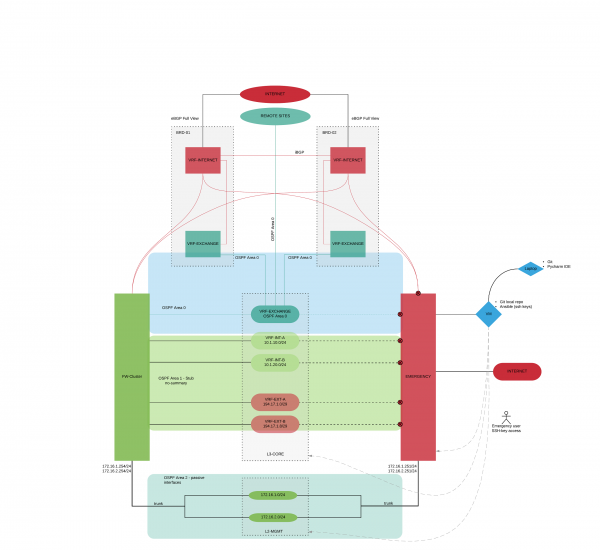
We'll consider the logical diagram of our organization. We won't name specific equipment manufacturers; it doesn't matter within the context of this article. (A careful reader will figure out which equipment is being used.). This is one of the great advantages of working with Ansible; when configuring, we essentially don't care about the equipment. Just for understanding, this equipment is from well-known vendors like Cisco, Juniper, Check Point, Fortinet, Palo Alto… you can insert your option.
We have two main tasks for traffic movement:
- To ensure the publication of our services, which are the business of the company;
- To provide communication with branches, remote data centers, and third-party organizations (partners and clients), as well as to allow branches to access the internet through the central office.
Let's start with the main elements:
- Two border routers (BRD-01, BRD-02);
- A cluster of firewalls (FW-CLUSTER);
- Core switch (L3-CORE);
- A router that will serve as a lifeline (as we resolve the issue, we will transfer the network settings from FW-CLUSTER to EMERGENCY) (EMERGENCY);
- Switches for managing the network infrastructure (L2-MGMT);
- A virtual machine with Git and Ansible (VM-AUTOMATION);
- The laptop used for testing and developing playbooks for Ansible (Laptop-Automation).
A dynamic routing protocol OSPF is configured in the network with the following areas:
- Area 0 – the area that includes routers responsible for traffic movement in the EXCHANGE zone;
- Area 1 – the area that includes routers responsible for the company's services;
- Area 2 – the area that includes routers responsible for routing management traffic;
- Area N – areas of branch networks.
On the border routers, a virtual router (VRF-INTERNET) has been created, which is connected to an eBGP full view with the corresponding AS assigned. iBGP is configured between the VRFs. The company has a pool of public IP addresses that are published on this VRF-INTERNET. Some public addresses are routed directly to the FW-CLUSTER (the addresses used for company services), while others are routed through the EXCHANGE zone (internal company services requiring external IP addresses, and external NAT addresses for offices). The traffic then passes to virtual routers created on the L3-CORE with public and grey addresses (security zones).
The Management network uses dedicated switches and is a physically separated network. The Management network is also divided into security zones.
The EMERGENCY router physically and logically duplicates the FW-CLUSTER. All interfaces are disabled on it except for those connected to the management network.
Automation and its description
We have understood how the network works. Now, let’s step through what we will do to redirect traffic from the FW-CLUSTER to the EMERGENCY:
- Disable the interfaces on the core switch (L3-CORE) that connect it to the FW-CLUSTER;
- Disable the interfaces on the L2-MGMT core switch that connect it to the FW-CLUSTER;
- Configure the EMERGENCY router (by default, all interfaces are disabled except for those related to L2-MGMT):
- Enable the interfaces on EMERGENCY;
- Configure the external IP address (for NAT) that was on the FW-Cluster;
- Generate gARP requests to change the MAC addresses in the L3-CORE ARP tables from FW-Cluster to EMERGENCY;
- Set a static default route to BRD-01, BRD-02;
- Create NAT rules;
- Bring up OSPF Area 1 on EMERGENCY;
- Bring up OSPF Area 2 on EMERGENCY;
- Change the cost of routes in Area 1 to 10;
- Change the cost of the default route in Area 1 to 10;
- Change the IP address, related to L2-MGMT (to those that were on FW-CLUSTER);
- We generate gARP requests to change MAC addresses from FW-CLUSTER to EMERGENCY in the L2-MGMT ARP tables.
Once again, we return to the original problem statement. It's three in the morning, there is immense stress, and any mistake at any stage could lead to new problems. Are you ready to enter commands via CLI? Yes? Okay, go wash your face, have some coffee, and muster your will.
Bruce, please help the guys.

And we continue to refine our automation.
Below is a diagram of how the playbook works in Ansible terms. This diagram reflects what we described earlier, just a specific implementation in Ansible.
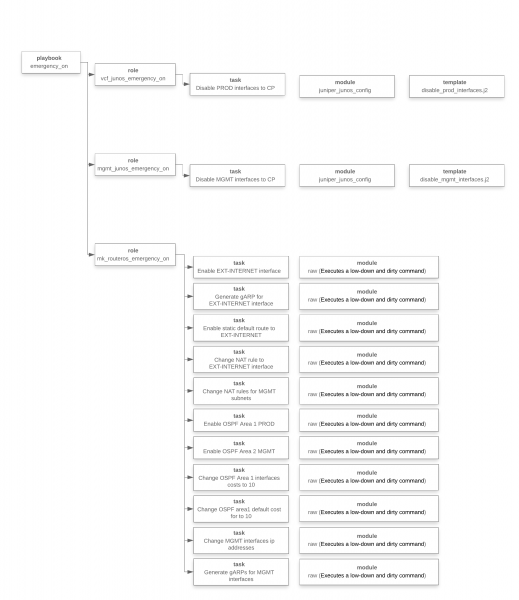
At this stage, we realized what needed to be done, developed the playbook, conducted testing, and now we are ready to launch it.
Another small lyrical digression. The ease of narration should not mislead you. The process of writing playbooks was not as simple and quick as it might seem. Testing took quite a bit of time; a virtual environment was set up, the solution was repeatedly tested, with about 100 tests conducted.
We are launching… It feels like everything is happening very slowly, there is an error somewhere, and something will not work in the end. It feels like jumping with a parachute, and the parachute just doesn't want to open right away… that's normal.
Next, we read the results of the executed operations from the Ansible playbook (IP addresses have been replaced for confidentiality):
[xxx@emergency ansible]$ ansible-playbook -i /etc/ansible/inventories/prod_inventory.ini /etc/ansible/playbooks/emergency_on.yml

PLAY [------->Emergency on VCF] ********************************************************

TASK [vcf_junos_emergency_on : Disable PROD interfaces to FW-CLUSTER] *********************
changed: [vcf]

PLAY [------->Emergency on MGMT-CORE] ************************************************

TASK [mgmt_junos_emergency_on : Disable MGMT interfaces to FW-CLUSTER] ******************
changed: [m9-03-sw-03-mgmt-core]

PLAY [------->Emergency on] ****************************************************

TASK [mk_routeros_emergency_on : Enable EXT-INTERNET interface] **************************
changed: [m9-04-r-04]

TASK [mk_routeros_emergency_on : Generate gARP for EXT-INTERNET interface] ****************
changed: [m9-04-r-04]

TASK [mk_routeros_emergency_on : Enable static default route to EXT-INTERNET] ****************
changed: [m9-04-r-04]

TASK [mk_routeros_emergency_on : Change NAT rule to EXT-INTERNET interface] ****************
changed: [m9-04-r-04] => (item=12)
changed: [m9-04-r-04] => (item=14)
changed: [m9-04-r-04] => (item=15)
changed: [m9-04-r-04] => (item=16)
changed: [m9-04-r-04] => (item=17)

TASK [mk_routeros_emergency_on : Enable OSPF Area 1 PROD] ******************************
changed: [m9-04-r-04]

TASK [mk_routeros_emergency_on : Enable OSPF Area 2 MGMT] *****************************
changed: [m9-04-r-04]

TASK [mk_routeros_emergency_on : Change OSPF Area 1 interfaces costs to 10] *****************
changed: [m9-04-r-04] => (item=VLAN-1001)
changed: [m9-04-r-04] => (item=VLAN-1002)
changed: [m9-04-r-04] => (item=VLAN-1003)
changed: [m9-04-r-04] => (item=VLAN-1004)
changed: [m9-04-r-04] => (item=VLAN-1005)
changed: [m9-04-r-04] => (item=VLAN-1006)
changed: [m9-04-r-04] => (item=VLAN-1007)
changed: [m9-04-r-04] => (item=VLAN-1008)
changed: [m9-04-r-04] => (item=VLAN-1009)
changed: [m9-04-r-04] => (item=VLAN-1010)
changed: [m9-04-r-04] => (item=VLAN-1011)
changed: [m9-04-r-04] => (item=VLAN-1012)
changed: [m9-04-r-04] => (item=VLAN-1013)
changed: [m9-04-r-04] => (item=VLAN-1100)

TASK [mk_routeros_emergency_on : Change OSPF area1 default cost for to 10] ******************
changed: [m9-04-r-04]

TASK [mk_routeros_emergency_on : Change MGMT interfaces ip addresses] ********************
changed: [m9-04-r-04] => (item={u'ip': u'x.x.n.254', u'name': u'VLAN-803'})
changed: [m9-04-r-04] => (item={u'ip': u'x.x.n+1.254', u'name': u'VLAN-805'})
changed: [m9-04-r-04] => (item={u'ip': u'x.x.n+2.254', u'name': u'VLAN-807'})
changed: [m9-04-r-04] => (item={u'ip': u'x.x.n+3.254', u'name': u'VLAN-809'})
changed: [m9-04-r-04] => (item={u'ip': u'x.x.n+4.254', u'name': u'VLAN-820'})
changed: [m9-04-r-04] => (item={u'ip': u'x.x.n+5.254', u'name': u'VLAN-822'})
changed: [m9-04-r-04] => (item={u'ip': u'x.x.n+6.254', u'name': u'VLAN-823'})
changed: [m9-04-r-04] => (item={u'ip': u'x.x.n+7.254', u'name': u'VLAN-824'})
changed: [m9-04-r-04] => (item={u'ip': u'x.x.n+8.254', u'name': u'VLAN-850'})
changed: [m9-04-r-04] => (item={u'ip': u'x.x.n+9.254', u'name': u'VLAN-851'})
changed: [m9-04-r-04] => (item={u'ip': u'x.x.n+10.254', u'name': u'VLAN-852'})
changed: [m9-04-r-04] => (item={u'ip': u'x.x.n+11.254', u'name': u'VLAN-853'})
changed: [m9-04-r-04] => (item={u'ip': u'x.x.n+12.254', u'name': u'VLAN-870'})
changed: [m9-04-r-04] => (item={u'ip': u'x.x.n+13.254', u'name': u'VLAN-898'})
changed: [m9-04-r-04] => (item={u'ip': u'x.x.n+14.254', u'name': u'VLAN-899'})

TASK [mk_routeros_emergency_on : Generate gARPs for MGMT interfaces] *********************
changed: [m9-04-r-04] => (item={u'ip': u'x.x.n.254', u'name': u'VLAN-803'})
changed: [m9-04-r-04] => (item={u'ip': u'x.x.n+1.254', u'name': u'VLAN-805'})
changed: [m9-04-r-04] => (item={u'ip': u'x.x.n+2.254', u'name': u'VLAN-807'})
changed: [m9-04-r-04] => (item={u'ip': u'x.x.n+3.254', u'name': u'VLAN-809'})
changed: [m9-04-r-04] => (item={u'ip': u'x.x.n+4.254', u'name': u'VLAN-820'})
changed: [m9-04-r-04] => (item={u'ip': u'x.x.n+5.254', u'name': u'VLAN-822'})
changed: [m9-04-r-04] => (item={u'ip': u'x.x.n+6.254', u'name': u'VLAN-823'})
changed: [m9-04-r-04] => (item={u'ip': u'x.x.n+7.254', u'name': u'VLAN-824'})
changed: [m9-04-r-04] => (item={u'ip': u'x.x.n+8.254', u'name': u'VLAN-850'})
changed: [m9-04-r-04] => (item={u'ip': u'x.x.n+9.254', u'name': u'VLAN-851'})
changed: [m9-04-r-04] => (item={u'ip': u'x.x.n+10.254', u'name': u'VLAN-852'})
changed: [m9-04-r-04] => (item={u'ip': u'x.x.n+11.254', u'name': u'VLAN-853'})
changed: [m9-04-r-04] => (item={u'ip': u'x.x.n+12.254', u'name': u'VLAN-870'})
changed: [m9-04-r-04] => (item={u'ip': u'x.x.n+13.254', u'name': u'VLAN-898'})
changed: [m9-04-r-04] => (item={u'ip': u'x.x.n+14.254', u'name': u'VLAN-899'})

PLAY RECAP ************************************************************************
Done!
In fact, it’s not quite ready; we shouldn’t forget about the convergence of dynamic routing protocols and the loading of a large number of routes into the FIB. We can't influence this in any way. We wait. It has converged. Now it’s ready.
In the village of Vilabaggio (which does not want to automate network configuration), they continue to wash dishes. Bruce (though a different one, but no less cool) is trying to understand how much more equipment needs to be reconfigured manually.

I would like to address one important point. How do we get everything back? After some time, we will bring our FW-CLUSTER back to life. This is the main equipment, not a backup; our network should operate on it.
Can you feel the tension building among the network engineers? The technical director will hear a thousand arguments about why it shouldn't be done now, why it can wait. Unfortunately, this is how network work ends up being a patchwork of fixes, leftover bits of former luxury. It becomes a patchwork quilt. Our overall task, not just in this specific situation, but as IT specialists in general, is to bring network operations to the beautiful English word 'consistency.' It is multifaceted and can be translated as: coherence, non-contradiction, logic, coordination, systematization, comparability, connection. This is all about it. Only in such a state is a network manageable; we clearly understand what works and how, we are fully aware of what needs to be changed if necessary, and we know exactly where to look if problems arise. Only in such a network can you perform the tricks we’ve just described.
In fact, another playbook was prepared that returned the settings to their original state. Its logic is the same (it’s important to remember that the order of tasks is crucial); to avoid making this already lengthy article longer, we decided not to include the playbook execution listing. After conducting such exercises, you will feel much calmer and more confident about the future; moreover, any makeshift solutions you have there will reveal themselves immediately.
Anyone interested can contact us to receive the source code of everything written, along with all playbooks. Contact details are in the profile.
Conclusions
In our opinion, the processes that can be automated have not yet crystallized. Based on what we have encountered and what our Western colleagues are discussing, the following topics are currently apparent:
- Device provisioning;
- Data collection;
- Reporting;
- Troubleshooting;
- Compliance.
If there is interest, we can continue the discussion on one of the given topics.
We would also like to contemplate the topic of automation a bit more. What should it be in our understanding:
- The system should operate independently of a person, while improving with human input. It should not depend on human intervention;
- Operations should be expert-driven. There is a lack of specialists who perform routine tasks. There are experts who have automated all routine operations and only handle complex issues;
- Routine standard tasks are done automatically at the push of a button, conserving resources. The outcome of such tasks is always predictable and clear.
And what these points should lead to:
- Transparency of the IT infrastructure (Lower risks in operation, modernization, implementation. Less downtime per year);
- Ability to plan IT resources (Capacity-planning system — visibility of consumption, understanding of resource requirements in a unified system, rather than through emails and visits to department heads);
- Ability to reduce the number of IT support staff.
Authors of the article: Alexander Chelekhov (CCIE RS, CCIE SP) and Pavel Kirillov. We are interested in discussing and proposing solutions on the topic of IT infrastructure automation.
Source: habr.com
