

And once again, good news from 3CX! Last week, two important updates were released: the new 3CX VoIP application for Android and a new version of the 3CX Call Flow Designer (CFD) development environment for 3CX v16.
New 3CX VoIP Application for Android
New version includes various improvements in stability and usability, including new support for Bluetooth headsets and car multimedia systems.
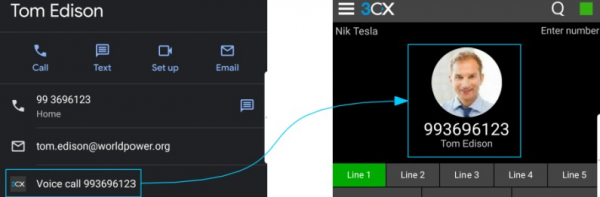
To maintain compact and secure code while adding new features, we had to limit support to specific versions of Android. Now, a minimum of Android 5 (Lollipop) is supported. This allows us to ensure stable integration and reliable operation on most phones. Here's what we've accomplished:
- Now from the Android address book, you can click on the 3CX icon next to a contact, and the number will be dialed through the 3CX application. No need to open the app first and then call the contact. You can call a 3CX subscriber directly from your Android contacts!
- When the number is dialed through the 3CX application, it is checked against the Android address book. If the number is found, the contact details are displayed. It's very convenient and clear!
- The application supports LTE networks that use IPv6. Now the app can operate in some of the latest networks where IPv6 is used.
According to our tests, 3CX for Android will reliably work on 85% of the smartphones available on the market. Bugs occurring on Nokia 6 and 8 devices have been fixed. The internal architecture of the application has been improved, resulting in significantly faster network requests, such as outgoing calls and message sending.
Experimental support for Bluetooth headsets
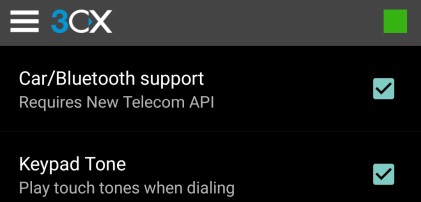
For devices running Android 8 and above, the 3CX application for Android adds an option called 'Car/Bluetooth support' (in the 'Settings' > 'Advanced' section). This option uses the new Android Telecom Framework API for improved Bluetooth integration and car multimedia systems. It is enabled by default on some phone models:
- Nexus 5X and 6P
- Pixel, Pixel XL, Pixel 2, and Pixel 2 XL
- All OnePlus phones
- All Huawei phones
For Samsung phones, this option is disabled by default, but we continue to work on supporting all modern devices.
Overall, we recommend enabling this option. However, please take note of the following limitations:
- On Samsung S8/S9 devices, the "Car/Bluetooth support" option creates one-sided audio. On Samsung S10 devices, you can receive calls, but outgoing calls won't go through. We are working on a solution to this issue with Samsung, as it is related to the specifics of their firmware.
- Different models of phones and headsets may experience audio routing issues over Bluetooth. In this case, try switching between the headset and the speakerphone a couple of times.
- If you encounter various Bluetooth issues, we recommend first checking the battery level. When the charge is low, some phones activate "smart" power-saving mode, which affects application performance. Test Bluetooth functionality when the battery level is at least 50%.
Full 3CX for Android.
3CX Call Flow Designer v16 - voice applications in C#
As is known, the CFD environment allows the creation of complex call processing scripts in 3CX. After the release of 3CX v16, many users rushed to upgrade their systems and found that voice applications from 3CX v15.5 no longer work. It should be noted that we . But there is no need to worry — the new 3CX Call Flow Designer (CFD) for 3CX v16 is already available! CFD v16 offers easy migration of already created applications, as well as some new components.
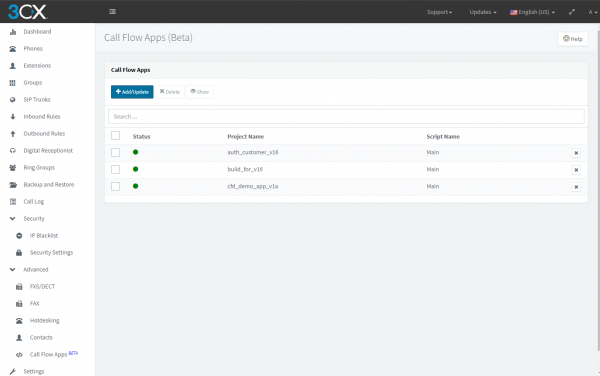
In the current release, the familiar interface from the previous version is retained, but the following features have been added:
- The created applications are fully compatible with 3CX V16, and existing applications can be quickly adapted for v16.
- New components for adding data to calls and extracting added data.
- The new MakeCall component provides a logical result to indicate whether the subscriber's response was successful or unsuccessful.
CFD v16 works with 3CX V16 Update 1, which has not yet been released. Therefore, to test the new Call Flow Designer, you need to install the preview version of 3CX V16 Update 1:
- Download . Use it only for testing purposes — do not install it in a production environment! It will be updated through standard 3CX updates in the future.
- Download and install , using .
To migrate existing CFD projects from v15.5 to v16 Update 1 Preview, follow .
Or watch the tutorial video.

Please note the existing issue:
- The CFD Dialer component successfully converts to the new version but must be explicitly called (manually or via a script) to make a call. We do not recommend using these components (dialers) in new projects as this is outdated technology. Outgoing calls will be implemented via the 3CX REST API instead.
Full CFD v16.
Source: habr.com
