

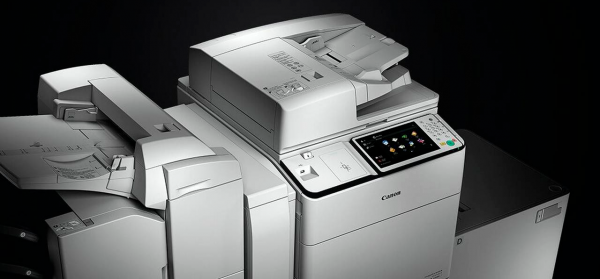
With the increase in built-in features, multifunctional office devices have long gone beyond trivial scanning/printing. They have now transformed into fully independent devices, integrated into high-tech local and global networks, connecting users and organizations not only within a single office but across the globe.
In this article, together with practical information security expert Luka Safonov, we will discuss the main threats to modern office multifunctional devices and ways to prevent them.
Modern office equipment has its own hard drives and operating systems, enabling multifunctional devices to perform a wide range of document management tasks independently, relieving other devices from the load. However, this high level of technical equipment comes with a downside. As multifunctional devices actively participate in data transmission across the network, they become vulnerable points in the entire organizational network environment without proper protection. The security of any system is determined by the protection level of its weakest link. Therefore, any investments in protective measures for the company's servers and computers become meaningless if a hacker can exploit a loophole through multifunctional devices. Understanding the issue of protecting confidential information, Canon developers have enhanced the security level of the third version of the platform , which is the topic of this article.
Main Threats
There are several potential risks associated with the use of multifunctional devices in organizations:
- System hacking through unauthorized access to multifunctional devices and using them as a 'jumping-off point';
- Using multifunctional devices for data exfiltration about users;
- Intercepting data during printing or scanning;
- Access to data by individuals without appropriate clearance;
- Access to printed or scanned confidential information;
- Access to confidential data on devices that have reached the end of their service life.
- Sending documents by fax or email to the wrong address intentionally or due to a typo;
- Unauthorized viewing of confidential information stored on unprotected multifunctional devices;
- A pile of printed tasks belonging to different users.
Indeed, modern multifunction printers often harbor significant potential for attackers. Our project experience shows that misconfigured devices or those lacking proper security levels provide attackers with vast opportunities to expand the so-called "attack surface." This includes acquiring account listings, network addressing, the ability to send emails, and much more. Let's explore whether the solutions offered by Canon can mitigate these threats.
For each type of vulnerability on the new imageRUNNER ADVANCE platform, a comprehensive set of complementary measures is implemented to ensure multi-layered protection. It is important to note that these developments required a specific approach due to the operational characteristics of multifunction printers. During the printing and scanning of documents, information transitions between digital and analog formats, or vice versa. Each of these types of information requires fundamentally different methods of protection. Typically, at the intersection of technologies, due to their heterogeneity, the most vulnerable spots emerge.
Multifunction printers are often easy targets for both penetration testers and malicious actors. This is usually tied to a negligent attitude towards the configuration of such devices and their relative accessibility in both office environments and network infrastructures. A recent case that stands out occurred on November 29, 2018, when a Twitter user under the alias TheHackerGiraffe "hacked" over 50,000 network printers and printed flyers urging people to subscribe to the YouTube channel of a certain PewDiePie. On Reddit, TheHackerGiraffe claimed he could have compromised over 800,000 devices but limited himself to just 50,000. The hacker emphasized that the main issue was that he had never done anything like this before, but all the preparations and the hack itself took him only half an hour.
When Canon develops technologies, products, and services, their potential impact on clients' work environments is taken into account. That is why Canon's office multifunction printers are equipped with a wide array of built-in and additional security features, enabling companies of all sizes to achieve the necessary level of protection.
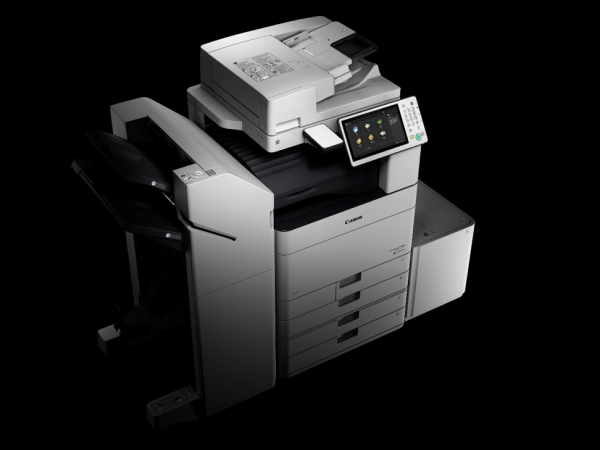
Canon uses one of the strictest security verification regimes in the entire office equipment industry. The technologies applied in the devices are tested for compliance with company standards. Considerable attention is given to security checks with current expert assessments, which have resulted in positive reviews regarding the operational experience of the devices from companies such as Kaspersky Lab, COMLOGIC, TerraLink, JTI Russia, and others.
While it is logical to enhance the security of products in today's realities, not all companies adhere to this principle. Companies often begin to consider protection only after incidents of hacking (and pressure from users) of various products. In this respect, Canon's thorough approach to implementing security methods and measures is notable.
Unauthorized access to multifunction devices
Unsecured multifunction devices are often priority targets for both internal violators (insiders) and external threats. In modern realities, a corporate network is not limited to a single office; it includes a group of subdivisions and users located in various geographic locations. A centralized document flow requires remote access and the integration of multifunction devices into the corporate network. Network printers are part of the Internet of Things, yet their protection often receives inadequate attention, leading to the overall vulnerability of the entire infrastructure.
The following measures have been implemented to protect against such threats:
- IP and MAC address filtering – configuration allowing communication only with devices that have specific IP or MAC addresses. This function regulates data transmission both within the network and beyond its borders.
- Proxy server configuration – this feature allows delegation of control over multifunction devices' connections to a proxy server. This function is recommended when connecting to devices outside the corporate network.
- Authentication via IEEE 802.1X – another layer of protection against the connection of devices not authorized by the authentication server. Unauthorized access is blocked by the LAN switch.
- IPSec connection protects against attempts to intercept or decrypt IP packets transmitted over the network. It is recommended to use it with additional TLS encryption.
- Port management is designed to protect against insider assistance to attackers. This feature is responsible for configuring port settings in accordance with security policies.
- Automatic certificate registration provides system administrators with a convenient tool for the automatic issuance and renewal of security certificates.
- Wi-Fi Direct is a feature designed for secure printing from mobile devices. There is no need to connect mobile devices to the corporate network. Wi-Fi Direct creates a local peer-to-peer connection between the device and the multifunction printer.
- Log monitoring records all events related to the use of the multifunction printer, including blocked connection requests, in various system logs in real-time. By analyzing these records, potential and existing threats can be identified, allowing for the development of a proactive security policy and conducting expert assessments of any information leaks that have occurred.
- Data encryption during interactions with the device—this option encrypts print jobs when they are sent from the user's PC to the multifunction printer. You can also encrypt scanned data in PDF format by activating the universal security feature set.
- Guest printing from mobile devices. Secure network print and scan management software addresses frequency issues related to printing security from mobile devices and guest printing, providing external means of sending print jobs such as email, the internet, and mobile applications. This ensures that the multifunction printer operates with a secure source, minimizing the risk of hacking.
“The shared use of such devices, while convenient and cost-saving, also carries the risks of access to third-party information. This can be exploited not only by malicious actors but also by unscrupulous employees in order to gain personal benefit or acquire insider information. The vast potential of processed information—from trade secrets to financial documents—is a significant target for attacks or illegitimate use.”
A new feature of the latest version of the imageRUNNER ADVANCE platform is the ability to connect printing devices to two networks. This is especially convenient when the multifunction printer is used simultaneously in both corporate and guest modes.
Data protection on the hard drive
A multifunction printer always retains a large volume of data that needs to be protected—from print job queues to received faxes, scanned images, address books, activity logs, and job histories.
Essentially, the disk serves only as a temporary storage, and retaining information on it longer than necessary increases the vulnerability of the corporate security system. To prevent this, the settings allow for a hard drive cleanup schedule. In addition to immediate deletion of print jobs after they are completed or in case of printing errors, other files can be deleted according to a schedule along with the cleanup of residual data.
“Unfortunately, even many IT professionals are not well aware of the role of the hard drive in modern printing devices. The presence of a hard drive can significantly reduce the duration of the preparation stage for printing. Hard drives typically store system information, graphic files, and rasterized images for making copies. Besides improper disposal of multifunction printers and the risk of data leakage, there is a possibility of disassembly/theft of the hard drive for analysis, or conducting specialized attacks to exfiltrate data, such as with the Printer Exploitation Toolkit.”
Canon devices offer a range of tools to protect data at all stages of the device’s lifecycle, as well as to maintain their confidentiality, integrity, and availability.
Great attention is paid to data security on the hard disk. The information stored there can have different levels of confidentiality. Therefore, all 26 device models across 7 different series of the new imageRUNNER ADVANCE platform incorporate HDD encryption. This complies with the FIPS 140-2 Level 2 security standard adopted by the U.S. government, as well as the equivalent Japanese standard JCVMP.
"It is important to have an information access system that takes into account user roles and access levels. For example, in many companies, discussing salaries among employees is strictly prohibited, and a leak of payroll or bonus information can provoke serious conflict within the team. Unfortunately, I am aware of such cases, one of which resulted in the termination of the employee responsible for this type of leak."
- Hard disk encryption. The imageRUNNER ADVANCE devices encrypt all data on the hard disk to enhance security.
- Hard disk clearing. Some data, such as that from copied or scanned images, as well as documents printed from a computer, are stored on the printer's hard disk for a limited time and are deleted after the corresponding task is completed.
- Initialization of all data and settings. To prevent data loss during the replacement or disposal of the hard disk, all documents and data on the hard disk can be overwritten, and then a reset to the default settings can be performed.
- Backup hard disk. Companies have the option to back up data from the device's hard disk to an additionally purchased hard disk. During backup, data on both hard disks is fully encrypted.
- Removable hard disk kit. This option allows for the hard disk to be removed from the device for secure storage while the device is not in use.
Leak of critical data
All companies deal with confidential documents such as contracts, agreements, accounting records, customer data, development department plans, and much more. Should such documents fall into the wrong hands, the consequences can range from reputational damage to hefty fines or even lawsuits. Malicious actors can gain control over a company's assets, insider information, or confidential data.
"The theft of valuable information is perpetrated not only by competitors or fraudsters. There are frequent cases where employees decide to start their own business or secretly moonlight by selling information externally. In such situations, the printer becomes their main ally. Any data transfer within the company is easily traceable. Moreover, access to valuable information is not generally held by ordinary employees. And what could be easier for a regular manager than to steal a valuable document that is lying around? Anyone can handle this task. Printed documents don’t always need to be taken outside the organization; it’s sufficient to quickly photograph the discarded materials with a good camera phone."

Canon offers a range of security solutions that will help you protect confidential documents throughout their entire lifecycle.
Confidentiality of Printed Documents
Users can set a print PIN code so that document printing begins only after entering the correct PIN code on the device. This helps protect confidential documents.
"Multifunction printers are often found in public areas of the organization for user convenience. These may include lobbies, meeting rooms, corridors, and reception areas. Only the use of identifiers (PIN codes, smart cards) can ensure the security of information in the context of user access levels. Noteworthy cases have occurred where users gained access to previously sent documents, passport scans, etc., due to inadequate oversight and the absence of data clearing functions."
On the imageRUNNER ADVANCE device, the administrator can pause all submitted print jobs, which means users will have to log in to print, ensuring the confidentiality of all printed materials.
Print jobs or scanned documents can be stored in mailboxes for access at any convenient time. Mailboxes can be protected with a PIN code, so only designated users can access their contents. In this secure space on the device, frequently printed documents (such as forms and templates) that require careful handling can be stored.
Full control over document and fax sending.
To reduce the risk of information leakage, administrators can restrict access to various recipients, such as those not present in the LDAP server address book, not registered in the system, or on a specific domain.
To prevent documents from being sent to incorrect recipients, it is necessary to disable email address auto-completion.
Setting a PIN code for protection will safeguard the device's address book from unauthorized user access.
Requesting users to re-enter the fax number will prevent documents from being sent to incorrect recipients.
Protecting documents and faxes in a confidential folder or with a PIN code ensures secure storage of documents in memory without printing them.
Verification of the source and authenticity of the document.
A device signature can be added to scanned documents in PDF or XPS formats using a key and certification mechanism, allowing the recipient to verify the source and authenticity of the document.
In an electronic document, a digital signature (EDS) is its attribute designed to protect the electronic document from forgery and allows for the identification of the owner of the signature key certificate, as well as establishing the absence of information distortion in the electronic document. This guarantees the integrity of the transmitted document and accurate identification of its owner, ensuring the reliability of the information.
User signature allows sending PDF or XPS files with a unique digital signature from the user, obtained from a certifying company. This way, the recipient can verify who signed the document.
Integration with ADOBE LIFECYCLE MANAGEMENT ES
Users can protect PDF files and apply uniform and dynamic policies for access control and usage rights, as well as safeguard confidential and valuable information from accidental or malicious disclosure. Security policies are enforced at the server level, allowing rights to be modified even after a file has been distributed. imageRUNNER ADVANCE devices can be configured for integration with Adobe ES.
Secure printing with uniFLOW MyPrintAnywhere allows print jobs to be sent through a universal driver and printed on any network printer.
Preventing the creation of duplicates
Drivers allow for printing visible marks on the page, overlaying the content of the document. This can be used to inform employees about the confidentiality of the document and prevent its copying.
Printing/copying with invisible watermarks – documents will be printed or copied with embedded hidden text in the background, which will appear when duplicates are created and act as a deterrent.
The capabilities of uniFLOW software from NTware (part of the Canon group) provide additional effective tools for ensuring the security of document workflows.
Using uniFLOW in conjunction with iW SAM Express will enable digitizing and archiving documents sent to the printer or received from the device, as well as analyzing text data and attributes in response to security threats.
Tracking the source of the document through an embedded code.
Document scanning lock – this option embeds a hidden code in printed documents and copies that prevents further copying on the device where this function is activated. The administrator can apply this setting to all jobs or only to user-selected jobs. TL and QR codes are available for embedding.
As a result of testing and familiarization with the functionalities of the imageRUNNER ADVANCE III technology, it has been confirmed that it meets the fundamental requirements of modern IT security policies. The aforementioned protective measures comply with key security requirements and can minimize information security risks.
The latest imageRUNNER ADVANCE devices are equipped with a security policy feature, allowing the administrator to manage all security settings from a single menu and edit them before applying them as the device configuration. After implementation, the use of the device and parameter modifications must adhere to this policy. The security policy can be protected with a separate password to provide additional management and protection capabilities, with access restricted to the IT security specialist responsible.
It is necessary to find and maintain a balance between security and convenience by wisely utilizing technological advancements and technical solutions to protect information, employing qualified personnel, and skillfully managing the provided resources to ensure the company's security.
Material preparation assistance – Luka Safonov, Head of the Practical Analysis Laboratory, Jet Infocom.
How comprehensive is your approach to corporate security?
Only registered users can participate in the survey. , please.
The corporate security policy extends to the fleet of multifunctional devices.
The company's print device fleet ensures secure usage of users' personal devices.
The company ensures the relevance of its printing infrastructure, as well as timely and effective installation of patches and updates.
Company guests can print and scan without exposing the corporate network to risk.
The IT department has sufficient time to address security issues.
The company has found a balance between ensuring security and user convenience when using devices.
Initiating IT enthusiasts: Show your Strength at RIF.
2 users have voted. There are no abstentions.
Source: habr.com
