

About a year ago, I published an article . It analyzed the pros and cons of different cloud gaming services for weak PCs. During my gaming sessions, I tested each service and ultimately shared my overall impressions.
In the comments to that and other similar articles, readers often shared their impressions of various gaming services. Contradictory opinions about the same service were common. Some had a flawless experience, while others struggled with lags and freezes. This prompted me to evaluate the quality of these services under various conditions—from ideal to terrible. The focus is on network quality, as not every user can boast of a fast and trouble-free connection, right? In general, below is an assessment of the services simulating different network quality.
What’s the problem?
As mentioned earlier, it’s the quality of the connection. More specifically, it’s about packet loss during gameplay. The higher the loss, the more problems gamers experience, and the less satisfied they are. Rarely does anyone have an ideal connection, such as fiber optics directly to their device, especially with a dedicated internet line rather than a shared one in an apartment building.
For reference, at a connection speed of 25 Mbps, sending 1 frame requires 40-50 data packets. The more packets are lost, the poorer the image quality becomes, and the more noticeable the lags and freezes are. In particularly severe cases, playing becomes simply impossible.
Naturally, the cloud service itself cannot influence the width and stability of the user’s connection (although that would be fantastic, of course). However, different ways to mitigate connection issues can be anticipated. Which services handle this problem best will be revealed below.
What exactly are we comparing?
A regular PC (Intel i3-8100, GTX 1060 6 GB, 8GB RAM), GeForce Now (its Russian version with servers in Moscow), , , , . On all services, except for Stadia, we study the gaming quality in ‘The Witcher’. Google Stadia did not have this game at the time of writing, so I had to test another one—‘Odyssey’.
What are the conditions and methodology for testing?
Testing from Moscow. Provider — MGTS, rate 500 Mbps, wired connection, not WiFi. We take quality settings in the services by default, resolution — FullHD.
Using the program we model network issues, namely, packet loss of various types and volumes.
Uniform single losses. This occurs when only 1 packet is lost and losses are distributed fairly evenly. Thus, uniform losses of 10% mean that out of 100 packets, every 10th is lost, but always just 1 packet. The problem usually manifests with distortions (screening) on the channel from the client to the server.
We test uniform losses of 5%, 10%, 25%.
Non-uniform mass losses, when at one point 40-70 packets are consecutively lost. Such losses most often occur due to problems with network equipment (routers, etc.) at the user’s or provider’s end. They can be related to buffer overflow of the network equipment on the communication line "user — server". WiFi with thick walls can also cause such losses. Wireless network congestion due to a large number of devices is another common reason, very characteristic for offices and apartment buildings.
We test non-uniform losses of 0.01%, 0.1%, 0.5%.
Below, I analyze all these cases and provide video comparisons for clarity. At the end of the article, I give a link to the raw, unedited gameplay videos from all services and cases — there you can take a closer look at the artifacts, as well as the technical information (in all services except Stadia, technical console data has been recorded; I couldn't find such for Stadia).
Let's go!
Below are 7 stress test scenarios and videos with timestamps (the videos are the same, for convenience, playback starts at the necessary moment in each point). At the very end of the post are the original clips for each of the services. A good friend helped me make the video, for which I am thankful!
Scenario #1. Ideal conditions. Zero losses in the network
Everything is as it should be in an ideal world. There are no communication issues, no breaks, no interference, your access point is a beacon of the internet. In such greenhouse conditions, almost all participants in the testing perform admirably.
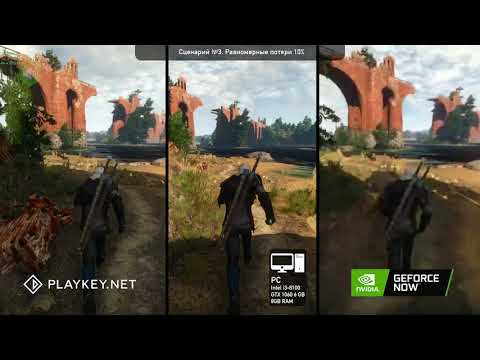
PC
In each scenario, we took frames from the PC game as a benchmark. It's clear that network quality does not affect it since the game runs locally on the PC. The presence of these frames answers the question of whether there is a noticeable difference when playing in the cloud compared to playing on one's own PC. Under ideal conditions in our case, most services do not show a difference. We won’t write anything more about the PC; just remember that it exists.
GeForce Now
Everything is good, the picture is clear, and the process runs smoothly without any freezes.
Vortex
Here Vortex disrupts our perfect world. It immediately started having issues — the picture is worse than all the others, plus noticeable 'lags'. The possible problem is that the game servers are located far from Moscow and the hardware on the game servers seems to be weaker, which poorly handles Full HD. In all tests, Vortex performed poorly. If anyone has positive experiences playing with Vortex — please share in the comments where you played and how well it went.
Playkey
Everything is great, just like on a local PC. There are no visible issues like freezes or lags.
Loudplay
The service provides an excellent picture, with no visible problems.
Stadia
Google's gaming service works excellently despite having no servers in Russia, and officially Stadia doesn't operate in the country. Nevertheless, everything is fine. It's a pity that 'The Witcher' wasn't available on Stadia at the time of playing, but we opted for 'Odyssey' — also demanding, and also about a man who cuts down people and animals.
Scenario #2. Uniform losses of 5%
In this test, around every 20th packet is lost out of 100 packets. I remind you that it takes 40-50 packets to render one frame.
GeForce Now
Nvidia's service is good, with no issues. The picture is slightly more blurred than Playkey's, but 'The Witcher' remains playable.
Vortex
Things got even worse here. Why — it's not entirely clear, likely because redundancy is not provided for or is minimal. Redundancy is the error-correcting coding of transmitted data (FEC — Forward Error Correction). This technology restores data during partial loss due to network issues. It can be implemented and configured in various ways, and judging by the results, Vortex's creators have not succeeded in this. Even with minimal uniform losses, it won't be possible to play. In subsequent tests, Vortex simply 'died'.
Playkey
Everything is fine; there is no significant difference compared to ideal conditions. It may help that the company's servers are also located in Moscow, from where the tests were conducted. Moreover, the aforementioned redundancy might be better configured.
Loudplay
The service has suddenly become unplayable, even with relatively low packet loss. What could be the issue? I suspect that Loudplay operates with the TCP protocol. In this case, until packet receipt is confirmed, no other packets are sent; the system waits for a delivery confirmation. Accordingly, if a packet is lost, there will be no delivery confirmation, no new packets will be sent, the image will freeze, and that's the end of the story.
However, if UDP is used, a receipt confirmation for the packet is not necessary. As far as I can tell, all other services, except for Loudplay, use the UDP protocol. If that's not the case, please correct me in the comments.
Stadia
Everything is playable. Sometimes the image pixelates, and there are minimal response delays. It seems that the error correction coding might not be performing ideally, leading to slight artifacts in an otherwise playable stream.
Scenario #3. Uniform 10% losses
We lose every 10th packet out of a hundred. This is already a challenge for the services. To manage such losses effectively, recovery technologists and/or resend mechanisms for lost data are needed.
GeForce Now
Geforce experiences slight drops in the quality of the video stream. As far as I can tell, GFN responds to network issues, trying to mitigate them. The service reduces the bitrate, which is the amount of bits used for data transmission. This is how it attempts to lower the load on a network it deems insufficiently quality, while maintaining stable connectivity. And there are indeed no issues with stability, but the video quality suffers noticeably. We see significant pixelation in the image. Since the modeling assumes a constant loss of 10% packets, reducing the bitrate doesn't help much; the situation doesn't normalize.
In real life, the image is likely to be not constantly bad, but fluctuating. When losses increase, the image becomes blurry; when losses decrease, the image returns to normal, and so on. This is certainly not beneficial for the gaming experience.
Playkey
There are no major issues. The algorithm probably detects network problems, assesses the level of packet loss, and focuses more on redundancy rather than on reducing bitrate. As a result, with 10% uniform loss, the image quality hardly changes, and users are unlikely to notice such losses.
Loudplay
Non-functional, it simply did not start. During further tests, the situation repeated itself. As far as can be judged, this service does not adapt to network issues. It may be due to the TCP protocol. Even slight losses completely paralyze the service. Not very practical for real life, of course.
Vortex
There are also significant problems. Playing under such conditions is impossible, although the image is still present and the character continues to move, albeit in jerks. I think the issue lies in poorly implemented or absent redundancy. Packets are frequently lost, and there is no recovery. Ultimately, the image quality degrades to an unplayable level.
Stadia
Unfortunately, everything is bad here. There are stream interruptions, causing events on the screen to occur in jerks, making it extremely difficult to play. It can be assumed that the problem arose, as in the case with Vortex, due to minimal redundancy or its absence. I consulted a couple of acquaintances who are 'in the know'; they stated that Stadia likely waits for the complete frame assembly. Unlike GFN, it does not attempt to salvage the situation with a total bitrate reduction. As a result, there are no artifacts, but freezes and lags appear (GFN, on the contrary, has fewer freezes/lags, but due to low bitrate, the image is quite unappealing).
Other services also seem not to wait for the complete frame assembly, replacing the lost part with a segment from the previous frame. This is a good solution; in most cases, the user won't notice the catch (30+ frames change per second), although artifacts may sometimes occur.
Scenario #4. Uniform losses of 25%
Every fourth packet is lost. It becomes increasingly scary and interesting. Generally, under such a 'leaky' connection, normal cloud gaming is hardly possible. Although some participants in the comparison manage, albeit not perfectly.
GFN
The issues are already quite noticeable. The image is pixelated and blurry. It’s still possible to play, but it’s definitely not what GFN offered at the beginning. And it’s certainly not how you should play beautiful games. The beauty can no longer be appreciated.
Playkey
The gameplay is going reasonably well. There is some smoothness, although the image suffers a bit. By the way, in the top left corner — the numbers indicate how many lost packets are being recovered. As we can see, 96% of packets are being recovered.
Loudplay
Did not start.
Vortex
Playing is impossible even with a great desire; freezes (image pauses, resuming the video stream from a new fragment) are even more noticeable.
Stadia
The service is practically unplayable. The reasons have been mentioned above. It waits for frame assembly; the redundancy is minimal, and with such losses, it’s insufficient.
Scenario No. 5. Uneven loss of 0.01%.
Out of 10,000 packets, 40-70 packets are lost in a row once. This means we’re losing about 1 out of 200 frames. This can happen if the network device buffer is full and all new packets are simply discarded (dropped) until the buffer is cleared. All comparison participants, except Loudplay, have managed such losses to some extent.
GFN
The image has lost a bit of quality, becoming somewhat hazy, but it’s still quite playable.
Playkey
Everything is quite good. The image is smooth, and the quality is decent. You can play without issue.
Loudplay
In the first few seconds, the image was visible, and the hero even started running. But the connection to the server was almost immediately lost. Oh, this TCP protocol. The first loss completely crippled the service.
Vortex
Normal problems are observed. Freezes, lags, and all that. It would be very difficult to play under these conditions.
Stadia
Playable. There are minor dips, and the image sometimes pixelates.
Scenario No. 6. Uneven loss of 0.1%
Out of 10,000 packets, 40-70 packets are lost in a row 10 times. So, we lose 10 out of 200 frames.
I’ll say right away that noticeable problems have arisen for most services. For example, the image stutters, so redundancy doesn’t help here. That means there is a positive effect when using redundancy technology, but it’s not significant.
The thing is, the reaction time to user actions and the game itself is limited; the video stream must be continuous. It’s impossible to restore the stream to an acceptable quality despite any efforts of the services.
Artifacts appear (attempts to compensate for packet loss, not enough data) and there are image stutters.
GFN
The image quality has noticeably dropped, bit rate has clearly decreased, and quite significantly.
Playkey
It performs better — likely because redundancy is well-tuned, plus the bit rate algorithm considers losses not too high and doesn’t turn the image into a pixelated mess.
Loudplay
Did not start.
Vortex
Launched, but with terrible image quality. Stutters and drops are very noticeable. Playing under such conditions is unlikely.
Stadia
Stutters are clearly visible, which indicates that there is not enough redundancy. The image freezes, then new frames appear, causing a video stream break. Playing is possible, but only if one really wants to and has a clinical tendency for self-torture.
Scenario No. 7. Uneven losses of 0.5%.
Out of 10,000 packets, 40-70 packets are lost consecutively 50 times. We lose 50 frames out of 200.
This is a situation of 'formal disaster'. Your router is glitching, the provider has an outage, wires have been chewed by mice, yet you still want to game in the cloud. What service should you choose?
GFN
Playing is already very difficult, if not impossible — the bit rate is significantly lower. Frames are lost, instead of a normal picture, we see 'mud'. Frames cannot be restored — there’s not enough information to restore. If GFN even has recovery available at all. The aggressive way the service tries to manage the situation with the bit rate raises doubts about its readiness to handle redundancy.
Playkey
There’s frame distortion, the image stutters, meaning elements from individual frames repeat. It's clear that a large part of the 'damaged' frame was restored from segments of previous ones. So new frames contain parts of old frames. But the image is fairly clear overall. Control is possible, but in dynamic scenes, like a fight where good reaction is needed — it’s hard.
Loudplay
Did not start.
Vortex
Launched, but it would have been better not to launch at all — it’s unplayable.
Stadia
The service is unplayable under such conditions. Reasons include the need to wait for frame assembly and weak redundancy.
Who is the winner?
The rating is, of course, subjective. You can argue in the comments. And the top spot, of course, goes to the local PC. This is primarily because cloud services are extremely sensitive to network quality, and that quality tends to be quite unstable in the real world, making a personal gaming PC unmatched. However, if for some reason you don't have one, check the rating.
- Local PC. As expected.
- Playkey
- GeForce Now
- Google Stadia
- Vortex
- Loudplay
As a conclusion, let me remind you that the main factor in cloud gaming in terms of resilience to network issues is:
- What network protocol is being used. For video streaming, UDP is the best option. I suspect that Loudplay uses TCP, although I can't say for sure. But you've seen the testing results.
- Is error correction coding implemented? (FEC — Forward Error Correction, also known as redundancy). The method of adjusting it for packet loss is also important. As we've seen, the implementation significantly affects the quality of the picture.
- How is the bitrate adaptation configured? If the service relies on bitrate to save the situation, this has a stronger impact on the picture. The key to success is a delicate balance between bitrate manipulations and redundancy.
- How is the post-processing set up? If problems arise, frames are either dropped, recovered, or reconstructed with fragments of older frames.
- The proximity of servers to the gamer and the power of the hardware also significantly affect the quality of the game, but this is true even for an ideal network. If the ping to the servers is too high, even on a perfect network, you won't be able to play comfortably. We did not experiment with ping in this study.
As promised, here is the link to.
Source: habr.com
