

Some time ago, I wrote about , but it was rather brief and chaotic. Afterwards, I decided to expand the list of tools in the review, add structure to the article, and consider the criticism (many thanks to ) and submitted it to a contest on SecLab (and published it , but for all understandable reasons, nobody saw it). The contest is over, the results have been announced, and I can publish it (the article) on Habr with a clear conscience.
Free Web Application Pentester Tools
In this article, I will discuss the most popular tools for web application pentesting (penetration testing) using the 'black box' strategy.
To do this, we will look at utilities that aid in this type of testing. We will consider the following categories of products:
- Network Scanners
- Web Script Vulnerability Scanners
- Exploitation
- Injection Automation
- Debuggers (sniffers, local proxies, etc.)
Some products have a universal 'character', so I will assign them to the category where they achieve thehigher level of isolation, as if one controller is broken, the problem is confined to that specific context).best results (subjective opinion).
Network Scanners.
The main task is to reveal available network services, determine their versions, identify the OS, etc.
Nmap
is a free open-source utility for network analysis and security auditing. Those who are passionate about GUI can use Zenmap, which is a GUI for Nmap.
This isn't just an 'intelligent' scanner; it's a serious extensible tool (one of the 'unusual features' is a script to check a host for the presence of the worm '' (mentioned ). A typical example of usage:
nmap -A -T4 localhost
-A for OS version detection, script scanning, and traceroute
-T4 for timing template (higher means faster, from 0 to 5)
localhost — target host
Something tougher?
nmap -sS -sU -T4 -A -v -PE -PP -PS21,22,23,25,80,113,31339 -PA80,113,443,10042 -PO --script all localhost
This is a set of options from the 'slow comprehensive scan' profile in Zenmap. It takes quite a while to execute but provides more detailed information about the target system. , if you want to delve deeper, and I also recommend translating the article .
Nmap has been awarded the "Security Product of the Year" by publications and communities such as Linux Journal, Info World, LinuxQuestions.Org, and Codetalker Digest.
Interestingly, Nmap can be seen in films such as "The Matrix Reloaded," "Die Hard 4," "The Bourne Ultimatum," "Hot Tub Time Machine," and .
IP-Tools
is a collection of various network utilities, comes with a GUI, and is designed for Windows users.
A port scanner, shared resources (shared printers/folders), WhoIs/Finger/Lookup, a telnet client, and much more. It's just a convenient, fast, functional tool.
There's not much point in considering other products since there are numerous tools in this area and they all have similar principles of operation and functionality. Nonetheless, the most commonly used remains nmap.
Web Script Vulnerability Scanners
They attempt to find popular vulnerabilities (SQL inj, XSS, LFI/RFI, etc.) or errors (undeleted temporary files, directory indexing, etc.)
Acunetix Web Vulnerability Scanner
— it's noticeable from the link that this is an XSS scanner, but that's not entirely true. The free version available via the link offers quite a bit of functionality. Usually, someone who runs this scanner for the first time and receives a report on their resource experiences a bit of shock, and you will understand why once you do it. It's a very powerful product for analyzing various vulnerabilities on a website and works not only with the familiar PHP sites but also with other languages (though the language difference isn't a clear indicator). There's not much sense in describing the instructions, as the scanner simply "picks up" user actions. Something like "next, next, next, done" in a typical installation of any software.
Nikto
is an Open Source (GPL) web scanner. It eliminates routine manual work. It searches the target website for undeleted scripts (such as test.php, index_.php, etc.), database administration tools (/phpmyadmin/, /pma, etc.), and so on; that is, it checks the resource for the most common errors usually caused by human factors.
Plus, if it finds any popular script, it checks it for known exploits (which are in the database).
It reports available "undesirable" methods, such as PUT and TRACE.
And so on. It's very convenient if you work as an auditor and conduct website analysis daily.
One downside to note is the high rate of false positives. For example, if your site returns the homepage instead of a 404 error when it should, the scanner will indicate that all scripts and vulnerabilities from its database are present on your site. In practice, this doesn’t happen very often, but it is a fact that much depends on the structure of your site.
Typical usage:
./nikto.pl -host localhost
If you need to be authenticated on the site, you can set a cookie in the nikto.conf file, the STATIC-COOKIE variable.
Wikto
— Nikto for Windows, but with some enhancements, such as "fuzzy" logic when checking code for errors, using GHDB, obtaining links and folders of the resource, real-time monitoring of HTTP requests/responses. Wikto is written in C# and requires the .NET framework.
skipfish
— a web vulnerability scanner from (known by the nickname lcamtuf). Written in C, cross-platform (for Windows, Cygwin is required). Recursively (and very slowly, about 20–40 hours, although last time it ran for 96 hours) traverses the entire site and finds all sorts of security gaps. It also generates a very high amount of traffic (several GB of incoming/outgoing). But all means are good, especially when there is time and resources.
Typical usage:
./skipfish -o /home/reports www.example.com
A report will be generated in HTML format in the "reports" folder. .
w3af 
— Web Application Attack and Audit Framework, an open-source web vulnerability scanner. It has a GUI, but can also be operated from the console. More accurately, it’s a framework with .
There’s a lot to discuss regarding its advantages, but it’s better to try it out yourself :)
Typical work with it involves selecting a profile, specifying a target, and, in fact, starting the scan.
Mantra Security Framework
is a dream that came true.A collection of free and open tools for information security, embedded in a web browser.
They are very useful when testing web applications at all stages.
Usage boils down to installing and launching the browser.
In fact, there are a lot of utilities in this category, and it’s quite challenging to single out a specific list. Most often, each pentester determines the set of tools that they need.
Exploitation
For automated and more convenient usage of vulnerabilities in software and scripts, exploits are written that only need parameters to be passed in order to take advantage of a security breach. There are also products that eliminate the need for manual searching of exploits and apply them 'on the fly.' This category will be discussed now.
Metasploit Framework 
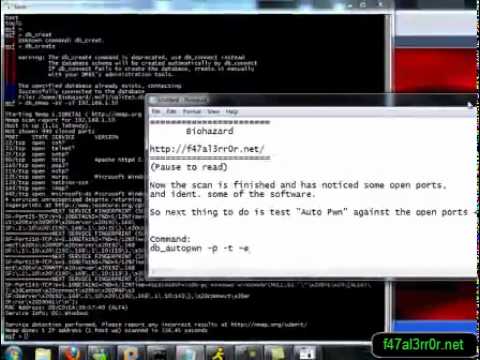
is a kind of monster in our field. It has so many capabilities that the tutorial will span several articles. We will look at automated exploiting (nmap + metasploit). The essence is that Nmap will analyze the necessary port, determine the service, and Metasploit will attempt to apply exploits to it, based on the service class (ftp, ssh, etc.). Instead of a text guide, I will include a video that is quite popular on the topic of autopwn.
Or we can simply automate the work of the exploit we need. For example:
msf > use auxiliary/admin/cisco/vpn_3000_ftp_bypass
 msf auxiliary(vpn_3000_ftp_bypass) > set RHOST [TARGET IP]
 msf auxiliary(vpn_3000_ftp_bypass) > run
In fact, the possibilities of this framework are very extensive, so if you decide to delve deeper, follow the link
Armitage
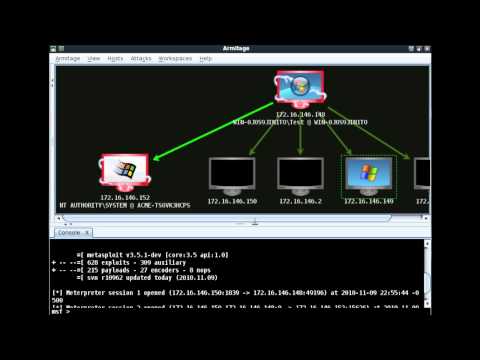
is a cyberpunk GUI for Metasploit. It visualizes the target, recommends exploits, and provides advanced capabilities of this framework. Overall, for those who like everything to look beautiful and impressive.
Screencast:
Tenable Nessus®
has a lot of functionality, but we need one of its capabilities — identifying which services have exploits. The free version is 'home only.'
Usage:
- Download (for your system), install, register (the key is sent to your email).
- Start the server, add a user in Nessus Server Manager (Manage users button).
- Go to the address
https://localhost:8834/
and get the flash client in the browser.
- Scans -> Add -> fill in the fields (choosing the appropriate scanning profile) and click Scan.
After a while, the scan report will appear in the Reports tab.
To check the practical vulnerability of services to exploits, you can use the aforementioned Metasploit Framework or try to find an exploit (for example, on , , etc.) and use it manually against your system.
IMHO: It's too cumbersome. I mentioned it as one of the leaders in this area of the software industry.
Automation of injections.
Many web app security scanners search for injections, but they are still just general scanners. There are utilities that specifically focus on finding and exploiting injections. This is what we'll discuss now.
sqlmap
— an open-source utility for detecting and exploiting SQL injections. It supports DB servers such as MySQL, Oracle, PostgreSQL, Microsoft SQL Server, Microsoft Access, SQLite, Firebird, Sybase, and SAP MaxDB.
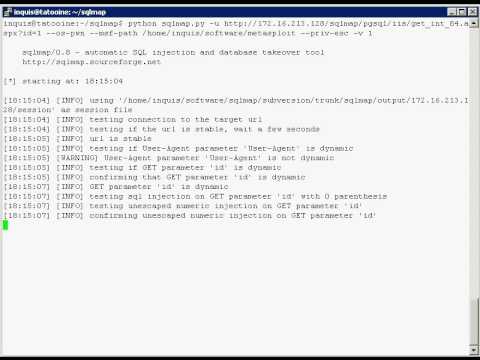
Typical usage boils down to the following line:
python sqlmap.py -u "http://example.com/index.php?action=news&id=1"
There are plenty of manuals available, including in Russian. This software greatly facilitates the work of penetration testers in this area.
I'll add the official video demonstration:
bsqlbf-v2
— a Perl script, a brute-forcer for ‘blind’ SQL injections. It works with both integer values in the URL and string values.
Supports databases:
- MS-SQL
- MySQL
- PostgreSQL
- Oracle
Example usage:
.\/bsqlbf-v2-3.pl -url www.somehost.com\/blah.php?u=5 -blind u -sql "select table_name from information_schema.tables limit 1 offset 0" -database 1 -type 1
-url — A link with parameters
-blind u — parameter for injection (by default, the last one from the URL is used)
-sql "select table_name from information_schema.tables limit 1 offset 0" — our arbitrary query to the database
-database 1 — DB server: MSSQL
-type 1 — type of attack, ‘blind’ injection based on True and Error (for example, syntax errors) responses
Debuggers
These tools are primarily used by developers when they encounter issues with their code's execution results. However, this direction is also useful in penetration testing, allowing us to manipulate the data we need 'on the fly', analyze the responses to our input parameters (for example, during fuzzing), etc.
Burp Suite
— a set of utilities that assist in penetration testing. There's a in Russian from Raz0r (albeit from 2008).
The free version includes:
- Burp Proxy — a local proxy that allows modifying already formed requests from the browser
- Burp Spider — a spider that finds existing files and directories
- Burp Repeater — manual sending of HTTP requests
- Burp Sequencer — analysis of random values in forms
- Burp Decoder — a standard coder-decoder (html, base64, hex, etc.), of which thousands can be quickly written in any programming language
- Burp Comparer — a string comparison component
Overall, this package addresses nearly all tasks related to this area.
Fiddler
— Fiddler is a debugging proxy that logs all HTTP(S) traffic. It allows you to explore this traffic, set breakpoints, and 'play' with incoming or outgoing data.
There are also , monster and others, the choice is up to the user.
Conclusion
Naturally, each pentester has their own arsenal and set of tools, as there are simply many. I tried to present some of the most convenient and popular ones. However, to allow anyone interested to discover other tools in this area, I will provide links below.
Various top lists of scanners and tools
- .
Linux distributions that already include a bunch of different pentesting tools
upd: in Russian from the 'Hack4Sec' team (added )
P.S. One cannot overlook XSpider. It is not included in the review, although it is conditionally free (I learned this when I sent the article to SecLab, and it was precisely because of this (lack of knowledge, plus no access to the latest version 7.8) that I did not include it in the article). Initially, I planned to review it (I have some challenging tests prepared for it), but I don’t know if the world will see it.
P.P.S. Some material from the article will be used for its intended purpose in the upcoming presentation at 2012 in the QA section, which will cover tools not mentioned here (free ones, naturally), as well as discuss the algorithm for the order of use, expected results, recommended configurations, and various hints and tricks while working (I ponder over the presentation almost every day, and I’ll do my best to share all the best topics I can).
By the way, there was a session based on this article at Open InfoSec Days (, ), you can rob caravans take a look .
Source: habr.com
