

Plesk is a powerful and convenient universal tool for quickly and effectively managing all daily operations related to websites, web applications, or web hosting. "6% of websites worldwide are managed through the Plesk panel" — about the platform by the developer company in its corporate blog on Habr. We present to you a brief overview of this user-friendly and probably the most popular hosting platform, the license for which can now be obtained for free until the end of the year with at RUVDS.
▍About the panel, brand, and company
Plesk is proprietary software developed in Novosibirsk and first released in the USA in 2001. Over nearly 20 years, the rights to the platform have been acquired successively by different companies, changing brands and names. Since 2015, Plesk has been an independent Swiss company with several branches (including Novosibirsk) and a workforce of about 500 people (including Russian specialists both in the headquarters and in the branches).
The last three versions:
- Plesk 12.5 (2015)
- Plesk Onyx (2016-2019)
- Plesk Obsidian (2020)
The panel is multilingual. It is written in PHP, C, and C++. It supports multiple versions of PHP, as well as Ruby, Python, and NodeJS; full Git support; integration with Docker; SEO toolkit. Each instance of Plesk is automatically secured using SSL/TLS.
Supported OS: Windows and various versions of Linux. Below are the requirements for these operating systems.
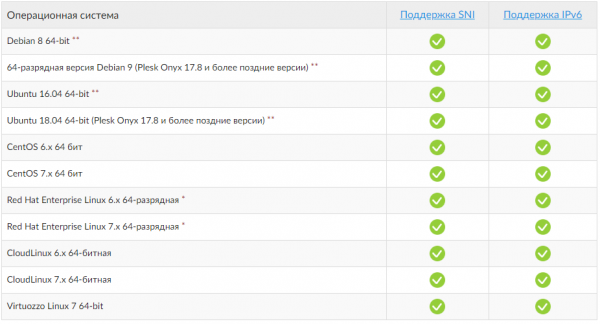
Linux
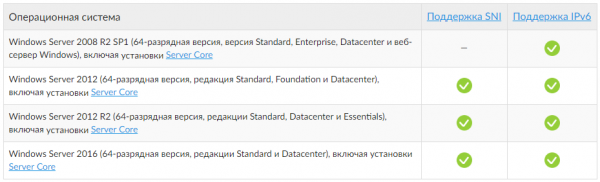
Windows
The program is released in different builds, each targeted at its specific audience. For example, administrators can use the panel to establish centralized management of all system services through a single web interface and reduce maintenance costs while ensuring the necessary level of flexibility and control. For companies selling virtual and dedicated hosting, the panel allows them to organize server resources into packages and offer these packages to clients—companies or individuals who want to host their website online but do not have the necessary IT infrastructure.
▍Info Center
is conveniently presented in three sections: for users (separately for the administrator, client, reseller), for hosters/providers, and for developers.
C Getting started is so straightforward that even those encountering hosting management for the first time can easily navigate the panel. The lessons are step-by-step instructions covering six topics:
- Creating your first website
- Creating a database
- Creating an email account
- Adding an additional DNS record
- Creating a website backup
- Changing the password and logging out
There’s also and with the opportunity to take training courses in the so-called Plesk University. And, of course, there’s an active . Russian-language support is available Monday to Friday from 04:00 to 19:00 Moscow time; English support is available 24x7x365.
Getting Started
The panel can be installed on a physical server or a virtual machine (Linux only) or on a cloud server (official Plesk partners: Google Cloud, Amazon Web Services, Microsoft Azure, Alibaba Cloud).
Default configurations are provided for quick start-up, which can be launched with a single command:
Note: Plesk is installed without a product license key. You can purchase a license from RUVDS. Or use the product that will work in trial mode for 14 days.
Used ports and protocols
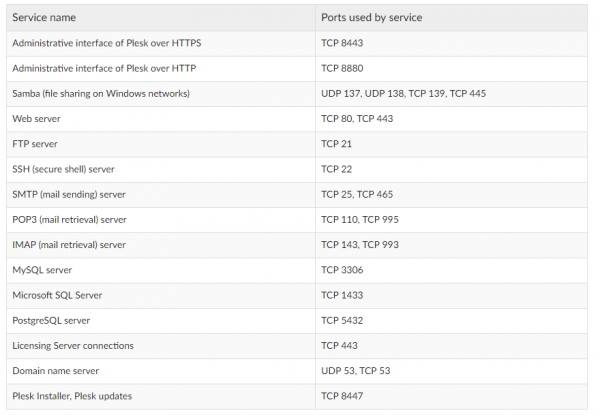
Ports and protocols for Plesk
Supported browsers
Desktop
- Mozilla Firefox (latest version) for Windows and Mac OS
- Microsoft Internet Explorer 11.x for Windows
- Microsoft Edge for Windows 10
- Apple Safari (latest version) for Mac OS
- Google Chrome (latest version) for Windows and Mac OS
Smartphones and tablets
- Default browser (Safari) on iOS 8
- Default browser on Android 4.x
- Default browser (IE) on Windows Phone 8
The PerformanceResourceTiming
In Plesk, each user group has its own interface tailored to their needs. The interface for hosting providers includes tools for providing hosting, including an integrated billing system to automate business. Companies using the platform to manage their own web infrastructure have access to a wide range of server management operations: system recovery, web server configuration, and more. Let’s take a look at the last two versions of the platform — Plesk Onyx and Plesk Obsidian — from a web administrator’s perspective.
▍Features for web administrators
User accounts. Create separate user accounts with their own credentials. Define user roles and subscriptions for each user or group of users.
Subscriptions. Create a subscription with a specific set of resources and services related to the service plan, and grant users access according to their user role. Limit the amount of system resources (CPU, RAM, disk I/O) that can be utilized by a specific subscription.
User Roles. Enable and disable functionality and icons for individual users. Provide different levels of access to different users at the same subscription level.
Service Plan. Create a service plan that defines the distribution of your resources: for instance, disk space, bandwidth, and other features offered to your client.
Mail Server Support. By default, the Postfix mail server and Courier IMAP are installed in Plesk for Linux, while MailEnable is available in Plesk for Windows.
DKIM, SPF, and DMARC Protection. Plesk supports DKIM, SPF, SRS, and DMARC for email message authentication.
Supported OS. The latest version of Plesk for Linux / Unix supports multiple platforms, including Debian, Ubuntu, CentOS, Red Hat Linux, and CloudLinux.
Database Management. Scan, restore, report, and repair supported databases.
Out-of-the-box PCI DSS Compliance. Secure your server and achieve PCI DSS compliance on a Linux server.
Task Scheduling. Set the time and date to run specific commands or tasks.
System Updates. Update all system packages on the server, manually or automatically, without opening the console.
Plesk Migrator. Migrations without the need to use the command line. Supported sources include cPanel, Confixx, DirectAdmin, and others.
The server administrator has the ability to change the appearance, and even server administration according to needs. can be changed for both marketing purposes and simply for convenience. Custom themes may be used. For more details, refer to the .
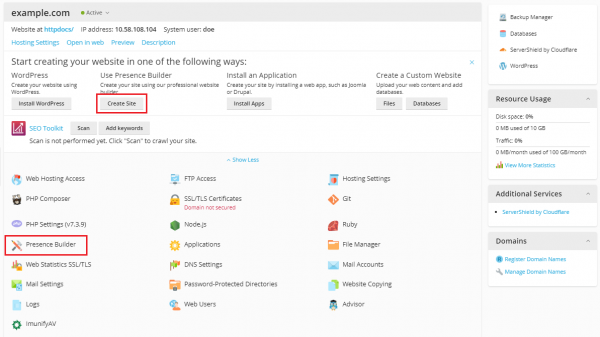
Button Configuration
The interface has a responsive design for working with smartphones, allowing customers to automatically log into Plesk from external resources without re-authentication (for example, from their hosting provider's panel), with the ability to share direct links to screens. Let's consider the 'Websites and Domains' tab.
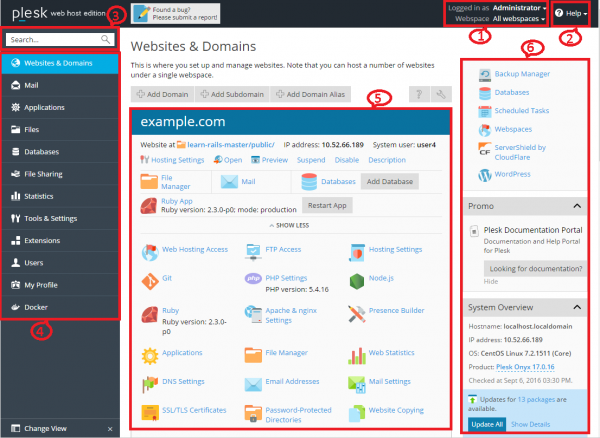
'Websites and Domains' Tab
- This section displays the username of the logged-in user and the currently selected subscription. Users can modify their account properties and choose which subscription to manage.
- Here is the 'Help' menu, which opens contextual online documentation and allows viewing tutorial videos.
- Search.
- This section houses the navigation panel, which helps organize the Plesk interface. Tools are grouped by functionality; for instance, tools for managing web hosting settings are located on the 'Websites and Domains' page, while those for managing email accounts are on the 'Mail' page. Here’s a brief description of all tabs and the functionalities provided:
- Websites and Domains. The tools presented here allow clients to add and remove domains, subdomains, and domain aliases. They also enable management of various web hosting settings, creation of databases and their users, modification of DNS settings, and protection of websites with SSL/TLS certificates.
- Mail. The tools presented here allow clients to add and remove email accounts, as well as manage mail server settings.
- Applications. The tools presented here allow clients to easily install and manage a variety of web applications.
- Files. Here is the file manager with a web interface that allows clients to upload content to their websites, as well as manage existing files on the server within their subscription.
- Databases. Here clients can create new databases and manage existing ones.
- File Sharing. Here is the file sharing service that allows clients to store personal files as well as share them with other Plesk users.
- Statistics. Here is information about disk space and traffic usage, as well as a link to visitation statistics, showing detailed information about website visitors.
- Server. This information is only visible to the server administrator. Here are tools that allow the administrator to set global server settings.
- Extensions. Here, clients can manage the extensions installed in Plesk and use the functionality of those extensions.
- Users. The tools presented here allow clients to add and remove user accounts.
- My Profile. This information is only visible in Power User mode. Here you can view and update contact information and other personal details.
- Account. This information is only visible in the Virtual Hosting Client Panel. Here is information about subscription resource usage, provided hosting options, and rights. Using these tools, clients can obtain and update their contact information and other personal details, as well as create backups of their subscription settings and websites.
- Docker. This item is visible if the Docker Manager extension is installed. Here you can launch and manage containers created from Docker images.
- This section contains all management tools related to the currently open tab. The screenshot shows the 'Websites and Domains' tab open, so various tools for managing aspects of the subscription related to web hosting are displayed.
- This section contains various management tools and information gathered for user convenience.
To perform many daily tasks, you will most likely need to open one of the tabs and click on the management tools presented there. If the panel does not have the required tab or tool, they are most likely disabled for this subscription. A detailed overview of the navigation panel elements on the left side of the screen is available. . The new version of Plesk Obsidian features an attractive new UX design that makes website management even simpler and is fully aligned with how web professionals create, secure, and launch cloud-scalable servers and applications.
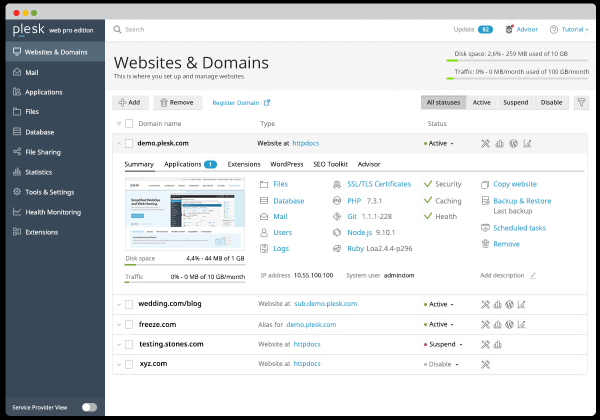
Plesk Obsidian
Server Administration on Linux
Administrators can utilize several additional tools available in the standard Plesk distribution to add customizable automation tasks, data backup and restoration, as well as recovery of Plesk components and system settings. These tools include various standalone applications, command-line utilities, and the ability to integrate custom scripts with Plesk. For easy execution of server management tasks, there is a , which includes the following sections:
- Introduction to Plesk. Describes the main components and services managed by Plesk, licensing terms, as well as methods for installing and updating Plesk components.
- Configuration of Virtual Hosts. Describes the concepts of virtual hosts and their implementation in Plesk. Contains instructions on why and how to modify their configurations.
- Service Management. Includes descriptions of various external services used on the Plesk server along with instructions for their configuration and usage.
- System Maintenance. Describes how to change the server's hostname, IP addresses, and directory locations for storing virtual host files, backups, and mail content. This chapter also covers Plesk command-line tools, the script trigger mechanism for Plesk events, and the service monitor that allows tracking and restarting services without logging into Plesk.
- Backup, Restore and Data Migration. Describes how to perform data backup and restoration in Plesk using the command-line utilities pleskbackup and pleskrestore, as well as presents tools for migrating hosted data between servers.
- Statistics and Logs. Describes how to perform on-demand statistical calculations for disk space and traffic usage, as well as how to access web server logs.
- Performance Enhancement. Provides information on how to improve the performance of Plesk with software.
- Security Enhancement. Contains instructions on how to protect a Plesk server and the websites hosted on it from unauthorized access.
- Customization of Appearance and Interface Elements of Plesk. Presents Plesk themes that can be used to customize the appearance and branding of Plesk, as well as describes how to remove certain elements of the Plesk interface or change their behavior.
- Localization. Introduces methods for localizing the Plesk interface into languages for which Plesk does not provide localization.
- Troubleshooting. Describes ways to troubleshoot issues in Plesk services.
Extensions
Additional tools, features, and services can be accessed through a wealth of extensions available in , conveniently categorized.
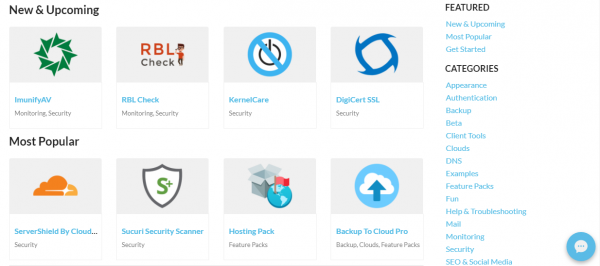
Plesk Extensions Library
Here are some of the most popular and actively developed:
- — a single point of management for WordPress for server administrators, resellers, and clients. It features 'Smart Updates', which analyzes WordPress updates with artificial intelligence to determine if installing an update could break something.
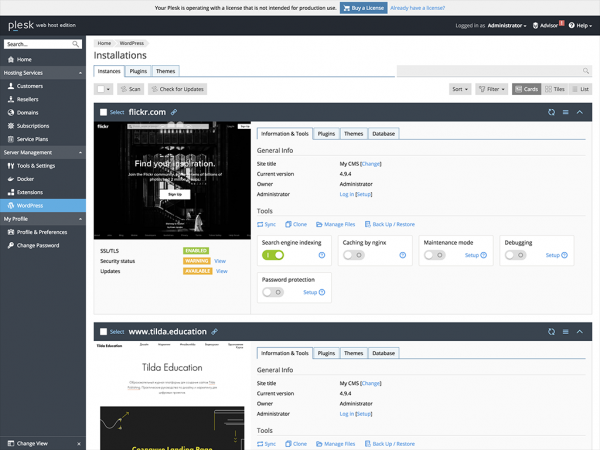
WordPress Toolkit
- — SEO toolkit.
- — a complete toolkit for Power Joomla!
- — automatic backups.
- – website builder.
- — forming client packages from hosting companies.
- — protects websites from online threats (hacking, spam, botnets, DDoS attacks) and speeds up their loading.
Response time and server load can be reduced through Caching. This feature can be activated through the panel interface.
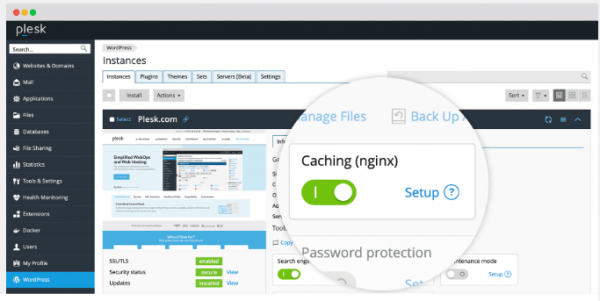
Nginx
Conclusion
As you may have noticed, the Plesk panel is designed for web administrators to make management of websites, domains, mailboxes, and databases simple and enjoyable. We hope this overview helps orient our clients who are acquiring a virtual server from RUVDS, as they can get the panel license for free as part of the promotion until the end of the year. .
Source: habr.com
