


A year and a half ago, on March 5, 2018, Google released the first alpha version of its open-source CI/CD project called , aimed at creating a "simple and reproducible development environment for Kubernetes", allowing developers to focus on development rather than administration. What makes Skaffold interesting? It turns out it has several strengths that make it a powerful tool for developers and possibly for operations engineers as well. Let's get to know the project and its capabilities.
NB: By the way, we briefly covered Skaffold in our general , whose lives are tied to Kubernetes.
Theory. Purpose and capabilities
So, in general terms, Skaffold addresses the task of automating the CI/CD cycle (during the build, push, deploy stages) by providing developers with immediate feedback, allowing them to quickly see the results of code changes in the form of an updated application running in a Kubernetes cluster. It can operate in different environments (dev, stage, production...), for which Skaffold helps describe the corresponding deployment pipelines.
The source code of Skaffold is written in Go, under the terms of the Apache License 2.0 (GitHub).
Let's look at the main functions and features. The first ones include:
- Skaffold offers tools for creating CI/CD pipelines.
- It allows background monitoring of changes in the source code and initiates an automated process of building code into container images, publishing these images to Docker Registry, and deploying them to a Kubernetes cluster.
- It synchronizes files in the repository with the working directory in the container.
- It automatically tests using container-structure-test.
- It forwards ports.
- It reads logs of the application running in the container.
- It assists in debugging applications written in Java, Node.js, Python, and Go.
Now — about the features:
- Skaffold itself has no components on the cluster side. This means that no additional Kubernetes configuration is needed to use this utility.
- Different pipelines for your application. Do you need to deploy code to a local Minikube while developing, and then to stage or production? This is accounted for. and user configurations, environment variables, and flags that allow describing different pipelines for a single application.
- CLI. Only a console utility and configurations in YAML. Mentions of attempts to create , however, at this point, it mostly means that someone needs it, but not a lot.
- Modularity. Skaffold is not a standalone tool but aims to use separate modules or existing solutions for specific tasks.
An illustration of this is:
- At the build stage, you can use:
- docker build locally, in a cluster using kaniko, or in Google Cloud Build;
- Bazel locally;
- Jib Maven and Jib Gradle locally or in Google Cloud Build;
- custom build scripts executed locally. If you need to run another (more flexible/conventional/…) build solution, it is described in the script so Skaffold runs exactly that one (). This allows you to use any builder that can be invoked through a script;
- At the testing stage, the previously mentioned ;
- For deployment, the following are available:
- Kubectl;
- Helm;
- kustomize.
Because of this, Skaffold can be described as a kind of framework for CI/CD. Here is an example workflow when using it (from the project documentation):
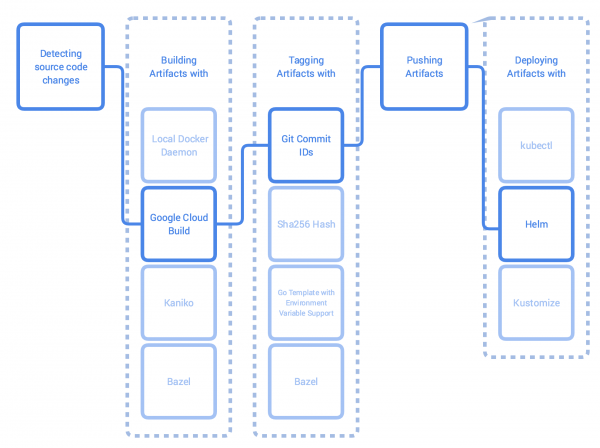
How does the Skaffold workflow generally look?
- The utility monitors changes in the source code directory. If files are modified, they are synchronized with the application's pod in the Kubernetes cluster. If possible — without rebuilding the image. Otherwise, a new image is built.
- The built image is tested using container-structure-test, tagged, and sent to Docker Registry.
- After that, the image is deployed — rolled out in the Kubernetes cluster.
- If the launch was initiated with the command
skaffold dev, then we start receiving logs from the application, and Skaffold waits for changes to repeat the actions again.
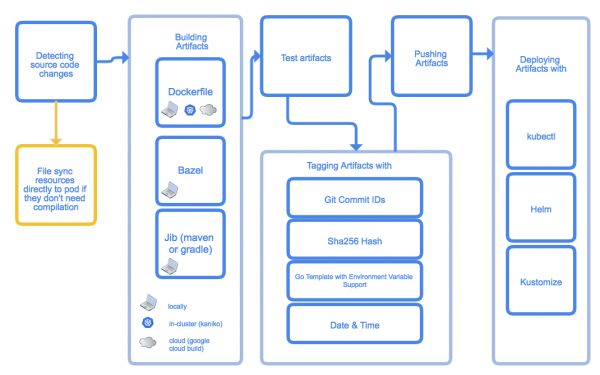
An illustration of the main stages of Skaffold's operation
Practice. Trying out Skaffold
To demonstrate the use of Skaffold, I will take an example from . By the way, you can also find many other examples considering different specifics. I will perform all actions locally in Minikube. The installation is straightforward and will take a few minutes, and kubectl will be needed to get started.
Let's install Skaffold:
curl -Lo skaffold https://storage.googleapis.com/skaffold/releases/latest/skaffold-linux-amd64
chmod +x skaffold
sudo mv skaffold /usr/local/bin
skaffold version
v0.37.1
Let's clone the Skaffold repository with the necessary examples:
git clone https://github.com/GoogleContainerTools/skaffold
cd skaffold/examples/microservices
I chose the example with two pods, each containing a small application written in Go. One application is the frontend (leeroy-web), which forwards requests to the second application — the backend (leeroy-app). Let's see how this looks:
~/skaffold/examples/microservices # tree
.
├── leeroy-app
│   ├── app.go
│   ├── Dockerfile
│   └── kubernetes
│       └── deployment.yaml
├── leeroy-web
│   ├── Dockerfile
│   ├── kubernetes
│   │   └── deployment.yaml
│   └── web.go
├── README.adoc
└── skaffold.yaml

4 directories, 8 files
leeroy-app and leeroy-web contain Go code and simple Dockerfiles for local builds of that code:
~/skaffold/examples/microservices # cat leeroy-app/Dockerfile
FROM golang:1.12.9-alpine3.10 as builder
COPY app.go .
RUN go build -o /app .

FROM alpine:3.10
CMD ["./app"]
COPY --from=builder /app .
I won’t provide the code for the applications — it’s enough to know that leeroy-web accepts requests and proxies them to leeroy-app. So, in the files Deployment.yaml there is a Service only for app (for internal routing). The pod's port web will be forwarded for easy access to the application.
How does it look? skaffold.yaml:
~/skaffold/examples/microservices # cat skaffold.yaml
apiVersion: skaffold/v1beta13
kind: Config
build:
  artifacts:
    - image: leeroy-web
      context: ./leeroy-web/
    - image: leeroy-app
      context: ./leeroy-app/
deploy:
  kubectl:
    manifests:
      - ./leeroy-web/kubernetes/*
      - ./leeroy-app/kubernetes/*
portForward:
  - resourceType: deployment
    resourceName: leeroy-web
    port: 8080
    localPort: 9000
This describes all the stages mentioned above. In addition to this config, there’s also a file with global settings — ~/ .skaffold/config. It can be edited manually or through the CLI — for example, like this:
skaffold config set --global local-cluster true This command will set the global variable local-cluster to true, after which Skaffold will not attempt to 'push' images to a remote registry. If you are developing locally, you can use this command to store images locally as well.
Returning to skaffold.yaml:
- At the stage of
buildwe indicate that the image needs to be built and stored locally. After the first build runs, we will see the following:// т.к. Minikube создает кластер в отдельной виртуальной машине, // придется проникнуть внутрь, чтобы найти образы # minikube ssh $ docker images REPOSITORY TAG IMAGE ID CREATED SIZE leeroy-app 7d55a50803590b2ff62e47e6f240723451f3ef6f8c89aeb83b34e661aa287d2e 7d55a5080359 4 hours ago 13MB leeroy-app v0.37.1-171-g0270a0c-dirty 7d55a5080359 4 hours ago 13MB leeroy-web 5063bfb29d984db1ff70661f17d6efcc5537f2bbe6aa6907004ad1ab38879681 5063bfb29d98 5 hours ago 13.1MB leeroy-web v0.37.1-171-g0270a0c-dirty 5063bfb29d98 5 hours ago 13.1MBAs you can see, Skaffold automatically tagged the images. By the way, multiple tagging policies are supported.
- Further in the config, it states
context: ./leeroy-app/, i.e., the context in which the image is built. - During the deployment stage, it is determined that we will use kubectl and a mask for the required manifests.
-
PortForward: similar to how we typically forward ports usingkubectl port-forward, we provide Skaffold instructions to invoke this command. In this case, local port 9000 is forwarded to 8080 in the deployment namedleeroy-web.
Now is the time to run skaffold dev: the command will create a continuous feedback loop, i.e., it will not only build everything and deploy it to the cluster, but it will also provide information about the current state of the pods, monitor changes, and update the state of the pods.
Here is the result of running skaffold dev --port-forward when rebuilding:
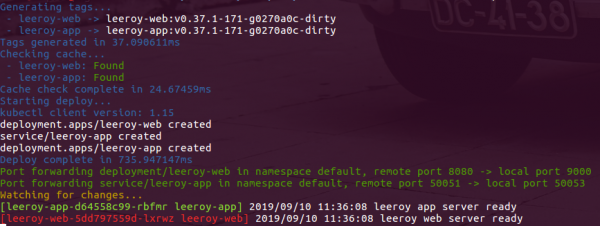
First of all, it's clear that a cache is being used. Next, the application is being built, deployed, and the ports are being forwarded. Since --port-forwardis specified, Skaffold forwarded the port to web, as requested, but it forwarded it at its discretion (choosing the nearest available one). After that, we receive the first logs from the applications. app Shall we check the functionality?
~\/skaffold\/examples\/microservices # kubectl get po NAME READY STATUS RESTARTS AGE leeroy-app-6998dfcc95-2nxvf 1\/1 Running 0 103s leeroy-web-69f7d47c9d-5ff77 1\/1 Running 0 103s ~\/skaffold\/examples\/microservices # curl localhost:9000 leeroooooy app!!!
Let's modify the file leeroy-app\/app.go — a few seconds pass… and: ~\/skaffold\/examples\/microservices # kubectl get po NAME READY STATUS RESTARTS AGE leeroy-app-ffd79d986-l6nwp 1\/1 Running 0 11s leeroy-web-69f7d47c9d-5ff77 1\/1 Running 0 4m59s ~\/skaffold\/examples\/microservices # curl localhost:9000 leeroooooy Habr!!!
In this case, Skaffold also outputted in the console the same information as before, with one exception: it only rolled out , and not everything at once. leeroy-appMore practice
It's also worth mentioning that when creating a new project, Skaffold configurations can be 'bootstrapped' using the command
, which is very convenient. Moreover, you can write multiple configs: develop using the default config, after which you can roll out to staging using the command init(the same process as run , only it doesn't monitor changes), using a different config. devOn Katacoda, there is
an even simpler example. However, it offers a ready-made sandbox with Kubernetes, an application, and Skaffold. A great option if you're interested in trying the basics yourself. with an even simpler example. However, it offers a ready-made sandbox with Kubernetes, an application, and Skaffold. A great option if you’re interested in trying out the basics on your own.
One of the possible uses of Skaffold is to develop on a remote cluster. Not everyone is comfortable running Minikube on their own hardware, deploying the application, and waiting for it to function properly... In such cases, Skaffold effectively addresses the task at hand, as confirmed by engineers at Reddit, as we have already noted. in our blog.
And in from Weaveworks provides an example of creating a pipeline for production.
Conclusion
Skaffold is a convenient tool for building pipelines intended for application deployment in Kubernetes, primarily focused on the needs of developers. It is quite simple to create a 'short' pipeline that meets the basic needs of a developer, but larger processes can also be organized if desired. One illustrative example of using Skaffold in CI/CD processes such a comprising 10 microservices that utilize the capabilities of Kubernetes, gRPC, Istio, and OpenCensus Tracing.
Skaffold has already garnered nearly 8000+ stars on GitHub, is developed by Google, and is part of — thus, at this point, there are ample reasons to believe that the project will continue to thrive.
P.S.
Also read in our blog:
- «»;
- «»;
- «»;
- «».
Source: habr.com
